
C++ Team Blog
The latest in C++, Visual Studio, VS Code, and vcpkg from the MSFT C++ team
Latest posts
Smarter Member List Filtering for C++

We are always looking for ways to make you more productive while coding in Visual Studio. In Visual Studio 2019 version 16.2, we have created a smarter, more relevant Member List. Specifically, we now apply method filtering based on type qualifiers. To illustrate this, consider the following example: You have two vectors, but one is . When we invoke the member list on the non-const vector, we see the option for . However, when we invoke the member list on the const vector, Visual Studio now knows not to display any non-const members on a const object: Even More Filtering If you wish to benefit furthe...
MSVC Backend Updates in Visual Studio 2019 version 16.2

In Visual Studio 2019 version 16.2 we continue to improve the C++ backend with build throughput improvements and new and improved optimizations. These build on top of our MSVC backend improvements in Visual Studio 2019 version 16.0 which we previously announced. We will be following up on many of the improvements here with their own blog posts. Build Throughput Improvements New and Improved Optimizations Inliner Improvements Improved Code Generation and Optimization of Intrinsics Vectorizer Improvements New Analysis Passes General Optimizer Impr...
Improved Linker Fundamentals in Visual Studio 2019

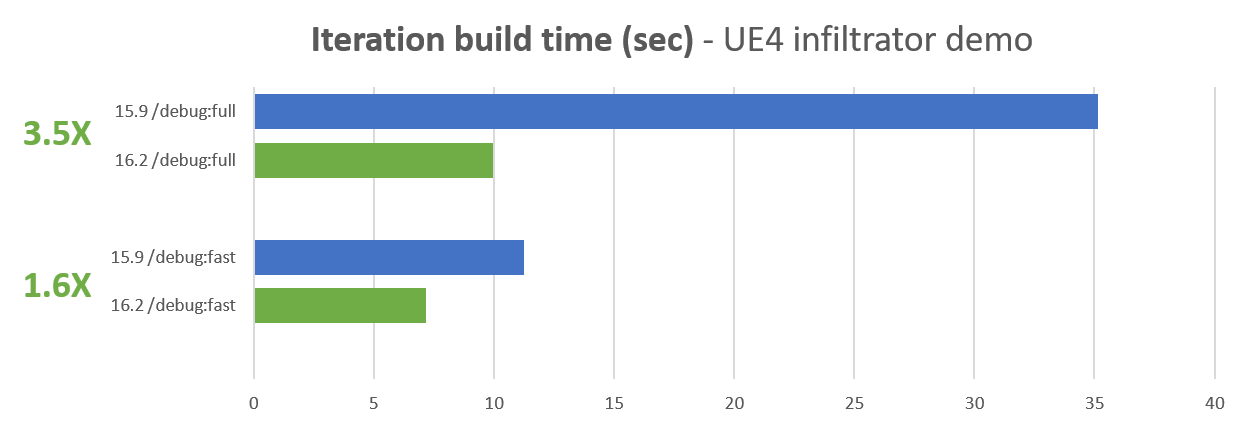
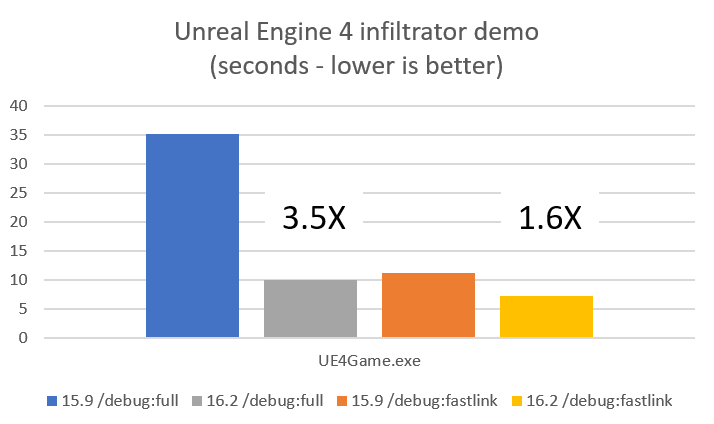
On the C++ team we’ve heard loud and clear from users that build times are a pain point. We’ve continued our focus on improving the step, linking, that dominates F5 build times. Fast F5 build times, or iteration build times, are a key contributor to developer productivity and we felt that there was a large opportunity so we narrowed in on changes that we felt could move the needle 2x or more. This is on top of the significant improvements we made to the tool chain to speed up link times in the Visual Studio 2019 version 16.0 release. Let me give a teaser of the kinds of wins we were able to achieve. ...
Visual Studio Code C/C++ Extension: July 2019 Update

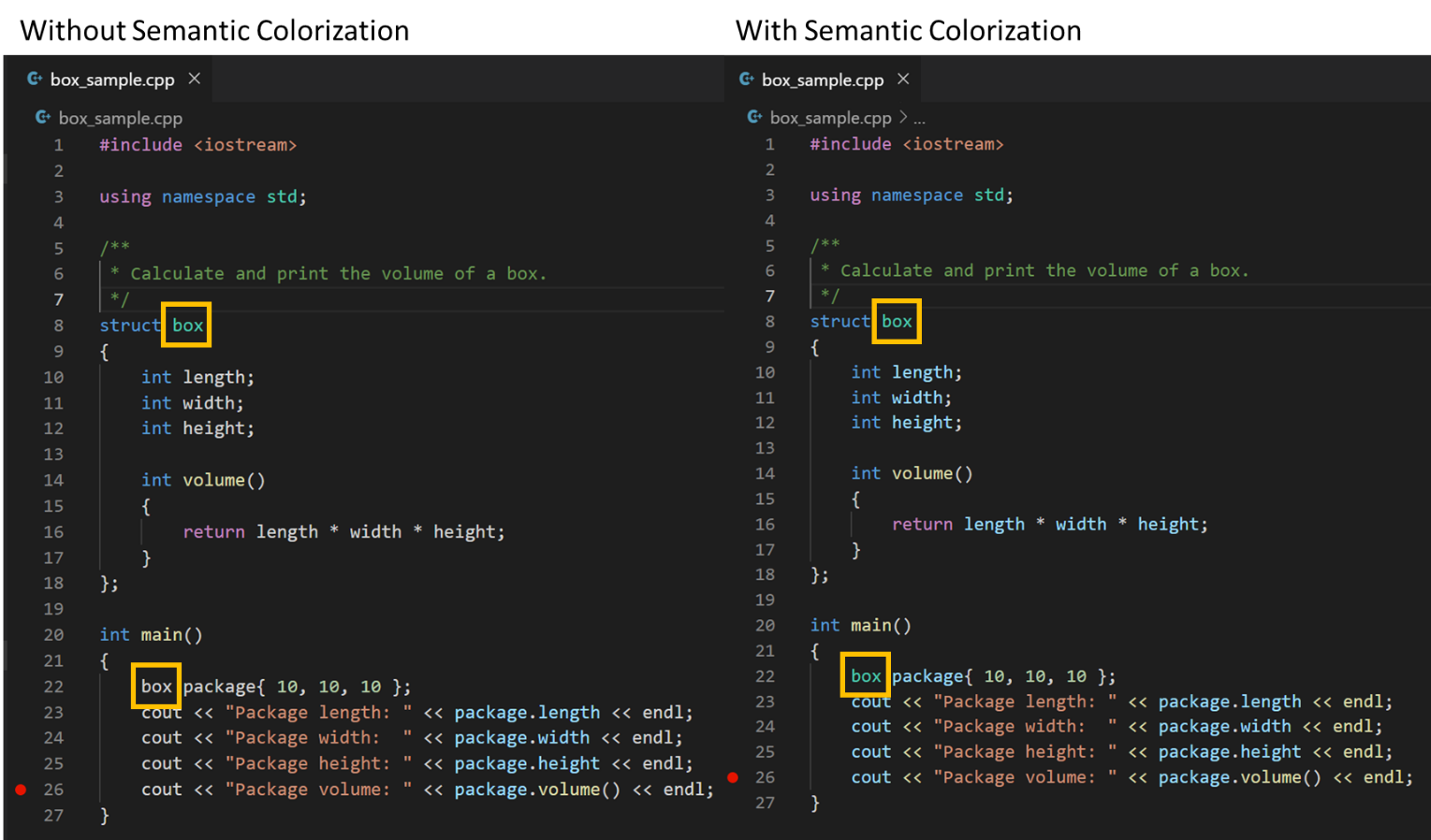
The July 2019 update of the Visual Studio Code C/C++ extension is now available. This release includes many new features, including semantic colorization and improvements to the IntelliSense Configuration Settings Editor UI and IntelliSense cache. For a full list of this release’s improvements, check out our release notes on GitHub. Semantic Colorization Semantic colorization support has been one of the top asks on our GitHub repo for the past few years. We faced many challenges in creating support for semantic colorization for the C/C++ extension since there is no VS Code API for semantic source highlighting a...
Inlining Decisions in Visual Studio

Introduction My name is Terry Mahaffey and I work on the code generation team in MSVC. Lately I’ve been doing some work on our inliner and I wanted to give a brief introduction to it before later diving into some of the changes we’ll be shipping. Inlining is perhaps the most important optimization a compiler performs. In addition to removing call overhead, an inline decision is most useful when it exposes additional optimization opportunities not present in either the caller or callee by themselves. For example: It is a really good idea to inline bar into foo in this example; once that is done the compiler...

Vcpkg: 2019.06 Update
The 2019.06 update of vcpkg, a tool that helps you manage C and C++ libraries on Windows, Linux, and MacOS, is now available. This is the first time we’ve created a vcpkg release on our GitHub repository. This update is designed to bring you a summary of the new functionality and improvements made to vcpkg over about a month’s time. The 2019.06 update covers the month of June. This release includes many new ports and triplet updates including overlay options, improvements for port contributors, and new documentation. For a full list of this release’s improvements, check out our release notes on GitHub. Ports ...
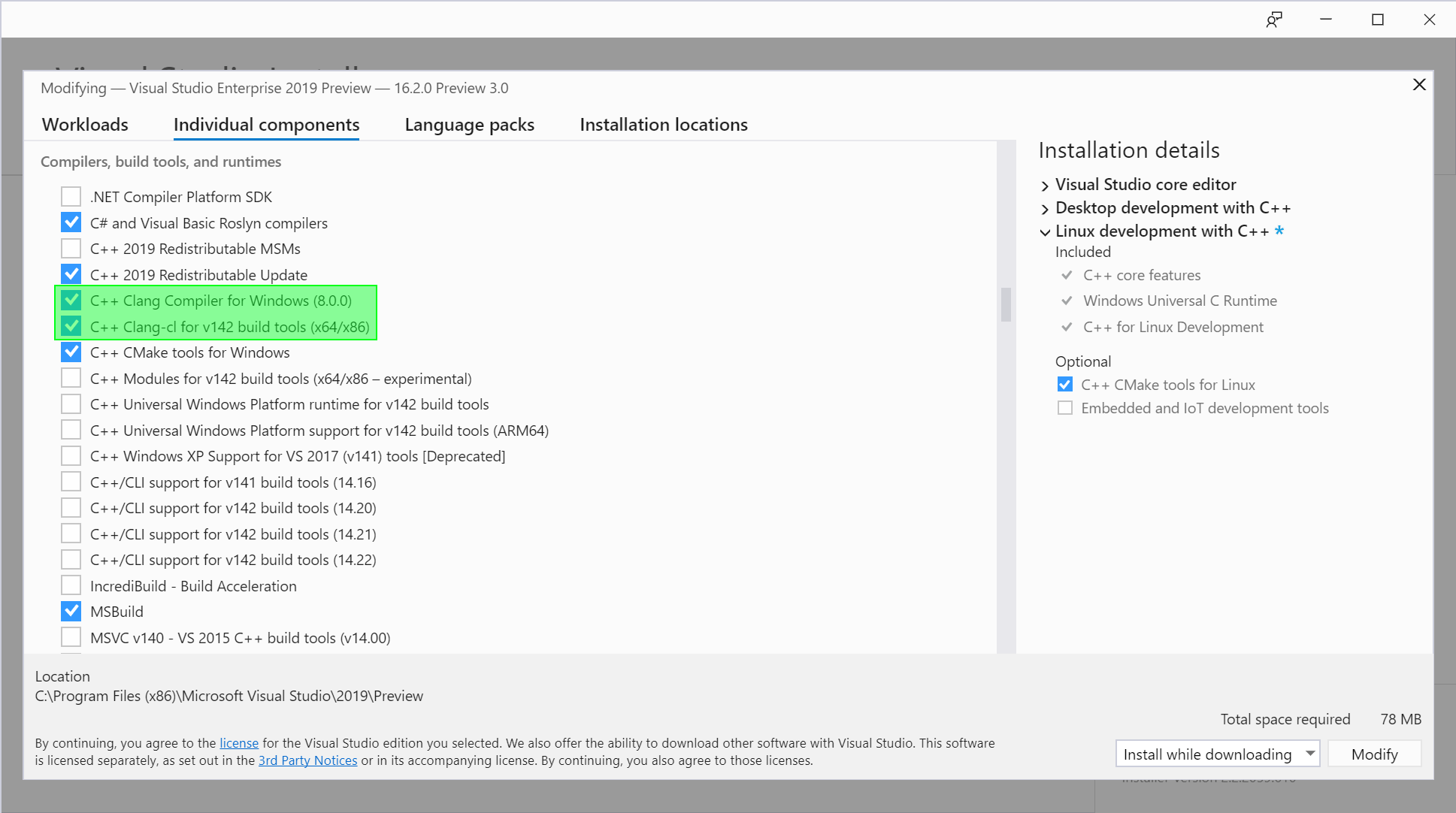
Clang/LLVM Support for MSBuild Projects

Visual Studio 2019 version 16.2 Preview 3 includes built-in Clang/LLVM support for MSBuild projects. In our last release, we announced support for Clang/LLVM for CMake. In the latest Preview of Visual Studio, we have extended that support to also include MSBuild projects. While in most cases we recommend using the MSVC compiler, we are committed to making Visual Studio one of the most comprehensive IDEs on Windows. You may want to use Clang instead if you are developing cross platform code, especially if it already depends on Clang or GCC extensions. You can now use Clang/LLVM to target both Windows and Linux usi...
Simplify Your Code With Rocket Science: C++20’s Spaceship Operator

This post is part of a regular series of posts where the C++ product team here at Microsoft and other guests answer questions we have received from customers. The questions can be about anything C++ related: MSVC toolset, the standard language and library, the C++ standards committee, isocpp.org, CppCon, etc. Today's post is by Cameron DaCamara. C++20 adds a new operator, affectionately dubbed the "spaceship" operator: . There was a post awhile back by our very own Sy Brand detailing some information regarding this new operator along with some conceptual information about what it is and does. The goal of this...

Cppp 2019 Trip Report

Summary CPPP is a new C++ conference in Paris, France. Its first iteration ran for a single day with three parallel tracks, drawing in 160 attendees. The conference great on all fronts: the speakers & talks were varied and high-quality, the venue was right next to the Eiffel Tower and had plenty of space, the food was tasty and varied (shoutout to the cream filled pastries), and the day went smoothly with strong communication from the organisers (Joel Falcou and Fred Tingaud). The three tracks were themed on roughly beginner, intermediate, and expert content, where the beginner track was in French an...