
C++ Team Blog
The latest in C++, Visual Studio, VS Code, and vcpkg from the MSFT C++ team
Latest posts
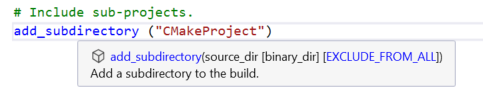
In-Editor Documentation for CMake in Visual Studio

Visual Studio 2019 version 16.1 Preview 1 introduces in-editor documentation for CMake commands, variables, and properties. You can now leverage IntelliSense autocompletion and quick info tooltips when editing a CMakeLists.txt file, which will save you time spent outside of the IDE referencing documentation and make the process less error-prone. If you are just getting started with our native support for CMake, head over to our CMake Support in Visual Studio introductory page. You can use CMake to target multiple platforms from the comfort of a single IDE. Quick info Visual Studio now provides tooltips for CM...
Visual Studio Code C/C++ extension: March 2019 Update

The March 2019 update of the Visual Studio Code C/C++ extension is now available. This release includes many new features and bug fixes, including IntelliSense caching, Build and Debug Active File, and configuration squiggles. For a full list of this release’s improvements, check out our release notes on GitHub. IntelliSense Cache (AutoPCH) The extension will now cache header information to improve IntelliSense speed. This is similar to precompiled header files in Visual Studio. Please note that IntelliSense caching works on Linux, macOS 10.13+ (High Sierra and later versions), and Windows. Precompiled Headers...
SIMD Extension to C++ OpenMP in Visual Studio

In the era of ubiquitous AI applications there is an emerging demand of the compiler accelerating computation-intensive machine-learning code for existing hardware. Such code usually does mathematical computation like matrix transformation and manipulation and it is usually in the form of loops. The SIMD extension of OpenMP provides users an effortless way to speed up loops by explicitly leveraging the vector unit of modern processors. We are proud to start offering C/C++ OpenMP SIMD vectorization in Visual Studio 2019. The OpenMP C/C++ application program interface was originally designed to improve applicati...
Linker Throughput Improvement in Visual Studio 2019

In Visual Studio 2019 Preview 2 we made the compiler back-end to prune away debug information that is unrelated to code or data emitted into binary and changed certain hash implementations in the PDB engine, to improve linker throughput, which resulted in more than 2x reduction on link time for some large AAA game title. Debug Info Pruning This is to have the compiler back-end prune away debug info of any user defined types (UDTs) that are not referenced by any symbol record. This cuts down the size of OBJ sections holding debug info, like .debug$S which holds debug records for symbols and .debug$T which hold...

Game performance and compilation time improvements in Visual Studio 2019

The C++ compiler in Visual Studio 2019 includes several new optimizations and improvements geared towards increasing the performance of games and making game developers more productive by reducing the compilation time of large projects. Although the focus of this blog post is on the game industry, these improvements apply to most C++ applications and C++ developers. Compilation time improvements One of the focus points of the C++ toolset team in the VS 2019 release is improving linking time, which in turn allows faster iteration builds and quicker debugging. Two significant changes to the linker help speed up t...
Making C++ Exception Handling Smaller On x64

Visual Studio 2019 Preview 3 introduces a new feature to reduce the binary size of C++ exception handling (try/catch and automatic destructors) on x64. Dubbed FH4 (for __CxxFrameHandler4, see below), I developed new formatting and processing for data used for C++ exception handling that is ~60% smaller than the existing implementation resulting in overall binary reduction of up to 20% for programs with heavy usage of C++ exception handling. *Update 5/25/2019* Due to logistical issues we couldn't get FH4 turned default on in Update 1. Everything looks in place to have FH4 default on in an early preview of Up...
CUDA 10.1 available now, with support for latest Microsoft Visual Studio 2019 versions

We are pleased to echo NVIDIA's announcement for CUDA 10.1 today, and are particularly excited about CUDA 10.1's continued compatibility for Visual Studio. CUDA 10.1 will work with RC, RTW and future updates of Visual Studio 2019. To stay committed to our promise for a Pain-free upgrade to any version of Visual Studio 2017 that also carries forward to Visual Studio 2019, we partnered closely with NVIDIA for the past few months to make sure CUDA users can easily migrate between Visual Studio versions. Congratulations to NVIDIA for this milestone and thank you for a great collaboration! A Bit of Background In var...
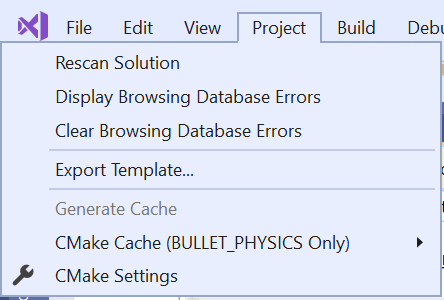
Open Existing CMake Caches in Visual Studio

Visual Studio typically manages all the details of CMake for you, under the hood, when you open a project. However, some development workflows require more fine-grained control over how CMake is invoked. The latest Visual Studio 2019 Preview lets you have complete control over CMake if your project needs more flexibility. You can now give your custom or preferred tools complete control of your project’s CMake cache and build tree instead of letting Visual Studio manage it for you. In Visual Studio 2019 Preview 3, you can open CMake caches by opening a CMakeCache.txt file. This feature may sound familiar if...

Visual Studio 2019 Preview 2 Blog Rollup

Visual Studio 2019 Preview 2 was a huge release for us, so we’ve written a host of articles to explore the changes in more detail. For the short version, see the Visual Studio 2019 Preview 2 Release Notes. We’d love for you to download Visual Studio 2019 Preview, give it a try, and let us know how it’s working for you in the comments below or via email (visualcpp@microsoft.com). If you encounter problems or have a suggestion, please let us know through Help > Send Feedback > Report A Problem / Provide a Suggestion or via Visual Studio Developer Community. You can...