
C++ Team Blog
The latest in C++, Visual Studio, VS Code, and vcpkg from the MSFT C++ team
Latest posts
Pure Virtual C++ Conference 2020 Videos and Survey Available

The videos of all Pure Virtual C++ 2020 sessions are now available on YouTube. If you attended the conference, we'd love to hear your feedback. Please fill in our survey so we know what to improve if we run another similar event in the future!
Vcpkg 2020.04 Update and Product Roadmap

This is the April 2020 blog post on vcpkg, the cross-platform, open source C/C++ library manager. In this post, we will share some information on the 2020.04 release of vcpkg and discuss the vcpkg product roadmap, which we are publishing and will keep up to date over time. To try out vcpkg for yourself and save yourself some time acquiring your project dependencies, follow the instructions on our GitHub repository. March Vcpkg Activity We want to start by thanking our contributors to the vcpkg project on GitHub. The following people contributed PRs that were merged to the master branch in March, not i...

Finding build bottlenecks with C++ Build Insights

C++ Build Insights offers more than one way to investigate your C++ build times. In this article, we discuss two methods that you can use to identify bottlenecks in your builds: manually by using the vcperf analysis tool, or programmatically with the C++ Build Insights SDK. We present a case study that shows how to use these tools to speed up the Git for Windows open source project. We hope these tutorials will come in handy when analyzing your own builds. How to obtain and use vcperf The examples in this article make use of vcperf, a tool that allows you to capture a trace of your build and to view it in t...
Sign Up For Pure Virtual C++ Conference 2020
Pure Virtual C++ 2020 is a free single-track one-day virtual conference for the whole C++ community. It is taking place on Thursday 30th April 2020 from 14:30 to 23:00 UTC. Sign up on the event website. All talks will be pre-recorded and streamed on YouTube Live with a live Q&A session with the speakers. After the event, the talks will be available to watch online for free. The Pure Virtual C++ conference organized by Microsoft will be run under the Berlin Code of Conduct. The preliminary schedule is (all times UTC): Get involved in the conversation on Twitter usi...
GSL 3.0.0 Release

Update June 4th, 2020 - GSL version 3.1.0 has been released. Please see the latest release page for information regarding GSL 3.1.0. For all future updates, please see refer to the release page on GitHub. GSL 3.0.0 Release Version 3.0.0 of Microsoft's implementation of the C++ Core Guidelines Support Library (GSL) is now available for you to download on the releases page. Microsoft’s implementation of has played a pivotal role in the standardization of span for C++20. However, the standard does not provide any runtime checking guarantees for memory bounds safety. The bounds safety provided by has b...
MSVC Backend Updates in Visual Studio 2019 Version 16.5

In Visual Studio 2019 version 16.5 we have continued to improve the C++ backend with new features, new and improved optimizations, build throughput improvements, and better security. Here is a brief list of improvements for you to review. For additional optimizations implemented in MSVC in previous releases, check out our MSVC Backend Updates in Visual Studio 2019 Versions 16.3 and 16.4 Do you want to experience the new improvements of the C++ backend? Please download the latest Visual Studio 2019 and give it a try! Any feedback is welcome. We can be reached via the...
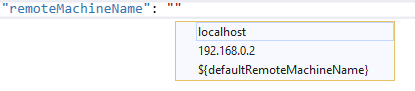
New templates for debugging CMake projects on remote systems and WSL in Visual Studio 2019

We heard your feedback that it can be difficult to configure debugging sessions on remote Linux systems or the Windows Subsystem for Linux (WSL). In Visual Studio 2019 version 16.6 Preview 2 we introduced a new debugging template to simplify debugging with gdb. The new cppgdb template We heard your feedback that the old debug configurations were too verbose, too confusing, and not well documented. The new cppgdb configuration has been simplified and looks like this: The new setting debuggerConfiguration indicates which set of debugging default values to use. In Visual Studio 2019 version ...
Porting a C++/CLI Project to .NET Core

One of the new features of Visual Studio 2019 (beginning with version 16.4) and .NET Core 3.1 is the ability to build C++/CLI projects targeting .NET Core. This can be done either directly with cl.exe and link.exe (using the new option) or via MSBuild (using ). In this post, I'll walk through the steps necessary to migrate a simple C++/CLI interop project to .NET Core. More details can be found in .NET Core documentation. The sample project First, I need to make a sample solution to migrate. I'm going to use an app with a native entry point that displays a Windows Forms form via C++/CLI. Migrating a solution w...
Announcing full support for a C/C++ conformant preprocessor in MSVC

Update June 8, 2021: The C11 and C17 announcement post has instructions on how to get the latest Windows SDK that works with the conformant preprocessor. We are excited to announce full support for a conformant preprocessor in the MSVC toolset starting with Visual Studio 2019 version 16.6 Preview 2. Since the original blog post announcing preprocessor conformance changes, we’ve come a long way and are now ready to announce the completion of the C/C++ conformant preprocessor and its move to a non-experimental, fully supported state via the switch. Alongside standard conformance, the preprocessor also suppor...