
C++ Team Blog
The latest in C++, Visual Studio, VS Code, and vcpkg from the MSFT C++ team
Latest posts

Improving code generation time with C++ Build Insights

Code generation time is a significant contributor to total build time for optimized builds. During this step of the compilation process, source code is passed through several algorithms that transform your program into an optimized version that can be executed more efficiently. In general, the optimization of a C++ function happens quickly and poses no problem. In exceptional cases, however, some functions can become large and complex enough to put pressure on the optimizer and noticeably slow down your builds. In this article, we show how you can use C++ Build Insights to determine if slow code generation is a p...
Visual Studio Code C++ Extension July 2020 Update: Doxygen comments and Logpoints

The July 2020 update of the Visual Studio Code C++ extension is now available. This latest release offers brand new features, such as the visualization of Doxygen comments and support for Logpoints while debugging (GDB/LLDB), along with a bunch of enhancements and bug fixes. To find out more about all the changes, check out our release notes on GitHub. Displaying Doxygen Comments Doxygen is a programming tool that generates documentation for source code. You can annotate your code with comments that contain helpful tips about functions, then Doxygen will generate documentation from these comments. With the J...
Initial Support For C++20 Ranges

We are happy to announce that Visual Studio 2019 version 16.6 contains the first user-visible pieces of C++20 Ranges support. We’ve been working on support machinery for a few releases now, but in this release the tip of the iceberg has finally broken the surface of the water and there are now some tools available for users. The Ranges implementation critically depends on C++ Concepts, and as such is usable with both MSVC and Clang in their C++20 Preview modes but not yet well-supported by IntelliSense. (Don’t worry, we’ll have proper IntelliSense support soon.) What’s Available? ...
C++ Linux development with Visual Studio: incremental build improvements and expanded shell support

Visual Studio 2019 allows C++ developers to target both Windows and Linux (including the Windows Subsystem for Linux) from the comfort of a single IDE. Visual Studio 2019 version 16.7 Preview 3 introduces two features specific to Linux development: improved build incrementality for MSBuild-based Linux projects, and support for a wider range of Linux distributions and shells. There are two ways C++ developers can target Linux systems from Visual Studio. Our recommendation for anything cross-platform or with an eye to open-sourcing is our native support for CMake. This allows you to leverage the same source code...
C++20 Features and Fixes in VS 2019 16.1 through 16.6

What's New We've been busy implementing C++20 features in MSVC's compiler and Standard Library, and migrating the latter to microsoft/STL on GitHub - in fact, we've been so busy that we haven't posted a C++ toolset changelog since the VS 2019 16.0 toolset changelog. So, here are the compiler features and STL features/fixes that have shipped for production use in the last year. As a reminder, the /std:c++17 and /std:c++latest compiler options are necessary to use C++17 and C++20 features. VS 2019 16.1 New features (all thanks to our intern Paolo Torres): New l...
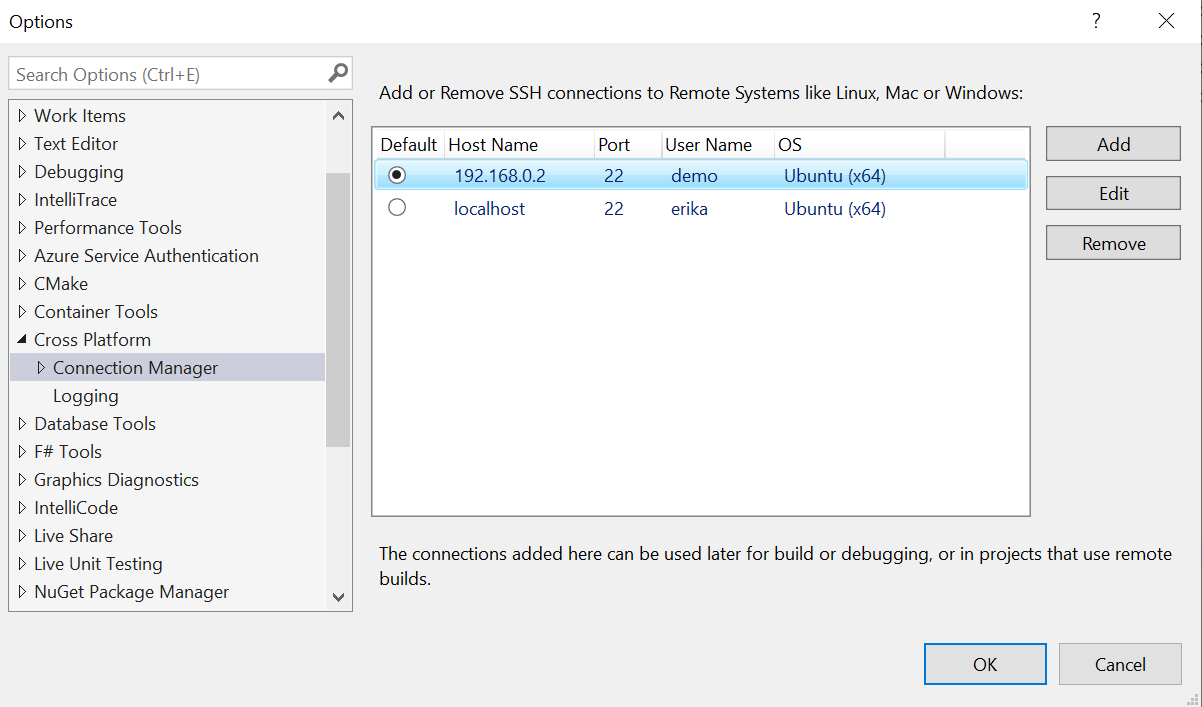
Linux development with Visual Studio: first-class support for gdbserver, improved build times with Ninja, and updates to the Connection Manager
With Visual Studio 2019 you can build and debug C++ projects on a remote Linux system or the Windows Subsystem for Linux (WSL). You can get started with Linux development in Visual Studio using MSBuild-based Linux projects or our native support for CMake. CMake lets you use the same source code and build scripts to target multiple platforms and is our recommendation for anything cross-platform or with an eye to open-sourcing. This blog post covers recent improvements to our Linux support in Visual Studio, including: More details on all these new features are listed below. Improved build times wi...
Profiling template metaprograms with C++ Build Insights
The use of templates in C++ programs can sometimes lead to longer builds. C++ Build Insights puts tools at your disposal for analyzing template usage patterns and their associated impact on build time. In this article, we show you how to use the vcperf analysis tool and the C++ Build Insights SDK to understand and fix problematic template patterns. We demonstrate the practical use of these tools through a case study in which we reduced build time for the Sprout open-source metaprogramming library by 25%. We hope these methods will help you approach your template endeavors with confidence! How to obtain and use...
Join us this week at Microsoft Build digital event

We are looking forward to this week's main event, Microsoft Build 2020. Build 2020 starts tomorrow Tuesday, May 19 and will run for 48 continuous hours as a digital-only event that is open to anyway around the world, at no cost. This is the first major tech conference to go full-digital with an experience designed from the ground-up for a virtual audience. The C++ team is excited to be a part of this event and we'd like to invite you all to join us. At Build, we will demo the new capabilities our team has been working on recently. Our partner teams at Microsoft will also showcase new services and tools that yo...
Visual Studio Code C++ extension: May 2020 update
The May 2020 update of the Visual Studio Code C++ extension is now available. This latest release offers brand new features—ARM and ARM64 IntelliSense modes and C++ language-specific code folding—along with a bunch of enhancements and bug fixes. To find out more about all the changes, check out our release notes on GitHub. ARM and ARM64 IntelliSense modes With the May 2020 update, you can configure the C++ extension to provide proper IntelliSense when cross-compiling for ARM and ARM64. This means you're compiling for a different architecture than your host development machine. All you need to do is set your com...