
C++ Team Blog
The latest in C++, Visual Studio, VS Code, and vcpkg from the MSFT C++ team
Latest posts
New Safety Rules in C++ Code Analysis

In Visual Studio version 16.8 Preview 3, we are adding a few safety rules to C++ Code Analysis that can find some common mistakes, which can lead to bugs ranging from simple broken features to costly security vulnerabilities. These new rules are developed around issues discovered in production software via security reviews and incidents requiring costly servicing. Every shipping piece of software in Microsoft runs these rules as part of security and compliance requirements. This blog post will introduce new rules related to and its sibling types – such as , or . To help with the new rules, we have built a cod...
Welcome C++ developers to GitHub Codespaces!

In May we announced Visual Studio Codespaces and its early support for C++ developers. Over the last several months we interviewed early adopters, and based on their feedback we continued to add new functionality and to improve the Codespaces experience. As part of these efforts, we are excited to announce that we’ve streamlined the experience and now Visual Studio Codespaces has consolidated into GitHub Codespaces. This shift means Visual Studio developers and VS Code developers will have a single service and experience when connecting to a Codespace. At Ignite we’ve provided some further updates to Codes...

Happy 20th Birthday CMake!

CMake is now 20! Kitware posted yesterday an interview with Bill Hoffman, the original creator for CMake and shared that August 31 was CMake's 20th birthday Here, in the C++ team, we are not only heavy CMake users. We also believe that CMake is a foundational piece for all C++ cross-platform developers and, as such, we strive to enable the best CMake experiences in both Visual Studio and Visual Studio Code. A lot of the work we do in Visual Studio and Visual Studio Code wouldn't be possible without the hard work on CMake toolability from the folks over at Kitware. So if you use these capabilities, join us i...
Project OneFuzz: new open source developer tool to find and fix bugs at scale
We're excited to echo Microsoft Security team's announcement that Project OneFuzz is now available as an open-source project in GitHub. To learn more about the announcement, head over to our Microsoft Security blog to read "Microsoft announces new Project OneFuzz framework, an open source developer tool to find and fix bugs at scale". From the announcement: "Microsoft’s goal of enabling developers to easily and continuously fuzz test their code prior to release is core to our mission of empowerment. The global release of Project OneFuzz is intended to help harden the platforms and tools that power our daily w...

C++ in Visual Studio Code reaches version 1.0!

We’re excited to announce the first generally available release of the C++ extension for Visual Studio Code! Visual Studio Code is a free code editor that runs on Linux, macOS, and Windows, and is highly-customizable to make it exactly what you want it to be. The C++ extension brings a rich set of productivity features to VS Code for C++ developers, including IntelliSense smart code completion, debugging, refactoring, code navigation, and more! On top of that, these features are adaptable to various platforms, architectures and compilers, enabling all your cross-compiling and remote development scenarios. T...
A Multitude of Updates in Visual Studio 2019 version 16.8 Preview 3

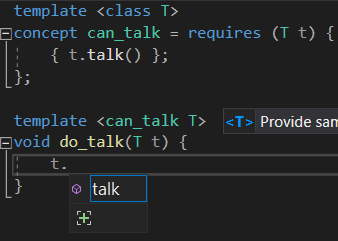
Visual Studio 2019 version 16.8 Preview 3 comes with a huge collection of updates for C++ programmers. Download today to try out new additions in conformance, performance, and productivity. C++20 We’ve improved support for major C++20 features across our compiler, standard library, and IDE. You can now use Modules, Concepts, Coroutines, and (some of) Ranges all in the same project! C++20 Coroutines are now feature-complete and available under /std:c++latest. When using C++20 Coroutines you should include the <coroutine> header. Support for our legacy behaviour is available under <experimental/corout...
Debug Linux core dumps in Visual Studio

In Visual Studio 2019 version 16.8 Preview 3 we added the ability to debug Linux core dumps on the Windows Subsystem for Linux (WSL) or a remote Linux system directly from Visual Studio. This support is specific to the “Native Only" debugger type for unmanaged C++ code. We understand that some teams develop on Windows but deploy to both Windows and Linux (or just Linux!) and rely on a CI system to catch Linux-specific errors. This feature will make your life easier if you run a Windows shop but deploy to Linux servers and want to debug crashes in a familiar environment. To get started, select Debug > Ot...
C++ Coroutines in Visual Studio 2019 Version 16.8

Please see our Visual Studio 2019 version 16.8 Preview 3 release notes for more of our latest features. It's been a long journey for coroutines in C++ and in MSVC. We announced an early preview of resumable functions in 2013, followed up by the switch and initial C++ standardization proposals in 2014, to proposal revisions in 2015, and have continued tracking the Coroutines TS (Technical Specification) progress through Visual Studio 2017 and 2019. With the adoption of coroutines into the C++ standard in 2019, we are now pleased to announce feature completion of C++20 coroutines in Visual Studio 2019 version 1...
Standard C++20 Modules support with MSVC in Visual Studio 2019 version 16.8

Please see our Visual Studio 2019 version 16.8 Preview 3 release notes for more of our latest features. It has been some time since our last update regarding C++ Modules conformance. The toolset, project system, and IDE teams have been hard at work to create a first class C++ Modules experience in Visual Studio 2019. There is a lot to share, so let's get right into it: What's new? Implies C++ Modules Since MSVC began down the path of implementing the Modules TS the toolset has always required the use of on any compilation. Since the merge of Modules into the C++20 standard (we ...