

We are super excited to announce General Availability of Bridge to Kubernetes.
Formerly known as Local Process with Kubernetes, Bridge to Kubernetes is an iterative development tool offered in Visual Studio and VS Code that allows developers to write, test and debug microservice code on their development workstations while consuming dependencies and inheriting existing configuration from a Kubernetes environment.
Simplifying Microservice Development
Microservice applications are comprised of many services, often calling each other. Each service has its own configuration and dependencies, making setting up and running the application locally time-consuming and complex.
By using Bridge to Kubernetes to connect your development workstation to your Kubernetes cluster, you eliminate the need to manually source, configure and compile external dependencies on your development workstation. Environment variables, connection strings and volumes from the cluster are inherited and available to your microservice code running locally.
Develop Microservice Apps Faster
Bridge to Kubernetes extends the Kubernetes perimeter to your development workstation, allowing you to sidestep operational complexities of building and deploying your code into the cluster to test, debug and rapidly iterate.
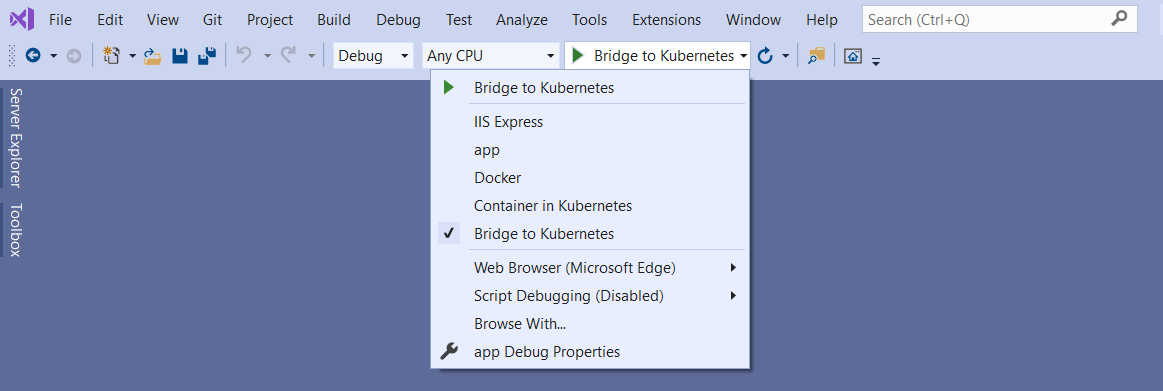
Docker and Kubernetes configurations are not required when using Bridge to Kubernetes. Simply run code natively on your development workstation using familiar development tools and practices, while connected to the Kubernetes cluster, allowing you to develop, test and debug in the context of the larger application.
Debugging and testing end-to-end
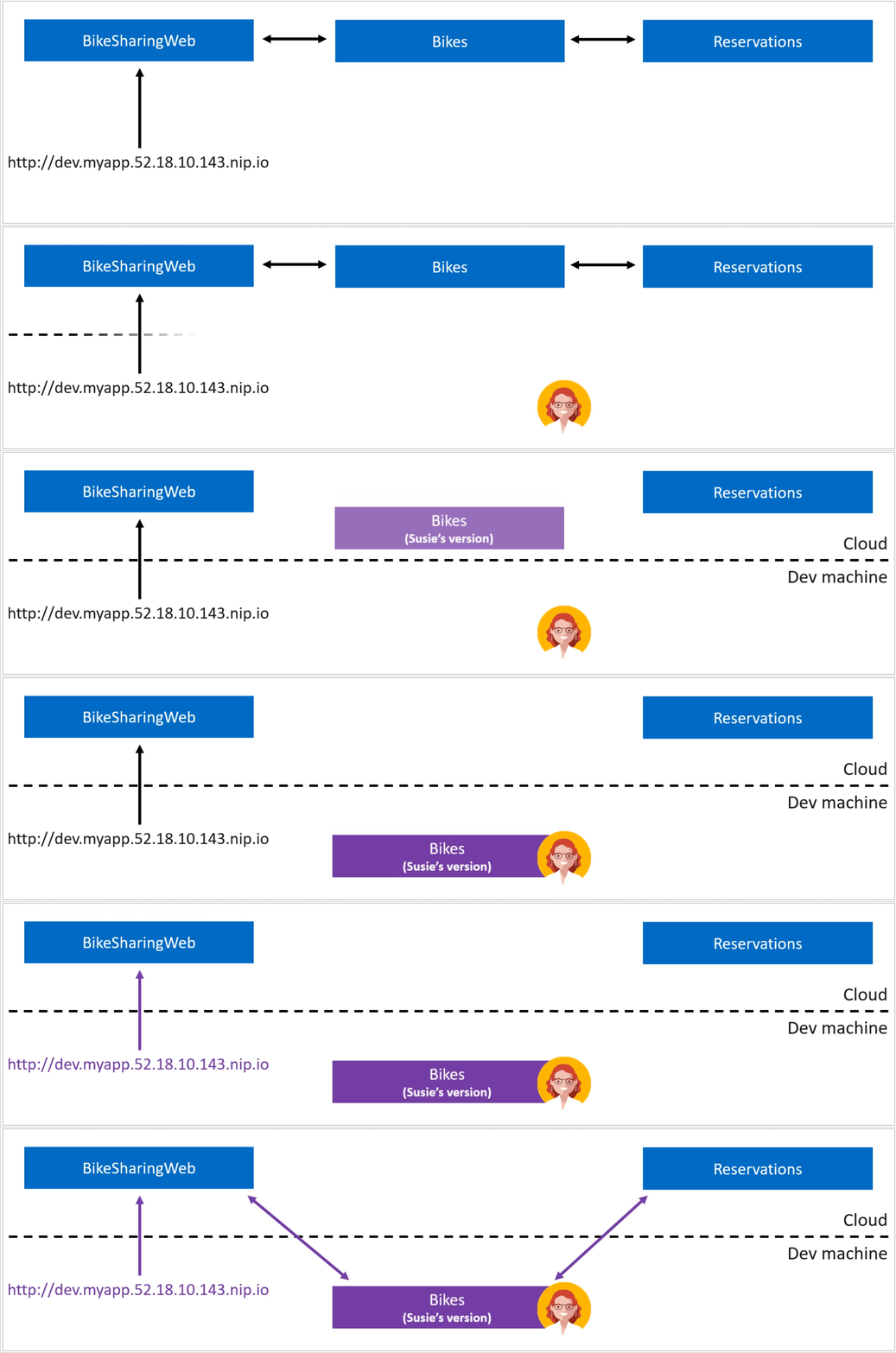
Bridge to Kubernetes enables debugging and testing end-to-end in the context of the larger application. Select an existing service in the cluster to route to your development machine where an instance of that service is running locally. Requests initiated through the application running in Kubernetes will route between services running in the cluster. When the service you are debugging is called, the request is redirected to your development machine to your locally running version. Your local changes are executed, and the request is completed transparently for the other services.

Work in isolation in a shared development environment
In clusters where developers are working together on the same application at the same time, there is a significant risk of interfering with another developers’ debugging session. This is because there is only one copy of each service deployed to the application namespace. To enable developers to work more effectively together and isolate their inner loop from the rest of the team, they need a copy of the service to work on exclusively.
Bridge to Kubernetes supports working in isolation in a shared cluster. By selecting the work in isolation mode during configuration, Bridge to Kubernetes will setup the isolated service, as well as a specific subdomain URL to make sure that only traffic using that URL is redirected to your development workstation.
Public Previews
Support for any Kubernetes
Bridge to Kubernetes is expanding support to any Kubernetes. Whether you’re connecting to your development cluster running in the cloud, or to your local Kubernetes cluster, Bridge to Kubernetes is available for your end-to-end debugging scenarios.
Support for Bridge to Kubernetes on any Kubernetes cluster is initially available in the VS Code experience and soon after in Visual Studio.
Increase confidence in pull requests with review apps
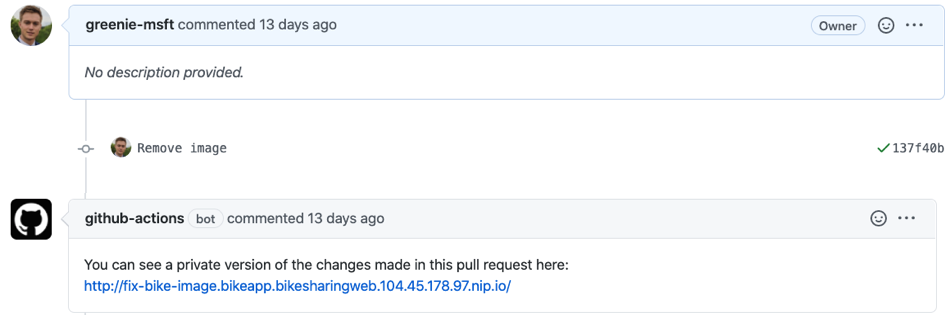
Bridge to Kubernetes lets you work in isolation from colleagues using the same cluster and namespace by leveraging our new routing technology. You can also apply the isolation capability outside the Bridge to Kubernetes experience, such as directly from a GitHub pull request. You can test changes from a PR directly in Kubernetes before the pull request is merged into the main branch of your repo. Having a running application to review changes of a pull request can increase confidence in proposed code changes. Testing your changes in the running application can also help other team members, such as product managers and designers, see the results of the development work even in the early stages.
For more information, including how to get started with the pull request review apps, see here.
Get started today and let us know about your experience!
Start debugging your Kubernetes applications today using Bridge to Kubernetes. Download the extensions from the Visual Studio and VS Code marketplaces and follow the quickstarts on how to use Bridge to Kubernetes.
We’d love to hear about your experience with Bridge to Kubernetes and where we can improve. For issues or comments, please visit our GitHub issues page.



This does not work with Windows containers and MVC applications built on top of .NET framework 4.5+. I don’t even see this option in Visual Studio unless I use a .NET Core project. Even when I tried .NET Core project targeting Windows, the pods goes into error state in Kubernetes. So I guess this works only for .NET Core targeting Linux containers. Do you have any plans to bring support for .NET Framework and Windows containers?
my website design by C# ضدکف
Will Bridge to Kubernetes support other IDEs besides Visual Studio and Visual Studio Code, such as IntelliJ or Eclipse?
First, this is AWESOME!! I am really excited to give this a try. And the move to make with work with my On Premises Kubernetes makes me really happy!
Second, I am noticing that VS Code is the IDE that is first getting features (as is the case here with "Any Kubernetes" support).
It seems odd leave the paying customers waiting for the features while you deliver first to the free product line (Visual Studio is not free for most of us).
Is Microsoft starting to shift away from Visual Studio? I have tried VS Code a few...
I’m facing issues when I try to run it in Visual Studio 2019 I get an error: ‘Common port ’80’ is in use on your machine and may prevent Bridge to Kubernetes from forwarding network traffic.’. Can you maybe help me with this?