
.NET Blog
Free. Cross-platform. Open source. A developer platform for building all your apps.
Latest posts
Deprecating packages on nuget.org

We are excited to announce that nuget.org now supports package deprecation. This has been a long standing ask that will help the ecosystem use supported packages. As a package publisher on nuget.org, you can now deprecate packages that are obsolete, legacy, or buggy. You can also suggest an alternate package to your deprecated package. This lets you guide your packages' consumers to the latest and greatest package. Unlisting vs. Deprecating packages Package deprecation is different than unlisting your package as explained below: Deprecating and Un-deprecating packages Package deprecation is easy. Just fo...
.NET Framework September 2019 Preview of Quality Rollup

We have released the September 2019 Preview of Quality Rollup and Cumulative Updates for .NET Framework for Windows 10 Quality and Reliability This release contains the following quality and reliability improvements. BCL1 CLR2 WPF3 1 Base Class Library (BCL) 2 Common Language Runtime (CLR) 3 Windows Presentation Foundation (WPF) Getting the Update The Preview of Quality Rollup is available via Windows Update, Windows Server Update Services, and Microsoft Update Catalog. Microsoft Update Catalog You can get the update via the Microsoft Update Catalog. For Windows 10, NET Framework 4.8 upda...
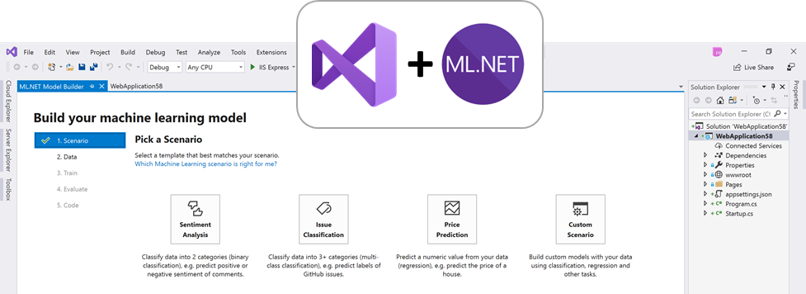
ML.NET and Model Builder at .NET Conf 2019 (Machine Learning for .NET)

We are excited today to announce updates to Model Builder and improvements in ML.NET. You can learn more in the “What’s new in ML.NET?.” session at .NET Conf. ML.NET is an open-source and cross-platform machine learning framework (Windows, Linux, macOS) for .NET developers. ML.NET offers Model Builder Model Builder (a simple UI tool) and CLI to make it super easy to build custom ML Models using AutoML. Using ML.NET, developers can leverage their existing tools and skillsets to develop and infuse custom AI into their applications by creating custom machine learning models for common scenarios like Sentiment Ana...
Setting HTTP header attributes to enable Azure authentication/authorization using HTTPRepl

Posted on behalf of Ahmed Metwally The HTTP Read-Eval-Print Loop (REPL) is a lightweight, cross-platform command-line tool that's supported everywhere .NET Core is supported. It’s used for making HTTP requests to test ASP.NET Core web APIs and view their results. You can use the HTTPRepl to navigate and interrogate any API in the same manner that you would navigate a set of folders on a file system. If the service that you are testing has a swagger.json file, specifying that file to HTTPRepl will enable auto-completion. To install the HTTP REPL, run the following command: For more information...
Joining the .NET Foundation Maturity Model Pilot

Joining the .NET Foundation Maturity Model Pilot The .NET Foundation is starting a new pilot program to increase quality and user confidence in open source projects, using a new project maturity model. We've been working with the Technical Review Action Group at the Foundation to help shape the program. We're happy to see the pilot being launched and that the .NET Team is participating in the project. For us, this includes the underlying .NET platform, and also the packages we release. We get to talk with larger organizations frequently, both from the private and public sectors, about open source. On one end of...

Announcing Entity Framework Core 3.0 and Entity Framework 6.3 General Availability

We are extremely excited to announce the general availability of EF Core 3.0and EF 6.3 on nuget.org. The final versions of .NET Core 3.0 and ASP.NET Core 3.0 are also available now. How to get EF Core 3.0 EF Core 3.0 is distributed exclusively as a set of NuGet packages. For example, to add the SQL Server provider to your project, you can use the following command using the tool: When upgrading applications that target older versions of ASP.NET Core to 3.0, you also have to add the EF Core packages as an explicit dependency. Also starting in 3.0, the command-line tool is no longer included in the .NET Co...
Announcing F# 4.7

We’re excited to announce general availability of F# 4.7 in conjunction with the .NET Core 3.0 release! In this post, I’ll show you how to get started, explain everything in F# 4.7 and give you a sneak peek at what we’re doing for the next version of F#. F# 4.7 is another incremental release of F# with a focus on infrastructural changes to the compiler and core library and some relaxations on previously onerous syntax requirements. F# 4.7 was developed entirely via an open RFC (requests for comments) process. The F# community has offered very detailed feedback in discussions for this version of the language. Yo...
Announcing .NET Core 3.0
Announcing .NET Core 3.0 We’re excited to announce the release of .NET Core 3.0. It includes many improvements, including adding Windows Forms and WPF, adding new JSON APIs, support for ARM64 and improving performance across the board. C# 8 is also part of this release, which includes nullable, async streams, and more patterns. F# 4.7 is included, and focused on relaxing syntax and targeting .NET Standard 2.0. You can start updating existing projects to target .NET Core 3.0 today. The release is compatible with previous versions, making updating easy. Watch the team and the community talk about .NET at .NET Con...
ASP.NET Core and Blazor updates in .NET Core 3.0

ASP.NET Core and Blazor updates in .NET Core 3.0 Today we are thrilled to announce the release of .NET Core 3.0! .NET Core 3.0 is ready for production use, and is loaded with lots of great new features for building amazing web apps with ASP.NET Core and Blazor. Some of the big new features in this release of ASP.NET Core include: You can find all the details about what's new in ASP.NET Core in .NET Core 3.0 in the What's new in ASP.NET Core 3.0 topic. See the .NET Core 3.0 release notes for additional details and known issues. Get started To get started with ASP.NET Core in .NET Core 3.0 i...