
Visual Studio Blog
The official source of product insight from the Visual Studio Engineering Team
Latest posts

Now Streaming: The Visual Studio ‘Tea & Technology’ Miniseries

2023 Visual Studio Miniseries: Tea & Technology The Visual Studio team is full of stories and insights, and we knew it was time to share them. So, we picked up our cameras and went on a special tour of Microsoft’s iconic Redmond Campus. Our goal? To offer you a snapshot—an insider's look at just a few of the many people who contribute to shaping Visual Studio every day. Leading us in these select conversations is the seasoned podcaster Richard Campbell from .NET Rocks. With decades of experience mirroring Visual Studio's own history, Richard uses his insightful questioning to bring a level of clarity that...
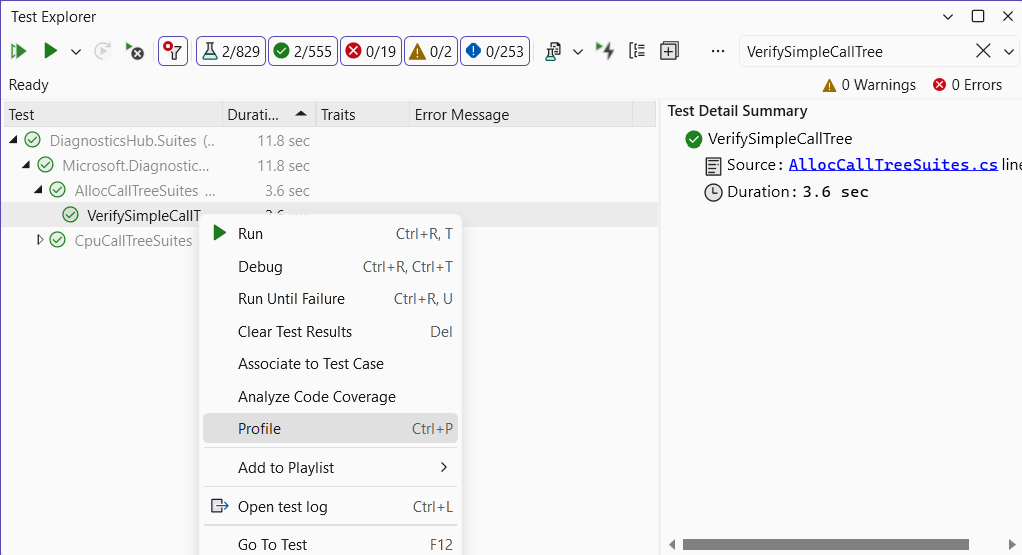
A unit of profiling makes the allocations go away

In Visual Studio 17.8 Preview 2 we have updated unit test profiling, allowing you to use any of the available tools in the performance profiler – not just the instrumentation tool. With this change, it’s easy to quickly profile small units of work in isolation, make changes, and then remeasure and validate the impact of the change. Assuming you have good test coverage, this is a great way to leverage existing assets to help performance-tune your application. Who moved my cheese? With this new release, we have updated the unit test profiling experience. Previously when selecting profile in the context menu for a...

New React TypeScript SPA Templates and More

We have made the latest React TypeScript SPA Templates available in our latest preview. If you are developing React TypeScript Web application with ASP.NET as backend in Visual Studio, go ahead and try the new template! All the Visual Studio React and Vue templates using the JavaScript SDK are now using Vite, so you would get the benefit of a much faster project creation and run experience. All the features and updates in this blog post are available in our latest version. React TypeScript SPA Templates When we initially released the JavaScript/TypeScript with ASP.NET Combined Templates in this blog ...

IntelliTest simplifies writing and maintaining unit tests

Writing a suite of unit tests that exhaustively exercise and validate the logic of the code is not easy. It can even be considered too expensive to do at all. Fortunately, IntelliTest addresses both concerns: it helps you achieve high code coverage at a fraction of the cost, and now in Preview, this Enterprise feature supports projects that target .NET6 and will run on x64. When you run on your .NET code, it generates test cases by dynamically analyzing the code. For every statement in the code, it crafts an input that will reach that statement, doing a case analysis for every conditional branch—if statements,...

Visual Studio 2022 17.8 Preview 2 has arrived!

We hope everyone enjoyed all the new and updated features that came with our first preview of Visual Studio’s next version, and now we’re back with more! This release brings additional tools to help you improve your productivity, debug your code, as well as some additional C++ and Game Dev enhancements. Browse this comprehensive list of enhancements and let us know which of these enhancements is your favorite: You can delve into the complete list of enhancements by checking out the Visual Studio 2022 17.8 Preview 2 Release Notes, and we always love to know what you think with feedback through Develope...
Balancing User Updates with Security Best Practices

In today’s world, it is imperative for IT administrators and organizations to manage security effectively and embrace security best practices. One common best practice involves implementing appropriate permission levels to ensure that only authorized accounts can access sensitive data and functionality. Another widely accepted best practice involves keeping software up to date with the latest security patches. Visual Studio recommends both of these security best practices as described in the online documentation for User permissions and Visual Studio and Applying Administrator Updates. Up until now, we’ve had ...
Elevating Debugging with Auto-decompilation and External Sources

Visual Studio has been supporting external sources debugging and decompilation for some time now. However, with the release of Visual Studio 17.7, the debugger took a significant leap forward by introducing Auto-decompilation for .NET libraries making the external code debugging in Visual Studio much more streamlined and effortless. Its integrated decompiler, it decompiles external code in real-time and seamlessly incorporates it into the debugger as needed. In this article, we'll investigate the Auto-decompilation feature of Visual Studio, highlighting its significance in debugging and engineering external co...
Keep your casing with Case-preserving Find and Replace

The Visual Studio search experience is getting a new feature that allows users to find and replace text without having to worry about different casings. For example, a method parameter `catalogItemId` and object property `CatalogItemId` have the same name but different capitalization but should both be replaced by something like ‘productId’ with their respective casings. The feature has been requested by users who were looking for an easy way to find and replace text without having to worry about different casings in various forums, including Stack Overflow and Developer Community Case-Preserving Search &...
Visual Studio for Mac Retirement Announcement

Today we are announcing the retirement of the Visual Studio for Mac IDE. Visual Studio for Mac 17.6 will continue to be supported for another 12 months, until August 31st, 2024, with servicing updates for security issues and updated platforms from Apple. While the decision has been made to retire Visual Studio for Mac, we remain committed to our developers on Mac with alternatives like the recently announced C# Dev Kit for VS Code and other extensions that will allow you to take advantage of our ongoing investments in .NET development on a Mac. Developing Across OS Environments Informed by ongoing user feedback...