
Visual Studio Blog
The official source of product insight from the Visual Studio Engineering Team
Latest posts
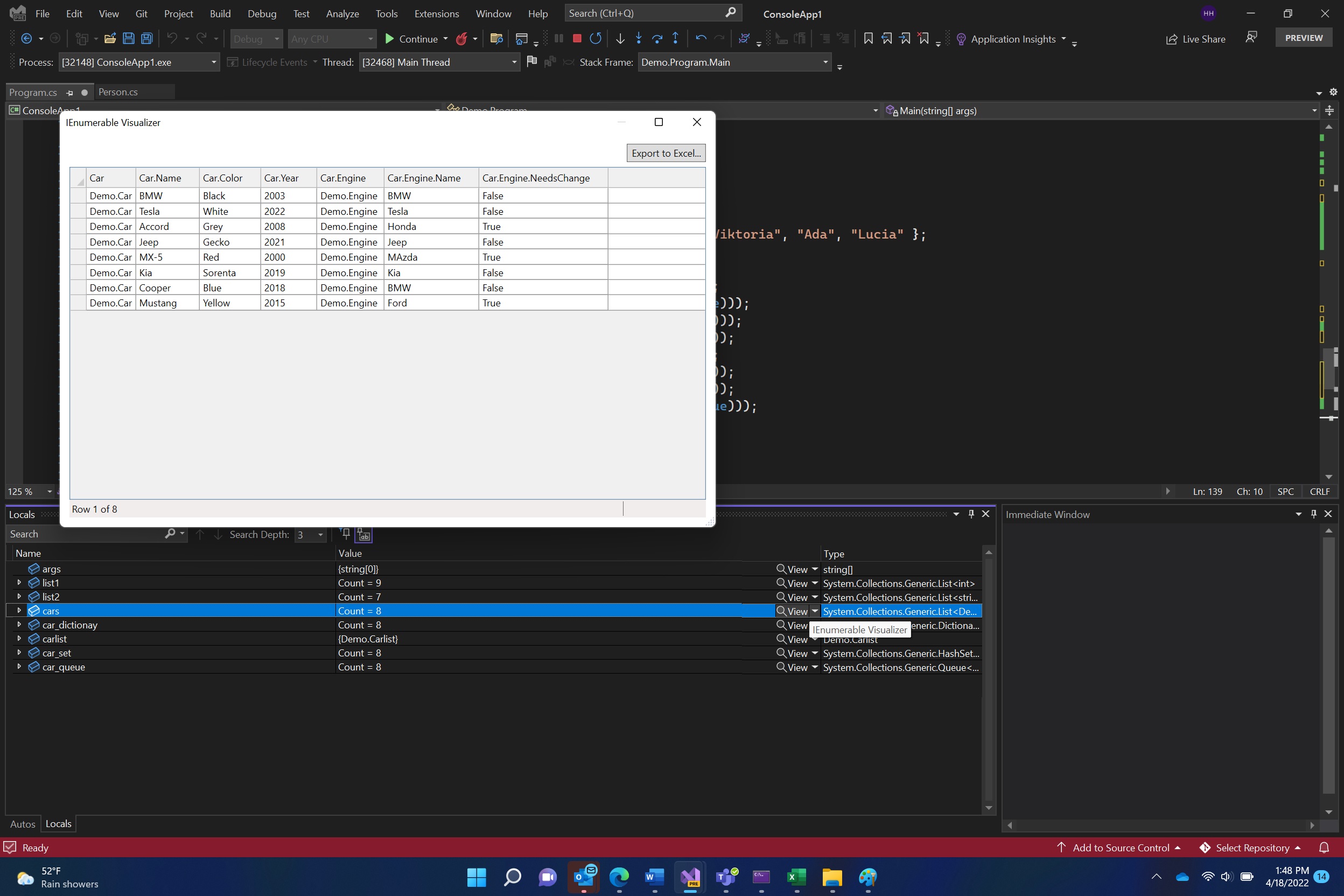
View .NET collections with the new IEnumerable Debugger Visualizer

While debugging .NET code, inspecting a large and complex collection object can be tedious and difficult. Hence, starting from Visual Studio 17.2. Preview 2, we are introducing a new Visualizer, which will help you view IEnumerable objects such as Arrays, List, etc. in a customized tabular view. The IEnumerable visualizer will display collections of objects in a table with a row per object and sortable columns for each field and property. IEnumerable Visualizer Visualize data with IEnumerable Visualizer The IEnumerable Visualizer is an extension to the existing Dataset Visualizer...

Introducing a New Way to Search Your Code and Visual Studio Features

All developers search within their code, in one way or another. Some might use code search to explore their code and understand how some components work; others might use code search to get to a very specific location they have in mind. Either way, as a developer yourself, sometimes this process of searching and finding a location might be frustrating and take you longer than you might want. Visual Studio 17.2 Preview 3 introduces a brand-new All-In-One search experience that merges the existing VS Search (Ctrl + Q) and Go To (Ctrl + T) to allow you to search both your code and Visual Studio features quicker and ...
Supercharge your Git experience in VS

Have you experienced delays when viewing your Git repository or branch history in Visual Studio? Have you run a network command like force-push and had to wait for the operation to complete? Your Git repository may be having performance issues due to its large size. We are happy to integrate a relatively new Git feature called the commit graph which leads to improving the performance of your Git operations and significantly improving performance in Visual Studio. Once you are on the latest preview version of Visual Studio (17.2 Preview 3 or later), Visual Studio will automatically show the foll...

Visual Studio 2022 for Mac Preview 9

Visual Studio 2022 for Mac 17.0 Preview 9 is now available! In this release, the focus is on addressing top reported issues from prior preview releases. This work builds on top of earlier previews where we’ve moved the UI of the IDE to fully native macOS UI and migrated the IDE to run on top of .NET 6 (enabling native support of Apple’s M1 (arm64) processor. Get the latest release now by using the Visual Studio > Check for Updates… menu in the product, or download it directly: Top issues fixed in this release Thank you to everyone who’s reported issues so far. Here are some of the top customer-reported i...
CPU Usage Tool Improvements

With Visual Studio 2022, we have converted the CPU Usage tool in the Performance Profiler to the profiler’s new analysis engine. This new change provides the tool with better source resolution, incremental/cancelable symbol loading, a performance boost, and a new flame graph.
Visual Studio 2022 for Mac Preview 8
Visual Studio 2022 for Mac 17.0 Preview 8 is now available! In this release, the focus is on addressing top reported issues from prior preview releases and driving forward to a high-quality GA (General Availability) release.
Suffer from Ctrl+S fatigue? We have a feature for you

The idea of the “Integrated Development Experience” is a tool that brings all the systems a developer needs to develop their application into a single place. Coding, debugging, publishing, profiling… these are all tools that Visual Studio brings to our developers.
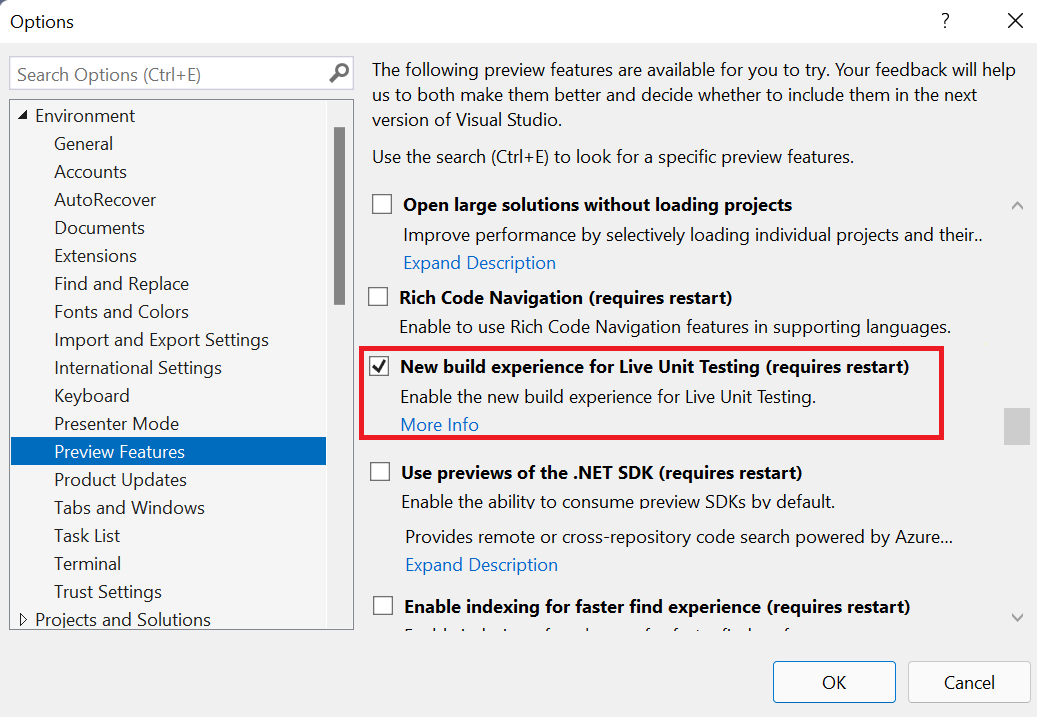
Live Unit Testing Preview: Better and Faster

Live Unit Testing is the automatic test running feature in Visual Studio Enterprise. As you make code changes, Live Unit Testing detects what tests are impacted and runs them in the background. This way you always know if the tests covering a certain line of code are passing or failing. You can see what your code coverage is for each line of your product code at a glance. You get instant feedback in the editor with pass/fail icons in the margin and you can easily run or debug the impacted tests from the Live Unit Testing icons. Live Unit Testing will help you catch if new code changes cause tests to fail as you d...
Visual Studio 2022 for Mac Preview 7
Visual Studio 2022 for Mac 17.0 Preview 7 is here and continues our focus on addressing top issues and driving forward to a high-quality GA (general availability) release. In addition to many fixes, this release brings back Xamarin mobile tooling as a supported experience and introduces Azure Functions V4 tooling which supports running on .NET