
Visual Studio Blog
The official source of product insight from the Visual Studio Engineering Team
Latest posts
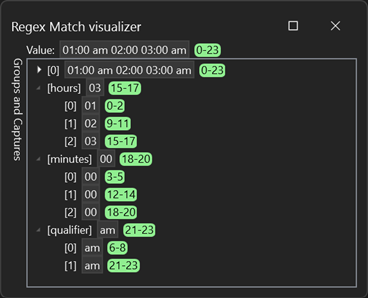
Build Better Extensions with VisualStudio.Extensibility Preview 3!

Today, we’re very excited to announce the third public preview of VisualStudio.Extensibility, our new SDK for creating extensions for Visual Studio! The VisualStudio.Extensibility SDK focuses on extensions that run out-of-process from the IDE for improved performance and reliability, and it features a modern API that has been streamlined and carefully engineered to maximize developer productivity. This release builds on our first and second public previews, and it brings some big features like an API to query and modify project information and the ability to create incredible debugger visualizers. Pleas...

GitHub Copilot in Visual Studio 2022

GitHub Copilot uses OpenAI Codex to suggest code and entire functions in real-time right from your editor. Trained on billions of lines of public code, GitHub Copilot turns natural language prompts including comments and method names into coding suggestions across dozens of languages. In Visual Studio, Copilot acts as a pair-programmer making it more joyous to code – and increases your productivity at the same time. And an updated version of Copilot for Visual Studio was just released. It contains a lot of fixes, tweaks, and other improvements. Check out this demo video: Together with the built-in AI in...

Try Visual Studio 2022 v17.6 Preview 1

The first Preview for Visual Studio 2022 17.6 is now available! This release expands on the recently released 17.5 version of Visual Studio and aims at enhancing your productivity whether you’re a .NET developer, a game developer, and/or a C++ developer. Why should you try the latest preview? Because it’s like living in the future – you get to try all the capabilities that we’re actively working on for the upcoming 17.6 release, influence their development early by providing your suggestions and by reporting any problem you encounter. And you get to do that while reliably continuing your critical work, as Prev...

The fastest way to add files and folders

Your Visual Studio team is excited to announce the release of the highly anticipated "Quick Add Files & Folders" feature in Visual Studio version 17.5! This new feature is the fastest and most convenient way to add files and create folders within your projects. Based on the feedback from the Visual Studio Developer Community, Quick Add was requested and highly voted on, making it a top priority for our development team. Yes, your votes matter! The team has iterated on the early preview to bring you the most efficient and effective way to manage your files. Check out this video to learn more and then ...

Reference GitHub Issues and Pull Requests in Visual Studio

We’re excited to announce the preview release of linking GitHub Issues. With Visual Studio 2022 17.6 Preview 1 you can now mention your issues in the commit message box in the Git Changes window. Speed up your workflow by linking your related work items directly in Visual Studio. You can use the related items to get more context from the Git Repository window. Learn more about how to leverage this feature below. Reference Your Related Items Building on the existing Azure DevOps work item support, we’ve enabled the same experience with GitHub. To try it out: Get Access to Is...
Visual Studio 2022 can now Always Update on Close!

Do you want Visual Studio 2022 to always stay up to date with the latest goodness with little-to-no action from your end? Then look no further, because as of now, we support the ability to “Always Update on Close”! Starting with Visual Studio 2022 version 17.5, we’ve made it easier to apply available updates when Visual Studio closes if you’ve made a one-time configuration change in Visual Studio. You can find this option in the Tools > Options > Product Updates dialog. This setting is configurable on a per instance basis of Visual Studio 2022 and we highly encourage you to enable this feature to s...
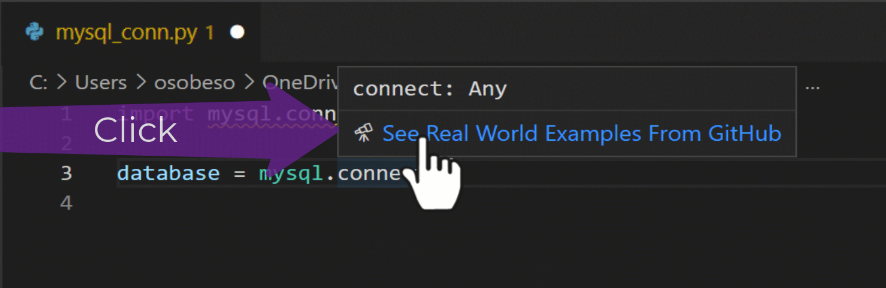
Maximizing the value of IntelliCode with API usage examples: Real-World Code Examples at Your Fingertips

As a software developer, we've all faced the frustration of having to leave our IDE to search for documentation, code examples, Stack Overflow, blog posts or simply trying to remember how to use a certain API. What if we told you that we have a solution for you? Now with Visual Studio 17.6 Preview, IntelliCode makes finding real-world code examples for common APIs easier than ever. With this feature, you'll have real examples at your fingertips. See how an API has been used in real-world projects. Saving you time and making your coding even more efficient. Under your fingertips IntelliCode API usage examples en...

Visual Studio 2022 – 17.5 Released

We’re excited to announce that Visual Studio 17.5 is now generally available. This release is full of updates that take friction out of your daily workflows making it easier for you stay in the zone while you code. Features like all-in-one search and intent-based suggestions help you move faster, while improved build and debug speeds ensure your IDE won’t slow you down. For .NET and cloud developers, we’ve focused on improving the inner-loop dev experience. New .http/.rest files make it easier to test and iterate on your APIs directly in Visual Studio, while improved Dev Tunnels help streamline the configu...
Visual Studio for Mac 17.5 is now available

We are pleased to announce the release of Visual Studio for Mac 17.5. Along with the usual incremental improvements, we’ve focused on improving the Git experience for this release. Read along as we look at these improvements and the other big changes made. As always, if you want to know all the changes made during this release, you can check out the release notes. If you are already using the Visual Studio for Mac Preview release, use the Visual Studio > Check for Updates… menu item to update. If you aren’t using it yet, download it now: Git Improvements The most noticeable new Git featu...