
Cesar de la Torre
Principal Program Manager at the Azure team.
Latest posts
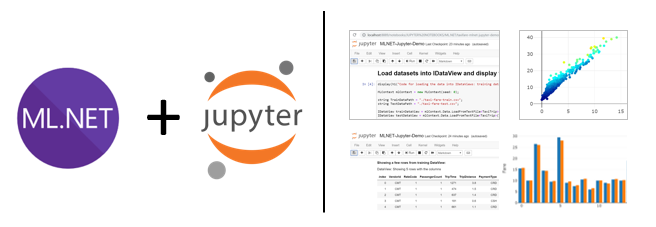
Using ML.NET in Jupyter notebooks

I do believe this is great news for the ML.NET community and .NET in general. You can now run .NET code (C# / F#) in Jupyter notebooks and therefore run ML.NET code in it as well! - Under the covers, this is enabled by 'dotnet-try' and its related .NET kernel for Jupyter (as early previews). The Jupyter Notebook is an open-source web application that allows you to create and share documents that contain live code, equations, visualizations and narrative text. In terms of ML.NET this is awesome for many scenarios like data exploration, data cleaning, plotting data charts, documenting model experiments, l...

Training Image Classification/Recognition models based on Deep Learning & Transfer Learning with ML.NET
Blog Post updated targeting ML.NET 1.4 GA (Nov. 2019) Note that this blog post was updated on Nov. 6th 2019 so it covers the updates provided in ML.NET 1.4 GA, such as Image classifier training and inference using GPU and a simplified API. Context and background for 'Image Classification', 'training vs. scoring' and ML.NET Image Classification, Object Detection and Text Analysis are probably the most common tasks in Deep Learning which is a subset of Machine Learning. However, for this blog post I am only focusing on Image Classification/Recognition and the multiple approaches you can take ...

Run with ML.NET C# code a TensorFlow model exported from Azure Cognitive Services Custom Vision
With ML.NET and related NuGet packages for TensorFlow you can currently do the following: However, in the scenario where you want to train with your own images, the Transfer Learning approach can be a bit complex because even without taking into account the code implementation for transfer learning you'll need to find a base TensorFlow model to train on top of it which was originally trained with similar image types to your new images. Here's some specific examples to understand that statement: In any case, it can get tricky and you need to understand some complexity. For some custom scenarios...

ML.NET Model Lifecycle with Azure DevOps CI/CD pipelines
As a developer or software architect, you are focused on the application lifecycle – building, maintaining, and continuously updating the end-user business application, as illustrated in the simplified image below: When you infuse AI (such as an ML.NET model) into your application, then your application lifecycle needs to be extended so it additionally embraces the 'Machine Learning Model Lifecycle'. Extending Azure DevOps CI/CD pipelines with the ML Model lifecycle When deploying ML models to production, you need to automate the process to track, version, audit, certify and re-use every asset in your ML...
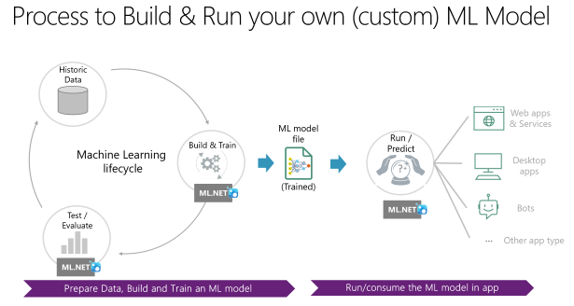
What is ML.NET 1.0 – Machine Learning for .NET
Today, coinciding with //BUILD 2019/ conference, we’re thrilled by launching ML.NET 1.0 release! You can read the official ML.NET 1.0 release announcement Blog Post here and get started at the ML.NET site here. In this blog post I'm providing quite a few additional technical details along with my personal vision that you might find interesting, though. This is the first main milestone of a great journey in the open that started on May 2018 when we released ML.NET 0.1 as open source. Since then we've been releasing monthly, 12 preview releases plus this final 1.0 release, as shown in the roadmap below: ...
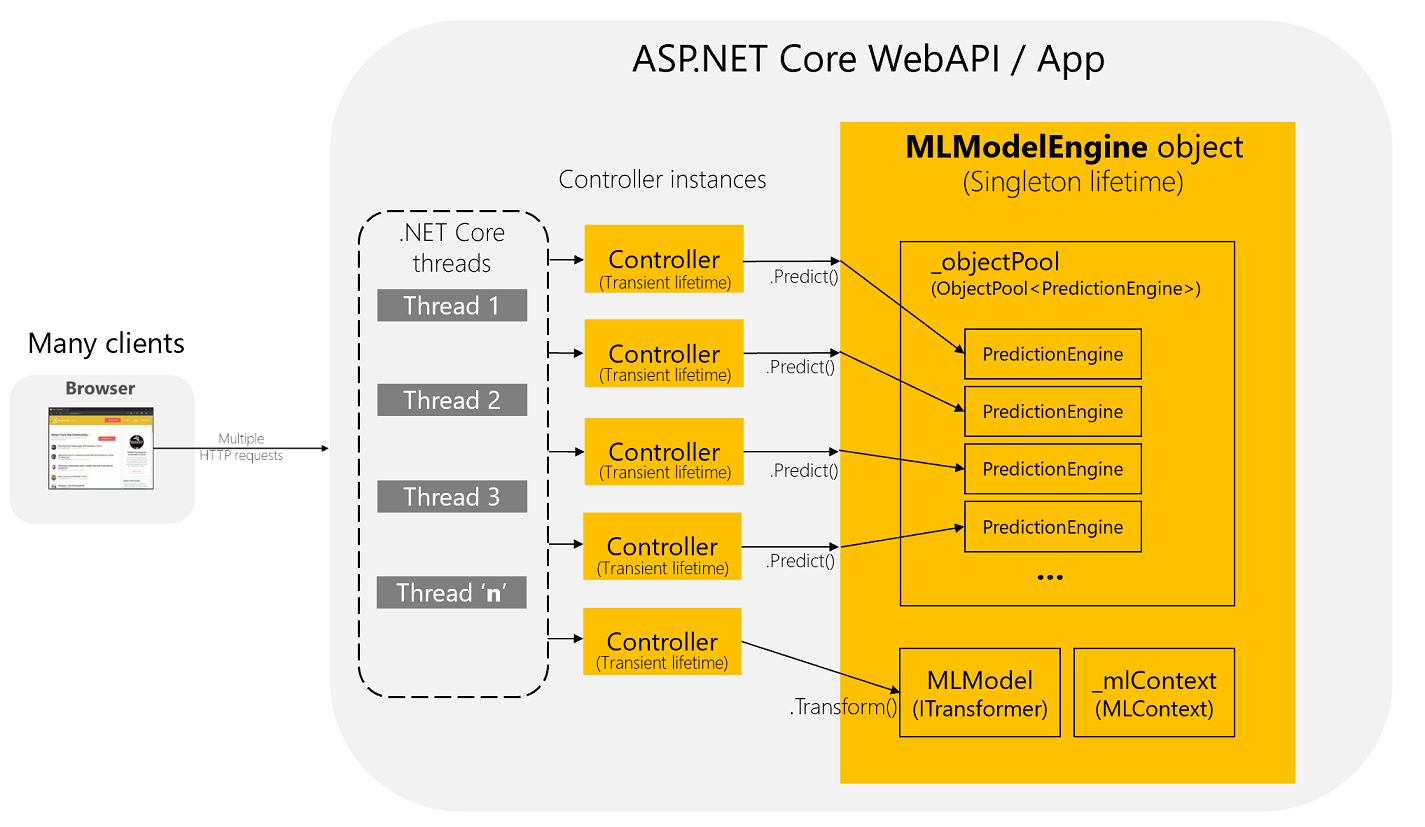
How to optimize and run ML.NET models on scalable ASP.NET Core WebAPIs or web apps
Context ------ UPDATE on May 13th 2019: The recommended way to deploy/run an ML.NET model into ASP.NET Core web apps or WebAPI services is by using the 'Microsoft.Extensions.ML' Integration package. Read about it in this tutorial: - Deploy an ML.NET model in an ASP.NET Core Web API The tutorial above uses optimized code based on an .NET Core Integration Package comparable to integration packages targeting Entity Framework, SignalR, etc. so it's transparent and a lot easier for you than the explained blog post below. This article below was written before that mentioned integration package was creat...
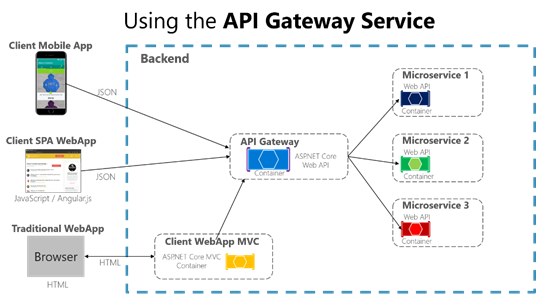
Designing and implementing API Gateways with Ocelot in .NET Core containers and microservices architectures
We're currently evolving the .NET microservices guidance and eShopOnContainers reference application. One of the most important topics is about the API Gateway pattern, why it is interesting for many microservice-based applications but also, how you can implement it in a .NET Core based microservice application with a deployment based on Docker containers. Why should you use API Gateways instead of direct communication? In a microservices architecture, the client apps usually need to consume functionality from more than one microservice. If that consumption is performed directly, the client will need to handle ...
Microsoft eBook gratuito en Español: “Microservicios .NET – Arquitectura para aplicaciones .NET contenerizadas” – Docker, .NET Core, Kubernetes, Service Fabric, Azure.
Las arquitecturas basadas en Microservicios están emergiendo actualmente como opciones apropiadas para aplicaciones distribuidas de misión crítica. En una arquitectura basada en microservicios, la aplicación se construye basada en una colección de servicios que deben ser desarrollados, probados, versionados y desplegados en producción, de forma independiente. En paralelo, las empresas actualmente están descubriendo como con contenedores Docker pueden reducir costes, resolver problemáticas de despliegues y en definitiva mejorar DevOps y operaciones de despliegues a producción. Docker se esta convirtiendo...
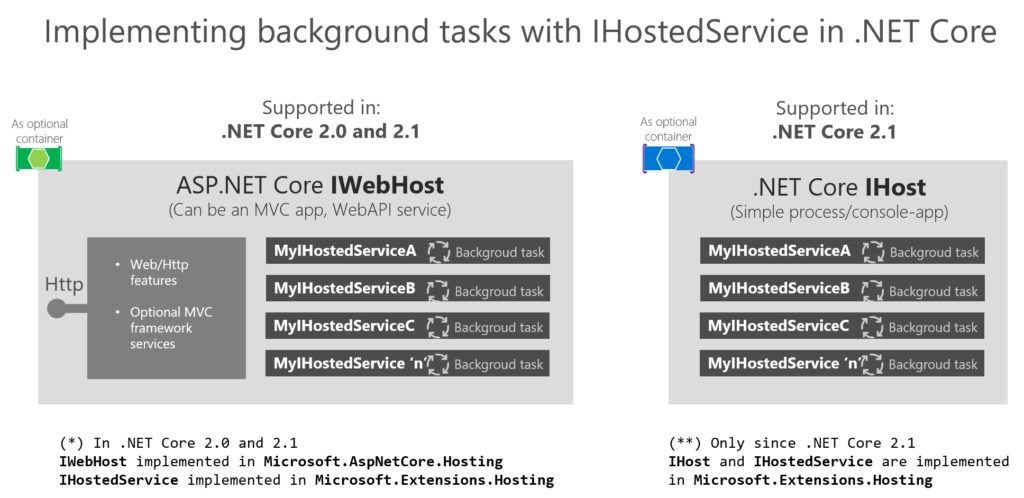
Implementing background tasks in .NET Core 2.x webapps or microservices with IHostedService and the BackgroundService class
Background tasks and scheduled jobs are something you might need to implement, eventually, in a microservice based application or in any kind of application. The difference when using a microservices architecture is that you can implement a single microservice process/container for hosting these background tasks so you can scale it down/up as you need or you can even make sure that it runs a single instance of that microservice process/container. From a generic point of view, in .NET Core we called these type of tasks as Hosted Services, because they are services/logic that you host within your host/application/...

Modernize, lift and shift, existing .NET apps with Windows Containers and Azure
************************** NOTE ************************ This blog post is a replica of the same blog post I just published at the official Microsoft .NET Blog, here: https://blogs.msdn.microsoft.com/dotnet/2017/11/01/modernize-existing-net-apps-with-windows-containers-and-azure/ ******************************************************** As part of the series of posts announced at this initial blog post (.NET Application Architecture Guidance) that explores each of the architecture areas currently covered by our team, this current blog post focuses on introducing the new "Modernize existing .NET applications w...
Best-in-class Microservices and Domain-Driven Design conference and workshops in the U.S.!! Explore DDD 2017 (Denver, September 19-22, 2017)
Explore DDD 2017 is a brand-new Domain-Driven Design (DDD)-centric conference, September 19-22 2017 at the Grand Hyatt hotel, in downtown Denver, Colorado, USA. I'm not directly related to this conference, but I wanted to provide some support/awareness because this type of quality events is fundamental for the development and software architecture community. They will have keynotes from Eric Evans, Ward Cunningham, and Rebecca Wirfs-Brock, plus an awesome speaker lineup for talks and hands-on sessions. Also, the following five amazing 2-day pre-conference workshops: Other great speakers and practitioners...
Free eBook/Guide on ‘.NET Microservices – Architecture for Containerized .NET Applications’
The microservices architecture is emerging as an important approach for distributed mission-critical applications. In a microservice-based architecture, the application is built on a collection of services that can be developed, tested, deployed, and versioned independently. In addition, enterprises are increasingly realizing cost savings, solving deployment problems, and improving DevOps and production operations by using containers. Microsoft has been releasing container innovations for Windows and Linux by creating products like Azure Container Service and Azure Service Fabric, and by partnering with industry ...
Using Resilient Entity Framework Core Sql Connections and Transactions: Retries with Exponential Backoff
There are many possible approaches to implement retries logic with exponential backoff also depending on the context/protocol, etc. (Database connections, HTTP requests, etc.) Retries with exponential backoff is a technique that assumes failure by nature and attempts to retry the operation, with an exponentially increasing wait time, until a maximum retry count has been reached. This technique embraces the fact that intermittently, cloud resources may be unavailable more than a few seconds, for any reason out of your control. An important case is about SQL Azure Databases that may be moved to another se...
Using Domain Events within a .NET Core Microservice
This blog post is related to the previous blog post named “Domain Events vs. Integration Events in Domain-Driven Design and microservices architectures” : https://devblogs.microsoft.com/cesardelatorre/domain-events-vs-integration-events-in-domain-driven-design-and-microservices-architectures/ Since I’m writing content related to “Microservices architecture, Docker containers and .NET Core” (draft available here, at GitHub), I thought it would be good to publish blog posts with partial content so I get feedback to take into account for the final Guide/eBook version. The code snippets shown below are also ava...
Domain Events vs. Integration Events in Domain-Driven Design and microservices architectures
This blog post is about comparing several approaches of Domain Events vs. Integration Events patterns already published by the community. I might evolve this post depending on feedback and some implementations we’ll be doing in the short/medium term. So, feel free to discuss about it with comments at the end of this post. I’m open to variations. :) When discussing about “Domain Events” there’s certain lack of clarity because sometimes you can be talking about Domain Events that happened but within the same transaction scope of the operation that is still in memory objects (so I fact, it still didn’t happen fro...
Comparing ASP.NET Core IoC container service lifetimes with Autofac IoC container instance scopes
In ASP.NET Core you can use the simple built-in IoC container or you can also plug any other more advanced IoC container like Autofac. When plugin an external container like Autofac, you can still use ASP.NET Core methods like services.AddTransient<> or services.AddSingleton<> or you can also use the more granular methods in Autofac based on its instance scopes, which offer a larger set of possibilities. Anyways, because I’m working “from both sides”, I wanted to have clear a comparison of each type and how are they exactly called from each API.. So here it is a convenient table that I just created: ...
Booting Windows 10 natively from a .VHDX drive file
This post is an update (using Windows 10 and a newer version of Convert-WindowsImage.ps1) of a similar post I had in my blog about booting natively from a .VHDX file: https://devblogs.microsoft.com/cesardelatorre/booting-windows-8-1-update-natively-from-a-vhdx-image/ I’m also publishing this for my own records and folks asking me about it, as it is not a super straight forward procedure.. This procedure is very useful when you need to boot Windows natively, but you need to have multiple different environments like when using BETA/RC versions of Visual Studio, dev tools or simply dual/multiple boots with differ...
Generating Swagger description metadata from your ASP.NET Core Web APIs with Swashbuckle
What is Swagger Swagger is a very much used open source framework backed by a large ecosystem of tools that helps you design, build, document, and consume your RESTful APIs. It is probably becoming as the main standard for this domain (APIs description metadata). The heart of Swagger is the Swagger Specification (API description metadata which is a JSON or YAML file). The specification creates the RESTful contract for your API, detailing all of its resources and operations in a human and machine readable format for easy development, discovery, and integration. The specification is the basis of the OpenAPI Spec...
Summary of Microsoft Docker Images for .NET Core and .NET Framework
Even when these official images are still evolving, I think that a summary about the multiple Microsoft Docker images for .NET available at Docker Hub would be a “nice to have” thing. This blog post is related to my previous blog post on “Docker containers – Should I use .NET Core or .NET Framework?”, however I’m drilling down here into the specific images available today (November 18th 2016). .NET Core images - microsoft/dotnet (https://hub.docker.com/r/microsoft/dotnet/) This repository is named as microsoft/dotnet and contains multiple images supporting several Operating Systems and versions (Linux and Window...
Docker containers – Should I use .NET Core or .NET Framework?
The short answer is: “For Docker containers, use .NET Core whenever is possible”. But, below is a summary decision table depending on your architecture or application type and the server operating system you are targeting for your Docker containers. Take into account that if you are targeting Linux containers you will need Linux based Docker hosts (VMs or Servers) and in a similar way, if you are targeting Windows containers you will need Windows Server based Docker hosts (VMs or Servers). And here’s a written summary about it: You should use .NET Core for your containerized Docker server application whe...
Free eBook on “Containerized Docker Application Lifecycle with Microsoft Tools and Platform”
Coinciding with today’s release of Visual Studio 2017 RC1 at CONNECT 2016 in NYC (Nov. 16th 2016), I wanted to announce the availability of this new and free eBook on “Containerized Docker Application Lifecycle with Microsoft Tools and Platform” which covers and end-to-end vision of Docker container based application development plus CI/CD (DevOps) workflows that you can have in Azure with new assets like Azure Container Registry and updates in Azure Container Service (Offering Mesos DC/OS, Kubernetes and Docker Swarm) and Azure Service Fabric with Docker support plus the new tooling created by Microsoft in Visua...
.NET, Cloud and Mobile Events in Argentina and Chile – Content
Last week (Sept. 19-22 2016) I delivered a similar event in Buenos Aires and in Santiago the Chile, afterwards. Here I post the agenda I delivered, a few pictures about it plus the decks I used about it. Morning Event – Developing microservices in the Cloud with .NET, Docker and Microsoft Azure Service Fabric Related technologies: - Microsoft .NET Core and .NET Framework o Cross-platform & open source in .NET o Present, future and .NET roadmap - Docker development - Azure Container Service (Docker Swarm and Mesosphere DC/OS) - Azure App Service - Azure Service Fabric Afternoon Event – Developing Cro...
Docker and Containers: Basic elements and taxonomy
I’m currently working on a Docker and Containerized applications related document and it happens that I just created the following explanatory figure. Since I got a few people asking about several related topics in Docker, it might be useful to publish this short blog post helping out folks starting with Docker. This diagram is just about the basics in Docker. There are many other aspects related to more complex applications, like in a microservices oriented application where you usually will need orchestrators and schedulers for your microservices and tasks. I’m not covering those in this simple post. The follo...
Running .NET Core apps on multiple frameworks and What the Target Framework Monikers (TFMs) are about
In .NET Core 1.0 apps (either ASP.NET Core apps or Console apps, as of today) there are new possibilities like being able to run your app (like an ASP.NET Core app) on top of the .NET Core Platform or on top of the traditional .NET Framework 4.5.x which is critical for many enterprise apps that still might not have all the libraries/components compiled for .NET Core available (custom or third party). In any case, when working with the project.json and the supported frameworks for your app can be a bit unclear because of the multiple possibilities available through project.json. The bottom line is summarized in t...
.NET Core, .NET Framework, Xamarin – The “WHAT and WHEN to use it”
I’m writing this blog post about “.NET end-to-end” now that we just released the .NET Core Platform 1.0 RTM, so it’s clear “who is who” and “when to use what”. It’s a long post but I think it’s good to have available a single post about .NET end-to-end. .NET is nowadays a development-platform running across many OS-platforms such as Windows, Linux, Mac and even iOS and Android through Xamarin which is also .NET. In this blog post I’ll explain from a high level point of view WHAT are each of the frameworks in the .NET ecosystem, and what is probably more important for customers, WHEN to use each of the frame...
Using Azure Functions from Xamarin Mobile Apps
I was testing Azure Functions by creating a simple proof of concept with a Xamarin.Forms client and since there’s not much info about “using Azure Functions from Xamarin” I thought it was a good idea to publish this Getting Started or Walkthrough in my MSDN blog. Make no mistake about it, you consume an Azure Function from a Xamarin app in the same way you’d consume a regular web service or ASP.NET Web API deployed in Azure in any other environment (Azure App Service or even Azure Service Fabric). But I think this E2E walkthrough is interesting in any case if you are not aware of Azure Functions and/or Xamarin...
Solving issue with VS Android Emulator, Xamarin apps and Intel Skylake processor (i.e. when using a Microsoft Surface Book i7, Surface Pro 4, etc.)
I got a Surface Book (comes with the new Intel i7 Skylake) a few days ago and I was experiencing a very weird issue when running and/or debugging Xamarin apps on the Visual Studio Android Emulator.. Basically, VS couldn’t debug/attach but I was not getting any application error, neither.. You can see the experience in the following recorded videos that I made with two different Apps, the HealthClinic Xamarin.Android sample app and the MyWeather Xamarin.Forms for Android app: 1. When trying to debug from VS, VS cannot attach and the app exits right away: HealthClinic Xamarin.Android app Xamarin.Android HealthC...