
Visual Studio Blog
The official source of product insight from the Visual Studio Engineering Team
Latest posts

New Benefits in Visual Studio Subscriptions

With CAST Highlight, Visual Studio Enterprise subscribers can rapidly scan their application source code to identify the cloud readiness of their applications for migration to Microsoft Azure and monitor progress of their app both during and after a migration. Visual Studio Enterprise subscribers are eligible for two 90-day free licenses to the full-featured CloudPilot, while Visual Studio Professional subscribers can take advantage of one 30-day license to scan apps and databases of millions of lines of code in minutes.
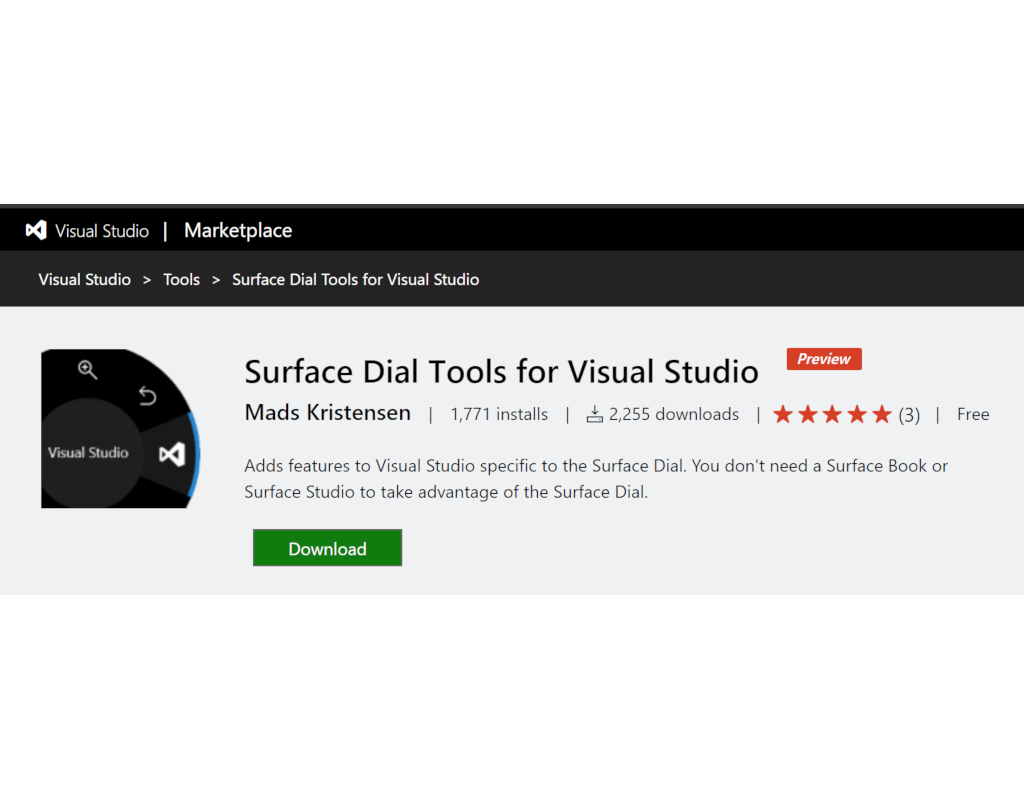
New Preview label for Visual Studio extensions

Visual Studio extensions can now be marked with a Preview label which is shown very clearly on the Visual Studio Marketplace. This gives your customers clear expectations that this version could contain issues as you are actively developing new features. Learn how to enable the Preview label here.

Visual Studio Live Share for real-time code reviews and interactive education

Collaborating with your team using Visual Studio Live Share keeps getting easier! Since making Live Share available for the public use at BUILD last May, we’ve heard so much great feedback from our users, which has helped guide us in continuing to build a tool that truly enables developers to collaborate in all the ways they need from the comfort of their favorite tools. Your feedback has pointed us towards new collaboration scenarios that we had not previously thought of (e.g. technical interviews and hackathons), as well helped us prioritize releasing some of the biggest feature requests and issues, like sharin...
Visual Studio IntelliCode supports more languages and learns from your code

At Build 2018, we announced Visual Studio IntelliCode, a set of AI-assisted capabilities that improve developer productivity. IntelliCode includes features like contextual IntelliSense code completion recommendations, code formatting, and style rule inference. IntelliCode has just received some major updates that make its context-sensitive AI-assisted IntelliSense recommendations even better. You can download the updated IntelliCode Extension for Visual Studio and IntelliCode Extension for Visual Studio Code today! The Visual Studio extension already works with the newly-release Visual Studio 2019 Preview 1. ...
Making every developer more productive with Visual Studio 2019

Today, in the Microsoft Connect(); 2018 keynote, Scott Guthrie announced the availability of Visual Studio 2019 Preview 1. This is the first preview of the next major version of Visual Studio. In this Preview, we’ve focused on a few key areas, such as making it faster to open and work with projects stored in git repositories, improving IntelliSense with Artificial Intelligence (AI) (a feature we call Visual Studio IntelliCode), and making it easier to collaborate with your teammates by integrating Live Share. With each preview, we’ll be adding capabilities, improving performance, and refining the user experience,...
Qubits in Q#
How should qubits be represented in a quantum programming language? In the quantum circuit model, a quantum computation is represented as a sequence of operations, sometimes known as gates, applied to a set of qubits. This leads to pictures such as: In this picture, each horizontal line is a qubit, each box is an operation, and time flows from left to right. When we want to design a programming language to express a quantum computation, the question naturally arises of whether qubits should be represented in the language, and if so, how. In the most naive model of such a picture, there would be a software en...
The Latest in Visual Studio 2017 for Mac – Version 7.7
Today, we are happy to share with you the next update to Visual Studio for Mac 2017. Version 7.7 incorporates much of your great feedback and is aimed at improving the core development experience for every project type from .NET Core to Xamarin and Unity. Below are just a few of the new features in Visual Studio 2017 for Mac 7.7 - for the full release notes, please read on here. Improved IntelliSense with brace completions, smart indenting and lightbulbs Visual Studio 2017 for Mac 7.7 includes a number of improvements to the IntelliSense experience. Most of the updated features will feel right at home to folks ...

Visual Studio 2017 version 15.9 now available

Visual Studio version 15.9 is now out. This release comes with improvements for C++ debugging, .NET tooling, UWP performance, and more. Click to learn more!
Learn Quantum Computing with the Quantum Katas
The brief history and the key principles of the Quantum Katas - self-paced programming tutorials aimed at teaching quantum computing with Q#.