
Visual Studio Blog
The official source of product insight from the Visual Studio Engineering Team
Latest posts
Q# Advent Calendar 2018

Share your stories and advice by guest authoring a post for Q#, a new quantum computing language.

AI-assisted coding comes to Java with Visual Studio IntelliCode

Visual Studio IntelliCode is a set of AI-assisted capabilities that aims to improve developer productivity with features like AI-assisted IntelliSense and statement completion, code formatting, and style rule inference. During SpringOne 2018, we announced that we will bring those productivity boosters to Java developers and now we’re happy to introduce AI-assisted IntelliSense to Java in the IntelliCode Extension for Visual Studio Code. IntelliCode saves you time by putting the most relevant suggestions at the top of your completion list. IntelliCode recommendations are based on thousands of open source projec...
AI-assisted Coding Comes to Java in Visual Studio IntelliCode
Visual Studio IntelliCode is a set of AI-assisted capabilities that aims to improve developer productivity with features like contextual IntelliSense, code formatting and style rule inference. During SpringOne 2018, we announced that we will bring those productivity boosters to Java developers and now we’re happy to introduce AI-assisted IntelliSense to Java with IntelliCode Extension for VS Code.

A preview of UX and UI changes in Visual Studio 2019

Check out the UI and UX changes coming to Visual Studio 2019. The Design Team working on Visual Studio would love to hear what you think.
Visual Studio Roadmap Updates and Visual Studio 2019 Information

Yesterday, we covered What’s next for Visual Studio for Mac, and today we’ve updated our Visual Studio Roadmap so you can see the latest news about what we’re working on. We’re particularly excited to share this update since it includes information about the first preview of Visual Studio 2019, which we will make available by the end of this calendar year. We plan to have a generally available (GA) version of Visual Studio 2019 in the first half of 2019. Be sure to check out the full roadmap for all the updates, but some notable improvements are: As always, we are committed to making Visual St...
What’s Next for Visual Studio for Mac

Since it was released a little more than a year ago, Visual Studio 2017 for Mac has grown from being an IDE primarily focused on mobile application development using Xamarin to one that includes support for all major .NET cross-platform workloads including Xamarin, Unity, and .NET Core. Our aspiration with Visual Studio for Mac is to bring the Visual Studio experiences that developers have come to know and love on Windows to the MacOS and to provide an excellent IDE experience for all .NET cross-platform developers. Over the past year, we added several new capabilities to Visual Studio for Mac including .NET C...
Microsoft’s Developer Blogs are Getting an Update
Update: Launch is now scheduled for mid-November to ensure you have the best blog experience. We appreciate all of the feedback so far and we look forward to showing what we’ve been working on! In the coming days, we’ll be moving our developer blogs to a new platform with a modern, clean design and powerful features that will make it easy for you to discover and share great content. This week, you’ll see the Visual Studio, IoTDev, and Premier Developer blogs move to a new URL while additional developer blogs will transition over the coming weeks. You'll continue to receive all the information and news from ou...
Simplify extension development with PackageReference and the VSSDK meta package

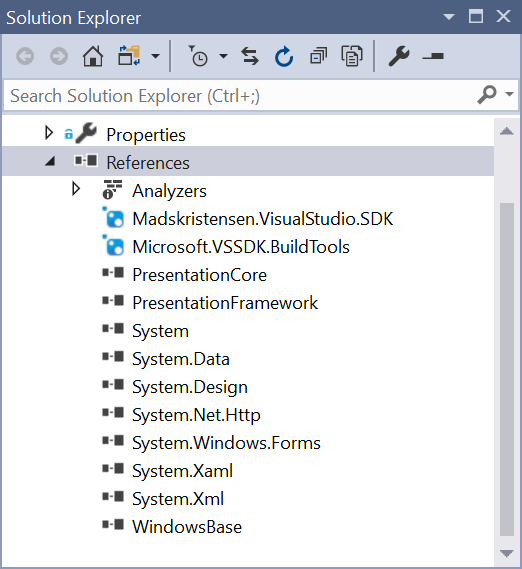
Visual Studio 2017 version 15.8 made it possible to use the PackageReference syntax to reference NuGet packages in Visual Studio Extensibility (VSIX) projects. This makes it much simpler to reason about NuGet packages and opens the door for having a complete meta package containing the entire VSSDK. Before using PackageReference, here’s what the References node looked like in a typical VSIX project: It contained a lot of references to Microsoft.VisualStudio.* packages. Those are the ones we call VSSDK packages because they each make up a piece of the entire public API of Visual Studio. Migrate to Packa...
Introducing ‘Suggest a Feature’ in Developer Community
Customer feedback is a critical input to help us improve Visual Studio. Up until two years ago, the Visual Studio customer feedback system left room for improvement – customers could use the “send a smile” feature in Visual Studio, but this would result in only coarse-grained feedback such as “I like this” or “I don’t like this.” The feedback we got through this UI then went into a database our team accessed, but didn’t leave an easy way for customers to see the feedback that other customers were giving so they could say, “I have that problem too!” More than that, the back-end system that gathered feedback was se...