
Visual Studio Blog
The official source of product insight from the Visual Studio Engineering Team
Latest posts

Visual Studio 17.9 Preview 2 has arrived!

Welcome to the release of Visual Studio 2022 17.9 Preview 2, which wraps up our development efforts for 2023. This update brings new features and enhancements, building on the solid foundation set by Preview 1 in November. In this preview, we've made some improvements to the C++ and .NET MAUI development experiences. You'll find the '#include Diagnostics' for C++ more robust and the 'Live Property Explorer' for .NET MAUI now available, making your coding more intuitive and efficient, along with other new features. These updates reflect our commitment to continuously improving Visual Studio in response to ...
Embracing SQL Server 2022 with SSDT 17.8: Unveiling Key Updates

In the dynamic landscape of database development, SQL Server Data Tools (SSDT) is a powerful tool for database developers in the Visual Studio ecosystem. SSDT 17.8 is included in the latest version of Visual Studio 2022 v17.8, which was released on November 14th, 2023. This version introduces crucial enhancements and fixes, underscoring Microsoft's commitment to refining the developer experience. In conclusion, SSDT 17.8 emerges as a notable release and fortifies the tool's capabilities. From connectivity advancements to accessibility improvements and performance optimizations, this rel...
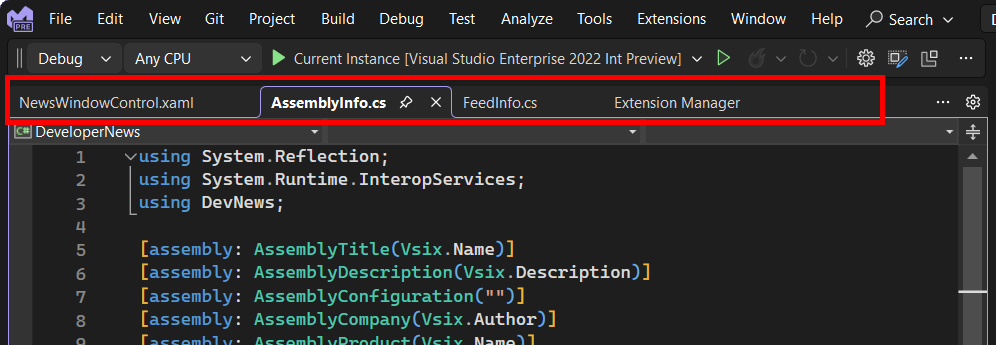
Scroll to expand document tabs

When you have lots of tabs open in Visual Studio, your horizontal screen resolution determines how many fit in the document tab well. The remaining document tabs are hidden unless you configure Visual Studio to display tabs in multiple rows. Alternatively, you could switch your tab layout to vertical tabs instead of the default horizontal layout. Vertical tabs, of course, isn’t the answer for everyone, and it’s not what we’re going to talk about in today’s blog post! Going back to multiple tab rows - enabling this feature and having multiple rows of tabs open will have an impact on your available coding space....

My favorite features in Visual Studio 17.8

It was a busy week for the Visual Studio team, preparing for both Ignite and .NET Conf. And releasing the latest version of Visual Studio 2022 which is now up to version 17.8. There were lots of announcements of cool new features, AI enhancements, performance improvements, and much more. That was a lot to digest, so I thought I’d bring attention to some of my favorites. Case-preserving find and replace When you do a replacement, you can now preserve the original casing of each match in your code. Note that to get Pascal case and Camel case, your replacement string must also be in Pascal case or Camel case. T...
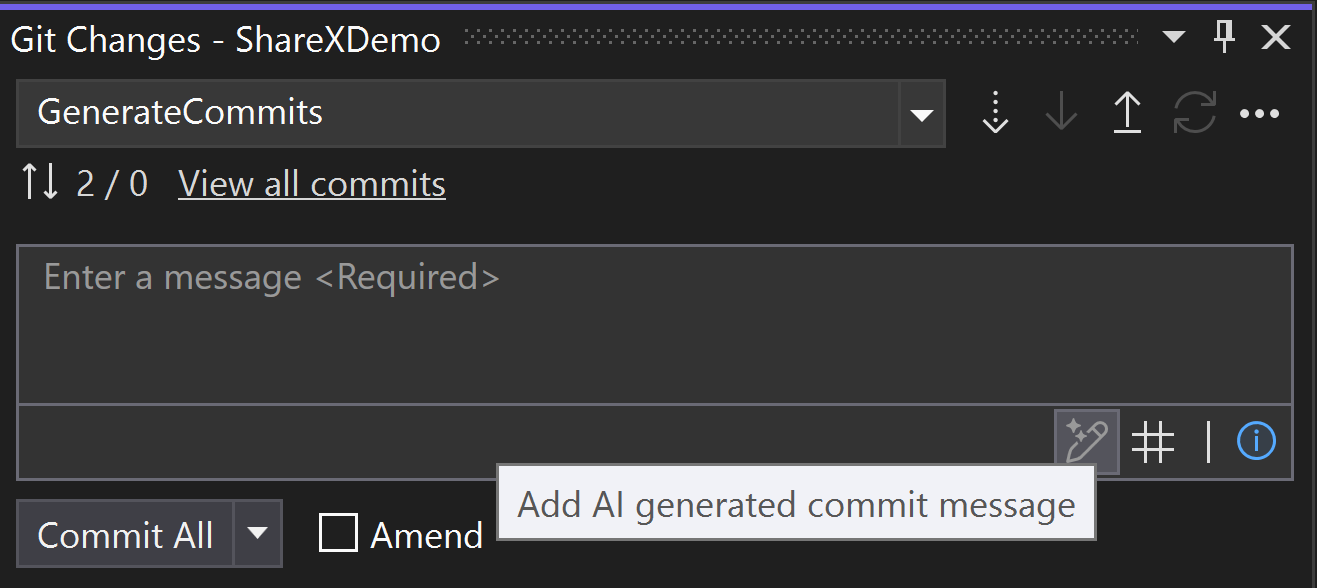
Write Your Git Commits with GitHub Copilot

After spending hours on a bug fix or a feature update, often the last thing we developers want to do is carefully explain the contents of the Git commit. The latest Visual Studio preview is here to help. Use the new generated Git commit message feature to help you describe your set of changes. You can then refine the message with "why" the change was made and commit. Generating useful and informative commit messages helps you in a variety of ways. To try it out, download the latest Visual Studio preview and update the GitHub Copilot Chat Extension. You’ll also need an...

Community Feedback Building 17.8 & 17.9 Preview 1

The Visual Studio team depends on community feedback from all users to help create, design, and improve Visual Studio. We’re thrilled to announce that Visual Studio version 17.8 (available here today) utilized more than 360 feedback items from Developer Community. We are currently working hard to build the next version of Visual Studio and just released 17.9 Preview 1, where we are actively looking for feedback. Below dives deeper into what community suggestions made it into the latest releases of Visual Studio, how you can start using these new features, and where to give feedback. If you haven’t given feedba...
Visual Studio 2022 – 17.8 Performance Enhancements

Version 17.8 welcomes an array of exhilarating performance enhancements, including Improved Razor/Blazor Responsiveness, Enhanced F5 Speed, Optimized IntelliSense for C++ Unreal Engine and Build Acceleration for Non-SDK style .NET Projects. At the heart of these changes is our commitment to enhancing performance, providing an ideal platform for a coding experience that is not only seamless but also highly productive. Embrace these improvements for a more efficient coding journey. Get ready for an exciting experience! Improved Razor/Blazor Responsiveness Solutions using Razor and Blazor will expe...
Visual Studio 2022 v17.8 Brings Increased Productivity, Further Unreal Engine Integration, and Cross-Platform Enhancements to C++

Introducing the latest updates to Visual Studio 2022, designed to make your development experience more productive and efficient than ever before. Our Visual Studio 2022 17.8 release includes powerful C++ productivity features that empowers you to check the size and alignment of classes, make member functions const, and make global functions static. We have also added features that will help you clean up and sort #include for improved code organization. For Unreal Engine developers, you'll appreciate the new Unreal Engine Test Adapter, Unreal Engine snippets, macro specifier suggestions, and view in-memory bitma...
Create a Pull Request with Summary Difference View Available in GA
You can now create a pull request in the 17.8 release of Visual Studio. With over 280 votes and 60 comments in Developer Community, integrating create a pull request has been a highly suggested feature with community involvement to make it happen. We’ve improved on the pull request preview feature released in 17.7 preview 2. You can now leverage the summary difference view, write your description with the Markdown, and add your reviewers. Adding Create a Pull Request to the IDE Pull requests are an essential tool in GitHub, Azure DevOps, and other Git hosting providers for code review. These reviews help ca...