
Visual Studio Blog
The official source of product insight from the Visual Studio Engineering Team
Latest posts
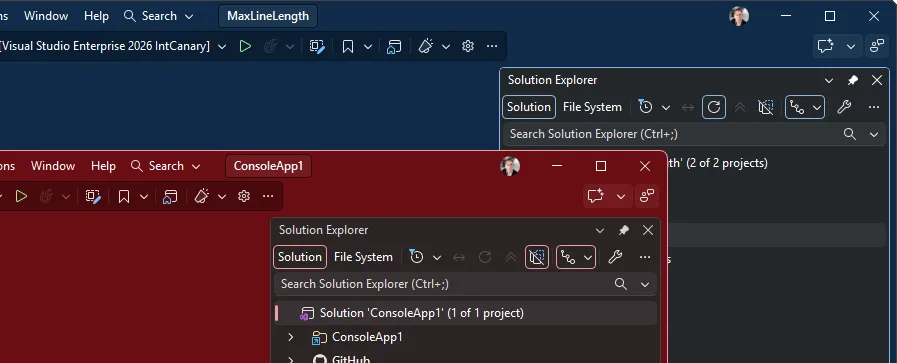
Stop alt-tabbing into the wrong Visual Studio

A user asked for per-solution color themes. It already ships, and it goes further than they asked. You run several instances of Visual Studio side by side, one per solution, and they all look identical. Same taskbar icon, same alt-tab thumbnail, same chrome. So, you land in the wrong one, start typing, and realize thirty seconds later you just edited the wrong repo. Could each solution get its own color theme? It can. It already does. And the way it works turns out to be more useful than a personal color preference. How to do it This uses the new settings experience introduced in Visua...
Today I will… review GitHub PRs

Today I will show you how we can tackle one of the most common tasks when working in a development team or managing an open-source project, and that is working with Pull Requests. While we're going to be using the GitHub tooling within Visual Studio for this, the approach would be very similar with Azure DevOps. Getting our PRs Start by opening the pull requests for your repository. Select Git → GitHub → View Pull Requests. You can also search for the command in the Command Palette with Ctrl+Shift+P. From here, Visual Studio will load all the PRs in the repo and group them to the ones that are assigned to m...
VSLive! @ Microsoft HQ: Developer Takeaways and Must-Watch Sessions

VSLive! @ Microsoft HQ 2026 was one of the most energizing VSLive! events I’ve attended. What stood out was the level of engagement over five days of learning and conversation from July 27 through July 31. Developers came ready to dig into the future of Visual Studio, .NET, and AI-assisted software development, and many Microsoft engineers and product managers were there to have those conversations directly. If you weren’t able to join us in Redmond, there’s still plenty you can take away from the event. The Microsoft-led sessions were recorded, so you can catch up on many of the topics that generated som...
The Visual Studio Debugger Agentic Workflow Gets a Test-Driven Upgrade

A few months ago, we introduced a new guided agentic workflow in the Visual Studio Debugger Agent designed to help you move from a bug report to a verified fix without spending your morning guessing where to begin. If you missed that announcement, check out Stop Hunting Bugs: Meet the New Visual Studio Debugger Agent to see how the Agent builds a hypothesis, guides the debugger, investigates your application at runtime, and validates the final change. Today, we’re building on that experience with a new Test-Driven Investigation workflow. The Debugger Agent can now create or identify a focused test, debug th...
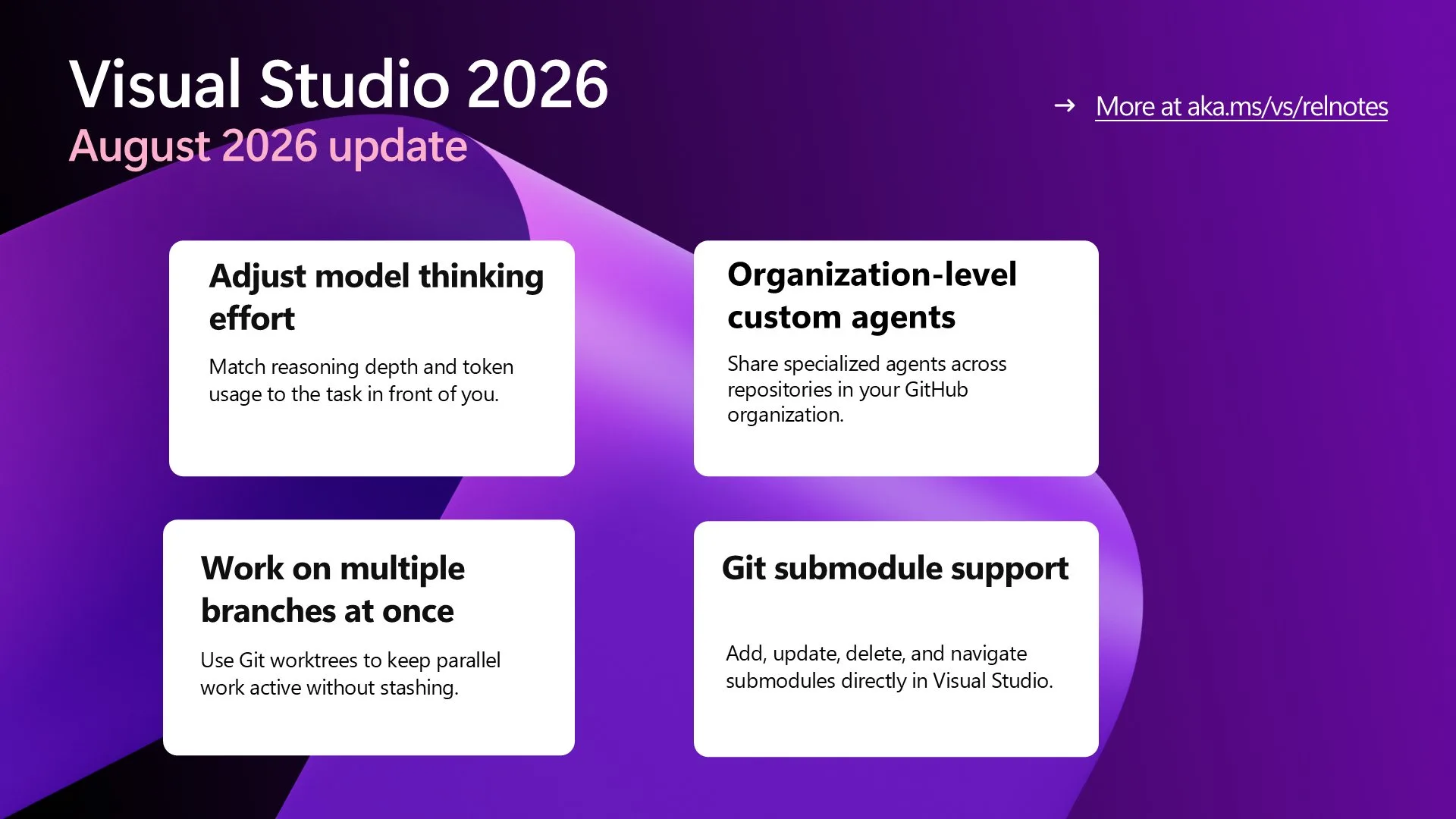
Visual Studio August Update — Work Smarter Across Models and Branches

Tune Copilot model thinking effort, share custom agents across your organization, track usage, and simplify complex Git workflows with worktrees and submodule support.
Unlocking the Power of AI for Every Developer in Visual Studio with Bring your Own Model

The best AI in Visual Studio is the AI you can bring with you. Developers don't work in a single-model world anymore. You might reach for one model for everyday coding, another for a domain-specific problem, and an approved model for work that must stay within your organization's governance boundaries. So, the question we hear most often isn't which model is best. It's, can I use mine? We're bringing Bring Your Own Model (BYOM) in Preview to Visual Studio, making it available and enabled by default across Community, Professional, and Enterprise SKUs. This Preview focuses on the developer experience available t...
Today I will… Modernize a .NET application


Today I will modernize a .NET Framework application to .NET 10 using the GitHub Copilot modernization tooling built-in to Visual Studio. The tooling helps us upgrade applications running on legacy versions of .NET and also migrate them to Azure. Today we're going to focus on the upgrade portion. And, the tooling will do all the work for us! But it doesn't do everything at once, and that's good. It introduces checkpoints into the .NET upgrade process to tell us what it has been up to we can then guide it towards the outcome we want. And at each of those checkpoints it creates a markdown file t...
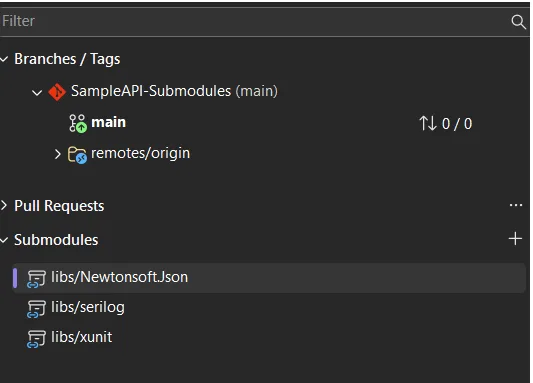
Today I will… manage Git Submodules without leaving the IDE
If you've worked with Git submodules for any length of time, you probably have a love-hate relationship with them. They're genuinely useful for pulling a shared library, an SDK, or common build scripts into your project. But actually working with them usually means tabbing over to a terminal and trying to remember whether it's this time all while a perfectly good IDE sits right in front of you, shrugging. That's the part we wanted to fix. Starting in Visual Studio 18.9, Git submodules are a first-class part of the IDE no more bouncing out to the command line just to keep your dependencies in order. It's been one...

Build Azure Skills Faster with Cloud Academy, a Visual Studio Subscriber Benefit
If you've been looking for a practical way to build Azure skills, Cloud Academy (a QA company) gives Visual Studio subscribers hands-on learning that fits into busy schedules. Whether you're new to Azure, expanding your cloud expertise, working towards certifications or preparing for more advanced projects, this benefit helps you learn by doing. What you'll find in Cloud Academy The Cloud Academy benefit gives Visual Studio subscribers a flexible learning experience that adapts to different learning styles and schedules, providing: With the Cloud Academy benef...