
Visual Studio Blog
The official source of product insight from the Visual Studio Engineering Team
Latest posts

Visual Studio for Mac version 7.5 and beyond

Last year at Build, we launched Visual Studio for Mac, our native macOS IDE for developers building cloud, web, and mobile applications using .NET. Updates have been rolling out at a steady pace ever since, and we're excited to announce the release of Visual Studio for Mac version 7.5. We have also continued to bring more Visual Studio 2017 code to the Mac. Our mission has always been to delight developers, and we have something for everyone in this release. You can get started by downloading the new release or updating your existing install to the latest build in the Stable channel. Here are some of the featu...

Introducing Visual Studio IntelliCode

Learn how Visual Studio IntelliCode brings you next generation developer productivity via AI-assisted development, tailored to your code context. Try it out by downloading the experimental extension for Visual Studio 2017 that provides AI-powered IntelliSense.
Azure Storage Explorer Generally Available
We are pleased to announce the general availability of Microsoft Azure Storage Explorer. Storage Explorer provides easy management of Azure Storage accounts and contents, including Blobs, Files, Queues, and Table entities. For example, you can easily manage your Azure Virtual Machines disks as Blobs. Azure Cosmos DB and Azure Data Lake are also supported as preview features. General Availability Highlights Looking Ahead We're working on a variety of features, including: Next steps Download latest Storage Explorer today from Storage Explorer landing page. For any feedback, please report to Gi...
Supporting Jetty for Java in Visual Studio Code

Eclipse Jetty is a popular web server and servlet container in Java community. We’ve released a new Jetty extension for Visual Studio Code that makes it easy to run and deploy WAR packages (Web Application aRchive), operate your Jetty servers, and interact with your application from within the editor. Today this extension includes the following features: Other Updates There are many additional new features added to our Java extension lineup for VS Code. Debugger for Java Java Test Runner Tomcat Maven P...
Visual Studio 2017 roadmap now available

With the release of Visual Studio 2017, we moved to a release schedule that delivers new features and fixes to you faster. With this faster iteration, we heard you would like more visibility into what’s coming. So, we’ve now published the Visual Studio Roadmap. The roadmap lists some of the more notable upcoming features and improvements but is not a complete list of all that is coming to Visual Studio. When you look at the roadmap, you’ll see that we grouped items by quarter. Since every quarter includes several minor and servicing releases, the actual delivery of a feature could happen any time during the qu...
Mobilizing Existing .NET Apps

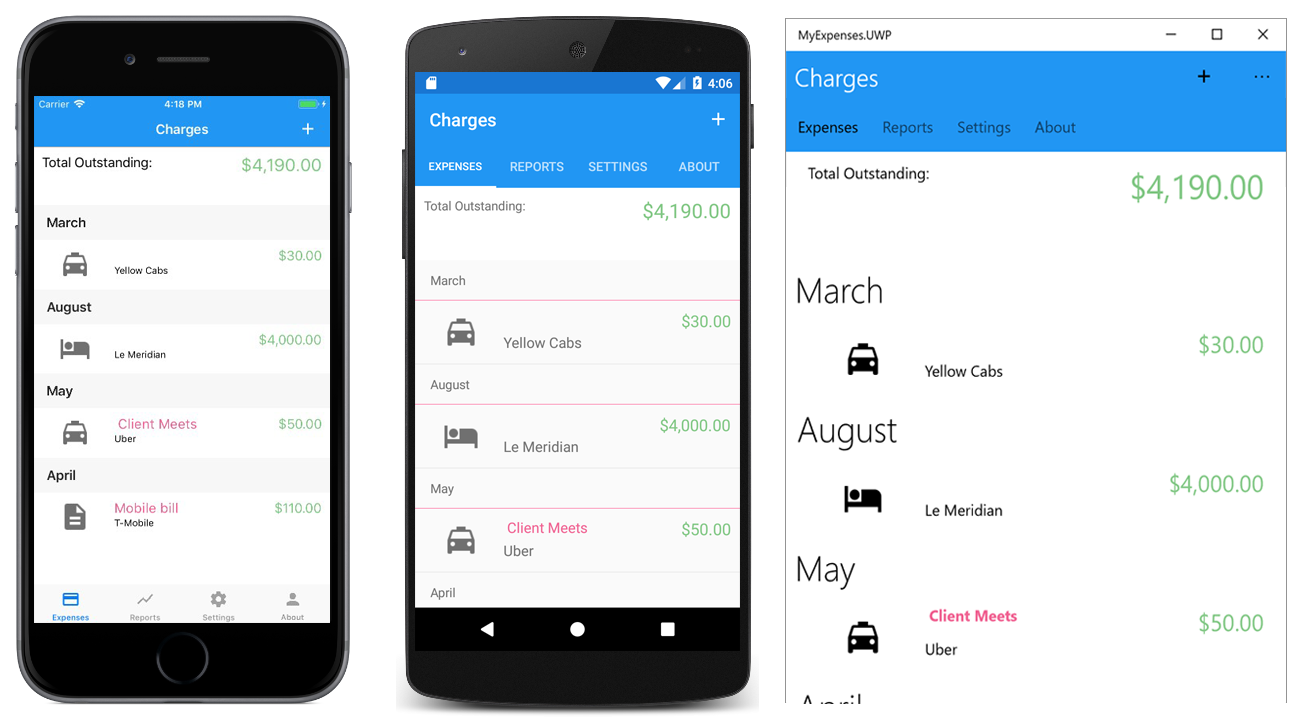
Almost any .NET codebase, including Windows Forms, WPF, ASP.NET, and Silverlight, has sharable code that can be ported to Mobile projects. In this blog post, You’ll learn how to port business logic from WPF and build a phone- and tablet-friendly mobile app for Android, iOS, and UWP.
Visual Studio 2017 version 15.7 Preview 3

Today we released the third preview of the next update: Visual Studio 2017 version 15.7. The top highlights of this Preview include - Updates to Universal Windows Platform development, C++ development improvements, significant updates in Xamarin and .NET Mobile Development, ability to configure installation locations, debugger support for authenticated Source Link, Live Unit Testing improvements, new tooling for migrating to NuGet PackageReference, connected Service improvements to deployment and Key Vault functionality.
Load solutions faster with Visual Studio 2017 version 15.6

As we have been working to improve the solution load experience in Visual Studio 2017, you may have read our blog about these improvements in version 15.5. With version 15.6, we have introduced parallel project load, which loads large .NET solutions twice as fast as earlier versions when you reload the same solution. This video compares the time it takes to load a very large solution from the Roslyn repository, with 161 projects, between version 15.5 and 15.6. Parallel project load During the first load of a solution, Visual Studio calculates all the IntelliSense data from scratch. In the previous version...
Adding support for Debug Adapters to Visual Studio IDE
Since its release, Visual Studio Code's extension model, based on well-known web technologies such as TypeScript and JSON, has attracted a great deal of participation from the community, with hundreds of extensions published to provide support for exciting new languages and technologies. Visual Studio 2017 took the first steps towards participating in this ecosystem in November, with the release of the Language Server Protocol preview. Now, in Visual Studio 2017 version 15.6, we're excited to announce support for another Visual Studio Code extension component - the debug adapter. If you've previously written a de...