
Visual Studio Blog
The official source of product insight from the Visual Studio Engineering Team
Latest posts

Organize Your Breakpoints like a pro

Do you feel overwhelmed by the sheer number of breakpoints in your Visual Studio project? Wish you could categorize and toggle them on and off with ease? The new breakpoint group feature in Visual Studio 2022 is here to transform your debugging experience. Breakpoint groups allow you to create custom collections of breakpoints and apply various actions to them. For example, you can enable or disable all breakpoints in a group or set conditions and actions for them or even make the whole group dependent on other breakpoints. But that's not all. You can also mark the selected breakpoint group as the defau...

Next-Gen Code Coverage in Visual Studio: Enhanced C++ Support and Security

We’re excited to share the latest changes in Visual Studio’s code coverage components. If you haven’t already, be sure to check out our previous blog posts: What’s New in Our Code Coverage Tooling? and Code coverage features in Visual Studio Enterprise. C++ Code Coverage Tired of instable native code coverage that doesn’t support ARM64? Now, you can collect native code coverage for all your methods, including those on ARM64. We have completely overhauled the C++ code coverage support to improve reliability, performance, and security. The new implementation, powered by MSVC compiler tooling, now supports x86...
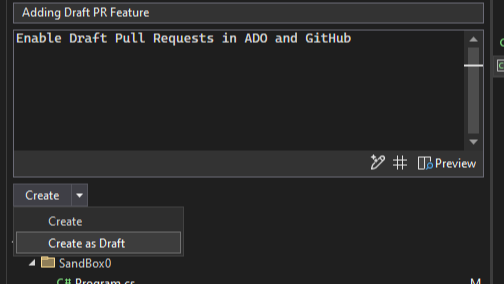
Level up your collaborations with the pull request experience in Visual Studio

One of our main goals is to help you and your team collaborate more effectively and efficiently on your software projects. That's why we are constantly improving our Version Control features, especially the ones related to the pull request workflow. Starting in Visual Studio version 17.11, you can enjoy a smoother and smarter pull request experience, from creating to reviewing to merging. You can link your Azure DevOps work items, and in both Azure DevOps and GitHub you can create draft PRs and use default templates. You can even get AI assistance to write your pull request descriptions. Plus, you can view and re...

Multi-Project Launch Configuration

Are you tired of the hassle of manually configuring your development environment every time you want to launch multiple projects? We've heard your feedback and are thrilled to announce a feature in Visual Studio that simplifies your workflow. The Multi-Project Launch Configuration feature in Visual Studio allows developers to set up and save profiles for launching specific projects within a multi-project solution in predefined states for debugging. This simplifies the process of working with complex solutions, improves debugging efficiency, and enables easy sharing of configurations among team members. En...

How to run .NET Framework apps natively on Arm64 devices

Are you developing .NET Framework applications for Arm-based processors? Do you want to take advantage of the performance and power efficiency of running your apps natively on Arm64 devices? If so, you'll be happy to hear that Visual Studio 2022 17.11 has a new feature that makes it easier than ever to do just that. Visual Studio 2022 natively supports building and debugging Arm64 apps on Arm-based processors. However, if you build your app with the AnyCPU setting, which is the default for most .NET Framework projects, your app will run on an Arm64 device using x64 emulation. While this may seem counterint...

Understanding the behavior of the XAML Designer with abstract base classes

Visual Studio 2022 introduced a new XAML designer for building WPF apps, with a goal of increasing the performance and reliability of the designer. The new designer can quickly open a XAML file by using WPF’s built-in parser and display. This new design has a nuanced behavior when the root XAML element derives from an abstract base class. This article helps with understanding implications for using an abstract base class and describes workarounds which can ensure a smooth design experience. The Challenge with Abstract Base Classes When working with the XAML Designer, the base class of the root element is instan...
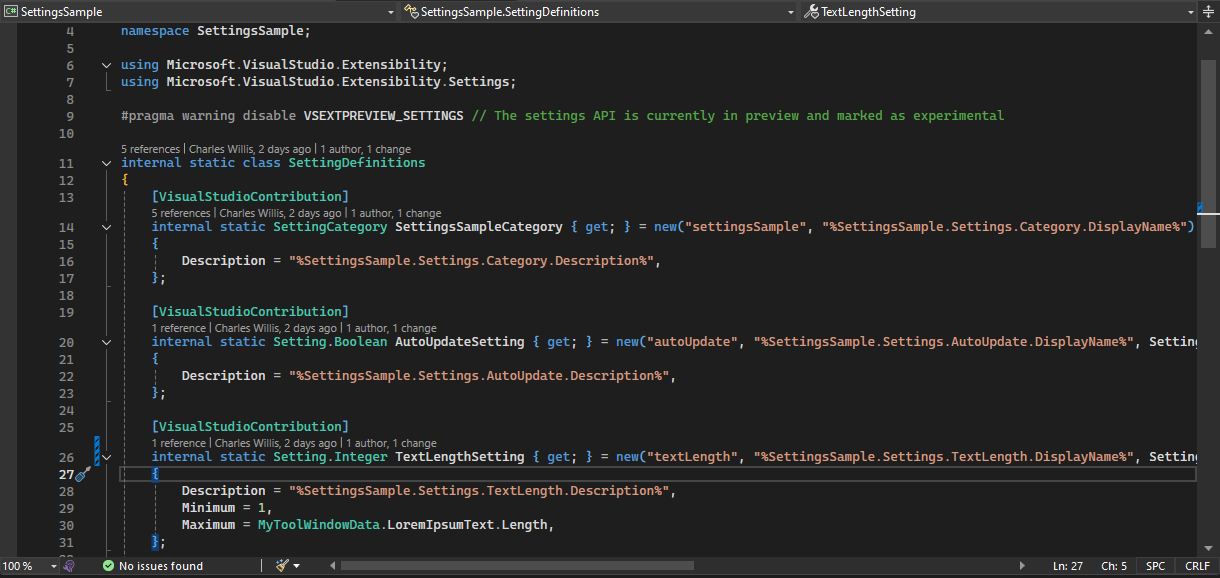
VisualStudio.Extensibility 17.11: Settings and more Remote UI support

We continue to invest in the VisualStudio.Extensibility SDK to allow users like you to create extensions that run faster and smoother than ever before! VisualStudio.Extensibility helps you build extensions that run outside the main Visual Studio IDE process for improved performance and reliability. Additional benefits include a sleek and intuitive .NET 8-based API and comprehensive, well-maintained documentation to help you develop amazing extensions faster than ever before. This 17.11 release builds on our previous releases, bringing support for defining user-configurable settings for your extensions to allow...
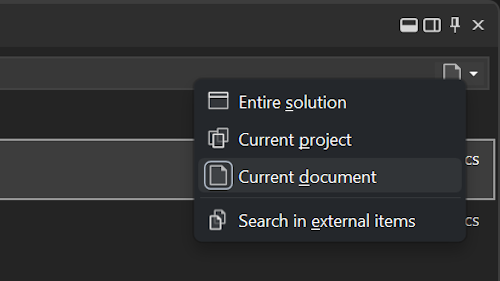
Search scoping helps you find what you’re looking for

If you're working on a large and complex solution, you might find yourself overwhelmed by the number of results when you use code search in Visual Studio. You might be looking for a specific class, method, or variable, but end up scrolling through pages of irrelevant matches. Wouldn't it be nice if you could narrow down your search scope to only the parts of the solution that you care about? In the latest update of Visual Studio, you can now use the new scoping options in code search to filter your results by the entire solution, the current project, or the current document. You can also toggle the inclusion o...
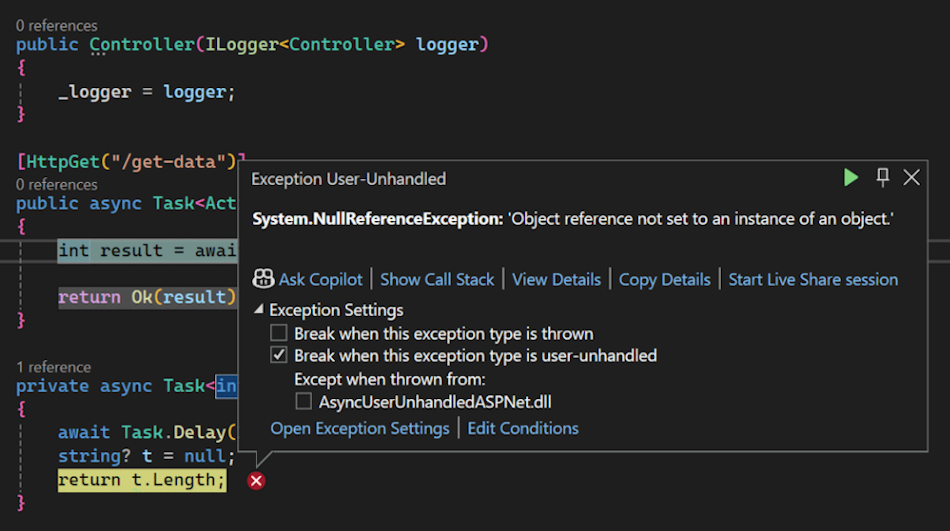
Break for Async User-Unhandled exceptions in the Visual Studio Debugger

Before .NET 9, the debugger was unable to track exceptions thrown from user-code async methods into non-user code framework methods, such as ASP.NET middleware. We are pleased to announce that you will now start seeing the debugger stop for these user-unhandled exceptions in your ASP.NET applications, as well as anywhere else this might happen! Summary Debugging asynchronous code, especially in frameworks like ASP.NET Core, can be tricky due to the potential for exceptions to be thrown across asynchronous boundaries. Now, the Visual Studio Debugger will automatically break when an async Task method throw...