
Azure DevOps Blog
DevOps, Git, and Agile updates from the team building Azure DevOps
Latest posts

Regenerating secrets for Azure DevOps OAuth applications

You can now self-regenerate new client secrets as needed for apps made on top of the Azure DevOps' OAuth platform. A valid, active client secret is critical for getting a refresh token to continue using your app. Once the secret has expired, you will also no longer be able to get access and refresh tokens needed to access Azure Devops APIs through this app. Why is this important? Client secrets have historically expired 5 years after the original app creation date. This new feature is useful for folks to get ahead of their app expiration and replace any soon-to-expire client secret before it runs out and causes...
Azure Boards + GitHub improvements in private preview

Today we are happy to announce several improvements to our GitHub integration story. These improvements are vital for those customers who are seeking better traceability between Azure Boards and GitHub repositories. AB# Validation This is a recap of the private preview announcement we made in December 2023. AB# validation is now available to all organizations across the service. We've enhanced the Azure Boards app to notify users about the validity of work item links, helping them spot and fix any issues before merging a pull request. Linking to GitHub Pull Requests and Commits (preview) You have two optio...

New Boards Hub Update, January 2024
In our fall update, we acknowledged the necessity to pause the rollout of New Boards Hub. Our focus was on enhancing its quality, performance, accessibility, and addressing an long list of bugs and issues. We're pleased with the progress achieved in the past few months and want to highlight a few key points as we prepare to make New Boards Hub the default experience for our next group of customers. 💁♀️ Accessibility and page reflow The impetus behind the development of New Boards Hub was the commitment to accessibility compliance. Unfortunately, we didn’t do a good job of building accessibility compliance from...
New version of Publish Code Coverage Results task

We’ve introduced a new V2 version of the publish code coverage results task (known as PCCR) in Azure Pipelines recently. The main benefit of the V2 task is the support for more formats of the code coverage results and therefore more programming languages than the V1 task, which was limited to Cobertura and JaCoCo formats only. You can see more details for the V2 task in our public documentation. The V2 task was made compatible with the build quality check task (known as BQC) in version 2.231.0. Any customer using build quality check can safely migrate from the V1 task to the V2 task version 2.231.0 or later. Wh...
Final notice of alternate credentials deprecation
In November 2019, we announced that the alternate credentials feature will be formally deprecated in March 2020. Since then, a small number of users were grandfathered in with continued usage of existing alternate credentials, which have remained active until today. We will be discontinuing all usage of alternate credentials this month. Users have been notified of this change over email over the course of 2023. If you are affected and this is the first time you are hearing of this, the recommended action from our team is to explore this list of alternative means of authentication available, at your earliest con...
Azure DevOps Server Product Lifecycle and Servicing

Azure DevOps Server and Team Foundation Server follow the Microsoft Product Fixed Lifecycle Policy of 10 years. The first 5 years of Mainstream Support provide feature updates, platform updates, security updates, functionality fixes, and quality improvements. The second 5 years of Extended Support provide critical security updates only for the latest release of each version. Azure DevOps Server and Team Foundation Server are serviced through security or servicing patches that provide targeted cumulative bug fixes for existing features in the product. For the best and most secure product experience, we strongly e...
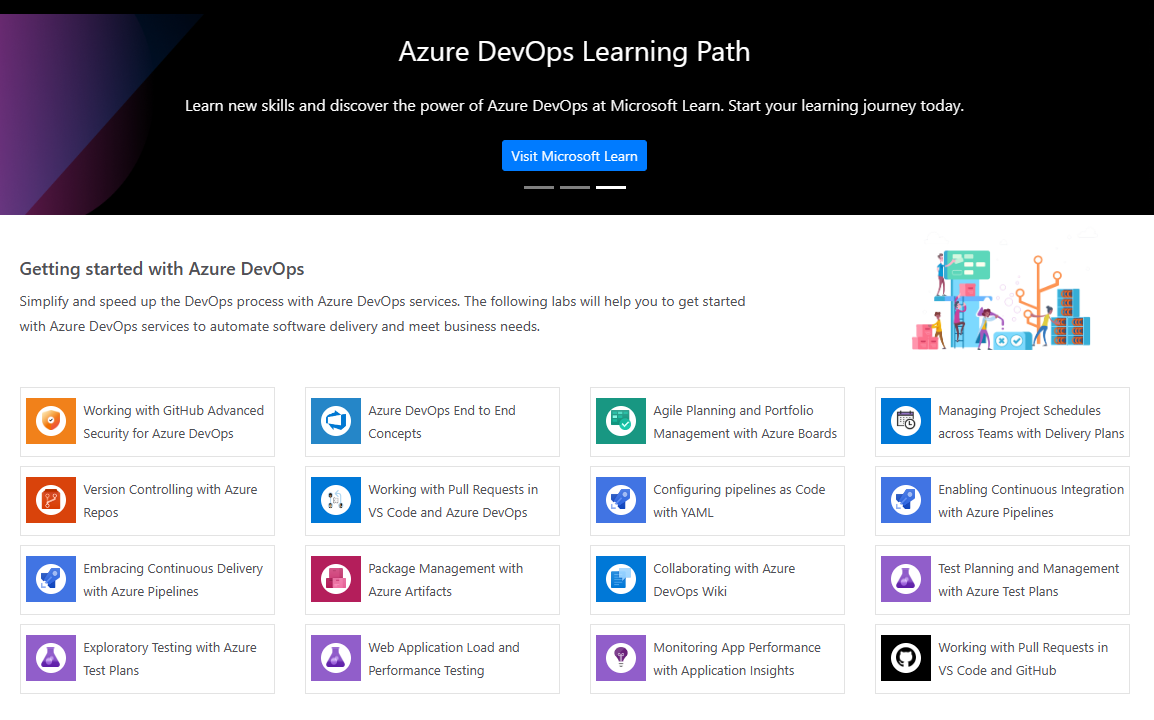
Updates to Azure DevOps Demo Generator and Labs
We are excited to announce that we have published new content to the Azure DevOps Demo Generator and Azure DevOps Labs! The Azure DevOps Labs is a great tool to help you learn about the integrated features offered in Azure DevOps. Now you can use the Azure DevOps end-to-end concepts hands-on lab to learn how you can bring together your development team and contributors to develop software at a faster pace. In addition to the end-to-end lab, we have also included a working with GitHub Advanced Security for Azure DevOps lab so you can learn about the security features offered in Azure Repos. On the Azure DevOp...

December patches for Azure DevOps Server
This month, we are releasing fixes that impact our self-hosted product, Azure DevOps Server. The following versions of the products have been patched. Check out the links for each version for more details. Azure DevOps Server 2022.1 Patch 1 If you have Azure DevOps Server 2022.1, you should install Azure DevOps Server 2022.1 Patch 1. Release notes Verifying Installation Azure DevOps Server 2020.1.2 Patch 11 If you have Azure DevOps Server 2020.1.2, you should install Azure DevOps Server 2020.1.2 Patch 11. Release notes Verifying Installation

Work Items in Visual Studio
Several years ago, with the introduction of Visual Studio 2019, we launched a completely revamped work item experience. This updated view operates entirely on REST, replacing the deprecated SOAP APIs utilized in the legacy version. Although Visual Studio 2022 still includes the option to revert to the legacy view, the majority of our users have transitioned to the new default view. For those who prefer the legacy experience, here is some guidance to facilitate a smooth transition. How do I turn on the new view? To enable the new default view, launch Visual Studio and navigate to the Search function at the top...