
Azure SQL Dev Corner
Voices from the Azure SQL PM Team, focusing on development and developers
Latest posts

Model your Supply Chain in a Graph Database | Part 4


In Part 4 of our series, we explore the power of graph visualization in understanding and analyzing supply chain data. Using tools like PowerBI and the force-directed graph visual, we transform our SQL Graph data into an interactive and shareable format. The visualization allows us to easily comprehend the relationships within the supply chain, make discoveries, and make informed decisions. With SQL Graph, we combine the familiarity of Azure SQL with the advantages of graph modeling, providing clarity and precision when communicating with stakeholders.

Model your Supply Chain in a Graph Database | Part 3
In Part 3 of our series, we delve into the rewards that graph databases bring to supply chain modeling. We explore the clarity achieved through the MATCH keyword, enabling precise communication between technical and business teams. Validation becomes seamless as stakeholders intuitively analyze the graph, uncovering missing relationships and enriching data.

Model your Supply Chain in a Graph Database | Part 2
In Part 2 of our series, we explore the practical aspects of enabling SQL Graph for modeling supply chains, including creating tables for nodes and edges and inserting data into them. We also introduce the MATCH keyword for querying graph data, simplifying the retrieval of information based on relationships between entities.

Model your Supply Chain in a Graph Database | Part 1
In this article, we'll explore the fascinating intersection of supply chains and graph databases. We'll explore the intricacies of supply chains, understand their complexities, and explore the practical benefits of utilizing graph databases for modeling and optimizing these networks.

Implement Change Data Streams with Azure SQL Database, Change Tracking, and Azure SQL Bindings

Building on my first Azure SQL Bindings blog post and taking inspiration from Drew Skwiers-Koballa's post on SQL Bindings, we are going to create a change data stream with Azure SQL Database. Now, usually, the first part of these blogs is a prerequisite section that goes over what you need to install locally to get started. From talking to many of you in person and getting questions/emails on this process, this post is going to use GitHub codespaces; nothing to install locally or configure. I've created a project here that you can fork and create a codespace to get you up and running in minutes. Starting the cod...
Change Tracking in Azure SQL Database
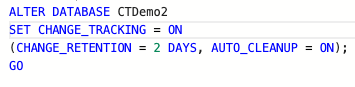
The Azure SQL Database has two main ways to track changes with data (rows/DML) as well as table changes. One of those methods is Change Tracking with the other being Change Data Capture. Today’s post will be going into depth on Change Tracking. Change Tracking and Change Data Capture So, what’s the difference between the two? Change Data Capture provides historical change information while Change Tracking captures the fact that rows in a table were changed but doesn’t capture the data that was changed. Here is a quick look up table from the documentation: So why would I use Change Tracking over Change Da...

Using Ledger in Azure SQL Database
Transactions have to be protected and you need to know when something is altered or prevent altering of records from the start. Ledger, available in Azure SQL Database and SQL Server 2022, helps to protect your database and establish trust, accuracy and integrity in your data. Ledger accomplishes this goal in a couple of ways. First, it provides you with a history of records in your database; if a row was updated or deleted in the database, its previous value is maintained and protected in a history table. This provides you with a chronicle of all changes made to the table over time. You can even enable this f...

Make data more human with Azure OpenAI and Azure SQL

In January 2023, Microsoft announced the General Availability of the Azure OpenAI Service (AOAI), which allows Azure customers to access OpenAI models directly within their Azure subscription and with their own capacity. There are four models families available at the moment: In this post, we will see how you can use those models to query your SQL tables. The idea is that of generating SQL queries using Azure OpenAI models' API with Python code. Prerequisites Quickstart Demo The first thing we want to do is import one of our SQL tables into ...

Data API Builder Quickstart Demo from VS Live Vegas
I was fortunate enough to be able to present Data API builder the week of March 20th at VS Live in Las Vegas and what an incredible group of attendees at that conference. During my session, I stepped through a live demo of Data API builder showing off REST and GraphQL endpoints on various database objects. This blog post contains the steps I performed in the demo so that you can perform them as well and create your first set of REST/GraphQL endpoints on a SQL Database. This quickstart is using 100% local components which are 100% free to use. Remember, while this quickstart uses SQL Server/Azure SQL Database, Da...