
Microsoft 365 Developer Blog
A platform for creating collaborative apps for hybrid work
Featured posts

Copilot UX components are generally available: bring interactive experiences into Copilot

Copilot UX components are generally available with SPFx 1.24. Bring interactive dashboards, forms, and business actions directly into Microsoft Copilot, so peop...
Latest posts

Flow scenario #1: Send a survey daily

This blog discusses the scenario where you might need to send a survey with the same set of questions on a daily basis. This could be automated very simply using Microsoft Flow. In case you are new to Flow or the Kaizala connector, suggest you read this post to get started.
Kaizala extensibility and programmability overview
Kaizala is a mobile application that allows you to get work done within the context of a conversation and group using actions. While the application provides a whole lot of functionalities that allows small and medium businesses and enterprises to get work done, it also supports extensibility that allows you to integrate it to existing business processes and workflows.
Extending SharePoint Patterns and Practices team with new MVP community members – June 2018

We are happy to announce additional community members being included in the SharePoint Patterns and Practices (PnP) team. We are really excited to grow the team, which will help us to address growing interest in the SharePoint community and development topics.
Introducing SharePoint Starter Kit
We are happy to announce the availability of a new SharePoint Starter Kit open-source project, which can be used to demonstrate possibilities with the communications sites and group associate team sites in Office 365.
SharePoint Development Community (PnP) – June 2018 update
SharePoint Dev Ecosystem / SharePoint Patterns and Practices (PnP) May 2018 update is out with a summary of the latest guidance, samples, and solutions from SharePoint engineering or from the community for the community
Announcing SharePoint Framework version 1.5: new tools and a beta preview
SharePoint Framework version 1.5 is now available, bringing both new tools to make your development more efficient as well as a new channel for trying new preview features.
Working with files in your Microsoft Teams bot (Preview)

We announced at Build 2018 that bots will soon be able to send and receive files. I’m happy to let you know that it’s finally here! If you have a Microsoft Teams app that works with files, it’s time to switch to Public Developer Preview and check it out.
New SharePoint CSOM version released for SharePoint Online – May 2018
We are happy to announce the availability of new SharePoint Client-Side Object Model (CSOM) version targeted for the Office 365 or more specifically for SharePoint and Project Online. This was mainly a small maintenance release with minimal updates on the CSOM API surface.
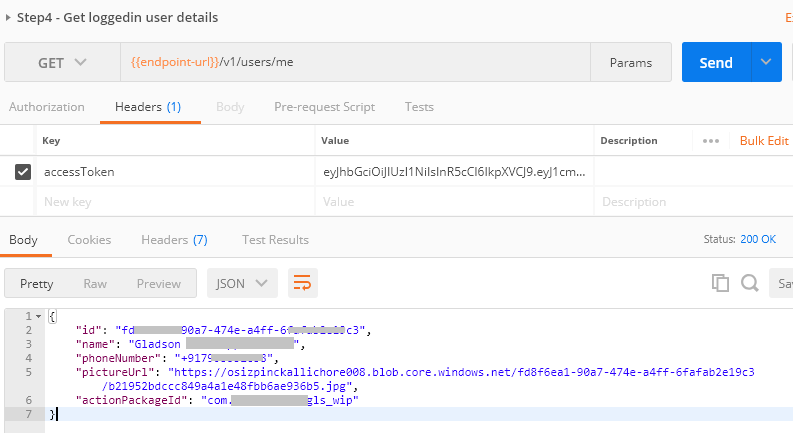
Securing API requests from Kaizala action
There are scenarios where you may want to query your service from within the Kaizala card. While the APIs to be queried are public (without any authentication), you can query them directly. But, in case you want to secure your APIs to make sure the calls are made by the particular user from within the Kaizala card alone – you use the Integration Service token. This post explains how you generate this token and subsequently validate this on the service side.