

Apple developers can now build and test their applications natively on Apple Silicon in Azure Pipelines. New arm64 macOS agents are available in public preview through the pay-as-you-go GitHub-hosted Agents pool.
Starting with Apple Silicon, Azure Pipelines is bringing over some of the agent sizes already available in GitHub Actions. The preview includes the following macOS images:
| Operating system | Hardware specification | VM image labels | Pool |
|---|---|---|---|
| macOS 26 | Standard | macos-26-arm64, xcode-27 |
GitHub-hosted Agents |
| macOS 26 | XLarge | macos-26-arm64-xl, xcode-27-xlarge |
GitHub-hosted Agents |
Running workloads directly on Apple Silicon avoids the overhead and compatibility limitations of emulating arm64 on Intel hardware. It also lets teams validate applications against the same architecture used by current Apple devices and development machines.
Pay-as-you-go pricing
The new agents use pay-as-you-go pricing with the rate tied to the size of the agent. This means they are charged per minute and no longer on the one-size-fits-all parallelism model. See Azure DevOps pricing for current rates.
Enable GitHub-hosted agents in billing settings
To use the Apple Silicon agents, first enable GitHub-hosted agents in the billing settings for your Azure DevOps organization.
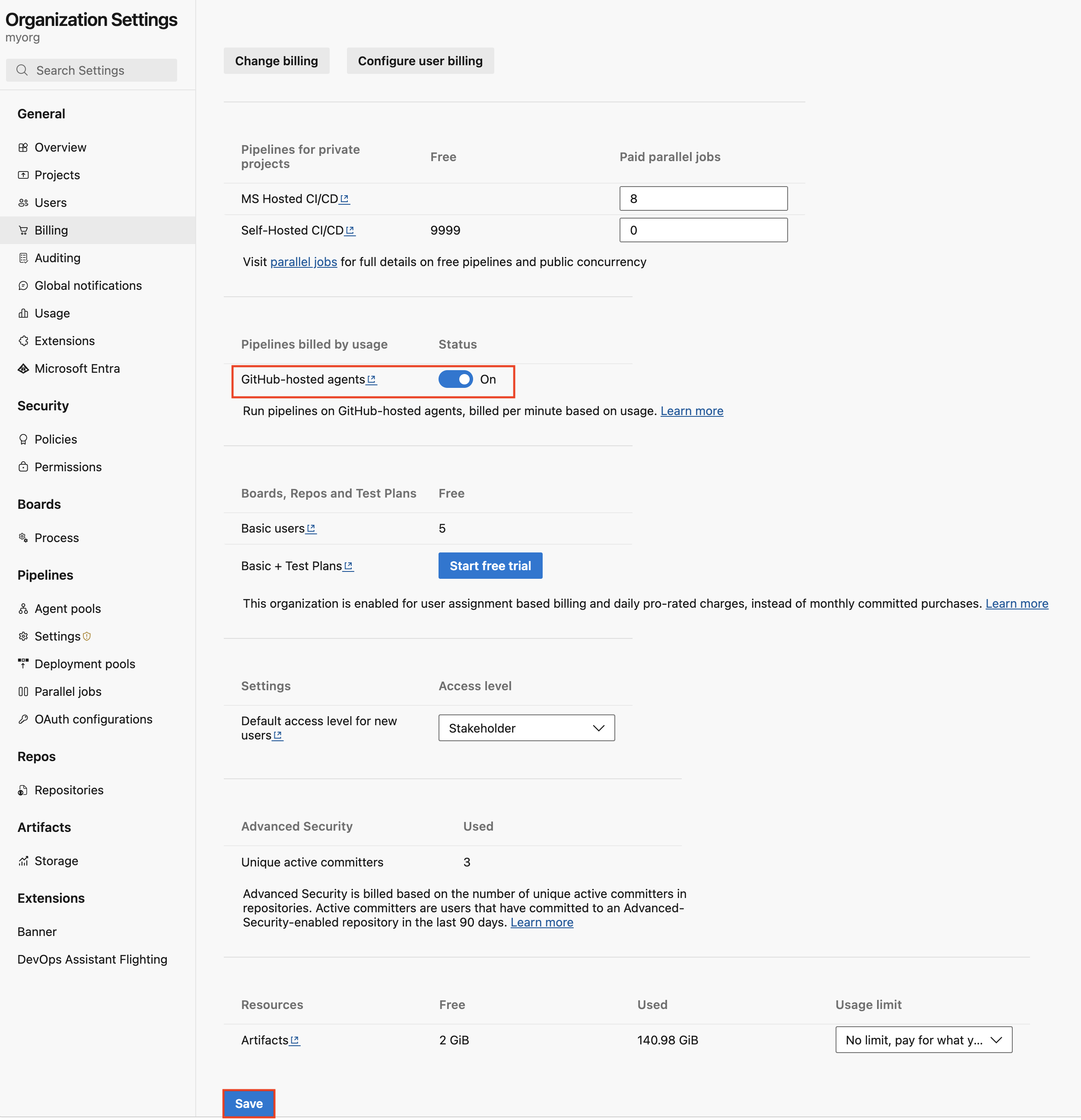
Enabling this option provisions the new GitHub-hosted Agents pool used for pay-as-you-go agents.
Use the Apple Silicon images
Once the pool is provisioned, target the standard macos-26-arm64 image in your YAML pipeline:
pool:
  name: 'GitHub-hosted Agents'
  vmImage: 'macos-26-arm64'
steps:
- bash: |
    echo Hello from macOS Tahoe arm64
    uname -a
    sw_vers
For a more powerful agent, target the XLarge macos-26-arm64-xl image:
pool:
  name: 'GitHub-hosted Agents'
  vmImage: 'macos-26-arm64-xl'
steps:
- bash: |
    echo Hello from XL macOS Tahoe arm64
    uname -a
    hostinfo | grep memory
A new Xcode-based naming convention for macOS images
Every macOS image version contains one major version of Xcode. Beginning with the Xcode 27 public preview, each new image name is based on a major Xcode version rather than the underlying operating system, with one major Xcode version supported per image version.
This model makes it easier to target the exact Apple toolchain a project needs and understand what each agent provides. It also reflects how macOS CI jobs are commonly defined: by their required Xcode toolchain rather than the operating system installed underneath it.
The Xcode 27 preview image is gradually rolling out in the ‘GitHub-hosted agents’ pool over the next few weeks. To use the image, use the xcode-27 and xcode-27-xlarge image labels:
pool:
  name: 'GitHub-hosted Agents'
  vmImage: 'xcode-27'
steps:
- bash: |
    echo Hello from macOS with Xcode 27
    uname -a
    sw_vers
    xcodebuild -version

# Or, for the larger agent:
pool:
  name: 'GitHub-hosted Agents'
  vmImage: 'xcode-27-xlarge'
steps:
- bash: |
    echo Hello from macOS with Xcode 27
    uname -a
    sw_vers
    xcodebuild -version
    hostinfo | grep memory
The Xcode 27 image is available only on arm64 macOS runners and is not supported on Intel agents. It also includes different tools and tool versions than earlier images. Review the image’s installed software here.
Important Xcode images are rolling out at publishing time of this blog post and will reach all Azure DevOps organizations over the next 2-3 weeks.
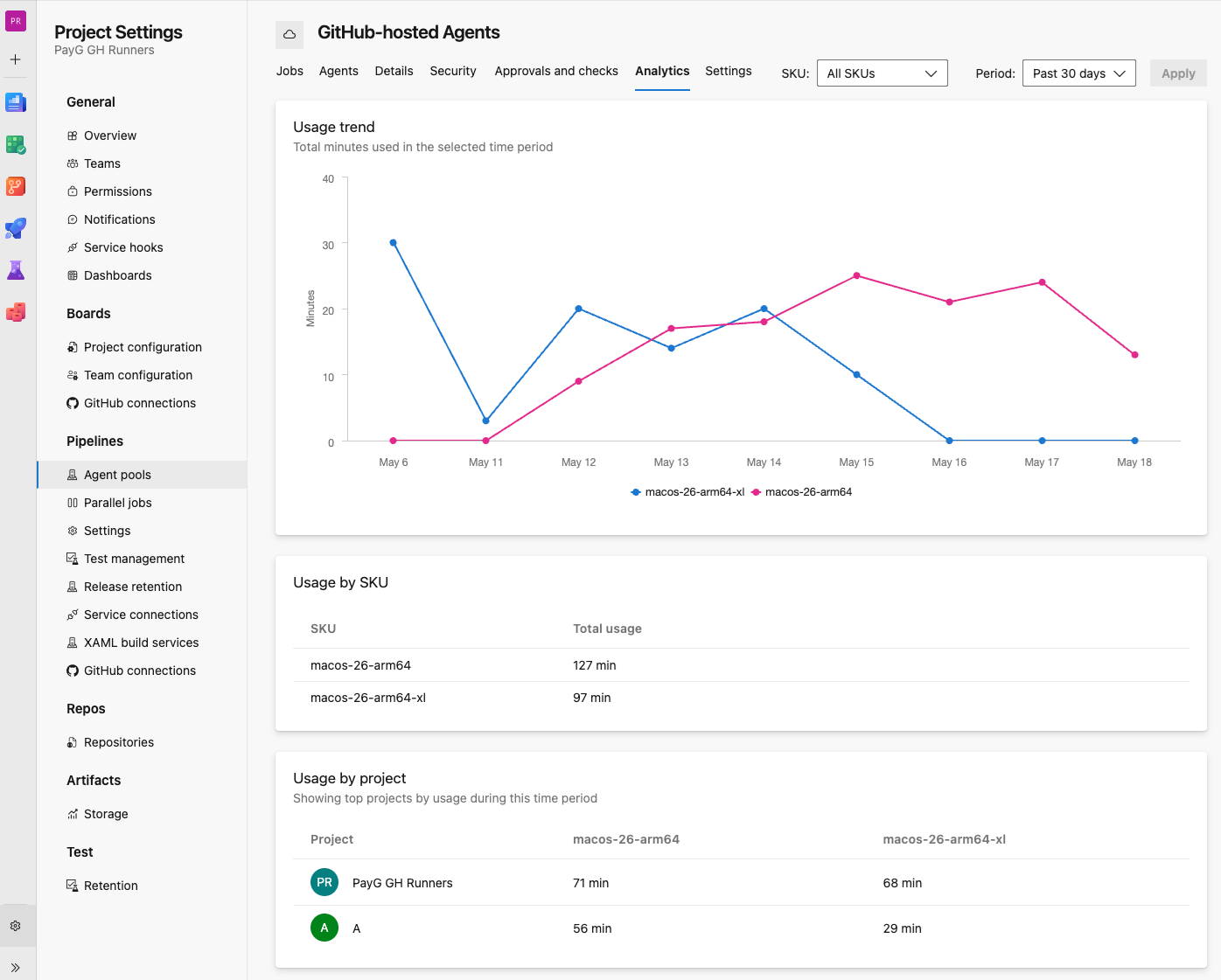
Monitor per-minute usage
Because pay-as-you-go agents are charged per minute, the updated Analytics tab in the GitHub-hosted Agents pool lets you:
- View the number of minutes used per project.
- Filter usage by image.
- Drill down by agent SKU and pipeline.
Usage is also available in Azure Cost Management. You can track the number of minutes used and break down usage by Azure DevOps organization and project.
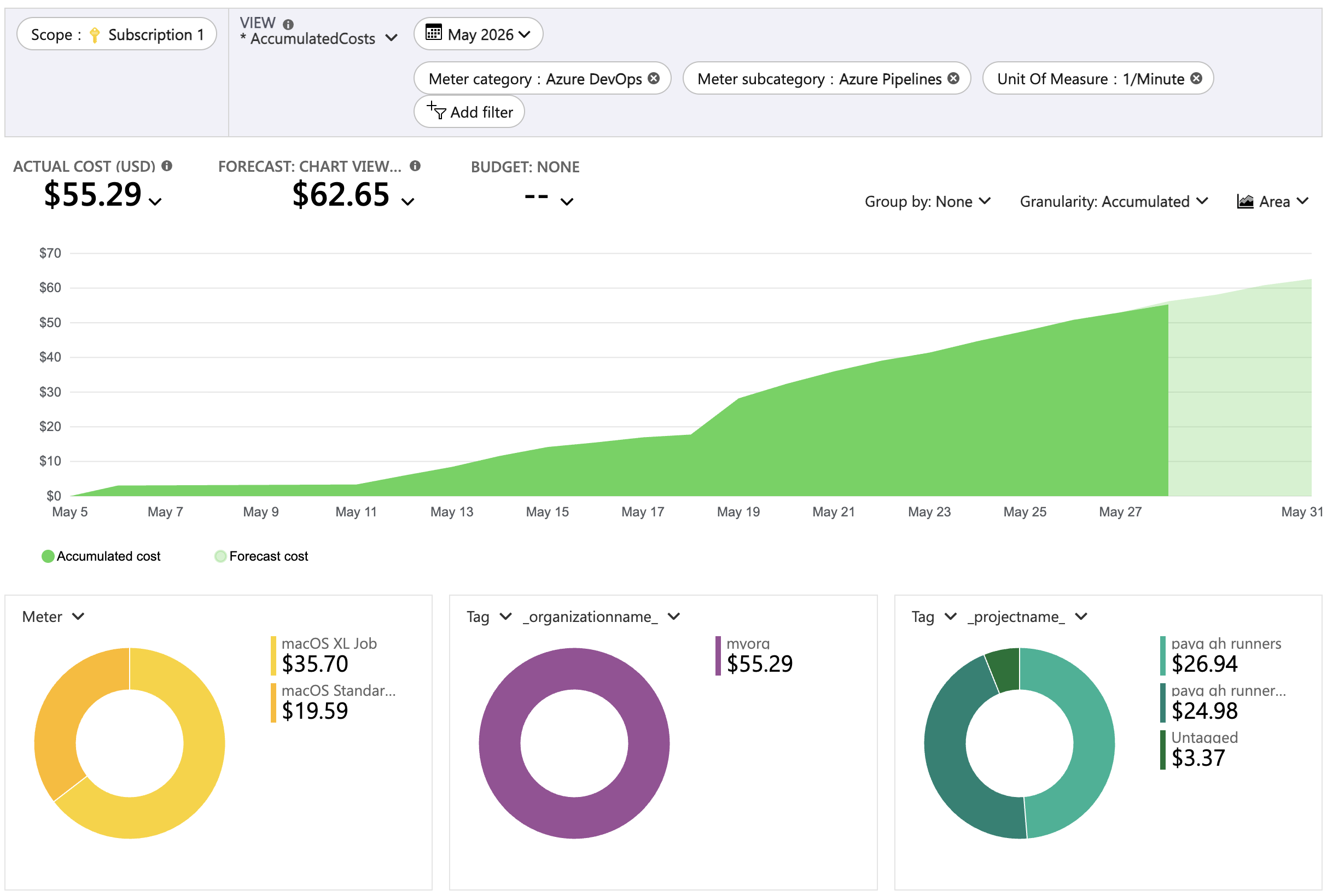
Azure Cost Management also supports budgets and alerts, which can help you forecast and monitor spending as teams adopt the new agents.
Get started
- Enable GitHub-hosted agents in your Azure DevOps organization’s billing settings
- Wait for the GitHub-hosted Agents pool to be provisioned
- Select the standard
macos-26-arm64, XLargemacos-26-arm64-xlimage or correspondingxcode-27/xcode-27-xlargeimages once available - Validate your dependencies and build scripts for arm64 compatibility
- Monitor consumed minutes in pool analytics and Azure Cost Management
Apple Silicon support gives Azure Pipelines users a native, scalable way to build and test modern Apple applications, with the flexibility to select an agent size that matches each workload.
Frequently asked questions
Q: How is GitHub-hosted agents billing different from Microsoft-hosted agents?
A: Microsoft-hosted agents use a concurrency-based billing model where you pay for the maximum number of jobs running in parallel. GitHub-hosted agents use pay-as-you-go billing where you’re charged per minute of pipeline execution time. For more information, see Pricing for Azure DevOps.
Q: What is the impact of enabling the ‘GitHub-hosted agents’ pool?
A: Initially, nothing. No existing pipelines use this pool unless you explicitly update them to do so. Existing standard-sized Intel images continue to be available in the Microsoft-hosted ‘Azure Pipelines’ pool. Over time, as you create and update pipelines to use the new ‘GitHub-hosted agents’ pool, you see usage and billing based on the GitHub-hosted agents pool.
Q: Do pay-as-you-go jobs consume existing parallelism settings?
A: No, the ‘GitHub-hosted agents’ pool is a brand new pool where agents are only metered by the minute.
Q: How are GitHub-hosted agents related to GitHub Actions?
A: GitHub-hosted agents run on the same infrastructure and use the same agent specifications and pricing as GitHub Actions do. Over time, more agent types available in GitHub Actions will become available in Azure Pipelines.
Q: Can I still use the Azure Pipelines pool for new versions of operating systems?
A: The Azure Pipelines pool and parallelism pricing continue to be available for the standard size Intel-based agents that use it. New Intel versions of Ubuntu and Windows are available in the Azure Pipelines pool. As Apple indicates macOS 26 Tahoe is the last version with native Intel support, new versions of macOS are available in the GitHub-hosted agents pool only.
Q: If I don’t specify any pool in YAML, what pool is used?
A: If you don’t specify a pool in your YAML pipeline, the default pool used is the Microsoft-hosted ‘Azure Pipelines’ pool.
Q: I enabled GitHub-hosted agents in billing, but don’t see any changes
A: It can take up to 24 hours for the new GitHub-hosted agents pool to be provisioned in your organization. If the pool isn’t provisioned within that time, create a support case.
Q: Some of my jobs get queued. How can I increase the number of virtual agents?
A: During the preview, the number of virtual agents is 8 per agent SKU. Over the period of the public preview, we will gradually increase this number. If you want to have the number of virtual agents for a specific agent SKU raised to a higher number, create a support case.
Q: How can I see how many minutes the new agents are using?
A: In addition to the monitoring available in Azure Cost Management today, we will add an analytics experience on the pool directly. For more information, see Monitor usage.
Q: How can I forecast the usage of pay-as-you-go agents?
A: Forecasting requires making some assumptions on what pipelines will be updated to use pay-as-you-go agents. We will add some usage data on the billing page that can be used before pay-as-you-go billing is enabled, combined with updates to the Azure Pricing Calculator. Together, these will give organization admins some idea of the impact before pay-as-you-go billing is enabled.
Q: I’m trying to use xcode-27 images, but they appear not available
A: The xcode-27 and xcode-27-xlarge images are gradually rolling out in the ‘GitHub-hosted agents’ pool over the next few weeks.
Q: Are there plans for additional agent types?
A: We are planning to add larger Linux and Windows agents to the GitHub-hosted agents pool at a later point in time.



GitHub-hosted runners through GitHub support Azure vnet integration. Is there a way to do the same for GitHub-hosted runners through ADO?
Is there a way to link this to our GitHub Enterprise to share minutes?
Hi Andrew. Are you referring to macOS, Linux or Windows agent VNet integration support? For Linux & Windows, we plan to introduce larger GitHub-hosted agents. Still, Managed DevOps Pools will provide the best Azure experience, including VNet integration.
You can’t share minutes. Minutes will be billed as an Azure meter against your Azure bill/credits.
Any ETA on when we can expect ephemeral on-demand self-hosted runners to be supported? https://developercommunity.visualstudio.com/t/Keep-jobs-waiting-even-if-there-are-no-a/11084070 explains that Azure has no way to keep a job waiting if there is nothing in the pool yet. We need to spin up a VM with specific criteria when a job is queued and then register it for only that job.