

Microsoft Foundry’s July and August 2026 updates make Hosted Agents, Voice Live integration, and Toolboxes generally available; expand Claude tools hosted on Azure; update Model Router’s regions and model pool; add Foundry Local capabilities; and advance the Python, JavaScript, Java, and .NET SDKs.
Author’s note: After a long summer break and a small US holiday, we have a lot to catch up on! I’ve brought July and August’s Foundry updates together in one roundup, with code examples and migration notes to help you get started.
TL;DR
Hosted Agents, Voice Live integration, and Toolboxes are now generally available, giving developers a managed runtime for agent code, real-time voice, and reusable tools managed outside the agent. Claude deployments hosted on Azure add structured outputs, Web search, Web fetch, MCP connector, and Tool search, with the MCP connector using the beta API. Model Router adds regions, refreshes its routing pool with GPT-5.6 variants and Claude Opus 4.8, and expands agentic routing to eligible Anthropic and open-source models. Foundry Local on Azure Local extension 2607 adds preview model evaluation, vLLM model parallelism, and improved automatic GPU inference tuning, while Foundry DevPack 0.1.3 provides preview installers for Windows, macOS, and Linux on x64 and Arm64. By the end of August, the Python and JavaScript/TypeScript SDKs had reached stable version 2.5.0 and Java 2.4.0; the .NET 3.0.0 line remained in preview, with hosted-agent management and runtime support differing by language.
Join the community
Which July or August update should we cover with a deeper implementation example? Share what you are building—or where you are blocked—in Discord or GitHub Discussions, and subscribe via RSS for the next roundup.
Agents & Foundry Agent Service
Hosted Agents in Foundry are generally available (GA)
Build agents with your preferred framework and run them in Foundry’s managed runtime. We announced general availability for Hosted Agents on July 9 in a post by Tina Schuchman, who leads our Foundry platform engineering organization.
Create an agent with the CLI
For this example, I’m using the OpenAI Agents SDK using Model Router with the Responses API protocol. The Foundry agents extension for Azure Developer CLI handles scaffolding, local testing, and deployment.
If you’d rather work in VS Code than follow the CLI steps, I recommend installing Foundry Toolkit from the VS Code Marketplace. For a guided visual workflow in the GitHub Copilot App, open Customize > Canvas > Microsoft Foundry to get started with Foundry Canvas (preview).
Install Azure Developer CLI 1.32.0 or later and the Foundry AI agents extension 1.0.0-beta.13 (preview) or later. These are the end-of-August releases we’re using as the setup baseline:
azd extension install azure.ai.agents --version 1.0.0-beta.13Sign in with both azd auth login for the CLI and az login for the sample’s local Azure credential flow. You’ll need an existing Foundry project. Agent Service works with many models available in the Foundry model catalog—including model-router. If you haven’t deployed Model Router yet, follow the Model Router deployment guide before continuing.
Start from the OpenAI Agents SDK template. Run initialization from a writable directory outside another Git repository. Replace the example project resource ID with yours, and model-router with your deployment name if it differs:
azd ai agent init openai-agents-hosted \
  --manifest https://github.com/microsoft-foundry/foundry-samples/blob/main/samples/python/hosted-agents/bring-your-own/responses/openai-agents-sdk/azure.yaml \
  --project-id "/subscriptions/<subscription-id>/resourceGroups/my-foundry-rg/providers/Microsoft.CognitiveServices/accounts/my-foundry-resource/projects/my-foundry-project" \
  --model-deployment model-router \
  --agent-name openai-agents-router-demo \
  --deploy-mode code
I named my hosted agent openai-agents-router-demo for this demo. You can omit --agent-name to keep the template’s default name.
Next, start the agent server on localhost to test it before deployment. The agent runs locally but still calls your deployed Model Router in Foundry:
cd openai-agents-hosted
azd ai agent run --no-client
Leave the server running, then invoke it from another terminal in the same directory:
Incurring costs
invoke incurs charges for the routed model. After deploy, remote sessions also incur hosting charges.azd ai agent invoke --local --new-session \
"Give a developer a two-sentence checklist for validating an AI agent before deployment."When the local response looks right, check the source package excludes environment files and virtual environments, then publish the agent.
azd deploy openai-agents-sdk-invocations

azd ai agent invoke openai-agents-sdk-invocations --new-session \
  "Give a developer a two-sentence checklist for validating an AI agent before deployment."
The commands select the template’s service key, openai-agents-sdk-invocations; despite that label, this sample uses Responses. Omitting --local sends the request to the deployed agent.
Example cloud response:
Before deployment, validate functionality and reliability: run unit/integration/end-to-end tests and benchmarks against acceptance metrics, stress and latency tests, adversarial and edge-case inputs, domain-shift simulations, and verify reproducibility and data lineage.
Also confirm safety, ethics, and operations readiness: perform bias/harm audits and red-team exercises, ensure PII handling, access control and injection protections, clear explainability and user disclaimers, monitoring/alerts/SLAs, a human-in-the-loop and rollback/kill-switch, and legal/compliance sign-off with a staged rollout plan.
Voila! I chose my model, used a third-party, open-source framework, and deployed my agent my way. Now it’s your turn: start in code, use the CLI, try Foundry Toolkit in VS Code, explore Foundry Canvas in the GitHub Copilot app, or use Azure Skills in your preferred agent development environment.
Once you’ve installed Azure Skills, try this prompt:
Use the Foundry OpenAI Agents SDK hosted-agent template with Model Router through the Responses API. Reuse my existing Foundry project and model deployment; ask me for their details. Help me test locally, then review the deployment plan and costs with me before I approve deployment.You can stop the local server with Ctrl+C. Keep the deployed agent for the next step: talking to it.
Give your agent a voice
Hosted Agents with Voice Live are also generally available (GA). We’ve tested our agent through text. Now let’s talk to it.
Using the same hosted agent from our previous example, we’ll run a minimal, voice-only session locally and reuse the AudioProcessor from the Voice Live quickstart. Replace the resource endpoint and project name with yours.
First, install the Voice Live package and its audio dependency. On Linux, install PortAudio first:
# Linux only
sudo apt-get install -y portaudio19-dev libasound2-dev
Then install the Python packages:
pip install --pre "azure-ai-voicelive[aiohttp]" azure-identity pyaudioIncurring costs
Running this session incurs Voice Live charges for text and audio tokens at the pricing tier associated with your agent’s model. The pricing guide also includes token-usage estimates and additional charges for custom speech, voices, or avatars.Download voicelive_client.py to the same directory as your script. Then run:
import asyncio

from azure.ai.voicelive.aio import connect
from azure.ai.voicelive.models import (
    AudioEchoCancellation,
    AudioNoiseReduction,
    AzureStandardVoice,
    InputAudioFormat,
    Modality,
    OutputAudioFormat,
    RequestSession,
    ServerVad,
)
from azure.identity.aio import DefaultAzureCredential

from voicelive_client import AudioProcessor

async def main():
    async with DefaultAzureCredential() as credential:
        async with connect(
            endpoint="https://<resource-name>.services.ai.azure.com",
            credential=credential,
            agent_config={
                "agent_name": "openai-agents-router-demo",
                "project_name": "<project-name>",
            },
        ) as connection:
            audio = AudioProcessor(connection)
            audio.start_playback()
            try:
                await connection.session.update(
                    session=RequestSession(
                        modalities=[Modality.TEXT, Modality.AUDIO],
                        voice=AzureStandardVoice(name="en-US-Ava:DragonHDLatestNeural"),
                        input_audio_format=InputAudioFormat.PCM16,
                        output_audio_format=OutputAudioFormat.PCM16,
                        turn_detection=ServerVad(),
                        input_audio_echo_cancellation=AudioEchoCancellation(),
                        input_audio_noise_reduction=AudioNoiseReduction(type="azure_deep_noise_suppression"),
                    )
                )

                async for event in connection:
                    if event.type == "session.updated":
                        audio.start_capture()
                    elif event.type == "response.audio.delta":
                        audio.queue_audio(event.delta)
                    elif event.type == "input_audio_buffer.speech_started":
                        audio.skip_pending_audio()
                    elif event.type == "error":
                        raise RuntimeError(event.error.message)
                    elif event.type == "response.done" and (
                        event.response.status in ("failed", "incomplete")
                    ):
                        raise RuntimeError(str(event.response))
            finally:
                audio.shutdown()

try:
    asyncio.run(main())
except KeyboardInterrupt:
    pass
Voice Live supports more than 600 neural voices; you can explore the standard, HD, and custom options and substitute the voice that fits your experience. Beyond voice choice, Voice Live includes real-time audio processing features for natural turn-taking and clearer input. Server-side voice activity detection (VAD) recognizes when I start and stop speaking; the speech_started handler then stops pending playback so I can interrupt the agent naturally. Echo cancellation prevents speaker output from feeding back into the microphone, while deep noise suppression reduces background noise. Together, these features enable more natural turn-taking in noisy, speaker-enabled scenarios such as customer support, field service, and in-vehicle assistants.
Sample output:
Learn more: Voice Live hosted-agent integration, Responses-protocol setup, shared Python voice client, and Voice Live Python quickstart.
You can delete the deployed agent using its agent name:
azd ai agent delete openai-agents-router-demoStuck? See Hosted Agent troubleshooting, including help with active sessions that block deletion.
Run within your network boundary
If your agent needs private access to storage, databases, or Key Vault, plan its VNet integration alongside the deployment. Subnet capacity, DNS, private endpoints, and outbound access all affect which resources it can reach.
Get started
- Create an agent with Foundry Toolkit with Foundry Toolkit.
- Start from code with the Python Copilot SDK sample.
- Use the CLI with the OpenAI Agents SDK and Model Router example above.
Runtime support varies by language. Check the stable-client changes and runtime requirements before migrating an existing agent.
Take tool authentication out of agent code with Toolboxes — generally available (GA)
Toolboxes give agents one MCP-compatible endpoint while Foundry manages tool authentication and credentials outside agent code. Teams can define integrations once, then version, share, and govern them across agents.
Agent skills and tool search—both in public preview—package reusable instructions and workflows, while tool search finds relevant tools at runtime. Individual tools still have their own availability and access requirements.
Tool Search keeps larger Toolboxes practical. Instead of loading every tool definition on each turn, the agent searches the collection and adds only the tools relevant to the task. That reduces token use, context clutter, and selection from an overcrowded tool list.
- Build a Toolbox and use it with a hosted agent.
- Explore the Toolbox architecture and supported tools.
- Configure user delegation and authentication.
- Create and attach Agent Skills.
Foundry Models
Expand Azure-hosted Claude inference with tools
In Foundry, Hosted on Azure describes where Claude inference runs: Anthropic operates the model service on Azure infrastructure, with prompts and completions remaining within Azure. Hosted on Anthropic runs inference on Anthropic infrastructure and offers a broader model catalog and API surface.
This announcement closes five of the capability gaps between those options:
| Capability | Hosted on Azure | Hosted on Anthropic |
|---|---|---|
| Structured outputs | ✅ New | ✅ |
| Web search | ✅ New | ✅ |
| Web fetch | ✅ New | ✅ |
| MCP connector (beta) | ✅ New | ✅ |
| Tool search | ✅ New | ✅ |
| Advanced web search and fetch options | — | ✅ |
| Code execution | — | ✅ |
| Agent Skills | — | ✅ |
| Programmatic tool calling | — | ✅ |
| Files API | — | ✅ |
| Message Batches API | — | — |
| Server-side fallback | — | — |
✅ Available · — Not supported
Check the current support boundaries before choosing a hosting option. When we have firmer plans and ETAs for the unsupported capabilities, we’ll share them.
Start with structured outputs
For a useful first test, I gave Claude this synthetic claim document and asked it for the policy number, loss type, and whether the claim should be escalated to an adjuster.
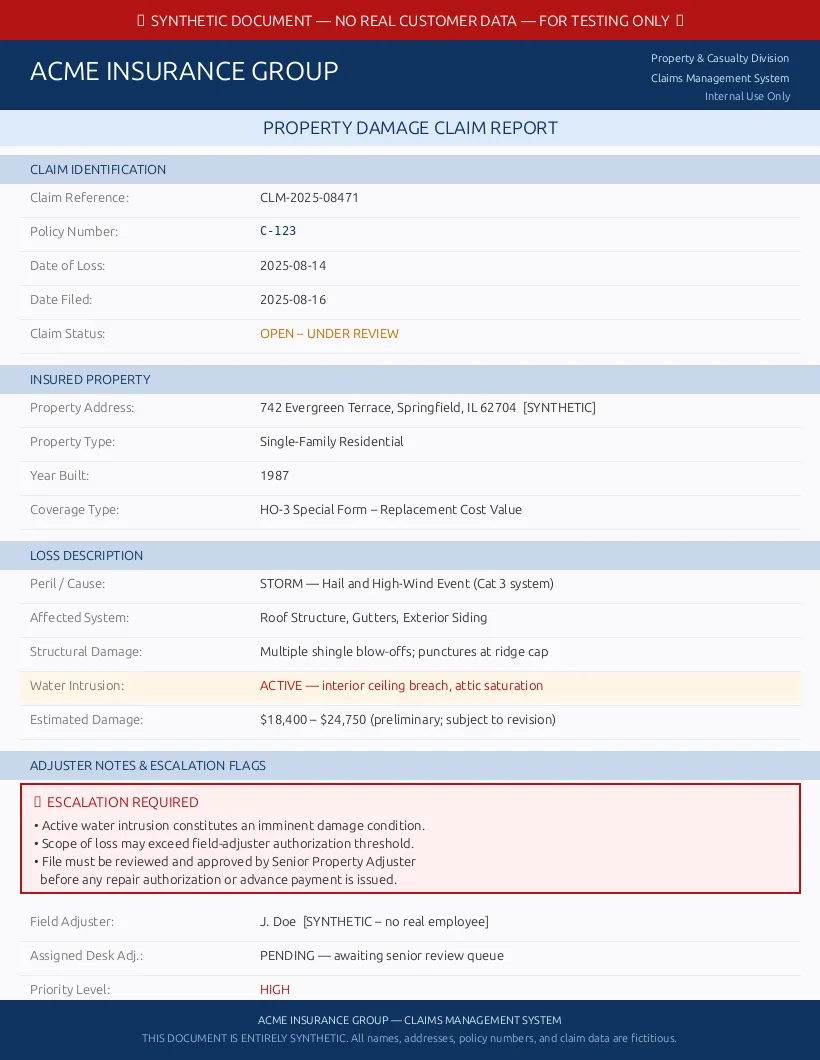
The document contains no real customer data. Install the Anthropic SDK, Azure Identity, and Pydantic:
pip install "anthropic>=0.74.0,<1" azure-identity pydanticAuthenticate with Azure CLI or another credential supported by DefaultAzureCredential, then save the sample document as synthetic-claim.png beside the script. Replace the resource name in this example with yours, then run:
import base64
from pathlib import Path

from anthropic import AnthropicFoundry
from azure.identity import DefaultAzureCredential, get_bearer_token_provider
from pydantic import BaseModel, ConfigDict

class ClaimIntake(BaseModel):
    model_config = ConfigDict(extra="forbid")

    policy_number: str
    loss_type: str
    escalate_to_adjuster: bool

client = AnthropicFoundry(
    resource="your-foundry-resource",  # Name only, without .services.ai.azure.com
    azure_ad_token_provider=get_bearer_token_provider(
        DefaultAzureCredential(),
        "https://ai.azure.com/.default",
    ),
)

response = client.beta.messages.parse(
    model="claude-haiku-4-5",
    max_tokens=128,
    messages=[
        {
            "role": "user",
            "content": [
                {
                    "type": "image",
                    "source": {
                        "type": "base64",
                        "media_type": "image/png",
                        "data": base64.b64encode(Path("synthetic-claim.png").read_bytes()).decode(),
                    },
                },
                {
                    "type": "text",
                    "text": "Extract the policy number, loss type, and adjuster escalation decision from this insurance claim.",
                },
            ],
        }
    ],
    output_config={
        "format": {
            "type": "json_schema",
            "schema": ClaimIntake.model_json_schema(),
        }
    },
)

claim = ClaimIntake.model_validate_json(response.content[0].text)
print(claim.model_dump())
I also sent the same image and prompt through the standard Messages API. Here are the observed responses:
| Without structured outputs | With structured outputs |
|---|---|
| Policy Number: C-123
Type of Loss: Storm — Hail and High-Wind Event (Cat 3 system) Escalation Required: Yes — This claim requires escalation due to active water intrusion, which constitutes an imminent damage condition, and the scope of loss may exceed field-adjuster authorization thresholds. |
|
Both responses got the claim right. The difference is what your application receives: free-form Markdown that you still need to interpret, or schema-constrained JSON that Pydantic can validate immediately. Structured outputs guarantee the response shape and types, not the accuracy of extracted values, so validate important identifiers and routing decisions against your business rules.
Match each prompt to the right model
Choosing one model for every request means paying for more capability than simple prompts need or accepting lower quality on harder ones. Model Router gives your application one deployment and selects an eligible model for each request based on your preferred balance of quality and cost.
We’ve expanded Model Router’s Global Standard availability to 28 regions and Data Zone Standard to 21. Router version 2025-11-18 adds the Azure OpenAI GPT-5.6 Sol, Terra, and Luna series alongside Anthropic’s Claude Opus 4.8. Eligible Anthropic and open-source models can also join OpenAI models for agentic requests, where model and tool compatibility allow it.
You don’t need to deploy the underlying models separately, except for Claude models. Deploy the Claude models you want Model Router to consider, then it can select among them based on your routing mode.
The refresh removes the retired gpt-5-chat, gpt-5.2-chat, gpt-5.3-chat, DeepSeek-V3.1, and claude-opus-4.1 models from the routing pool. Earlier Model Router versions do not preserve access to a retired underlying model.
If you configure a custom subset, check it for those names. Then run a fixed set of representative requests and compare answer quality, latency, and cost. A changed routing pool is worth an evaluation even when your application code does not change.
Models added in July and August
Foundry’s model catalog also expanded across reasoning, realtime audio, transcription, and image generation:
| Released | Models | Status | What they add |
|---|---|---|---|
| July 7 | gpt-realtime-2.1, gpt-realtime-2.1-mini |
Preview | Improved silence and noise handling for realtime audio |
| July 9 | gpt-5.6-sol, gpt-5.6-terra, gpt-5.6-luna |
GA | Three capability and cost tiers with text and image input |
| July 24 | claude-opus-5 |
GA | Anthropic’s most capable model for complex reasoning and coding |
| July 28 | FW-Kimi-K3 |
GA | Native vision, a one-million-token context window, and long-horizon coding and reasoning |
| July 29 | gpt-live-transcribe |
GA | Streaming transcription through the Realtime API |
| July 31 | MAI-Image-2.6, MAI-Image-2.6-Flash |
Preview | Image generation and editing, with quality and faster lower-cost variants |
| August 11 | MAI-Code-1.1-Flash |
Preview | Faster, lower-cost coding assistance for everyday engineering tasks |
| August 26 | grok-4.6 |
Preview | xAI’s latest Grok model in Foundry |
gpt-chat-latest also moved to version 2026-08-06, expanding its context window to 400,000 tokens. Because it is a rolling preview alias rather than a new model, I have kept it outside the release table.
You can now browse and compare models in the new Foundry model catalog without signing in.
Run models on Azure Local infrastructure
For teams deploying models to their own Azure Local hardware, preview extension 2607 adds local model evaluation, multi-GPU parallelism for vLLM, and improved automatic GPU inference tuning. This update is for the Azure Local extension—not the desktop Foundry Local SDK—and requires an Azure Local environment and preview access.
Developer tools, APIs, SDKs, and CLI
Foundry DevPack preview installers
Setting up a Foundry development environment can mean installing Azure CLI and azd, adding Foundry extensions, and connecting Foundry guidance to the coding tools you already use. The Foundry DevPack 0.1.3 preview brings that setup into one installer for Windows, macOS, and Linux on x64 and Arm64.
It installs Azure CLI, azd, the microsoft.foundry and azure.ai.agents extensions, and the Microsoft Foundry agent-development skill. If VS Code, GitHub Copilot CLI, or Claude Code is already installed, DevPack also connects the corresponding Foundry extension, plugin, or skill. It does not install those host applications.
Because this is a preview release, try it on a development machine before adopting it across your team.
Choose the right SDK surface
The Foundry SDK is a family of project data-plane packages, not another name for the OpenAI SDK. Start with the surface that owns the operation:
- Use the Foundry Projects SDK to work with project-scoped resources such as agents, Toolboxes, evaluations, connections, datasets, and indexes.
- Use the OpenAI SDK for OpenAI-compatible inference APIs. A Foundry project client can create a configured OpenAI client, but the packages and API surfaces remain distinct.
- Use Azure Resource Manager, Bicep, or Terraform to provision Foundry resources, projects, deployments, networking, and role assignments. That control plane has a separate release cycle.
The July and August releases matter less for their version numbers than for three changes you may need to act on.
Hosted Agents and Toolboxes move to stable clients
Python azure-ai-projects 2.3.0 and JavaScript/TypeScript @azure/ai-projects 2.3.0, both released in July, moved core Hosted Agent and Toolbox operations out of beta. If you’re upgrading from 2.2.x or earlier, update project.beta.agents to project.agents and project.beta.toolboxes to project.toolboxes.
Java keeps hosted-agent management in the separate com.azure:azure-ai-agents package. For .NET, Azure.AI.Projects 2.0.1 remains the stable Projects package, while the 3.0.0-beta.1 line contains newer preview management APIs.
Evaluation jobs become long-running operations
Evaluation and data-generation job creation moved to long-running operations in Python 2.4.0, JavaScript/TypeScript 2.4.0, Java Agents 2.3.0, and the .NET 3.0.0-beta.1 preview. Code that inspected a job result immediately must instead wait for submission or completion using the language’s polling pattern.
Test the full submission-to-completion path before upgrading an evaluation workflow—not just client construction.
Runtime requirements move forward
By the end of August, Python azure-ai-projects 2.5.0 required Python 3.10 or later and openai>=3.0.0. JavaScript/TypeScript raised its minimum to Node.js 22 in 2.3.0. Treat either upgrade path as a dependency migration and review your lockfile, custom HTTP clients, and CI runtime before rollout.
Review the Foundry SDK overview for the client boundaries, then use the Python, JavaScript/TypeScript, Java, or .NET changelog for the package you ship.
July and August gave us more capable models and agent APIs, plus clearer paths from local development to hosted deployment. Pick the update that removes the most friction from a workflow you already own, try it against a real task, and tell us what you build—or where we still need to improve.
Resources & Community
- Foundry Forgebook—Your cookbook for building AI with Microsoft Foundry.
- Join the Foundry community—Discord and GitHub Discussions


0 comments
Be the first to start the discussion.