


How Toolboxes in Foundry simplify user delegation
At some point, many agents move from answering questions to taking action. And when it does, the question becomes: whose identity is it acting with? Imagine you are building an internal employee agent. It needs to call a private, Entra-protected MCP server for orders, and it also needs to use Microsoft’s managed Work IQ MCP server to reason over the employee’s Microsoft 365 context. In both cases, the agent can’t run as a managed identity or service account. It has to act as the real signed-in user — with that user’s permissions, access boundaries, and data protections. That’s where identity gets hard: exchanging tokens on behalf of the user, keeping each user’s tokens isolated, and handling consent and refreshing.
Why is this hard to build yourself?
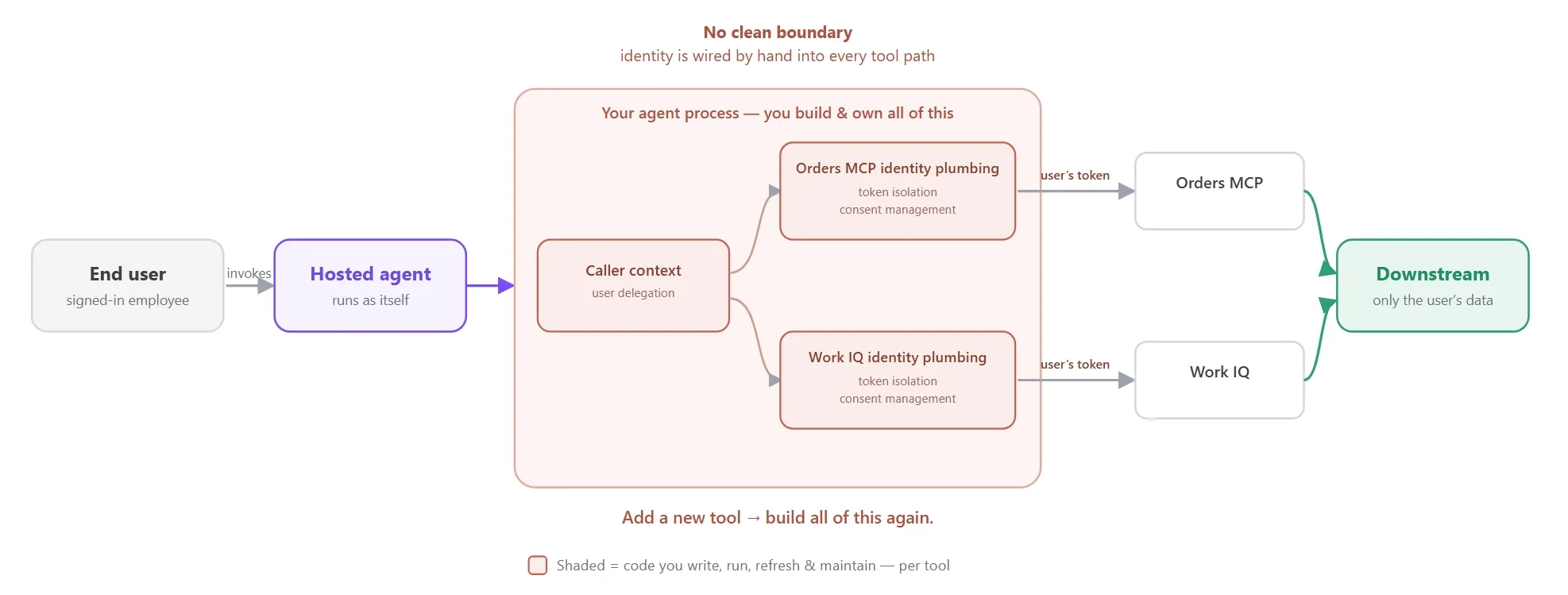
Let’s take the example of employee agent. Both tools demand the same thing: user delegation. If you choose to implement the entire user delegation yourself, you probably need to spend weeks before you can start building the business logic for your agents:
- Complex, high-stake token isolation: You must partition token caches correctly by user and tenant. A wrong cache key can silently leak one user’s downstream API access to another user.
- Consent management overhead: You need to detect consent failures, send users through consent, refresh expired tokens, and handle retries correctly for each API in each agent code you write.
- Duplicated implementation: Every new tool adds another scope, token exchange, cache entry, consent path, retry path, and header path. As you scale with hundreds of tools and thousands of agents, you end up rebuilding the same fragile plumbing.
How does Toolbox solve it?
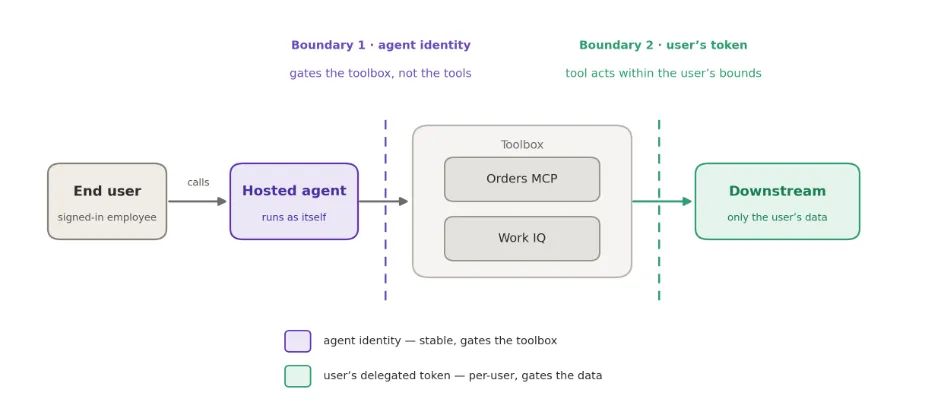
Same scenario, same user delegation — but the agent carries none of the plumbing above. The core idea:
- Auth lives on the toolbox, not in the agent: You pick an auth type once, when you connect a tool — the agent code stays auth-free.
- Foundry handles the whole flow: Whatever a tool needs — User delegation, agent identity, API keys, and more — Foundry acquires, exchanges, and refreshes the tokens server-side.
- The auth flow is never your burden: You can configure tools behind Toolbox and get an MCP endpoint. As your business logic evolves, you simply add or remove tools behind the versioned toolbox endpoint.
Toolboxes in Foundry solve these for you:
| Before Toolbox | After Toolbox |
| Per-user token isolation | Foundry isolates tokens per caller automatically — there’s no cache key to get wrong |
| Consent management | Foundry acquires, refreshes, and handles consent for each user |
| Duplicated implementation | Build a toolbox with various tools and auth once and reuse across agent harness |
Step 1 — Put the auth
Auth type is chosen when the connection is created — in the portal, with azd, or via REST. Never in agent code. For end-user delegation you set the connection to OAuth2:
azd ai connection create <name-of-connection> \
    --kind remote-tool --target <tool-endpoint> \
    --auth-type oauth2
   --authorization-url <auth-url> \
   --token-url <token-url> \
   --client-id <oauth-client-id> \
   --client-secret <oauth-client-secret> \
   --scopes "<scope1> <scope2>"
Step 2 — Build the toolbox once
version = project.toolboxes.create_version(
    name="employee-toolbox",
    description="Private orders MCP and Work IQ connected via user delegation auth",
    tools=[
        MCPToolboxTool(
            server_label="orders",
            server_url="https://orders-mcp.example.com/mcp",
            require_approval="never",
            project_connection_id="orders-mcp",
        ),
        WorkIQPreviewToolboxTool(
            name="work_iq",
            description="Reason over the caller's M365 mail, chats, meetings, docs.",
            project_connection_id="workiq-conn",
        ),
    ],
)
Step 3 — Consume from a hosted agent
The agent references the toolbox by its MCP endpoint — one tool, no header providers, no brokers, no caller context to thread through:
PROJECT_ENDPOINT = "<project-endpoint>"
CONSUMER_URL = f"{PROJECT_ENDPOINT}/toolboxes/employee-toolbox/mcp?api-version=v1"
toolbox = MCPStreamableHTTPTool(
    name="employee_toolbox",
    url=CONSUMER_URL,
)
agent = Agent(
    client=FoundryChatClient(project_endpoint=PROJECT_ENDPOINT, credential=credential),
    tools=[toolbox],
)
One user request flows in, and Foundry hits both the private MCP and Work IQ, each on end user’s behalf, and composes the response. Adding a third tool later is a new connection + one line in the toolbox version — the agent code never changes.
Beyond user delegation — what else you get
Once your tools live in a toolbox, end-user delegation is just the first payoff. Toolbox provides comprehensive auth support beyond end user delegation, protect and govern your tools with guardrail and gateways.
Comprehensive set of auth support
| Auth Type | Whose identity reaches the tool | Use it for |
| agentic-identity | the agent’s own identity | service-to-service with per-agent audit |
| project-managed-identity | the project’s managed identity | service-to-service, no user context |
| oauth2 | the end user (user delegation, consent-once) | Tools that require end user context such as WorkIQ, GitHub and more |
| custom-keys | a stored API key/header | key-based SaaS; the agent never sees the secret |
| none | anonymous | public servers (e.g. Microsoft Learn MCP) |
Governed by default
Because Foundry manages every tool call, it can enforce policy at the boundary — not per-agent code:
- RAI guardrails screen every tool’s input and output, so an untrusted MCP response can’t smuggle prompt-injection or unsafe content back into the agent.
- Bring-your-own gateway — front your MCP servers with a gateway, for example APIM, for rate limiting, logging, and network policy.
Try it yourself
Get started fast today with our Microsoft Foundry samples — it walks through setup, various auth types, and consuming the toolbox from Microsoft Agent Framework, and LangGraph in one place.
Further reading


0 comments