

For many intelligent document processing and emerging agentic workflows, extracting text is only the starting point. Applications increasingly need to capture a document’s structure and implicit business meaning in a form that agents and downstream systems can interpret accurately and act on.
A schema defines the output contract for this structured extraction: field names, types, required properties, nested objects, and allowed values. But as we discussed in the previous post, even a powerful model needs more than a schema to deliver reliable, production-ready extraction.
A schema can require totalAmount to be a number. It cannot tell you whether a minus sign was dropped, a date was interpreted using the wrong locale, or a value came from the wrong line item. A result can satisfy the schema and still cause costly business errors.
Azure Content Understanding offers prebuilt analyzers for these workflows: ready-to-use tools for extracting structured fields from common document types such as invoices, tax forms, and identity documents.
A prebuilt analyzer is more than a schema
Azure Content Understanding makes it easy to start with schema-first extraction. Using custom analyzers, developers can describe each field in natural language and define what the analyzer should extract or generate. This offers a flexible zero-shot starting point. For specialized workloads, teams may further improve quality by testing representative documents, adding labeled examples, refining field definitions, and evaluating results against their requirements. Our development platform streamlines much of that work but does not eliminate it.
A domain-specific prebuilt analyzer packages a maintained schema together with learned knowledge of the document family: how fields are expressed, where they tend to appear, how related values are associated, which representations are equivalent, and which ambiguities commonly cause extraction errors. The resulting analyzer is designed to efficiently associate fields with supporting evidence, interpret and normalize values, handle missing or ambiguous information, and ground results in their source.
This gives developers a different starting point. Microsoft takes on the work of building the domain-specific baseline, so developers do not have to collect the same document variations, label the same common fields, or develop extraction conventions from scratch. Developers can instead focus on how the results fit their application: which fields matter, which business rules apply, and which cases need review.
What your application gets
Domain intelligence is reflected not only in the extracted value, but also in the signals applications need to use it safely. For supported document fields, a prebuilt analyzer can return:
- Value: The typed, structured result for the application. Supported dates and numbers are normalized to a canonical format, rather than leaving each application to interpret their printed representation.
- Confidence: A score that estimates the analyzer’s certainty and can inform straight-through processing or human-review thresholds.
- Grounding: The source span, page, and coordinates that connect the result to evidence in the document.
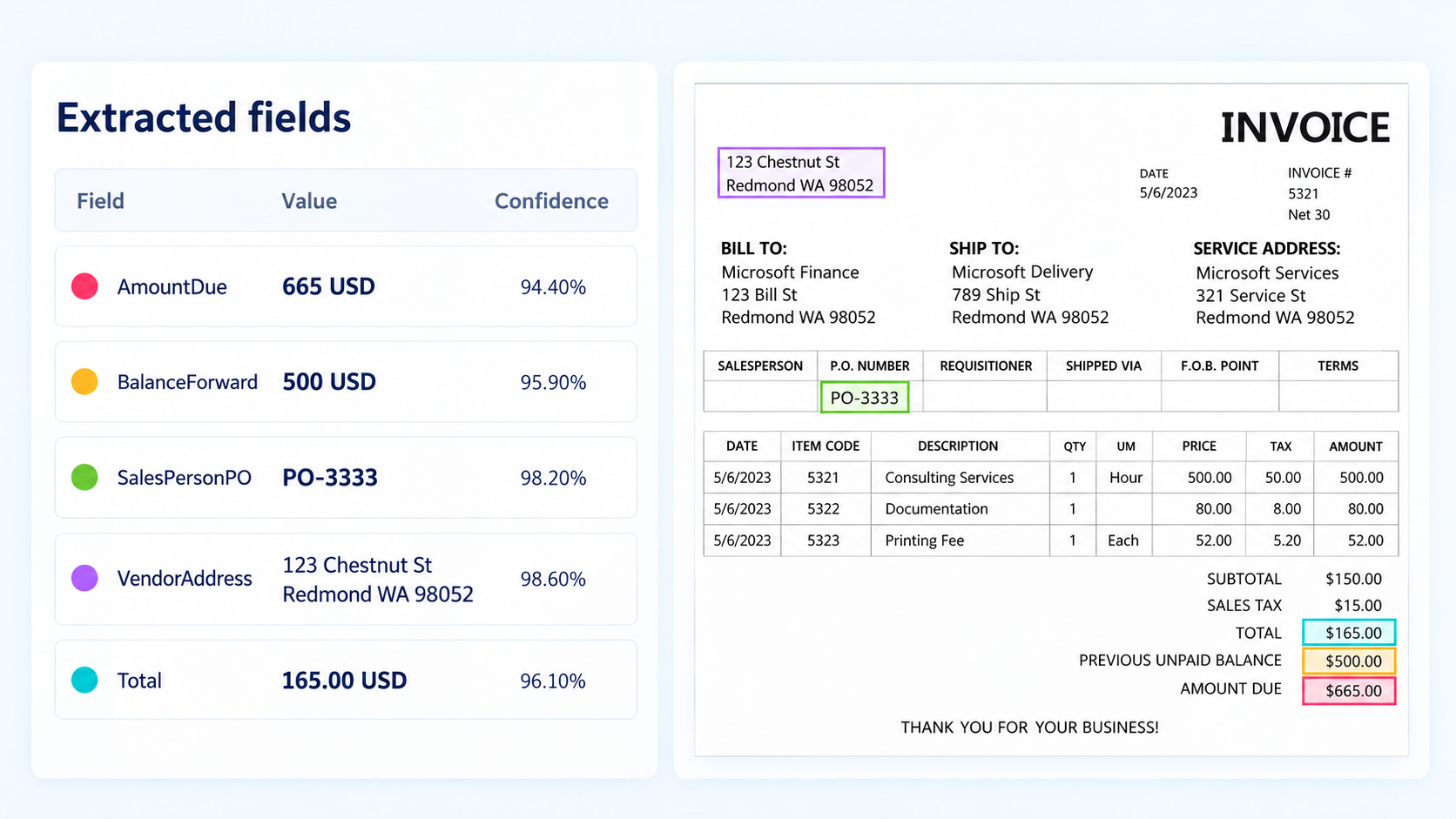
Together, these signals make the output actionable. In an accounts-payable workflow, for example, the prebuilt-invoice analyzer extracts P.O. numbers and itemized amounts with estimated confidence scores and grounding. The workflow can then validate the results against business rules, highlight the source of a disputed value, and route uncertain results to a reviewer.
Where built-in domain intelligence matters
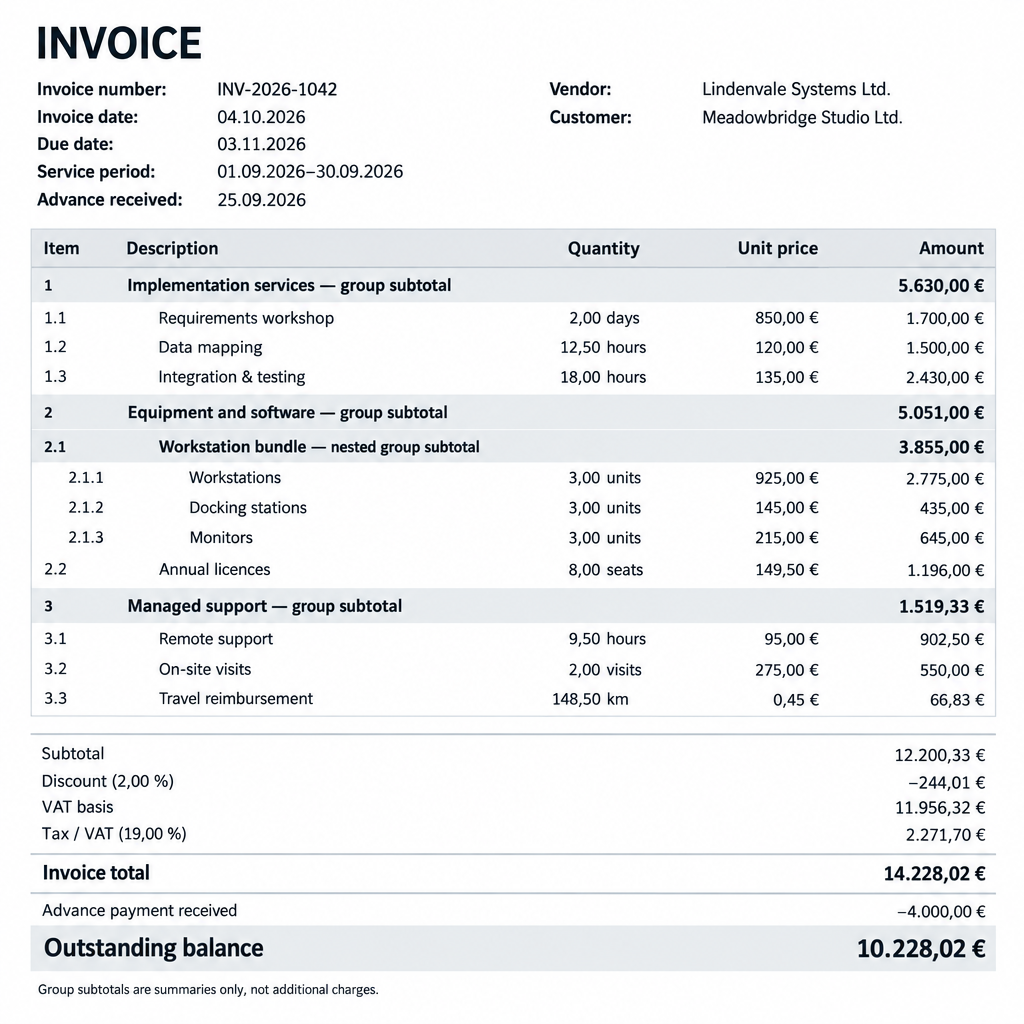
Consider an invoice with a subtotal, tax, an invoice total, an outstanding balance, and nested line items. Finding a number is not the hard part. The extraction must distinguish what each amount means, associate a quantity and price with the correct line item, and interpret dates and numbers in the document context.
That understanding starts with data, not just a schema. We build these analyzers from high-quality, representative examples for each supported document family, covering variations across regions, layouts, and business scenarios. The aim is to reflect on the real-world distribution of documents the analyzer will encounter.
The invoice sample below illustrates two challenges:
- The requested amount is easy to confuse with another total.
- Values need locale-aware normalization.
A simpler document parser may output a valid numeric field attached to the wrong amount.
That is where a document-family baseline adds value. We engineer efficient, reliable ways to combine that foundation with an LLM’s general knowledge and semantic capabilities. Layout and document-specific patterns help locate candidate values; semantic understanding helps determine what those values mean and which field they belong to.
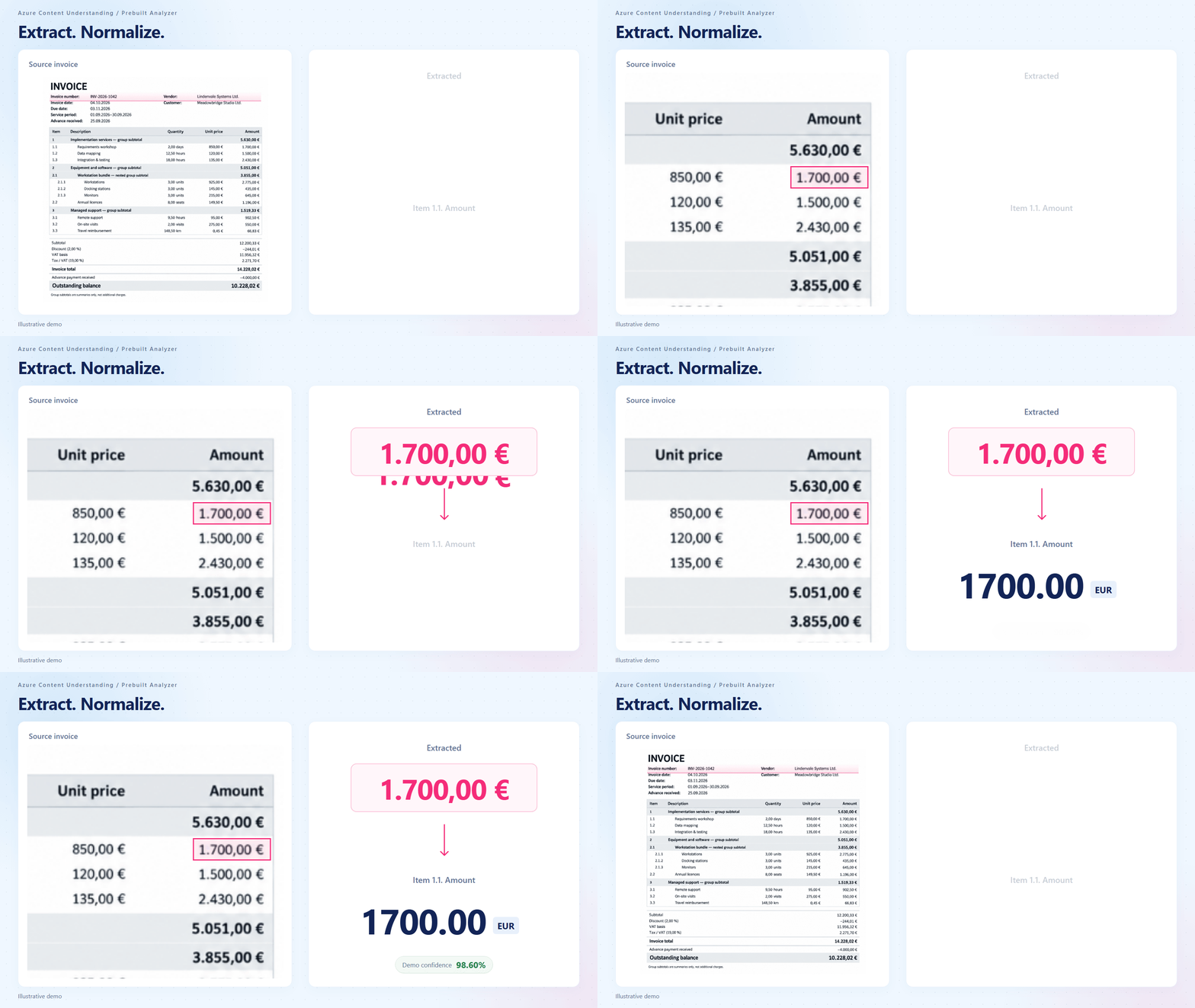
The prebuilt-invoice analyzer distinguishes the correct value for the requested field, normalizes it based on the detected locale, and returns it in a structured format with a confidence score and grounding evidence. When the document type and fields fit, developers can begin from that baseline instead of building the extraction approach from scratch.
Other postprocessing uses the same context to format values and correct errors when the evidence supports a correction. For example, if OCR substitutes a period for a thousands-separating comma, $1,000 may be read as $1.000. Parsing the latter as a decimal changes the value by a factor of 1,000. Correcting it requires the document’s numeric conventions and surrounding evidence.
A W-2 illustrates why both location and semantic meaning matter. The W-2 prebuilt analyzer separates the employer’s name and address in box c, even when the text spans multiple lines.

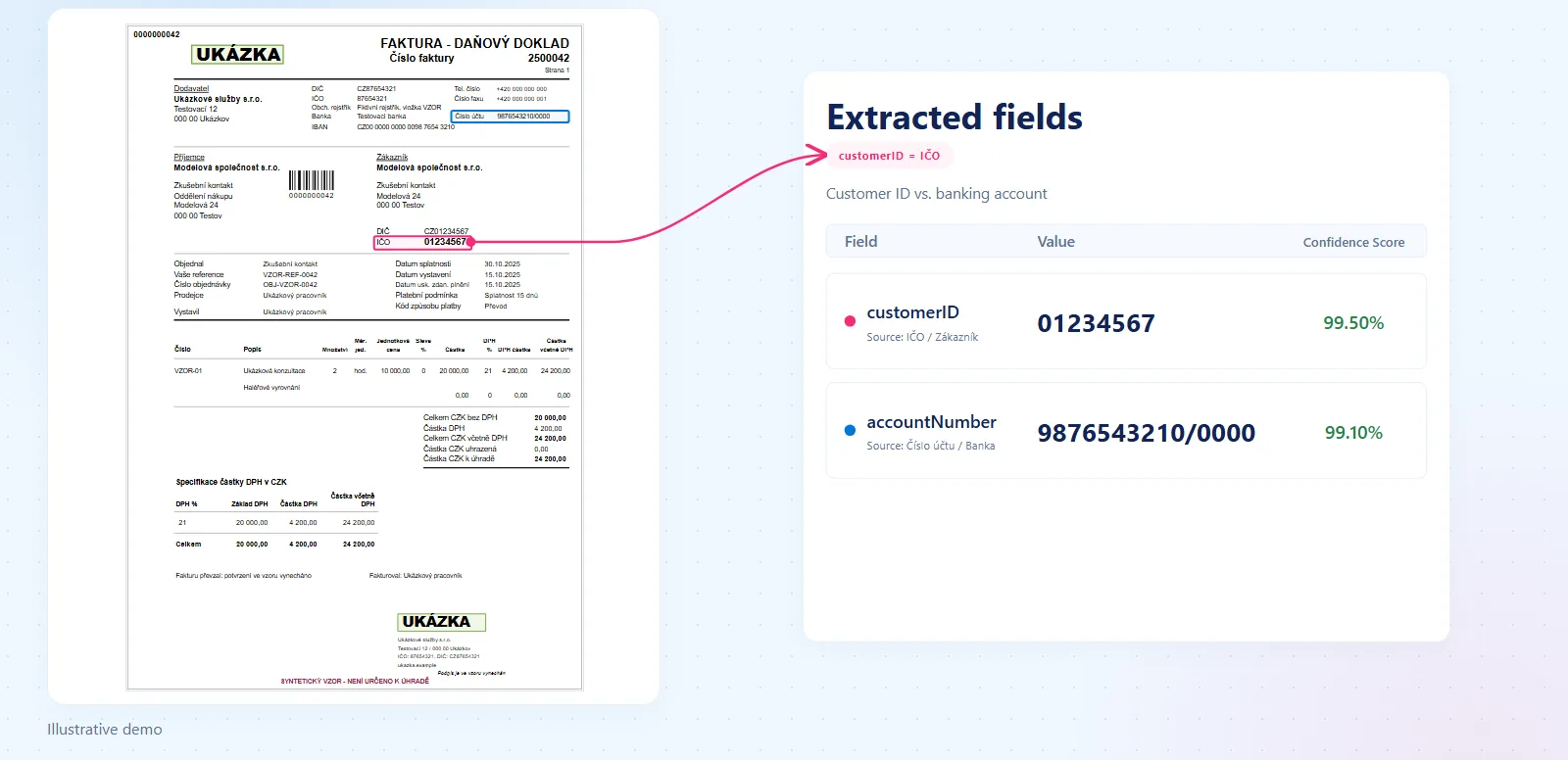
Identifiers pose a similar challenge: a bank account, a company registration ID, and a VAT ID serve different business purposes and must each be associated with the right party. In a Czech invoice, for example, a simpler extraction tool may have difficulty distinguishing Číslo účtu (account number) from IČO (ID number) in the customer block. Knowledge of the document type helps the analyzer use that context to distinguish the roles of these identifiers.
Composed solutions
Domain knowledge also helps when a workflow receives more than one document type.
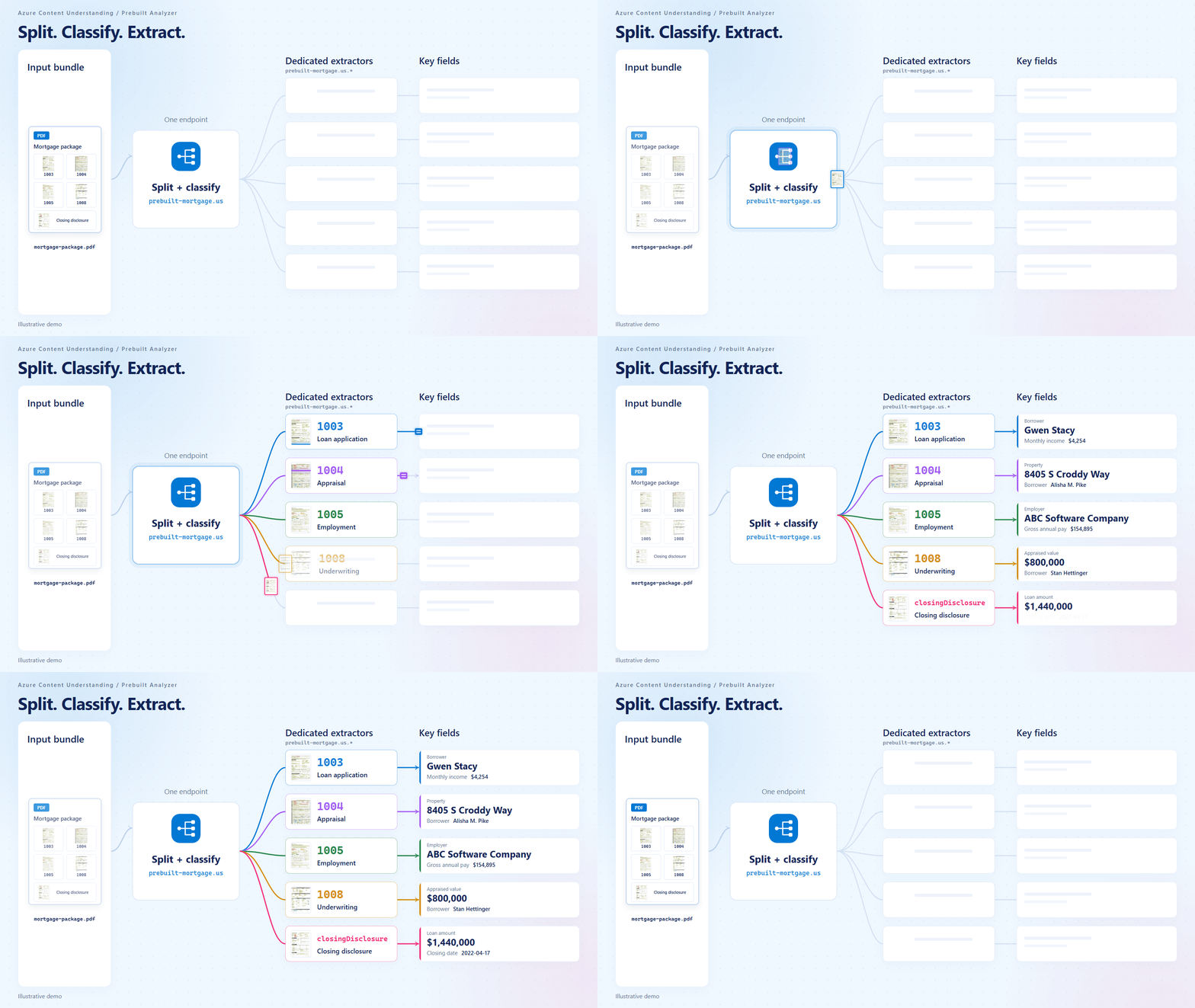
Our domain-specific analyzer catalog includes composed solutions for procurement, US tax, and US mortgage intake, where documents with different purposes and formats need to be identified before extraction.
Composed prebuilt analyzers combine classification and routing with specialized extraction. Send each document to a family-level analyzer, and it classifies the document’s segments and routes them to the appropriate extractor and schema.
For example, a mortgage intake service can submit each incoming file to the prebuilt-mortgage.us analyzer rather than relying on filenames or maintaining its own form classifier. Recognized forms are routed to their specialized analyzers, leaving the application to validate the results and handle exceptions.
What the tax-form benchmark shows
Packaging domain intelligence is only useful if that intelligence can be applied economically at runtime. Advanced Contextualization is our latest approach to doing that for supported prebuilt analyzers, improving the balance of quality, cost, and latency.
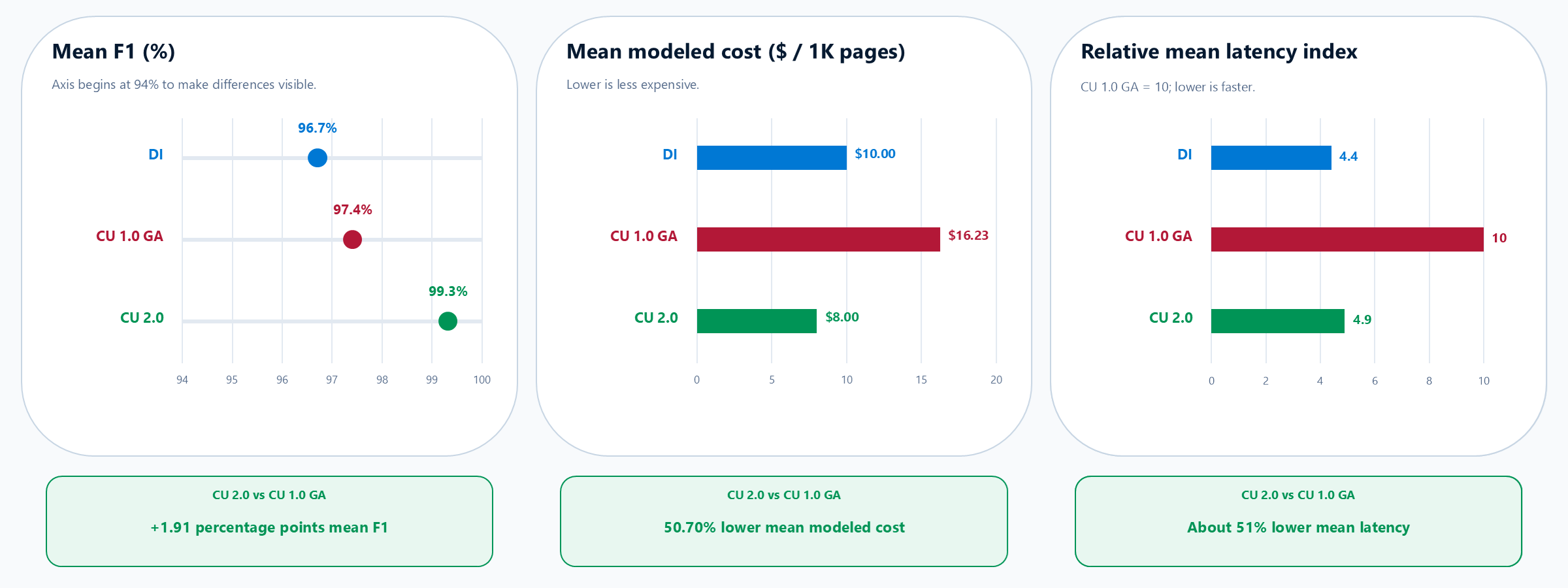
To measure the impact, we evaluated the latest generation of our prebuilt tax analyzers across 19 US tax-form categories. The benchmark compares Azure Document Intelligence, Azure Content Understanding 1.0 GA, and Azure Content Understanding 2.0 Preview with Advanced Contextualization, using category-level F1 scores, modeled cost, and average latency.
The equal-weight means of the 19 reported category values are:
| System | Mean F1 | Mean modeled cost per 1,000 pages | Mean latency index (ACU 1.0 GA = 10) |
|---|---|---|---|
| Azure Document Intelligence | 96.71% | $10 | 4.4 |
| Azure Content Understanding 1.0 GA | 97.41% | $16.23 | 10 |
| Azure Content Understanding 2.0 Preview | 99.32% | $8 | 4.9 |
Compared with 1.0 GA, Azure Content Understanding 2.0 Preview improved the equal-weight mean F1 by 1.91 percentage points, reduced mean modeled cost by 51%, and lowered mean latency by 51%. Compared with Azure Document Intelligence, its mean F1 was 2.61 percentage points higher, modeled cost was 20% lower, and mean latency was 10% higher.
The category-level results matter as much as the averages. Azure Content Understanding 2.0 Preview recorded higher F1 than 1.0 GA in 17 categories, was faster in 18, and had a lower modeled cost in all 19.
These cost figures are modeled benchmark estimates. Actual cost depends on the applicable content-extraction and contextualization meters, Foundry model usage, and current rates. Use the API’s usage values with the current pricing guidance to estimate the cost of your workload.
A complex tax example: 1099 Combo
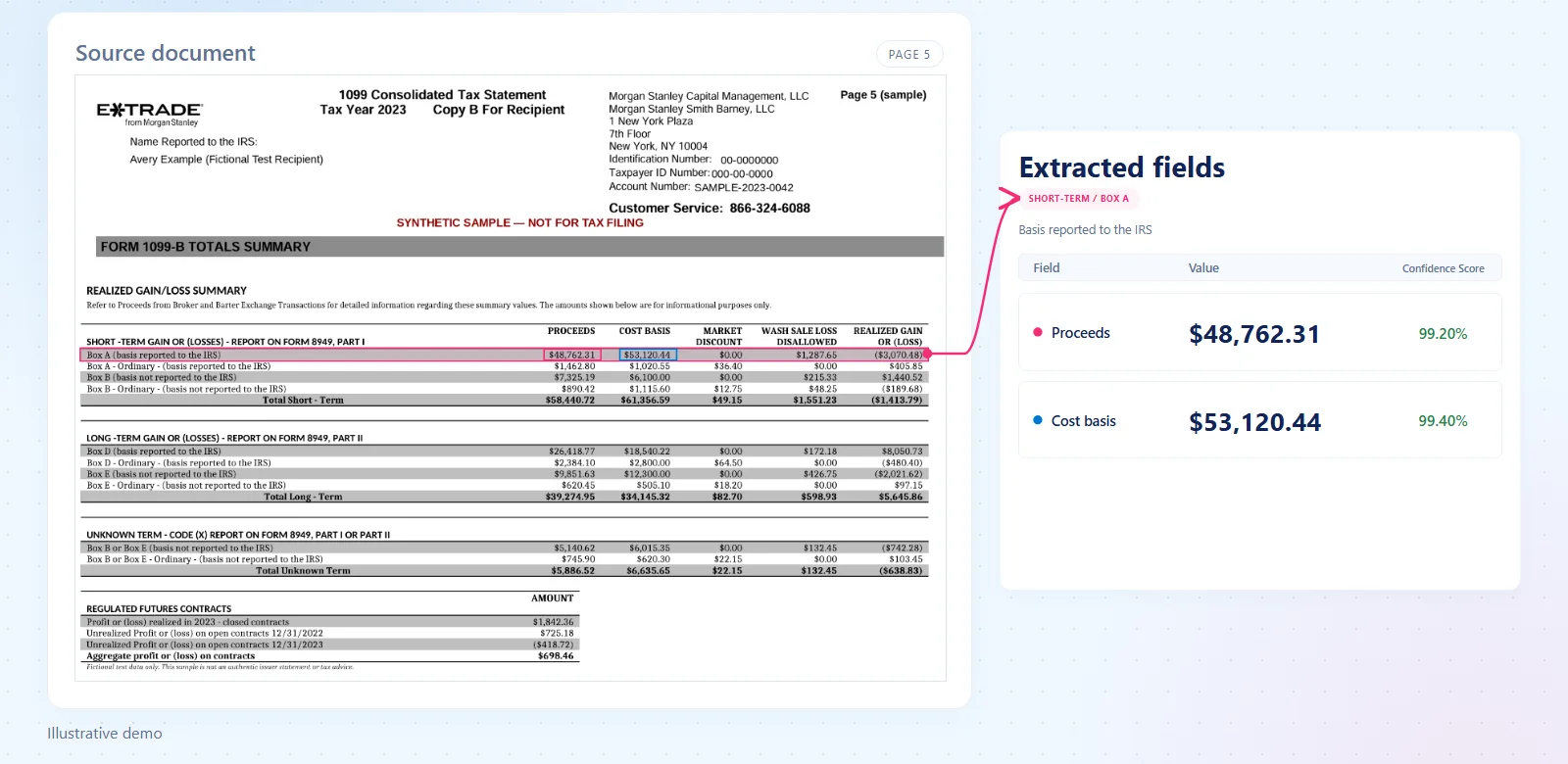
The benchmark summarizes performance across tax-form categories. To see what reliable extraction requires within a complex document, consider a consolidated 1099 statement, or 1099 Combo. A single brokerage packet can combine multiple tax forms, dense tables, and formats that vary by issuer and tax year.
Representative data reveals these variations, but a purely rule-based approach can turn into a growing set of layout-specific exceptions. A new issuer format or tax-year revision can add more rules to maintain. An LLM brings semantic flexibility but can still misinterpret reading order or lose the association between table headings, rows, and amounts.
Our 1099 Combo prebuilt analyzer in 2.0 Preview combines domain rules, layout signatures, and LLM semantic understanding to provide the context needed to associate each line value with the correct row, column, and output field.
Try it with your document family
Find a prebuilt baseline
The prebuilt analyzer catalog covers procurement documents, US tax forms, identity documents, financial statements, mortgage documents, contracts, and personal records. Start with the document family and field schema closest to your workflow.
Follow a tutorial, then test your own documents
You can get started with a prebuilt analyzer either through the UI or in code. First, follow the Content Understanding Studio quickstart to connect a Foundry resource and configure the required model deployments before analyzing your own documents.
Choose the next guide based on what you want to do:
- Try prebuilt analyzers in Studio to inspect a document and its extracted fields.
- Use the REST API to integrate analysis and result retrieval into your application. Use the preview API version for preview-only analyzers.
- Create a custom analyzer as an alternative when a prebuilt does not cover your workflow.
To see whether a prebuilt fits, test it against the workflow you intend to run:
- Select the prebuilt analyzer for your document family in Azure Content Understanding Studio.
- Run a representative mix of clean digital files, scans, and layout variants.
- Compare each value with expected results, inspect grounding and confidence, and apply your business validation rules.
- Record field-level quality, completion rate, latency, and the API’s
usagevalues for contextualization and model tokens. - Repeat analysis on the same files to measure consistency. Then set validation and human-review thresholds based on business risk.
For repeatable comparisons, use the same API version and analyzer configuration across runs and record them alongside your results.
Have an idea for a new form?
If your document family is not yet covered, tell us what would make a useful prebuilt. We are always looking for opportunities to build new solutions, so share the scenario in the comments or reach out to us!
A schema defines the expected output; domain intelligence helps determine which evidence belongs to each field. Advanced Contextualization is designed to improve extraction quality, reliability, and cost efficiency for supported prebuilt solutions. We are just getting started with enabling Advanced Contextualization for prebuilt solutions, so follow Azure Content Understanding What’s New for product updates.


0 comments
Be the first to start the discussion.