

Document-processing tools can appear straightforward when every input follows a predictable format. Production workloads are rarely that tidy. Invoices arrive in different layouts, contracts hide important facts in prose, and a single business process can span PDFs, Office documents, images, audio, and video.
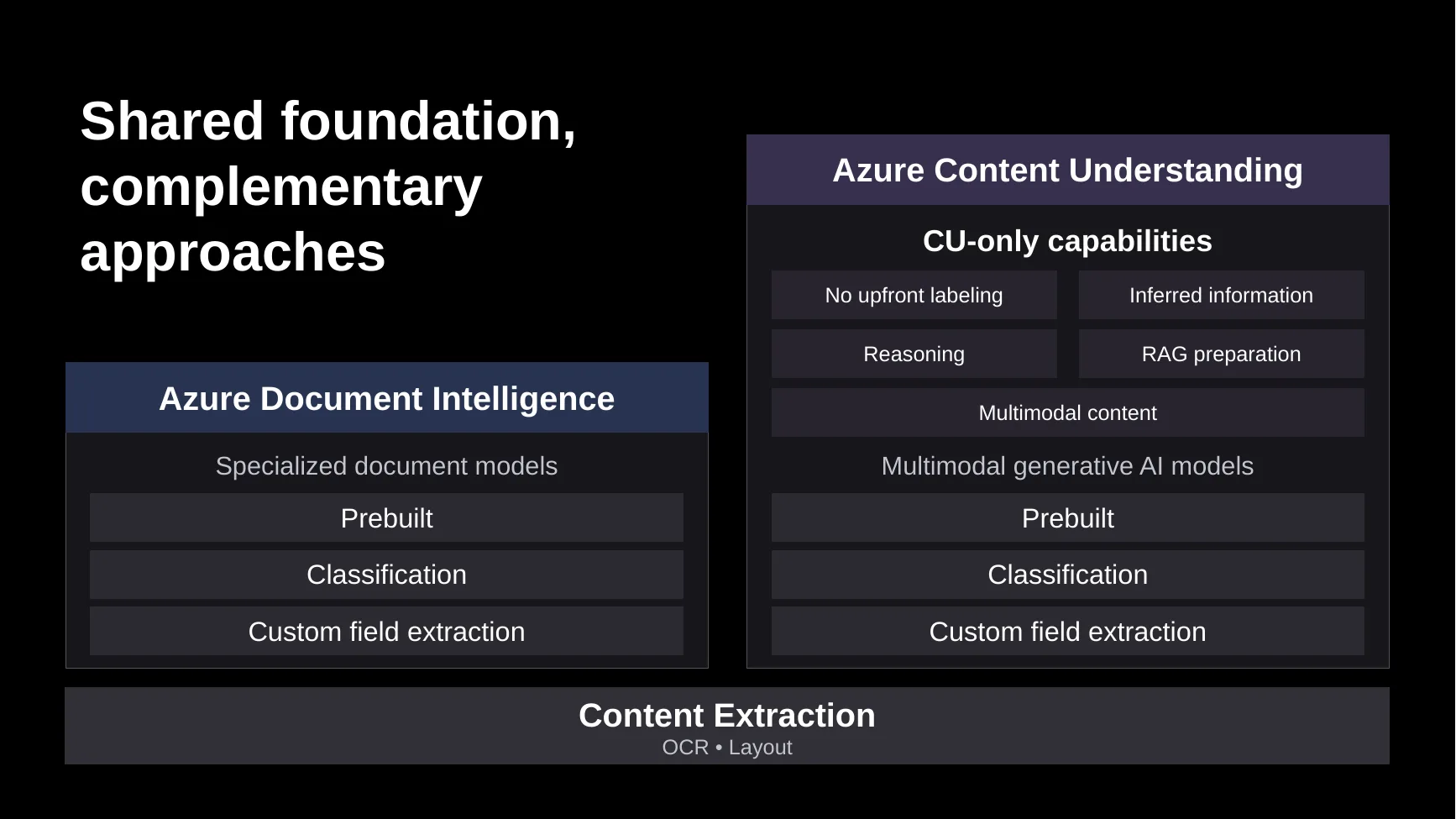
The right approach affects extraction quality, labeling effort, latency, cost, deployment options, reasoning and grounding, and the amount of custom pipeline code you need to maintain. Azure Document Intelligence and Azure Content Understanding share foundational content extraction capabilities such as OCR and layout analysis. On top of this foundation:
- Azure Document Intelligence (ADI) uses specialized document models for classification and field extraction and is a proven choice for many structured and form-oriented document-processing workloads.
- Azure Content Understanding (ACU) combines content extraction with generative AI capabilities. It is particularly useful for high-variation or unstructured content, custom extraction without upfront labeling, inferred information, reasoning, RAG preparation, and multimodal content.
There is no universal rule that one service is always the better choice. The right starting point depends on the workload. If an existing Azure Document Intelligence workload meets its production requirements, keep it. Evaluate Azure Content Understanding when expanding into scenarios that current solution does not address well, such as high document variation, unstructured extraction, reasoning, RAG, or multimodal content.
This guide explains how the services differ under the hood, where each one is a strong starting point, and how to evaluate them against the outcomes that matter to your application.
Start with the workload
For a new workload, ask:
- Is the content structured, semi-structured, or unstructured?
- Are the required fields stated explicitly, or must they be inferred?
- Does an established prebuilt model cover the document type and required schema?
- Are representative labeled examples available?
- How much variation exists across layouts, languages, and document sources?
- Does the workload involve documents only, or also images, audio, and video?
- Does the solution require cloud deployment, containers, or an air-gapped environment?
- What quality, latency, cost, and human-review thresholds must the system meet?
The following table provides a starting point:
| Scenario | Recommended starting point | Why |
|---|---|---|
| Existing ADI workload meeting production requirements | Continue with ADI | Avoid unnecessary change to a proven production workflow. |
| OCR or Layout extraction for a new cloud workload | ACU prebuilt-read or prebuilt-layout | The newer analyzers have richer structural output, synchronous and asynchronous APIs, higher accuracy, lower latency, and lower per-page pricing for Layout. |
| Standard structured document covered by a mature prebuilt, such as an invoice, receipt, ID, tax form, or mortgage form | ADI prebuilt model or ACU 2026-06-01-preview | Specialized prebuilt models still have cost advantages at similar accuracy.
Customers open to use the preview version of ACU could try prebuilt analyzers with Advanced Contextualization for higher accuracy and lower cost. |
| Custom extraction with no labeled examples | ACU custom analyzer | Supports zero-shot field extraction leverage Generative AI’s world knowledge. |
| Highly structured custom forms with representative labeled examples | ADI custom model | Specialized document models are excellent for leveraging both text and layout information to achieve high accuracy. |
| High-variation or unstructured custom extraction | ACU custom analyzer | Generative AI is great for unstructured document understanding. |
| Fields requiring inference, reconciliation, calculations, or multistep reasoning | ACU custom analyzer | Supports generative and agentic analysis over document evidence. |
| RAG-ready document preprocessing | ACU RAG analyzer | Produces structure-aware Markdown and retrieval-oriented output, at better quality and lower cost. |
| Images, audio, video, or mixed-media processing | ACU | Extracts structured information across document, image, audio, and video modalities. |
| On-premises or air-gapped processing | ADI containers | Provides the container deployment option. |
The recommendations reflect internal benchmarks based on the latest APIs at the time of publication. We recommend validating representative content and the success criteria defined for your workload.
Why capabilities overlap
Both services can perform document OCR, layout analysis, and field extraction. Some document types, including invoices, receipts, identity documents, tax documents, and mortgage documents, also have relevant capabilities in both portfolios.
The overlap does not mean that the implementations behave identically. When both services support a scenario, choose based on the required fields, operating constraints, and evaluation results rather than the document category alone.
For example:
- Use an Azure Document Intelligence prebuilt invoice model when its established schema and quality meet the business need.
- Consider an Azure Content Understanding analyzer when the workflow requires a substantially customized schema, greater variation across inputs, inferred values, or reasoning beyond direct extraction.
- If either approach appears suitable, evaluate both against the same representative documents.
Current guidance does not require successful Azure Document Intelligence workloads to migrate. Existing APIs, endpoints, SDKs, and billing remain separate, so teams can introduce Azure Content Understanding selectively when a new scenario benefits from it.
A shared foundation, different extraction approaches
With this context in place, let’s examine each solution more closely and see how their distinct technical approaches shape different outcomes.
OCR and document layout
Both services turn raw document content into text and structural elements such as pages, paragraphs, tables, figures, selection marks, and coordinates. For this type of processing task, we recommend Azure Content Understanding for new cloud workloads.
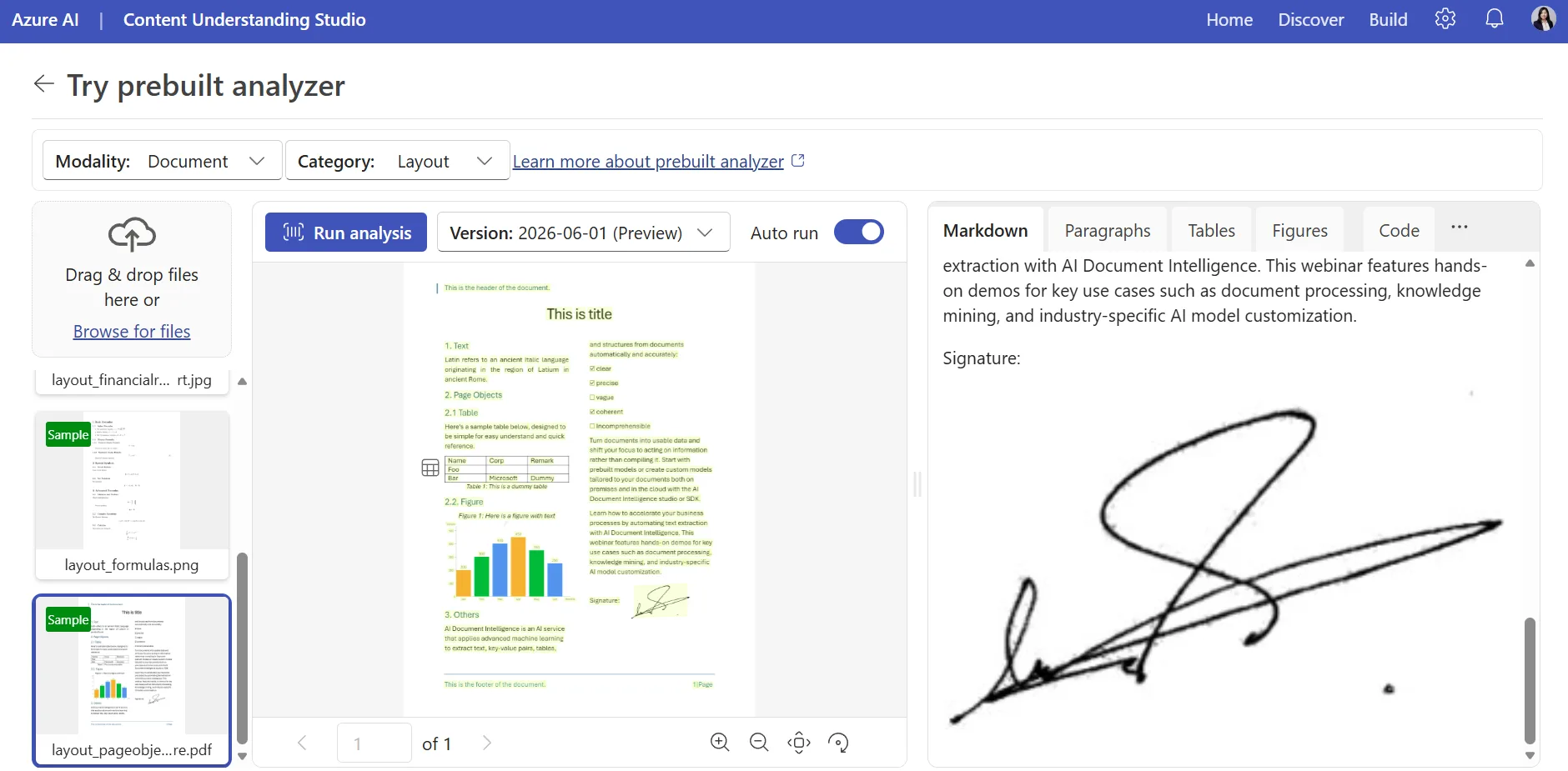
Azure Content Understanding document output can include structure-preserving Markdown together with words, paragraphs, sections, formula, tables, figures, signatures, hyperlinks, bar code, QR code, annotations, metadata, and page-level information. This list and supported file types continue to grow with evolving business needs.
Azure Content Understanding’s prebuilt-read and prebuilt-layout analyzers use specialized OCR and layout models; they do not require a language model or embedding model and produce deterministic results. Prebuilt-read provides foundational OCR, while prebuilt-layout adds richer layout and structure extraction.
Field extraction
The primary architectural difference appears in field extraction.
Azure Document Intelligence uses purpose-trained document models. These models learn visual and two-dimensional relationships in forms and documents, including labels, values, rows, columns, and repeated structures. This approach is a strong fit when:
- Document structure is stable or varies within a bounded range.
- Required values are explicitly present in the document.
- Representative labeled samples are available for custom model training.
- Consistent, repeatable results are a top priority.
Azure Content Understanding, on the other hand, uses generative models for schema-based field extraction. This approach is useful when:
- Layouts and language vary substantially.
- Documents are semi-structured or unstructured.
- Fields are defined by meaning rather than fixed visual positions or layouts.
- Answers must be inferred or synthesized from multiple passages.
- You want to get started without labeling a training set.
- The workload requires information from figures, charts, or other visual content.
Azure Content Understanding combines text, layout, visual structure, schema definitions, and other document signals to ground extraction. You can begin with a field schema and later add labeled examples or knowledge sources for difficult cases. Confidence and source grounding are available for document fields, including generative fields, and supported typed values such as dates and numbers are normalized to canonical forms.
Content Understanding 2.0 preview introduces advanced contextualization, which learns from multiple labeled examples to determine how each field can be extracted most efficiently and reliably, as well as an agentic mode that uses an iterative reasoning loop to handle more complex extraction tasks. We will explore these capabilities in greater depth in upcoming blog posts.
Architecture provides useful guidance, but it is not a strict decision boundary. Actual results vary by document population, field definition, model configuration, and success criteria.
Broader content analysis
Azure Content Understanding extends the analysis model beyond document fields. It also provides analyzers for images, audio, and video; produces Markdown and chunked output for search and RAG; and can reason across text, tables, figures, and related evidence.
Use these capabilities when the business process extends into knowledge ingestion, retrieval, mixed-media analysis, or answers that must be constructed from several pieces of evidence.
Common workload patterns
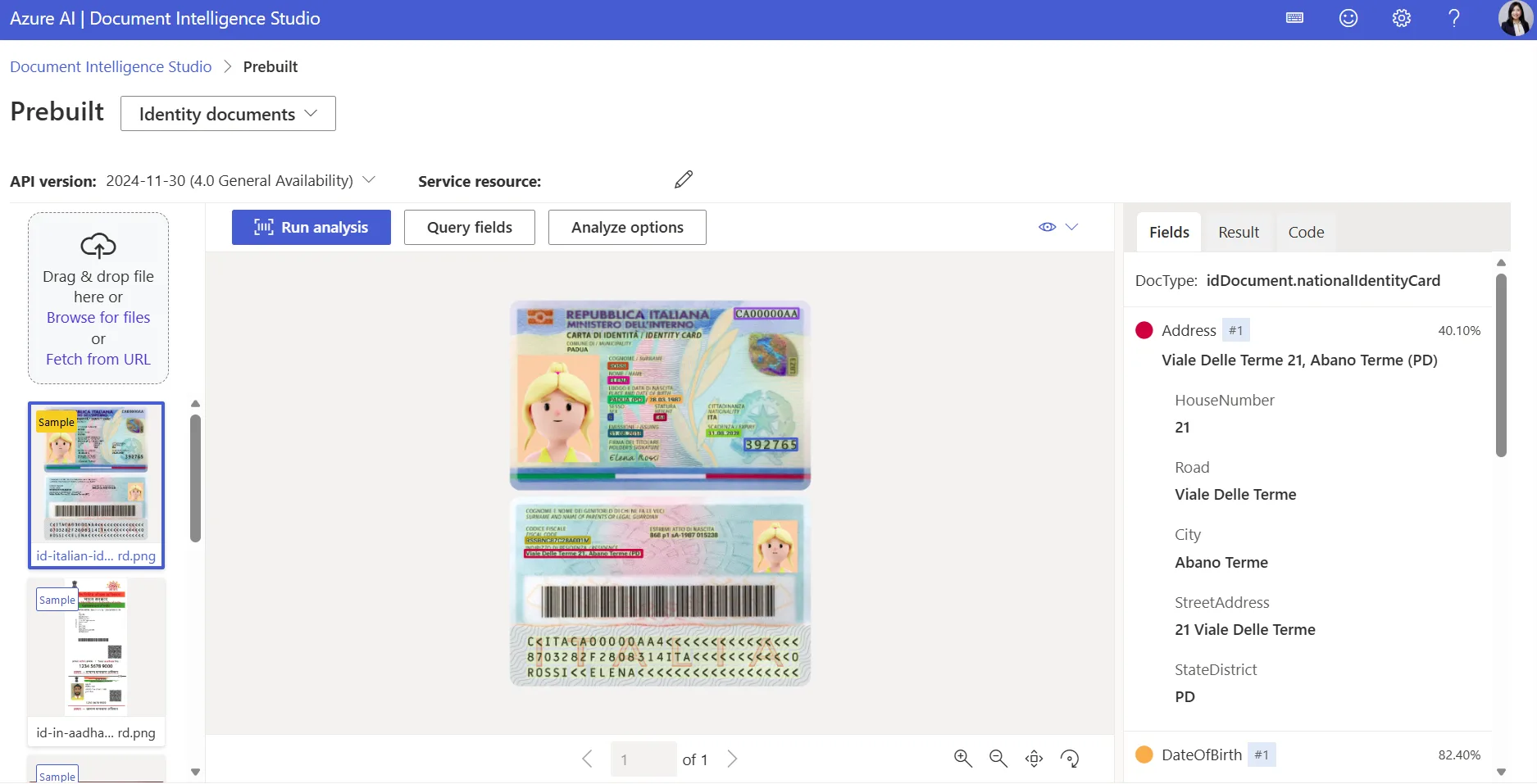
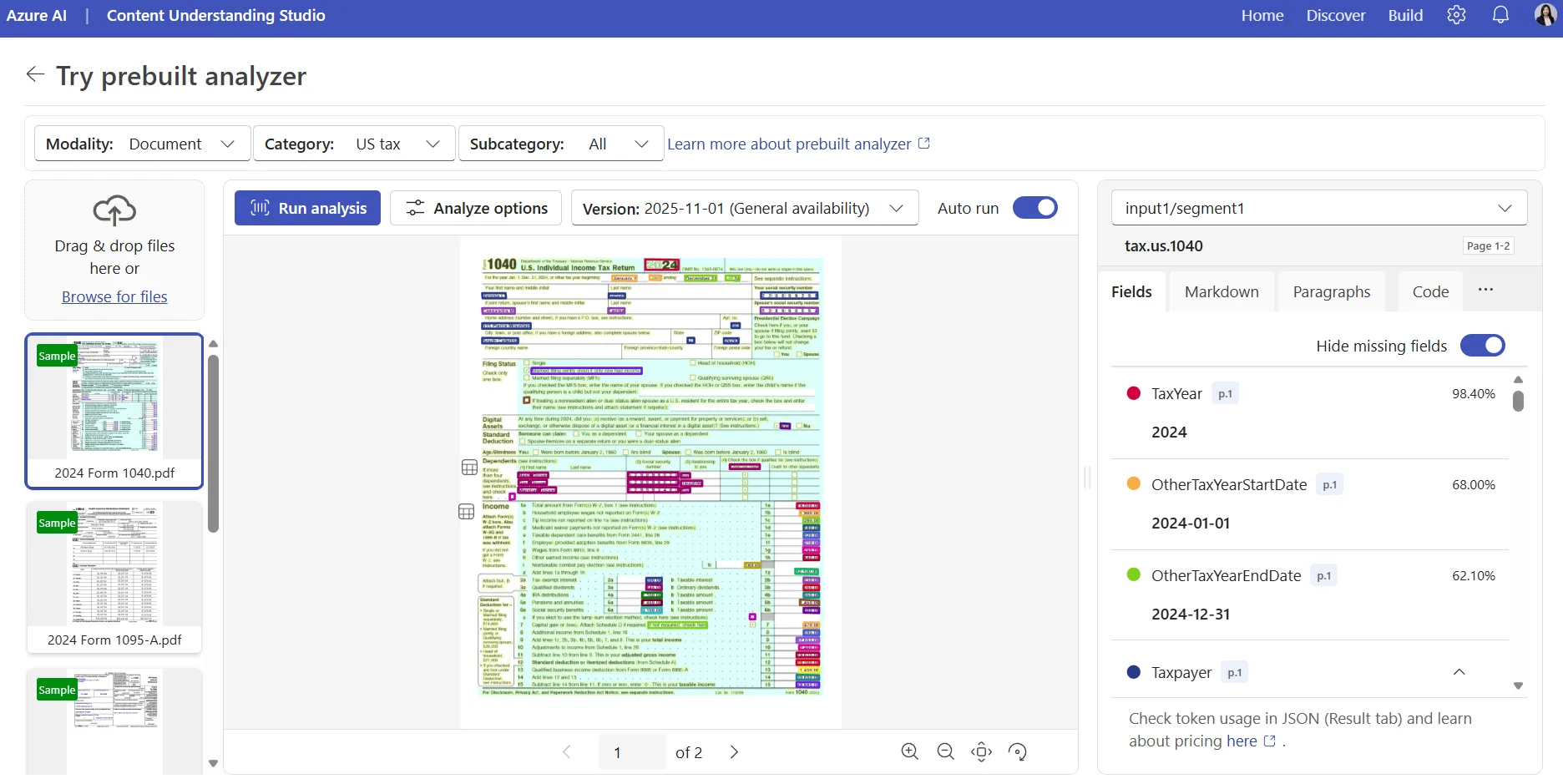
Standardized forms
Examples include tax forms, fixed mortgage applications, passports, identity documents, and organization-specific applications.
If an Azure Document Intelligence prebuilt model covers the required document type and fields, start there. For a custom but highly stable form, an Azure Document Intelligence custom model can learn from representative labeled samples. Consider Azure Content Understanding when the schema differs substantially from an existing prebuilt, the result includes inferred information, or beginning without labels is important.
A small number of known variants
Examples include insurance claims from a few regions, expense reports from several departments, applications from a known set of programs, and annual form revisions.
Both approaches may be viable. Azure Document Intelligence is a strong candidate when layouts are bounded, and representative labels are available. Azure Content Understanding is attractive when rapid schema iteration or starting without labeled samples matters more.
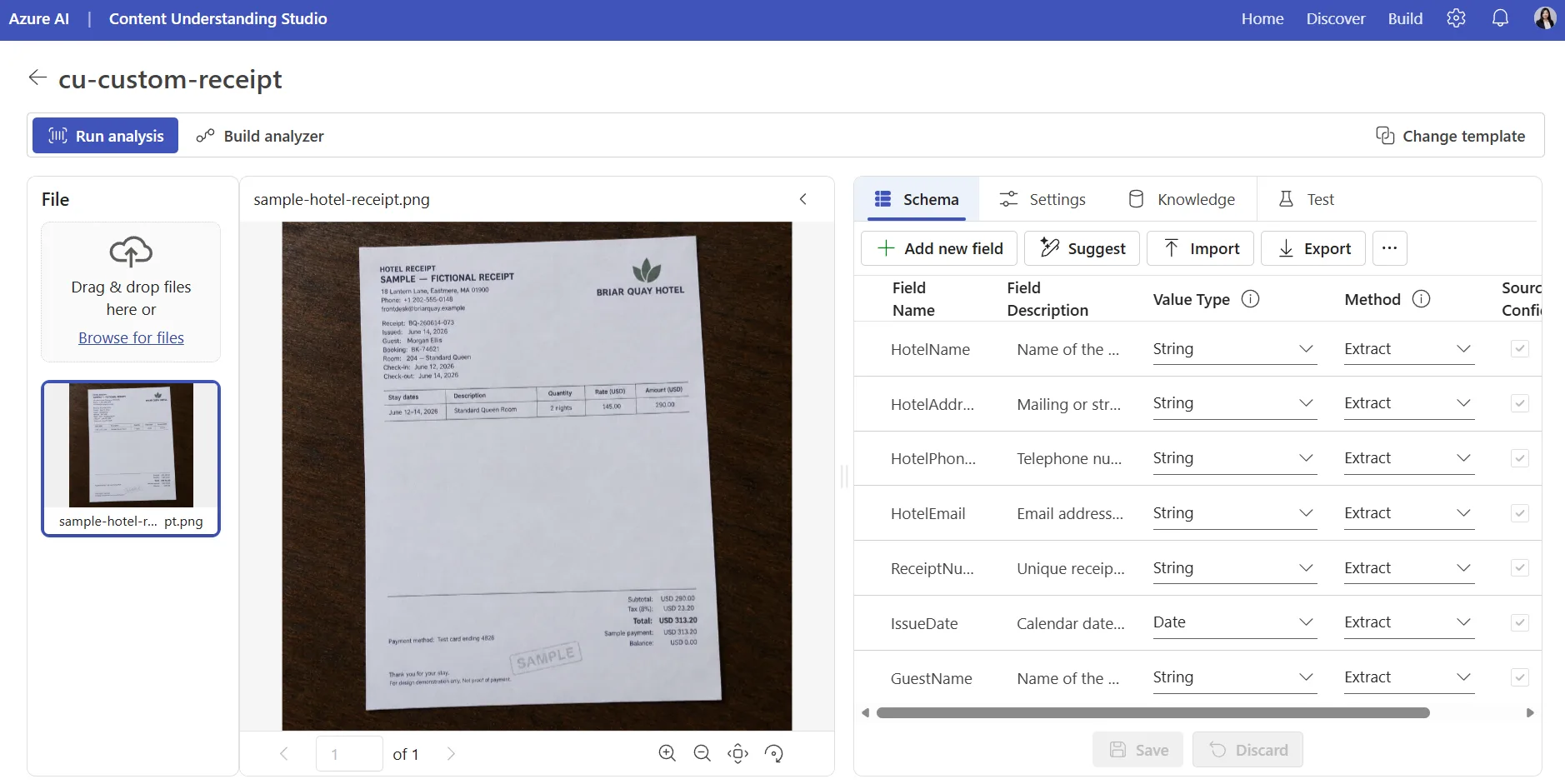
High-variation, semi-structured documents
Examples include invoices from many vendors, international receipts, purchase orders from different suppliers, delivery notes, and student transcripts from many institutions.
Do not decide based on the document category alone. If an Azure Document Intelligence prebuilt covers the required schema and performs well across the full distribution, it may remain the simplest solution. If the schema is business-specific, document variation is high, or labels are unavailable, begin with an Azure Content Understanding custom analyzer.
Unstructured documents
Examples include contracts, investment reports, research papers, policies, referral letters, and narrative business records.
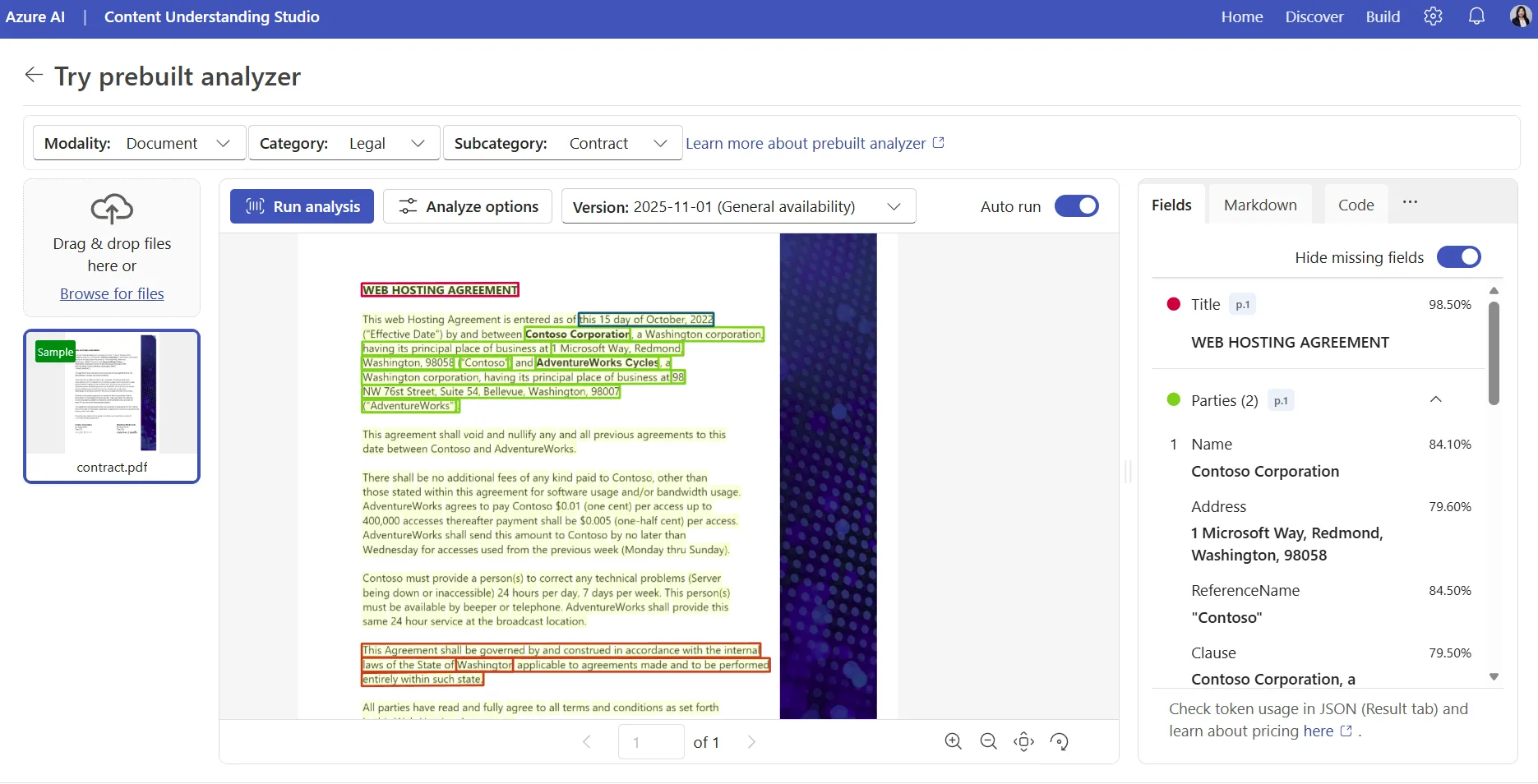
Azure Content Understanding is generally the better starting point when required information is expressed in prose, distributed across sections, or inferred rather than copied from a fixed location. For legal agreements, Azure Content Understanding provides a prebuilt contract analyzer; a custom analyzer can tailor the schema to a specific business process.
Reasoning-intensive document analysis
Examples include reconciling totals in financial documents, calculating values that are not directly stated, checking internal consistency, evaluating whether specified conditions are satisfied, relating a contract to amendments in the same file, and combining evidence from tables, figures, and text.
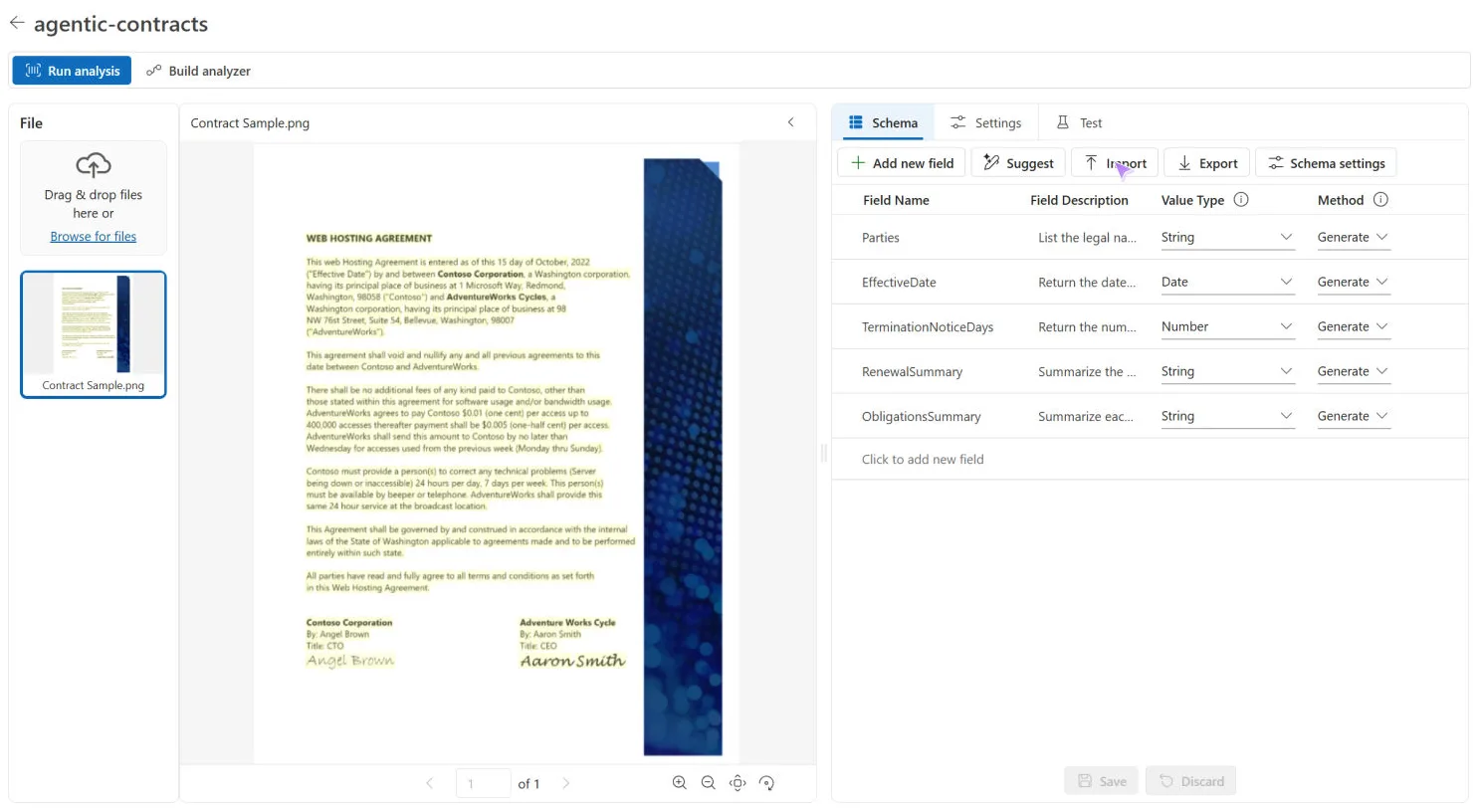
For these scenarios, consider Azure Content Understanding agentic mode. Agentic mode supports multistep reasoning, calculations, validation, visual analysis, and structured, schema-aligned output. Use it for complex analysis when standard extraction is insufficient, rather than as the default for straightforward field extraction. Agentic mode is currently available in preview.
Mixed-media and RAG scenarios
Examples include onboarding packages with PDFs and ID images, compliance cases with contracts and call transcripts, claims containing forms, notes, images, and audio, or knowledge retrieval scenarios.
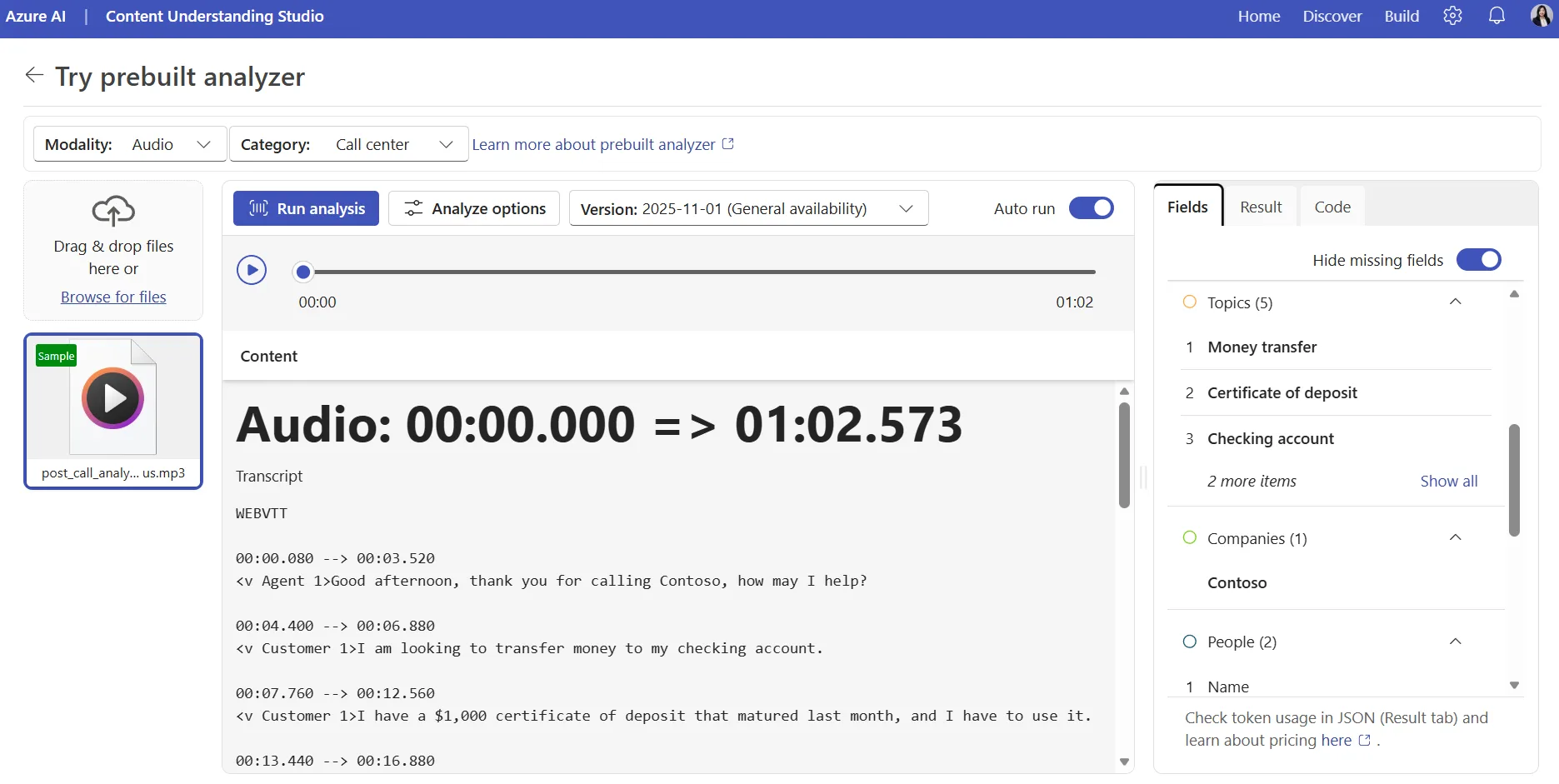
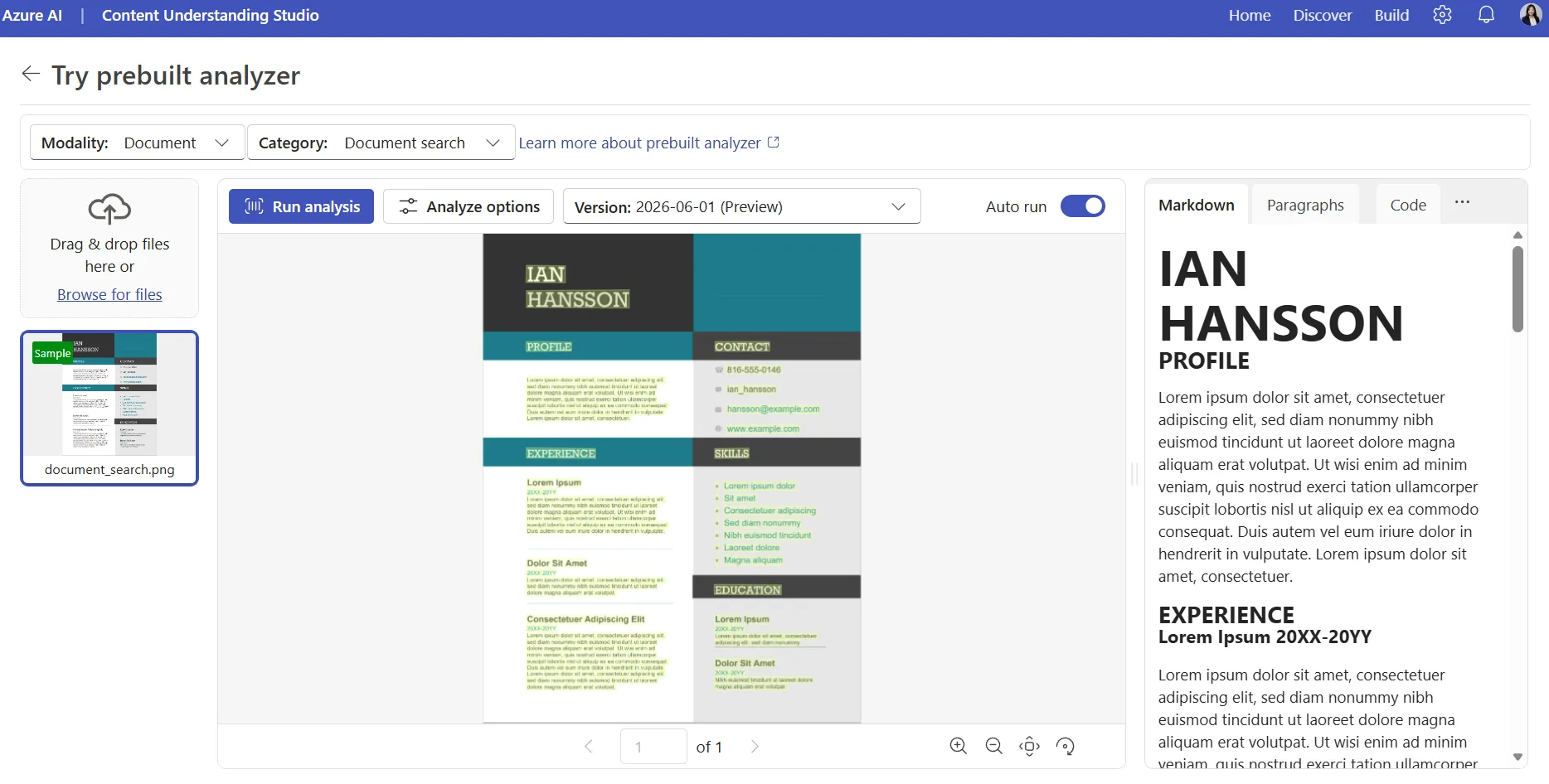
Azure Content Understanding provides analyzers for images, audio, and video, reducing the custom orchestration needed to process each modality with a separate extraction pipeline. It also provides RAG analyzers that extract layout-aware Markdown, analyze figures and charts, produce summaries, and create chunked output for embedding and indexing. Use these capabilities when the business process extends beyond structured document fields into search, retrieval, knowledge ingestion, or mixed-media analysis.
A closer look at Read and Layout
Read (OCR) and Layout are where the services overlap most directly.
For new cloud-based OCR and Layout workloads, begin by evaluating Azure Content Understanding’s prebuilt-read and prebuilt-layout analyzers. Azure Content Understanding Layout produces structural output that can include words, paragraphs, sections, formula, tables, figures, signatures, hyperlinks, bar code, QR code, annotations, metadata, and page-level information.
Azure Document Intelligence Layout may remain appropriate when:
- It is already deployed and meeting requirements.
- A required capability is specific to its response or integration.
- The workload depends on existing Azure Document Intelligence operational characteristics.
- Container deployment is required.
- Service limits or supported inputs favor Document Intelligence for the particular workload.
Published prices, limits, supported elements, and preview capabilities can change. To compare the current pricing and service-limit documentation, see Document Intelligence Layout and Document Intelligence pricing, Content Understanding Layout and Content Understanding pricing.
Evaluate business outcomes, not only exact string matches
Repeatability is operationally useful, but it is not the same as accuracy. A system can consistently return the wrong value, while two correct outputs can differ in formatting.
For example, a date might appear as:
- January 1, 2025
- 1/1/2025
- 2025-01-01
Exact-string evaluation can treat them as different even though they represent the same business value. Azure Content Understanding automatically normalizes supported typed fields, including dates and numbers, into canonical values.
That is again why we invest in both approaches and encourage customers to compare them using metrics connected to the business process:
- Field-level semantic accuracy
- Required normalization and validation
- Error and exception rates
- Human-review rate
- Straight-through-processing rate
- Classification and routing accuracy
- Latency
- Total cost
- Operational reliability
- Effort required to build and maintain the solution
For an invoice workflow, success might mean that amounts reconcile and documents are routed correctly. For a contract workflow, it might mean accurately identifying parties, dates, obligations, and jurisdiction.
Test against representative documents, including difficult cases and expected production variation. Average accuracy alone can hide serious failures on particular document types or subpopulations.
Real-world example: FinHero
FinHero is a Malaysia-based fintech developing AI-powered financial infrastructure, document intelligence, and alternative data capabilities. They use both Azure Document Intelligence and Azure Content Understanding in their document-processing pipelines, selecting the approach based on document type and business requirements.
Its receipt evaluation illustrates why the decision should be workload-specific. Azure Document Intelligence prebuilts can work well for common standardized receipt formats. A trained custom model can provide consistent extraction for known variants, while an Azure Content Understanding custom analyzer can define a tailored schema for concepts such as embedded discounts, nested add-ons, rounding adjustments, and service charges. By pairing that schema with a cost-efficient model configuration, the team achieved the balance it needed: high-quality extraction and cost-efficient processing tailored to its data requirements.
The practical lesson is not that one service is universally preferred. Different document types and extraction requirements can justify different approaches within the same business process.
“Azure Document Intelligence and Azure Content Understanding have given FinHero a powerful foundation to automate high-quality extraction and structuring of financial documents, while Azure’s broader cloud platform supports the scalability, security and reliability we need for regulated financial services.
With Microsoft’s technology and support, FinHero is building toward becoming one of Malaysia’s first AI- and cloud-native Credit Reporting Agencies.”
Top Lim
CEO & Co-Founder, FinHero
Recommended decision process
- Keep successful Azure Document Intelligence workloads in place. Reevaluate when the workload or business requirements change, not merely because another service has overlapping capabilities.
- Check for an applicable prebuilt capability. Prefer an established prebuilt when it covers the document population and required schema.
- Use workload characteristics to create a shortlist. Consider structure, variation, labels, inference, reasoning, modality, deployment, latency, and cost.
- Prototype with representative inputs. Include common documents, difficult cases, and expected production variation.
- Evaluate business-level outcomes. Measure downstream validation, exception handling, human review, reliability, and total operating cost.
- Select per document type when appropriate. A business process does not need to standardize on one extraction architecture when another approach performs better for a particular input category.
In closing
The opportunity is not simply to choose between two services, but to build a document-processing architecture that aligns each workload with the right capabilities. Azure Document Intelligence provides proven, specialized extraction for structured and form-centric scenarios, while Azure Content Understanding expands what is possible through generative extraction, contextual grounding, reasoning, RAG-ready output, and multimodal analysis.
Start with representative production content, measure the outcomes that matter to your business, and choose the approach – or combination of approaches – that delivers the best balance of quality, speed, cost, and operational simplicity. We can’t wait to see what you build next with Azure Content Understanding and Azure Document Intelligence.
Try it
- Upload representative content to the Azure Content Understanding playground in Microsoft Foundry or Azure Content Understanding Studio and inspect the output before writing integration code.
- Use Choose the right AI tool for document processing to shortlist applicable analyzers and models.
- Review the Azure Content Understanding document elements reference to understand the response elements available to the application.
- Run both shortlisted approaches against the same evaluation set and compare business outcomes, not only raw string matches.


0 comments
Be the first to start the discussion.