


“Civilization advances by extending the number of important operations which we can perform without thinking about them.” — Alfred North Whitehead
Automation is the promise of agentic document processing, but getting AI to read a document is only part of the job. The harder part comes when an extracted value starts doing something: paying an invoice, updating a policy record, moving a claim forward. This is where true value is created with automation. At that point, the application needs more than an answer. It needs to know where the answer came from and how much to trust it in order to make a smart decision.
A large insurance organization recently put this to the test working with Microsoft’s Forward Deployed Engineering team to use Content Understanding’s classification, extraction, grounding, and confidence to decide which extracted values needed the most attention from human review.
The solution delivered nearly a 50% reduction in human review burden and 75% faster form onboarding compared to previous solutions. These outcomes were enabled by 97%+ page-level classification accuracy and intelligent confidence- and grounding-based routing that focused human review on the results most likely to contain errors.
That result didn’t come from a single magic confidence score threshold. It came from understanding what confidence scores mean, then calibrating them against real, representative documents. In Azure Content Understanding, building on a decade of work on Document Intelligence, Cha Zhang argued that reliable document understanding needs a harness around the LLM, including grounding and confidence.
This post shows what that looks like in production: how confidence and grounding work, how this customer used them, and how you can try the same approach yourself.
Grounding: “Where did this come from?”
An extracted value shouldn’t be a dead end. If Content Understanding returns an Invoice Total of $14,228.02, grounding links that structured value back to the content in the document that supports it. In our latest release, we merged grounding deeper into the extraction flow. That cut average inference token usage by up to 28% and improved accuracy.
That link changes what an application can do:
- Show evidence with the result, so a reviewer doesn’t have to search the document for the source.
- Validate further using the value and its evidence together, instead of treating the value as an unsupported claim.
- Keep an audit trail from the business record back to the page it came from.
Grounding makes an extraction checkable. Confidence helps you decide which extractions are worth checking.
Confidence: “How much should I trust this?”
What a confidence score is
A confidence score is a learned estimate of how reliable a specific field result is. For supported extracted fields, it is a value between 0 and 1. Our latest refresh improved confidence score accuracy, measured by AUROC, by up to 14%.
It’s important to be clear about what the score is not. It isn’t the language model reporting how sure it feels. LLMs are notoriously overconfident about their own answers, and a model that has misread a value can describe the wrong answer just as fluently as the right one. Content Understanding instead uses a separate confidence model, trained to recognize the patterns that tend to come with correct and incorrect extractions.
How it works
For each extracted field, the confidence system looks at a range of signals that can indicate whether the result is likely to be correct:
- The document and the evidence. Where and how the value appears on the page, and what the supporting evidence that grounding located looks like.
- The field and the result. What kind of field it is, where it sits in the schema’s structure, and what the predicted value looks like.
- Labeled examples, where available. How the result compares with examples the analyzer has been given.
- The model’s own behavior. Diagnostic information from the extraction itself, such as signs of ambiguity or of a value that doesn’t line up cleanly with its field.
Those signals are fed into a separate confidence model, which produces a confidence score for that field result. The score reflects the result in context, not just the extracted text. For example, the same value can receive a different score as a top-level field than it does inside a table or object because the surrounding signals and typical error patterns are different.
So where does that confidence model come from? Microsoft trains it using Microsoft-curated data, not customer data. It is a shared, service-level model: today, Content Understanding customers use the same underlying confidence model rather than training a separate confidence model for each customer or analyzer. Microsoft updates that model periodically as part of the service. Customer data is not used to train it.
The service model is trained and tuned so its scores provide a useful signal about the likelihood that an extraction is correct. But a good global confidence score is not the same thing as a decision rule for a particular business workflow. Different document types, fields, and sources can behave differently.
That is where customer calibration comes in. Customers do not retrain the confidence model. Instead, they evaluate the model’s scores against checked examples from their own workflow to understand what those scores mean for their data, and then choose thresholds that meet their business goals. The rest of this post shows how to do that.
What the score is for
The most useful way to think about confidence is as a ranking signal for risk. Across many extractions, lower-scoring results should contain a much larger share of the errors than higher-scoring ones. AUROC measures how well the score separates right answers from wrong ones, and that’s the measure our latest refresh improved by up to 14%.
That ranking is what makes the score useful in production. You can’t review everything, so the score tells you where to look first. The question is how to turn that ranking into decisions for your documents. That’s where the customer example comes in.
A real workflow: confidence in production
We worked through this question with a large insurance organization. Microsoft’s Forward Deployed Engineering team co-built a document-processing solution with the customer’s engineers. Content Understanding first classified and segmented incoming pages by form type. Each in-scope segment then went to a form-type-specific classifier to identify its version, followed by the corresponding field-extraction analyzer.
To handle the large document catalog, the team split classification across multiple analyzers in two tiers, with segmentation enabled only in the first tier. Content Understanding v1 does not return confidence scores for classifications, so all classifications still required human review. Where a valid calibration existed for the document type and extraction configuration, the team used field-level confidence rules to populate priority labels in the human-in-the-loop (HITL) review tool. Other results stayed in standard human review. Because insurance data is sensitive, people still checked every field; the labels directed attention rather than authorizing straight-through processing. In less sensitive workflows, teams could use the same calibrated rules to send unflagged values straight through instead.
To reduce targeted review, the team took three steps.
Step 1: Start with the documents, not the score
Before you set any threshold, look at how accurate extraction is across the different kinds of documents in your workflow.
Real workflows rarely handle one uniform document. They process different forms, different versions of the same form, and documents from many sources. Extraction quality can vary a lot among them. For example:
- Form versions. The 2024 version of a tax form might extract very reliably, while the 2026 version adds a field, moves a section, or changes a table.
- Sources. Some vendors or submitters send clean, consistent documents. Others send dense, scanned, or unusual ones.
Break your human-checked results down by document type. Define document type at the level that matters for your workflow: the form or document family, version, and source, such as a customer, vendor, or submission channel. Use these groups to understand where extraction quality varies.
Calibrate on real, representative production documents with human-verified answers to capture real-world variability. Calibration applies only to the document types and sources, analyzer configuration and field schema, and underlying extraction model (LLM) evaluated. It is not a portable guarantee across other documents, analyzers, or model versions.
Step 2: Set thresholds per document type and per field
Within each document type, measure whether confidence separates correct from incorrect extractions for each field. Choose thresholds against human-checked examples and explicit business targets, then validate them on held-out documents. High overall accuracy alone does not justify a more permissive threshold, and a stricter threshold cannot compensate for a confidence signal that does not reliably distinguish errors.
Fields need the same treatment. A threshold that works well for a policy number may be a poor choice for a handwritten address or a table row. For some fields, confidence and correctness aren’t closely related enough to automate at all, and those fields stay in review.
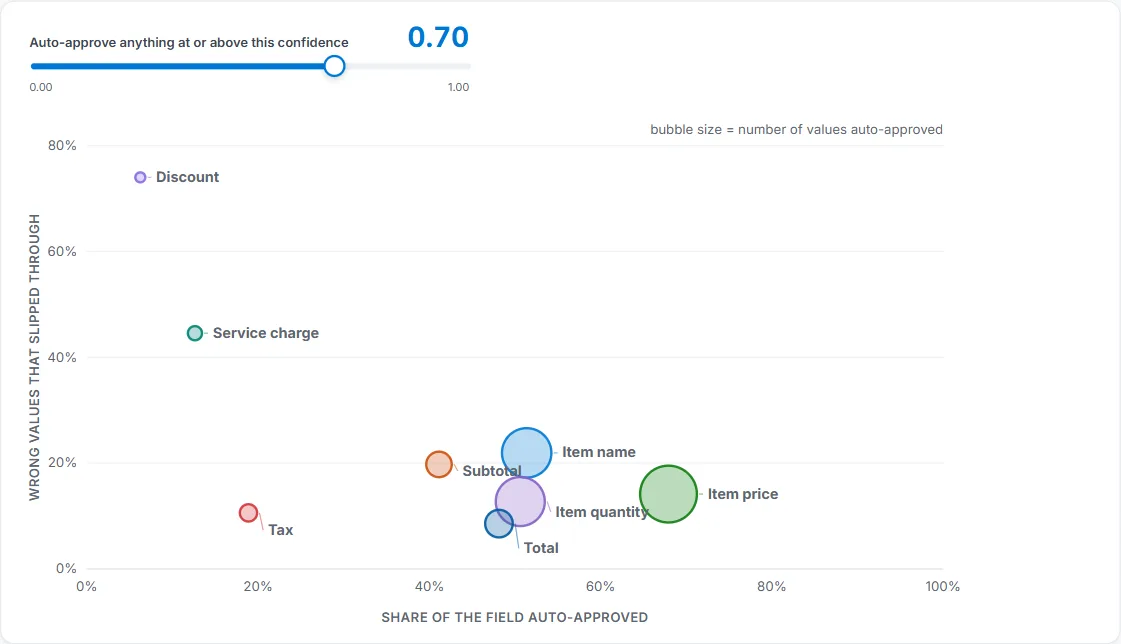
Figure 1. One confidence cutoff produces very different results across fields. Example from the public receipt dataset, not the customer engagement.
Empty fields need their own rule. When the system returns nothing, the document either really has no value there or the system missed it. In this workflow, confidence on empty results didn’t reliably separate those two cases. So empty values got a separate policy, based on how often “nothing” was actually the right answer for that field.
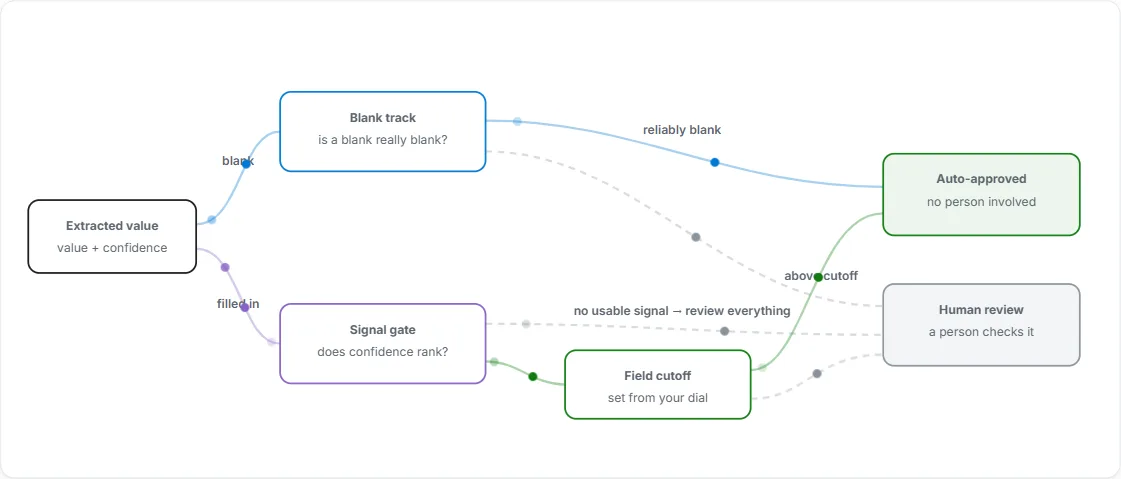
Figure 2. Blank and filled-in values follow different paths. Where the evidence does not support automation, a person reviews the value. This illustrates an automation policy, not the insurance customer’s review-every-field workflow.
Step 3: Choose thresholds with data, not intuition
“0.8 feels safe” isn’t a policy. The team chose thresholds with a repeatable, measurable process:
- Collect checked examples. Gather real, representative production documents from each document type, version, and source in scope, with answers confirmed by people. Include the variability the workflow will encounter, such as handwriting, scan quality, and missing values. Synthetic or unrepresentative examples are not a substitute for production calibration data.
- Measure each document type and field. For each field in each document type, record the accuracy, and check whether confidence actually separates right answers from wrong ones.
- Set a target. Decide what the business needs, for example that review must catch at least 80% of known errors. This business decision is key to the process. Ultimately, it’s based on the business value of catching errors in this specific workflow.
- Find the threshold that meets the target. For each field and document type, choose the cutoff that meets the error-coverage target while sending the fewest values to review. If no cutoff meets it, keep that field in review.
- Validate on held-out documents. Test the policy on documents that weren’t used to build it. Results on the calibration set can be too optimistic.
- Monitor production and feed results back. Every reviewed result becomes another checked example. Maintain an “outer loop” that periodically measures extraction accuracy and review-policy performance by document type and field, including human-checked samples of results not flagged for targeted review. Monitor both the errors captured by targeted review and those outside it; confidence-score distributions alone cannot establish correctness.
In the customer engagement, we recommended this outer loop to detect changes in incoming documents or in Content Understanding’s service-side behavior that could warrant recalibration. Revalidate when document versions or sources, analyzer configuration, field schema, or the underlying LLM change, and when monitoring shows a shift in extraction or confidence performance. Recalibrate the affected policies on current, representative production documents as needed. Calibration updates the workflow’s interpretation of confidence scores; it does not retrain the service’s confidence model.
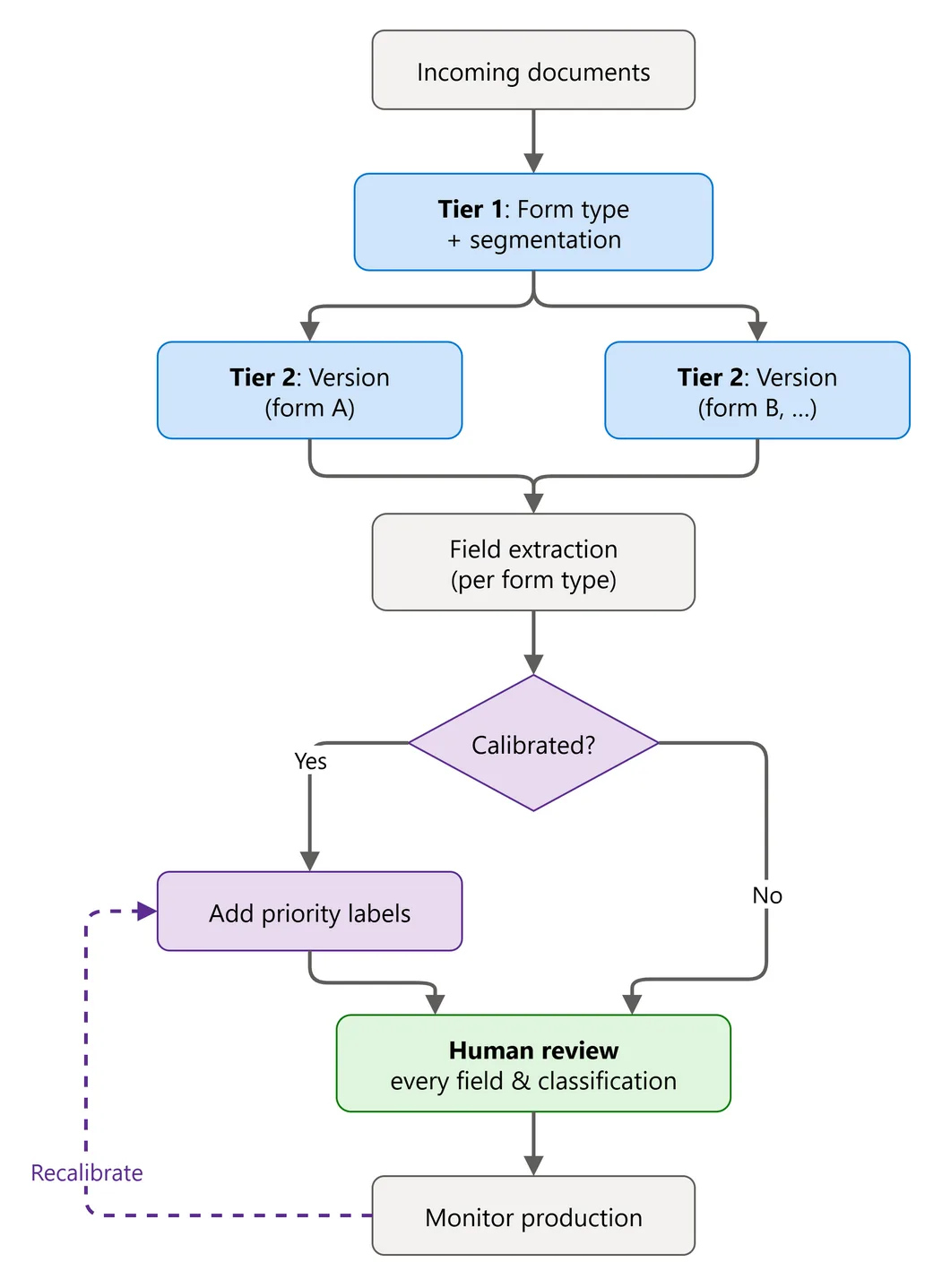
Customer workflow: classify first, then extract. Calibrated confidence prioritizes human review; it doesn’t replace it.
The results
The evaluation covered more than 22,000 field values across more than 1,000 production documents, scored against human-checked answers from the customer. Policies were learned on one set of documents and tested on a separate held-out set.
On the held-out set, 41% fewer field values were selected for targeted review, and that smaller selection still included more than 80% of known extraction errors.
That’s compared with reviewing every field value. It doesn’t mean 41% less staff time or error-free automation. Some errors were still outside the targeted set. What it gave the team was a measured way to prioritize review. In a less sensitive workflow, the same policy could shrink the review queue, with a clear view of the tradeoff.
Try it yourself
We wanted other teams to be able to explore the same decision without access to a customer’s documents. So we built a public calibration lab. It uses real Content Understanding results on 1,000 receipts from the public CORD v2 dataset: 800 to build policies and 200 held back for evaluation.
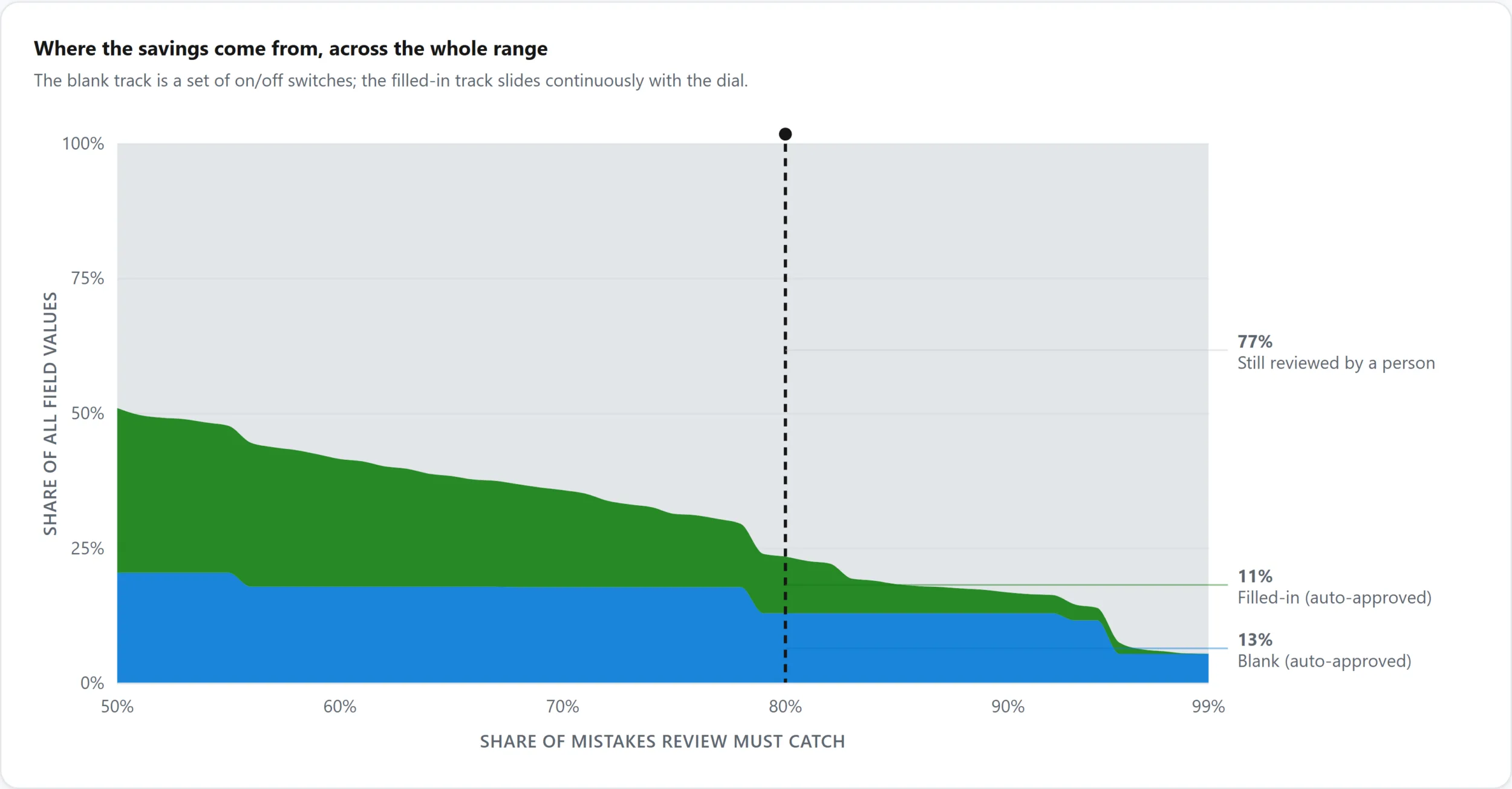
Figure 3. The public lab illustrates how requesting greater error coverage changes review workload. These are calibration-set results, not customer outcomes or guarantees of future performance.
A few highlights from the lab:
- One cutoff behaves very differently from field to field. At a single confidence threshold, some receipt fields let very few wrong values through, while others let through a large share.
- Savings come from both filled and empty fields. On the calibration set, a policy that sends 77% of mistakes to review automatically approves about 11% of all values from filled-in fields and about 13% from empty fields. That leaves 77% for a person to check. These figures are illustrative, not customer outcomes.
- The output is deliberately simple: a table of field-level rules your application can use to route new extractions. Calibration doesn’t retrain Content Understanding, and routing doesn’t call another AI model.
Want to understand the business tradeoff first? Explore the interactive explainer to see how the share of errors you want review to catch changes the review workload.
Ready to inspect the method? Open the calibration lab notebook to work through the evidence, save a field-level policy, and evaluate it on documents held back from calibration.
Lessons for reliable automation
- Ground every result. Keep structured output connected to its source evidence.
- Use confidence as a ranking signal for risk. It tells you where to look first.
- Classify by document type before you threshold. Document types, versions, and sources often explain more about accuracy than any single cutoff.
- Set thresholds per document type and per field, using data. Pick a business target, measure against it, and validate on held-out documents.
- Give empty fields their own policy.
- Keep the loop running. New form versions and new sources are new segments that need to be calibrated.
Trust is something you engineer
Reliable document automation doesn’t come from a model that never makes mistakes. It comes from a system that makes its answers inspectable, exposes uncertainty, and gives applications a principled way to decide when to proceed and when to ask for another look.
Perception lets the system read. Reasoning lets it understand. Grounding lets you verify. Confidence exposes risk. Calibration turns that risk into a business decision.
Learn more
- Explore the interactive explainer to understand the tradeoff between review workload and error coverage, and choose a target to discuss with your team.
- Open the calibration lab notebook to inspect the implementation and held-out evaluation, then calibrate a policy against representative, human-checked documents from your own workflow.
- For more about Content Understanding industry prebuilts, read Azure Content Understanding Prebuilt Analyzers: Packaging domain knowledge for document AI.

0 comments
Be the first to start the discussion.