

Today we’re introducing a preview of DirectX Raytracing (DXR) Clustered Geometry and Partitioned Top-Level Acceleration Structures (PTLAS), with a unified GPU-driven API for building and updating them.
This is part of a larger AgilitySDK release described in the parent post: https://devblogs.microsoft.com/directx/agilitysdk-1-620-retail-and-1-722-preview/
For DXR this is the most significant update since its debut in 2018.
| Mar 2018 | DXR debut |
|---|---|
| Nov 2019 | Tier 1.1: inline raytracing and GPU-driven ray dispatch |
| Apr 2021 | Shader Model 6.6: payload access qualifiers |
| Feb 2026 | SM 6.9 / Tier 1.2: Shader Execution Reordering (SER) and Opacity Micromaps |
| Oct 2026
this preview |
Clustered Geometry and Partitioned TLAS: GPU-driven efficient scene updates |
Here’s the motivation for Clustered Geometry and Partitioned TLAS:
At object level scope within a scene, animation, streaming, and generated geometry can repeatedly incur the cost of building large bottom-level acceleration structures (BLAS). Clustered Geometry breaks the unit of building down into small reusable clusters of triangles. One benefit of more efficient builds is it can become practical to raytrace the same full-detail geometry used for rasterization, rather than simplified proxies, so ray-traced shadows and reflections match the visible scene.
At scene wide scope, updating a top-level acceleration structure (TLAS) can be costly for large worlds even if only a few instances changed. Partitioned TLAS focuses update costs on changed scene regions while retaining acceleration-structure data elsewhere.
Applications can use Clustered Geometry and PTLAS separately or together.
These features don’t require new hardware capabilities beyond existing raytracing support. Even in normal times this would be a wonderful thing.
The breadth of support will depend on hardware vendors implementing and validating drivers for each of their hardware generations. Support for some older raytracing GPUs is to be determined: implementation work may uncover performance issues, so exposing the features may be impractical for that or other reasons. For now, see Availability and prerequisites for currently supported hardware and drivers from AMD, Intel and NVIDIA (Qualcomm in 2027).
Gears of War: E-Day is an early example of a title adopting clustered geometry through NVIDIA’s vendor-specific API, RTX Mega Geometry. Standardizing these capabilities in DirectX provides a common integration path across supporting hardware, making them accessible to a broader range of future titles.
Since this is a preview, your feedback (Discord) can help refine the design before final release, or give us confidence to go to retail as soon as possible. There are various samples as well as PIX support to go with these features, detailed later in this blog.
NVIDIA has a great post with additional samples and resources here: https://github.com/NVIDIA-RTX/Whitepapers/blob/main/dx_clusters_and_ptlas/README.md
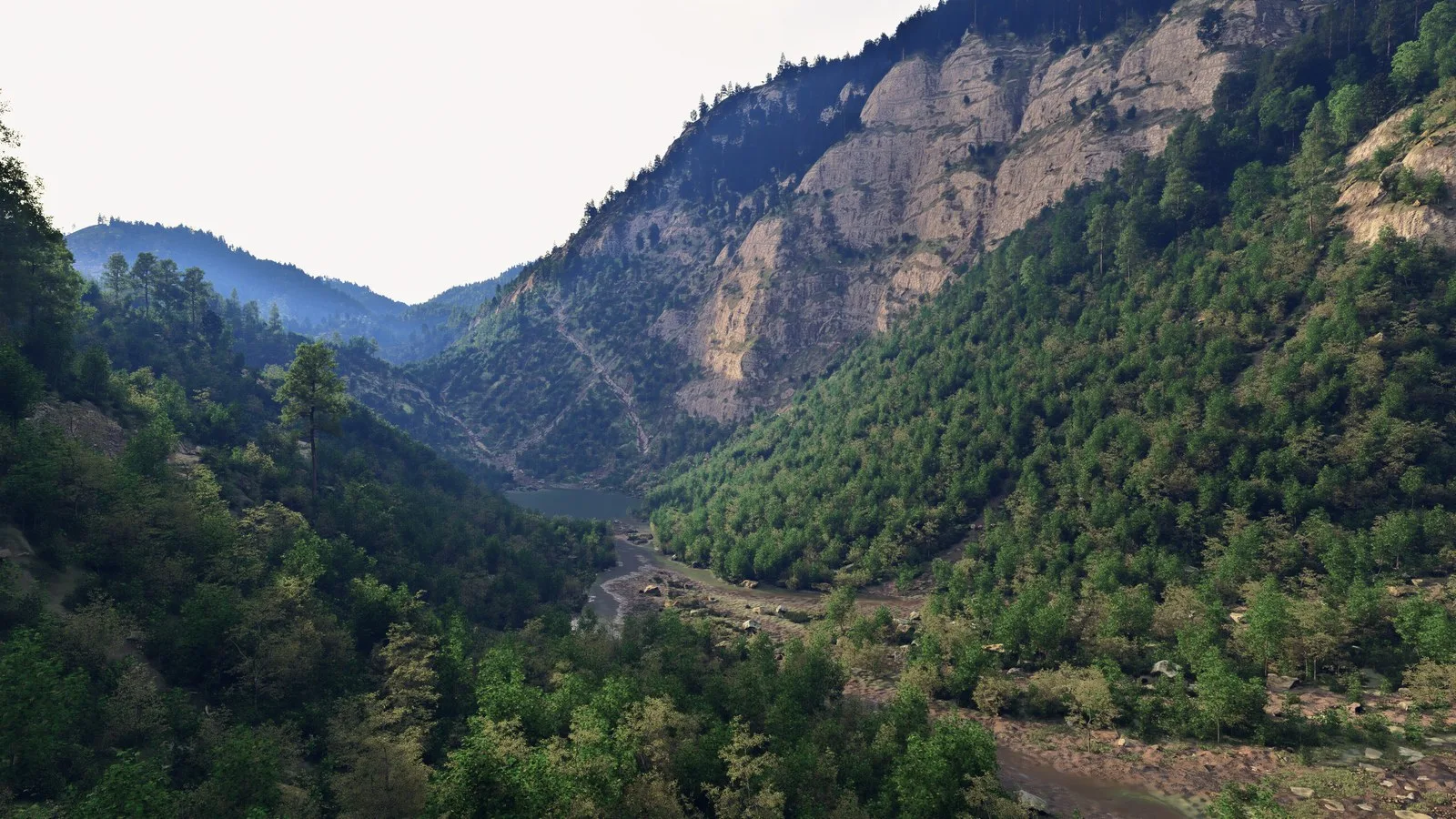
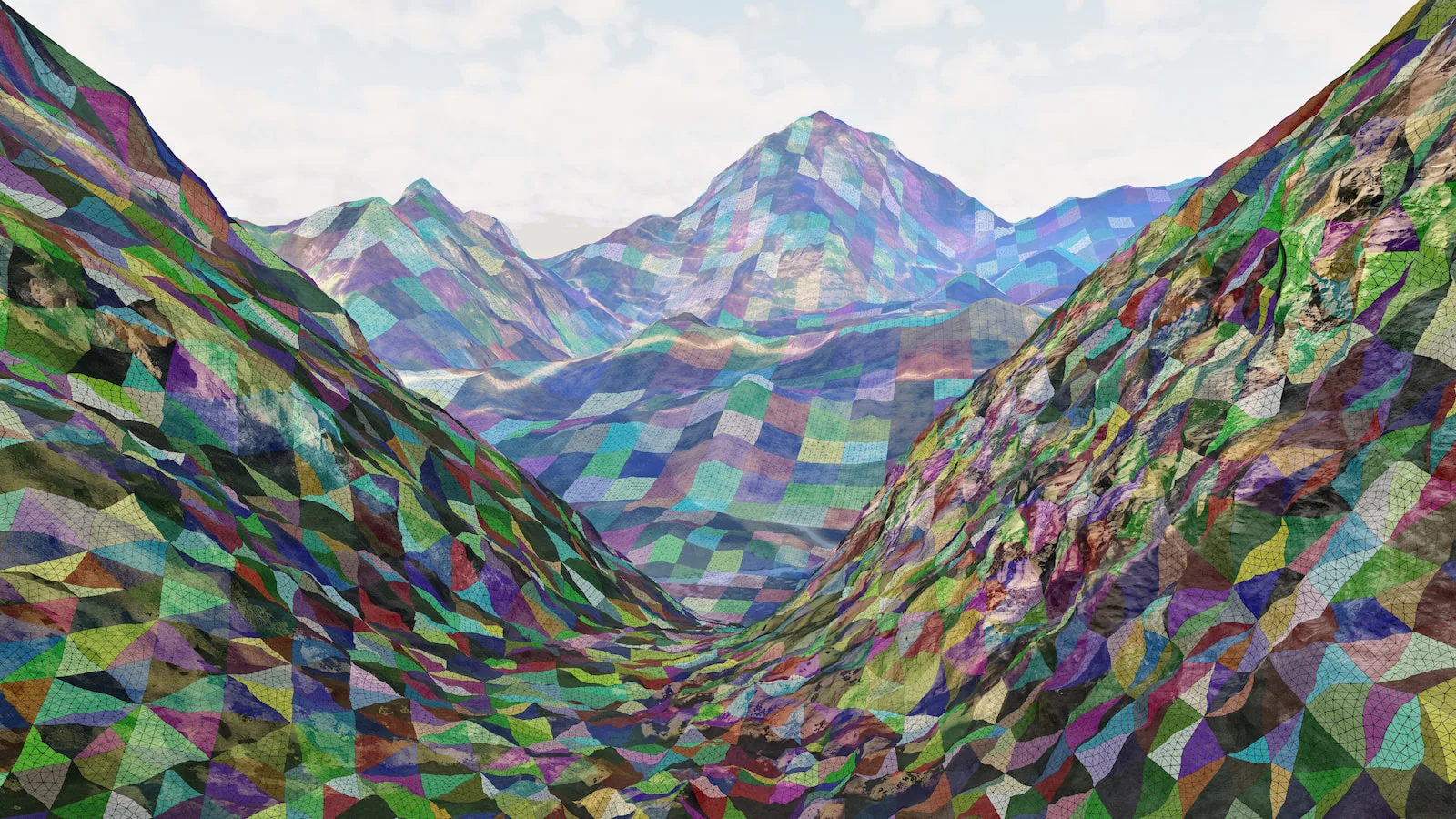
The scenes below are from that post, describing their dx12_forest_ray_tracing demo which uses all of the new features to impressive effect. This new D3D12 version is a work in progress, available soon. The sample uses cluster templates to optimize builds of its dynamic terrain. In the background, cluster templates form square patches, which are then doubled in resolution towards the midground and then recursively subdivided into triangular patches in the foreground. This achieves a nearly uniform screen-space triangle density.
Spec and API Overview
The following is a brief walkthrough of how code drives the new features.
See the spec for full detail: Clustered Geometry and Partitioned TLAS specification.
GPU-driven Acceleration Structure Builds
The raytracing acceleration-structure (RTAS) operation API has two entry points.
GetRTASOperationPrebuildInfo() queries conservative result and
scratch requirements. ExecuteIndirectRTASOperations() executes
batches whose argument arrays, and where supported their counts, reside
in GPU memory.
The CPU describes each operation and its workload bounds; compute shaders can generate the arguments. Cluster operations also support size-only queries and copy/move operations.
Operations submitted in one ExecuteIndirectRTASOperations()
call may execute in any order and must not depend on each other. Dependent
stages need separate calls with barriers between them — for example,
cluster builds → Cluster BLAS builds → PTLAS builds when an
application combines Clustered Geometry and PTLAS.
Clustered Geometry
Clusters as raytracing building blocks
A Cluster Level Acceleration Structure (CLAS) contains an indexed mesh of up to 256 triangles and 256 vertices. An application builds a Cluster BLAS from a list of CLAS references, then creates instances of that BLAS in a non-partitioned TLAS or a Partitioned TLAS.
The point is to reduce aggregate acceleration structure build costs across smaller chunks.
Multiple Cluster BLAS can share a CLAS; TLAS instances reference BLAS, not individual CLAS.
The vertex positions in all CLAS used by a Cluster BLAS are expressed in that Cluster BLAS’s object space. There is no per-CLAS transform during assembly.
For streaming and level of detail (LOD), applications can assemble different sets of existing CLAS rather than rebuild from triangles. Meshlet-based geometry pipelines may already provide suitable triangle groupings.
The application assigns each CLAS a 32-bit ClusterID,
retrieved in hit shaders with
ClusterID().
PrimitiveIndex() is local to the hit CLAS; use the pair to
look up that triangle’s normals, materials, or other application data.
Shader Model 6.10 also requires support for
TriangleObjectPositions()
and its RayQuery counterparts,
CandidateTriangleObjectPositions()
and
CommittedTriangleObjectPositions().
When data access is enabled at build time, these intrinsics retrieve
a triangle’s object-space vertex positions from the acceleration structure.
This is useful with clustered geometry, for example to compute geometric
normals without fetching positions from a separate vertex buffer.
Changing a referenced CLAS’s contents or address invalidates the Cluster BLAS, so it would need a rebuild along with dependent top-level structures.
Vertex position formats
Cluster builds support a range of vertex formats, including floating-point and normalized integer positions. For these formats, applications can also request truncation of low mantissa bits after conversion to float32, providing another way to quantize positions.
COMPRESSED1 is a fixed-point position encoding that uses a shared
anchor and power-of-two scale for each cluster. Vertices store packed
integer offsets from that anchor instead of three full floating-point
values, with precision and range chosen for the content.
Position encodings and precision controls in the specification
Building CLAS from triangles
The BUILD_CLAS_FROM_TRIANGLES operation builds one CLAS for
each argument in a GPU array. Each argument references a cluster’s
vertices and triangle indices.
This example lets the implementation place the CLAS within a single application-allocated result buffer. This is implicit-destination mode: the build writes an array of GPU addresses identifying where each CLAS was placed. In explicit-destination mode, the application supplies the individual result addresses instead.
With formats and workload limits already filled in
clusterInputs, select implicit destinations and query the
batch’s result and scratch requirements:
clusterInputs.Mode = D3D12_RTAS_OPERATION_MODE_IMPLICIT_DESTINATIONS;

D3D12_RTAS_OPERATION_INPUTS inputs = {};
inputs.Type = D3D12_RTAS_OPERATION_TYPE_BUILD_CLAS_FROM_TRIANGLES;
inputs.pClusterTrianglesDesc = &clusterInputs;

D3D12_RTAS_OPERATION_PREBUILD_INFO sizes = {};
rtasDevice->GetRTASOperationPrebuildInfo(&inputs, &sizes);
Allocate clasResults and clasScratch using the
returned sizes, plus an output address array with one entry per cluster:
D3D12_RTAS_BATCHED_OPERATION_DATA batch = {};
batch.BatchResultData = clasResults->GetGPUVirtualAddress();
batch.BatchScratchData = clasScratch->GetGPUVirtualAddress();
batch.ResultAddressArray = {
    clasAddresses->GetGPUVirtualAddress(),
    sizeof(D3D12_GPU_VIRTUAL_ADDRESS)
};
batch.IndirectArgumentArray = { argsGpuAddress, argsStride };

D3D12_RTAS_OPERATION_DESC build = {};
build.Inputs = inputs;
build.pBatchedOperationData = &batch;

rtasCommandList->ExecuteIndirectRTASOperations(
    1, &build, D3D12_EXECUTE_INDIRECT_RTAS_OPERATIONS_FLAG_NONE);
After the build and a barrier, the address array can feed a
BUILD_BLAS_FROM_CLAS operation to assemble the Cluster BLAS.
The sizing query must cover the entire implicit-destination batch; adding separate query results does not guarantee sufficient space.
Cluster templates for animation and generated geometry
Clustered geometry does not support refits, intentionally. For deforming meshes, cluster templates fill that role by precomputing position-independent build work. A template stores topology and other non-positional properties, but not final vertex positions. Instantiating it with positions produces a CLAS; the template itself cannot be traced.
For an animated mesh, a typical sequence is:
- Build templates for the mesh’s clusters, optionally supplying example vertex positions as build hints.
- Generate the current vertex positions with a compute shader.
- Instantiate templates into CLAS using those positions.
- Build a Cluster BLAS from the CLAS and update its top-level instances.
The template’s VertexInstantiationFormat specifies the
precision and range contract adhered to by stored positions, without dictating their physical
storage layout. Positions supplied at instantiation use a separately
selected VertexSourceFormat.
When the formats differ, instantiation converts the input to the
template’s format contract.
Templates also suit recurring topology in generated surfaces. Selecting different templates or CLAS permits topology and LOD changes without fixing the update topology of the entire object.
Partitioned TLAS
Partitioned TLAS is a functional superset of non-partitioned TLAS. It adds partitioned-based management and sparse updates, supporting existing BLAS types and Cluster BLAS.
The point is to allow the cost of TLAS build to be proportional to the amount that changed in a scene as opposed to the entire scene.
Applications assign persistent instance records to partitions. Grouping spatially coherent instances lets PTLAS build a structure for each group and combine those structures at the top level. A group that receives no changes can retain its built structure across frames.
Frequently moving instances can instead use a special global partition, separate from those spatial groups. For building and tracing, each instance in the global partition behaves as if it were in its own partition, avoiding repeated work in larger spatial groups. Once an instance stops changing frequently, the application can move it back to a spatially appropriate partition.
Overlapping partition bounds can hurt traversal. Global-partition membership trades partition rebuild work against the cost of handling instances individually; the best choice depends on layout and activity.
PTLAS operation types
WRITE_INSTANCEwrites complete instance records, including transforms and partition assignments. Use it to populate a PTLAS, move instances, or reassign them to partitions. Affected partitions are rebuilt.UPDATE_INSTANCEchanges only the referenced BLAS address and hit-group-table contribution, for example when swapping LODs. It does not change the instance transform. If the instance has explicit bounds, the replacement must fit within them. Without explicit bounds, updates may expand the instance bounds and trigger a partition refit.TRANSLATE_PARTITIONsets a partition’s translation without rewriting each instance’s transform, supporting origin-relative large-world coordinates. Partition translation must be enabled; each value replaces the previous translation rather than accumulating.
Operation argument layouts and validity rules
Updating a Partitioned TLAS
Sparse transform changes require WRITE_INSTANCE, not
UPDATE_INSTANCE. After populating the PTLAS, a compute pass
generates writes for just the changed instances.
Each write’s stable InstanceIndex identifies the persistent
record, not its position in that frame’s write array. Unwritten records
remain unchanged.
A WRITE_INSTANCE operation in the GPU operation buffer
references that write array:
D3D12_RTAS_PARTITIONED_TLAS_OPERATION_DATA data = {};
data.SourceAccelerationStructureData = ptlas->GetGPUVirtualAddress();
data.DestAccelerationStructureData = ptlas->GetGPUVirtualAddress();
data.ScratchAccelerationStructureData = scratch->GetGPUVirtualAddress();
data.IndirectPartitionedTlasOpCount = operationCount->GetGPUVirtualAddress();
data.IndirectPartitionedTlasOps = operations->GetGPUVirtualAddress();

D3D12_RTAS_OPERATION_DESC update = {};
update.Inputs.Type = D3D12_RTAS_OPERATION_TYPE_PARTITIONED_TLAS;
update.Inputs.pPartitionedTLASInputsDesc = &ptlasInputs;
update.pPartitionedTlasOperationData = &data;

rtasCommandList->ExecuteIndirectRTASOperations(
    1, &update, D3D12_EXECUTE_INDIRECT_RTAS_OPERATIONS_FLAG_NONE);
Source and destination match for an in-place update; the initial build has no source. Allocation must cover declared instance and partition capacities, not just the current write count.
IndirectPartitionedTlasOpCount points to the operation
count, whereas each WRITE_INSTANCE operation’s
ArgCount counts instance writes. Here the operation count
is one; compute varies ArgCount as instances change.
Availability and prerequisites
Use matching Agility SDK preview headers and runtime, a supporting driver, and Windows Developer Mode for experimental feature enablement.
Agility SDK:
- 1.722.0-preview available here: Agility SDK downloads
DirectX Shader Compiler:
- Shader Model 6.10 preview release, Patch 2 (v1.10.2605.37), also available as the Microsoft.Direct3D.DXC 1.10.2605.37-preview NuGet package.
Drivers and hardware:
| NVIDIA | NVIDIA and Microsoft have been collaborating closely to bring Clusters and Partitioned Top Level Acceleration Structures to DirectX Raytracing. These features enable unprecedented levels of animated geometric detail and unlock new algorithms including path tracing of hierarchical LOD streaming solutions found in modern game engines. We are excited to fully support this update to DXR on all RTX GPUs.
– Martin Stich, Senior Director of Engineering Drivers: Download the official NVIDIA drivers or use the NVIDIA App for automatic driver updates. Supported hardware: All RTX GPUs |
| AMD | Clustered Geometry and Partitioned TLAS are important advancements for the DirectX Raytracing ecosystem. The ability to reuse geometry work through clusters and update only the portions of a scene that have changed can significantly improve scalability for streaming content, level-of-detail transitions, animation, and large open-world experiences.
– Rodney Andre, Corp. VP Software Development, AMD Supported hardware: AMD Radeon™ RX 9000 series GPUs |
| Intel | The latest agility SDK brings a major improvement in raytracing in the form of PTLAS/cluster APIs. They set the foundation for efficient updates and management of very large and complex scenes, while keeping the memory footprint low, allow developers to represent their scenes with high fidelity without excessive memory usage. We’re very happy to support this API early on to enable smooth developer adoption over the coming months!
– Matthäus Chajdas, Senior Principal Engineer, Intel Drivers: https://www.intel.com/content/www/us/en/download/931698 Supported hardware:
|
| Qualcomm | DirectX Clustered Geometry and Partitioned TLAS represent important advancements for next-generation gaming experiences on Snapdragon® compute platforms. Qualcomm is working closely with Microsoft to enable these features on Snapdragon X2 platforms, with driver support targeted for availability in Q1/Q2 2027. |
| WARP Software Renderer | https://www.nuget.org/packages/Microsoft.Direct3D.WARP/1.65535.22-preview |
Before device creation, enable the preview:
UUID features[] = {
    D3D12ExperimentalShaderModels,
    D3D12RaytracingPreview
};
ThrowIfFailed(D3D12EnableExperimentalFeatures(
    _countof(features), features, nullptr, nullptr));
Query support through ID3D12Device16:
D3D12_FEATURE_DATA_D3D12_OPTIONS_RAYTRACING2 options = {};
ThrowIfFailed(device16->CheckFeatureSupport1(
    D3D12_FEATURE_D3D12_OPTIONS_RAYTRACING2,
    &options, sizeof(options), D3D12_PREVIEW_SDK_VERSION));

if (!options.ClustersAndPTLASSupported)
{
    // Fall back to traditional BLAS/TLAS path or report unsupported hardware.
}
Clustered Geometry’s shader intrinsics use Shader Model 6.10.
Raytracing pipelines that traverse Cluster BLAS opt in with
D3D12_RAYTRACING_PIPELINE_FLAG_ALLOW_CLUSTERED_GEOMETRY.
Inline raytracing uses the corresponding clustered-geometry
RayQuery flag.
Samples
D3D12 Clustered Geometry sample
D3D12RaytracingClusteredGeometry is a cluster sandbox for experimenting with build modes, allocation strategies, vertex formats and precision, workload size, and primary rays per pixel. Procedural objects exercise CLAS builds, while an animated sphere demonstrates template instantiation.
The scene is programmer art, with the goal to help you build intuition for how clusters behave as you change the settings.
You can switch between building BLAS from triangles and assembling Cluster BLAS for the same scene, with allocation sizes and GPU build timings shown in the overlay.
In the pair of images below running on an AMD RX 9070, the first shows traditional BLAS mode, and the second Clustered Geometry mode. Since the stats are hard to read with jpg compression, the table below highlights the differences. This is just one configuration, so keep in mind conclusions might vary depending on settings / load / GPU.


| Metric | Traditional BLAS rebuild | Clustered geometry | Cluster vs Traditional |
|---|---|---|---|
| Frame rate | 1.8 FPS | 84 FPS | ~47x higher |
| Per-frame GPU AS preparation/build | 482 ms | 3.06 ms | 157x less time |
| Per-frame GPU raytracing | 73.8 ms | 8.47 ms | 8.7x less time |
| Static AS memory | 1,368 MiB | 527 MiB | 61.5% less |
| Animated AS memory | 11,358.73 MiB | 2448 MiB | 97.8% less |
| Total AS memory, including TLAS | 12,728 MiB | 774 MiB | 93.9% less |
| Static build scratch | 1.78 MiB | 526.44 MiB | Higher scratch requirement |
| Animated build scratch | 8.00 MiB | 179.04 MiB | Higher scratch requirement |
Here’s a short snippet of the report the benchmark generated for the AMD RX 9070 in this example.
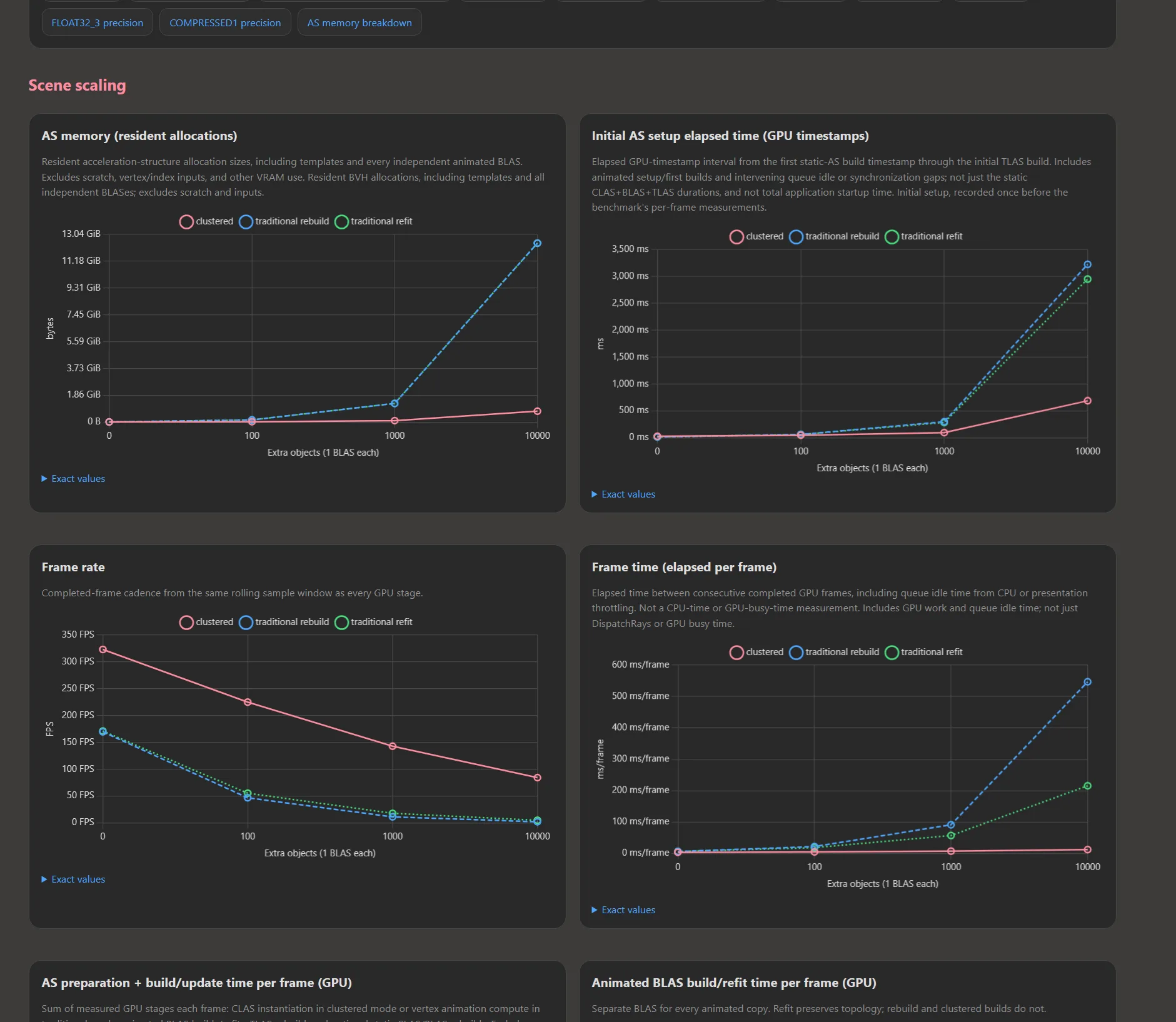
Instructions for generating reports can be found in the sample’s readme here.
The sample is available in the DirectX-Graphics-Samples repository here: https://github.com/microsoft/DirectX-Graphics-Samples/tree/master/Samples/Desktop/D3D12Raytracing/src/D3D12RaytracingClusteredGeometry
If you want to browse the sourcecode, for the shortest CLAS example, start with BuildClasImplicitand BuildBlasFromClasIndirect. For animation, followBuildAnimatedObjectSetup and UpdateAnimatedObjectPerFrame, together with the GPU argument writers in the Fill*Args.hlsl files.
NVIDIA D3D12 Clustered Geometry sample
NVIDIA’s RTX Mega Geometry sample demonstrates Clustered Geometry with animated content, path-traced rendering, and visualization modes for inspecting the generated geometry. A good selection of assets / scenes is available to load into the app.
NVIDIA-RTX/RTXMG: NVIDIA RTX Mega Geometry SDK
Github release tag: https://github.com/NVIDIA-RTX/RTXMG/releases/tag/v2.2.0
Below: NVIDIA Zorah scene running on D3D12. The second image shows clusters and the third triangles. This hasn’t been tested on other vendors’ GPUs yet.


As mentioned in the intro, NVIDIA has a post with additional samples here: https://github.com/NVIDIA-RTX/Whitepapers/blob/main/dx_clusters_and_ptlas/README.md
D3D12 Partitioned TLAS domino sample
D3D12RaytracingPartitionedTLAS is a D3D12 sample contributed by NVIDIA to DirectX-Graphics-Samples. It demonstrates sparse instance updates using the D3D12 PTLAS API in a world of dominoes and static scenery, with BLAS built from triangles. You can compare Partitioned TLAS with non-partitioned TLAS refit or rebuild using the same scene and animation.
The sample’s partitioning modes keep moving dominoes in their spatial partitions, move active instances to the global partition, or combine the approaches according to camera distance. Colors show real partition membership and simulation activity.
The sample focuses on sparse writes and fixed-capacity partitions. The Partitioned TLAS specification covers additional features such as partition translations, explicit instance bounds, and resizing.
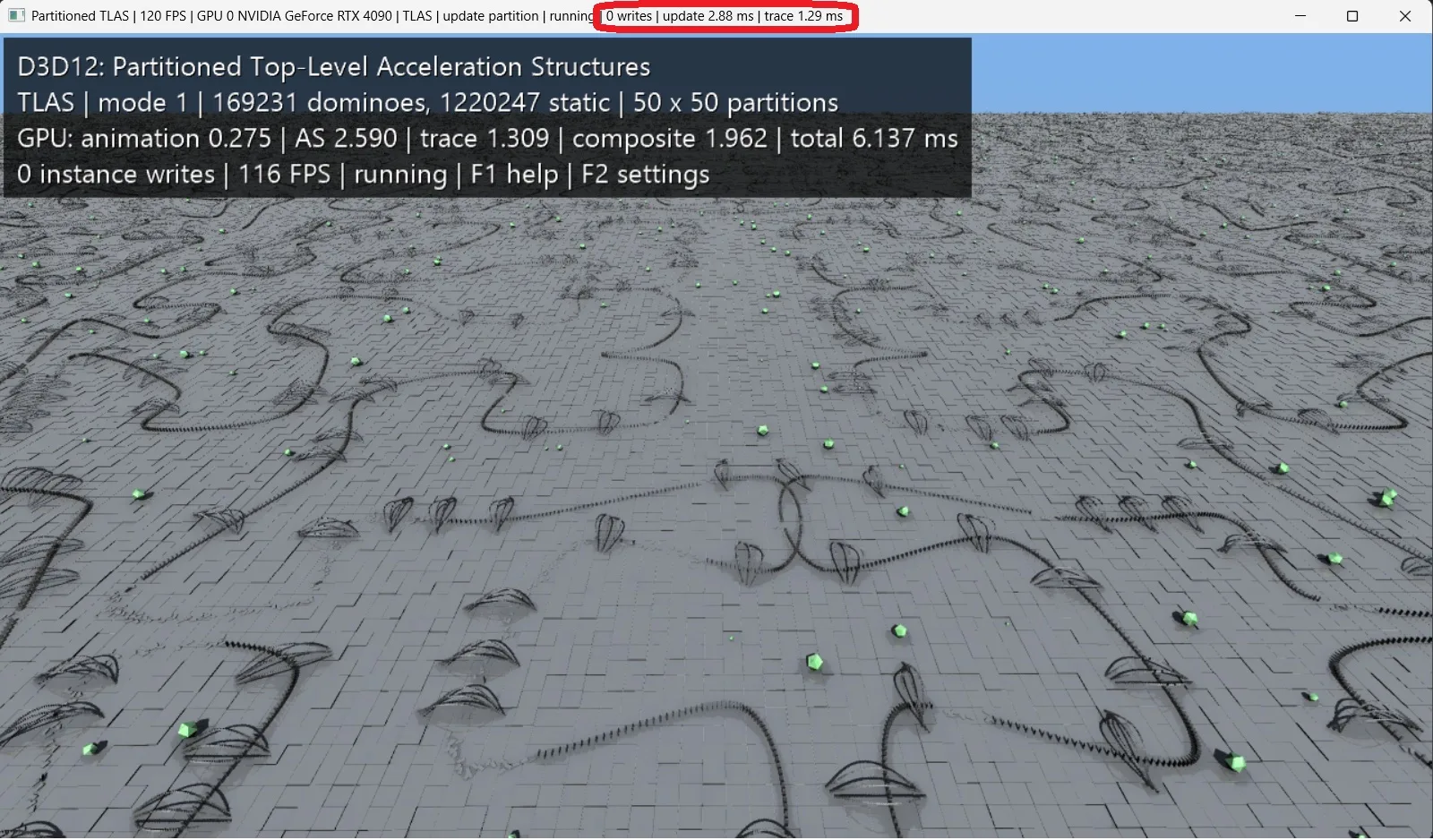
The first screenshot shows a TLAS compared to PTLAS in the second shot. Note the huge difference in scene update time as many dominos are falling. TLAS needs a full rebuild each frame and takes 2.88ms, while PTLAS with localized writes (4702 in this case) only takes 0.79ms. PTLAS trace time is a bit slower here, but here the tradeoff is worth it.

The sample is available in the DirectX-Graphics-Samples repository here: https://github.com/microsoft/DirectX-Graphics-Samples/tree/master/Samples/Desktop/D3D12Raytracing/src/D3D12RaytracingPartitionedTLAS
NVIDIA ported the sample from its original Vulkan implementation by Pascal Gautron and the nvpro-samples contributors.
PIX
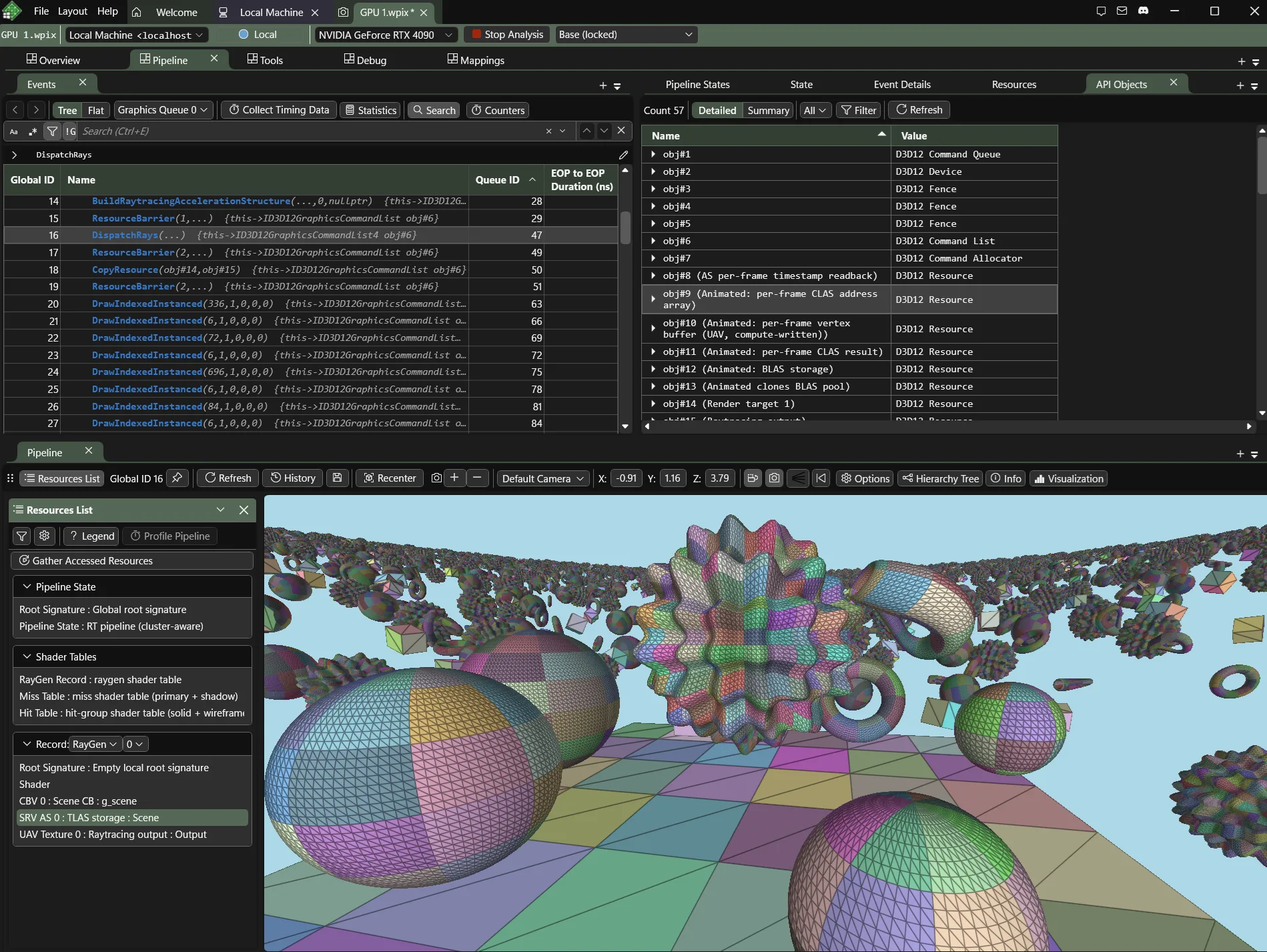
Last but not least, PIX with preview support for Clusters and PTLAS can be found here:
https://devblogs.microsoft.com/pix/?p=7181&preview=true
Here is PIX analyzing the Clustered Geometry sample:


0 comments
Be the first to start the discussion.