


For decades, DBAs relied on linked servers to stitch data together. If you needed data from two places, you wired them up and moved on. It worked. It was straightforward. It felt native to SQL.
But what if linked servers are not an option? What if policy blocks them? What if one of the systems is not SQL or lives in another cloud? How do you cross engines, environments, and ownership boundaries without turning your architecture into a science project?
In most modern enterprises, the limitation is not SQL. It is usually more hidden things like governance, separation of duties, or risk management policy. Application developers often can’t alter schemas, enable cross database features, or introduce new trust relationships. They typically need to introduce composition at the app or API level without refactoring databases.
Keep it Simple
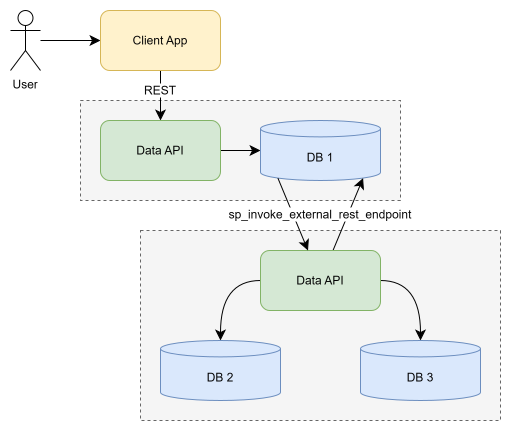
This is where Data API Builder chaining becomes super interesting. Slightly unconventional, yes, but extremely practical. DAB can already target multiple data sources within a single configuration. In many scenarios, API level composition is sufficient. This is next level.
Learn more about Data API builder: https://aka.ms/dab/docs
Now, with sp_invoke_external_rest_endpoint in SQL, composition can move into the database engine itself. That shifts the architectural question from “can we federate?” to “where should federation live?” In this article, we deliberately push it into SQL and chain DAB instances through REST. We aren’t overlooking that there are many options, but if your hands are tied, here’s a nice one.
The scenario
Imagine an online store with three databases. DB1 is a SQL catalog. DB2 is a Postgres inventory system managed by a warehouse vendor. DB3 is Cosmos DB holding product relationships derived by some backend machine learning system.
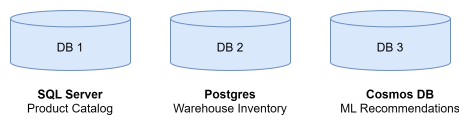
Of course, we want one call: hit DB1 and ask for a product. Behind the scenes, though, we enrich that response with inventory from DB2 and recommendations from DB3.
CREATE OR ALTER PROCEDURE dbo.sp_GetProduct
    @productId INT,
    @userId INT
AS
BEGIN
    SET NOCOUNT ON;

    -- TODO: fetch product details from DB1

    -- TODO: federate inventory data from DB2

    -- TODO: federate related products from DB3

    -- TODO: shape and return final result
END
GO
The synchronous approach
Synchronous federation means enrichment happens as part of the request. There is no staging or precomputation. SQL calls downstream APIs, merges the results, and returns a unified payload. The upside to this approach is freshness, but the tradeoff is serialization. SQL does not fan out in parallel here. Instead, it calls DB2 and waits, then calls DB3 and waits. Every downstream delay becomes user facing latency, but the value proposition can be worth a short progress bar.
And then there is failure. Networks stall or APIs time out. Your real design decision is not whether failure occurs, it is how to handle it and how much of that failure you allow to surface. The good news here is that SQL has options, solid options you can use to create more dependable operations.
dbo.sp_GetProductInventory_FromAPI
Assume DB2 exposes a DAB endpoint:
{DB2}/api/getinventory/productid/{productid}
To call it, we register a credential and endpoint once, then invoke by name.
-- Register the credential so we can use it by name
CREATE DATABASE SCOPED CREDENTIAL Db2ApiCredential
WITH IDENTITY = 'Managed Identity';
GO

-- Register the endpoint so we can call it by name
EXEC sys.sp_create_external_rest_endpoint
    @name = 'Db2InventoryApi',
    @url = 'https://db2-api.contoso.com',
    @credential = 'Db2ApiCredential';
GO

-- Call the registered endpoint with a custom relative path
DECLARE @productId INT = 42;
DECLARE @productString NVARCHAR(20) = CAST(@productId AS NVARCHAR(20));
DECLARE @path NVARCHAR(4000) = '/api/getinventory/productid/' + @productString;
DECLARE @response NVARCHAR(MAX);

EXEC sp_invoke_external_rest_endpoint
    @endpoint = 'Db2InventoryApi',
    @method = 'GET',
    @path = @path,
    @response = @response OUTPUT;
GO
Since the API is Data APi builder, we know the response comes back as a consistent JSON structure.
{
  "value": [
    {
      "productId": 42,
      "quantityAvailable": 128,
      "warehouse": "DEN-01"
    }
  ]
}
JSON is not a result set, but SQL turns it into one quickly with OPENJSON. In a step you can start to use unstructured data in the same way you use your relational data. Clean and consistent, this is an important step you can ensure happens.
DECLARE @inventoryJson NVARCHAR(MAX) = @response;

SELECT
    inv.productId,
    inv.quantityAvailable,
    inv.warehouse
FROM OPENJSON(@inventoryJson, '$.value')
WITH
(
    productId INT '$.productId',
    quantityAvailable INT '$.quantityAvailable',
    warehouse NVARCHAR(50) '$.warehouse'
) AS inv;
Then again, if you only need a scalar result, JSON_VALUE is even simpler.
DECLARE @inventoryJson NVARCHAR(MAX) = @response;
DECLARE @jsonPath NVARCHAR(100) = '$.value[0].quantityAvailable';

DECLARE @quantityAvailable INT =
    CAST(JSON_VALUE(@inventoryJson, @jsonPath) AS INT);

SELECT @quantityAvailable AS quantityAvailable;
This isn’t a new pattern. It works.
Handling failure
sp_invoke_external_rest_endpoint is synchronous and blocks. There is no parallel fan out, and that means you must be intentional about timeouts and fallback. Start with @timeout and decide how long you are willing to wait, then wrap it in TRY CATCH. In every situation, it’s you that decides what failure really means. A partial result could be fine. Again, it’s going to be up to you.
DECLARE @response NVARCHAR(MAX);
DECLARE @quantityAvailable INT = NULL;

BEGIN TRY
    EXEC sp_invoke_external_rest_endpoint
        @endpoint = 'Db2InventoryApi',
        @method = 'GET',
        @path = @path,
        @timeout = 5,
        @response = @response OUTPUT;

    IF @response IS NOT NULL
    BEGIN
        SET @quantityAvailable =
            CAST(JSON_VALUE(@response, '$.value[0].quantityAvailable') AS INT);
    END
END TRY
BEGIN CATCH
    SET @quantityAvailable = NULL;
END CATCH;

SELECT @quantityAvailable AS quantityAvailable;
GO
You are not eliminating failure here; you are just bounding it. You define the latency ceiling and fallback behavior. SQL shapes the final contract returned to the caller. Then, rinse and repeat this pattern for DB3 and assemble your final result.
The asynchronous option
Moving federation off the request path changes the performance profile entirely. Instead of enriching inside sp_GetProduct, you refresh local cache tables on a schedule or in response to events. sp_GetProduct becomes a fast read over local state.
Caching the downstream results
To make this work, all you really need are landing tables. One for inventory and one for recommendations, depending on what external data you plan to cache. This keeps the request path simple and insanely fast, but it adds a few more moving parts.
Refreshing the cache out of band
sp_invoke_external_rest_endpoint still performs the integration work. It just runs inside a refresh procedure instead of inside sp_GetProduct.
Elastic Jobs
In Azure SQL Database, Elastic Jobs are the native scheduling mechanism. Azure SQL does not include SQL Server Agent in the engine. Elastic Jobs fill that role as a managed scheduler that executes TSQL on a defined cadence.
You can create and schedule elastic jobs that could be periodically executed against one or many Azure SQL databases to run Transact-SQL (T-SQL) queries and perform maintenance tasks. Learn more: MS Learn Docs
Here you provision a job agent, define the schedule, and run your stored procedures. That’s it. Once in place, the flow is predictable and your refresh procedures update cache tables. sp_GetProduct reads only local data or partly local data, depending on your final solution.
Your basic refresh logic does not change. Only the trigger changes.
EXEC dbo.sp_RefreshProductInventoryCache @productId = 42;
EXEC dbo.sp_RefreshProductRecommendationsCache @productId = 42, @userId = 1001;
GO
Now, our recommendation data is a good thought experiment. Inventory scales linearly with product count, so recommendations are multiplied by user count. That can grow fast. At 10,000 products and 100,000 users, refreshing every combination is not realistic. Narrow the surface area to what actually drives value or consider caching a little of this and a little of that.
Conclusion
Federation does not require linked servers. With Data API Builder and sp_invoke_external_rest_endpoint, SQL can compose across databases, engines, and environments. You can do this synchronously and keep everything fresh but couple latency and failure to the request, or asynchronously with Elastic Jobs that isolate variability and keep your request path fast. But which path and how much of either is going to be your call.
In either case, SQL stays the composition layer. Data API builder is your bridge. Remember that DAB can target one data source or many. The diagram may show multiple API servers, but one DAB instance can federate several backends as long as authentication aligns.
Data API builder does not execute cross database JOINs inside the engine. It lets you query across databases. The difference is where the JOIN happens.
Federated data is enriched data, and enriched data makes your app better. Check it out!


0 comments