


Azure Functions is the event-driven application platform in Azure. Your code runs when a queue message, a blob upload, a database change, or an HTTP request arrives. Azure Functions Hosted Skills adds AI reasoning to these apps. When an event arrives, an LLM reads it, applies your instructions, skills, and tools, and decides what to do.
Some events need several steps. An alert may require data from several services. A blob upload may contain 100 invoices that need individual processing. These tasks can take minutes or hours and must run reliably to completion.
The Dynamic Workflows feature of Azure Functions Hosted Skills separates planning from execution. The LLM writes a plan as a DAG (directed acyclic graph). The embedded Durable Functions engine runs the plan outside the planning LLM reasoning loop. Intermediate tool results do not return to that loop, which can reduce token use and latency.
Durable Functions provides retries, crash recovery, and long waits without keeping a Functions instance running. Backend charges can still apply during a wait. The Durable Task Scheduler (DTS) dashboard shows workflow progress and task details. You do not need to write an orchestrator to use these capabilities.
This post explains how Dynamic Workflows operate, which design decisions we made, what our benchmark shows, and which scenarios are a good fit.
Note: The Dynamic Workflows feature that this post describes is different from the similarly named Dynamic workflows in Copilot CLI and the Copilot app. Two important differences are the declarative plan (not generated code) and the durable execution engine that Hosted Skills includes. This post discusses both.
Try it now: Read the Dynamic Workflows documentation and try the samples. Or, open the Azure Functions Hosted Skills canvas in GitHub Copilot, and let Copilot build one for you with the azure-functions-hosted-skills skill.
Requirements: Python 3.13 or later, Azure Functions Core Tools v4, Azurite (for local runs), and a model from Microsoft Foundry, Azure OpenAI, or OpenAI.
Availability: Dynamic Workflows is a preview feature of Azure Functions Hosted Skills (public preview). The API is small, and it can change because of your feedback.
Names you’ll see in this post:
- Azure Functions Hosted Skills: adds AI reasoning to your Azure Functions app. You describe the reasoning in an
.agent.mdfile, with skills and tools. Earlier posts call it the Azure Functions serverless agents runtime.azurefunctions-agents-runtime: the Python package of Hosted Skills. Its source is in the Azure/azure-functions-agents-runtime repository.- Dynamic Workflows: a feature of Hosted Skills. The model writes a DAG, and Durable Functions runs it.
- Durable Task Scheduler (DTS): a managed backend for Durable Functions. It includes a dashboard that shows each orchestration. To learn more, read the DTS documentation.
The problem with LLM reasoning loops
Without Dynamic Workflows, an LLM reasoning loop must process each step in a multi-step workflow independently. For each step, the LLM calls one tool, reads the result, and then calls the next tool. At each step, the reasoning loop sends the full conversation history, the tool definitions, and all the tool results to the LLM again. A task that makes dozens of sequential tool calls can easily consume huge numbers of tokens and take a long time to execute.
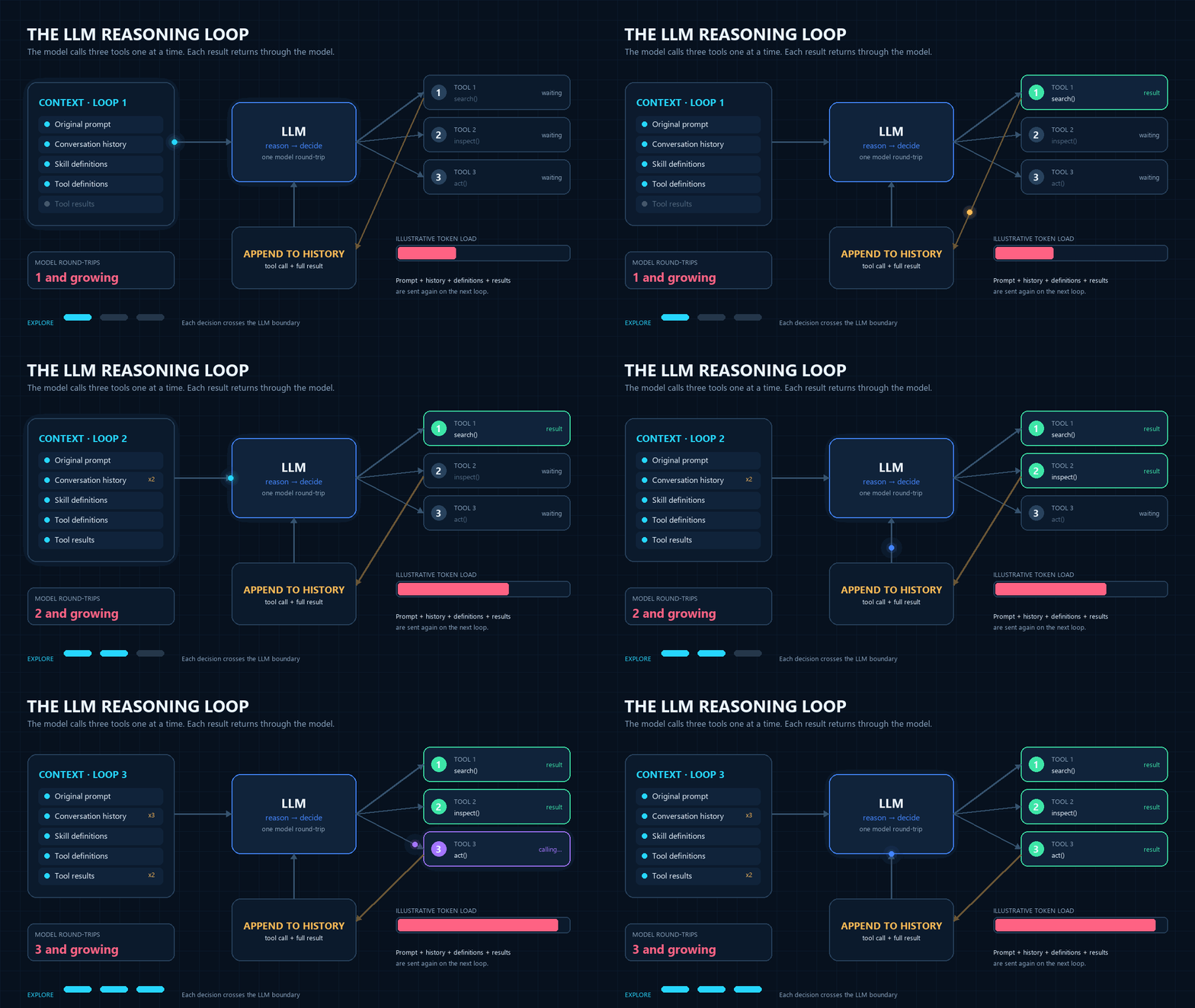
This approach has three costs:
- Tokens: For each tool call, the full conversation history and all the tool results go to the LLM again. If your LLM provider charges (or rate-limits) per token, you effectively pay for the same work multiple times.
- Latency: Each step of the loop needs one more LLM inference: the LLM must read the previous tool result before it can request the next tool call. A task with 10 tool calls needs 20 or more sequential inferences. Each inference can take a long time, so the total latency becomes large.
- Reliability: As the context window fills up, the LLM has more difficulty following instructions. For example, it can skip part of the work, or stop before the work is complete.
Anthropic’s programmatic tool calling shows one way to solve the token and latency problems: the LLM writes code that calls the tools. The Dynamic Workflows feature uses the same idea, but the LLM translates the task description into a strongly typed workflow DAG. The typed schema limits the structure of the plan. Before execution, validation checks its dependencies, references, and permissions for tools and sub agents. The Durable Functions engine that runs the DAG also adds durability and observability to the execution, which event-driven apps in the cloud frequently need.
Dynamic Workflows: keep planning and execution separate
With Dynamic Workflows, the LLM reads the prompt once and generates an execution plan as a DAG. Then it uses a built-in tool call to schedule the DAG for execution in a built-in Durable Functions orchestration. All tasks in the DAG run independently from the planning LLM reasoning loop. The orchestrator schedules tool tasks and waits without further calls to the planning LLM. A sub_agent task, however, makes its own LLM calls, consumes tokens, and adds LLM latency while it runs. A workflow tool can also call an LLM if its implementation requires one. If the LLM later summarizes the final result, that turn also consumes tokens.

To enable this feature, add the workflows.enabled: true setting to the front matter of the .agent.md file:
---
name: Incident Triage Assistant
description: Investigates incidents by gathering evidence in parallel.
workflows:
  enabled: true
---
The Hosted Skills runtime then gives the LLM access to five built-in tools for generating and interacting with dynamic workflows:
| Tool | What it does |
|---|---|
start_workflow(plan) |
Validates the LLM-generated DAG, starts a Durable orchestration, and immediately returns a workflow_id. |
get_workflow_status(workflow_id) |
Returns the workflow runtime status and also its final result if completed. |
list_workflows() |
Lists the workflows of the current session. |
cancel_workflow(workflow_id) |
Cancels a workflow cooperatively. |
terminate_workflow(workflow_id) |
Stops a workflow immediately. |
start_workflow is fire-and-forget. When the LLM gets the workflow_id, it ends its turn immediately. It does not poll for completion. The workflow runs to completion without a client. To get the result, the LLM can call the get_workflow_status tool, and a client can call the GET /agents/{slug}/workflows endpoint of the runtime. The built-in chat UI of Hosted Skills (served at / for HTTP-triggered hosted skills) uses this endpoint to show live progress for each task during the run. When the workflow completes, the chat UI sends a notification message to the LLM, and the LLM summarizes the result one time. Other clients can use the same endpoint in the same way.
The DAG that the LLM writes
The LLM gives a DAG, like the example below, as the argument of start_workflow. This is a simple fan-out/fan-in task with many tool calls that can run in parallel. It has the same basic shape as the benchmark later in this post.
{
  "tasks": [
    { "id": "inspect_00", "type": "tool", "tool": "inspect_service_evidence",
      "args": { "service": "checkout-api-00", "evidence_lines": 40 } },
    { "id": "inspect_01", "type": "tool", "tool": "inspect_service_evidence",
      "args": { "service": "checkout-api-01", "evidence_lines": 40 } },
    { "id": "inspect_02", "type": "tool", "tool": "inspect_service_evidence",
      "args": { "service": "checkout-api-02", "evidence_lines": 40 } },
    { "id": "publish", "type": "tool", "tool": "publish_benchmark_report",
      "depends_on": ["inspect_00", "inspect_01", "inspect_02"],
      "args": {
        "report_blob": "runs/services-3/workflow.json",
        "service_reports": ["${inspect_00.result}", "${inspect_01.result}", "${inspect_02.result}"]
      } }
  ]
}
The three inspect_* tasks have no dependencies, so the orchestrator runs them in parallel in the same wave. The publish task starts only after all three tasks complete. The orchestrator resolves templates such as ${inspect_00.result} inside the workflow engine, so the inspection results never go back to the LLM. The publish_benchmark_report tool then writes the combined report to Azure Blob Storage. The storage is an external resource, not a task in the DAG.
Here is a more complex DAG. It uses data-driven control flow, an execution policy, and a sub agent:
{
  "tasks": [
    { "id": "discover", "type": "tool", "tool": "list_services",
      "args": { "environment": "prod" } },
    { "id": "inspect", "type": "tool", "tool": "inspect_service_evidence",
      "depends_on": ["discover"],
      "for_each": "${discover.result.services}",
      "when": { "ref": "${item.in_scope}", "operator": "equals", "value": true },
      "args": { "service": "${item.name}", "evidence_lines": 40 },
      "execution": {
        "timeout": "PT30S",
        "continue_on_error": true,
        "retry": { "max_attempts": 3,
                   "backoff": { "initial": "PT1S", "multiplier": 2.0, "max": "PT4S" } }
      } },
    { "id": "analyze", "type": "sub_agent", "agent": "incident_evidence_analyst",
      "depends_on": ["inspect"],
      "task": "Find the likely root cause from these inspection results: ${inspect.result}" },
    { "id": "publish", "type": "tool", "tool": "publish_report",
      "depends_on": ["analyze"],
      "args": { "summary": "${analyze.result.text}" } }
  ]
}
- The
discovertask returns a list of services. - Because of
for_each, the durable orchestrator expandsinspectat run time into one task for each item (inspect[0],inspect[1], and so on). The LLM does not have to know the number of items when it writes the plan. - When
whenis false for an item, that item gets theskippedstatus, and the tool does not run. - When a transient failure occurs, the durable orchestrator retries the task as
execution.retryspecifies. - When all the parallel tasks complete, the orchestrator collects the results. Each result has the shape
{index, status, result}. The orchestrator then gives the results to the sub agent.
Dynamic Workflows support fan-out/fan-in, retry, timeout, continue-on-error, sub agents, data-driven control flow, and Durable timers. This table shows the elements of a DAG:
| Element | Meaning |
|---|---|
depends_on |
An edge of the DAG. Tasks with satisfied dependencies run in parallel. |
${node.result.path} |
A reference to the result of an upstream task. The workflow engine resolves it. |
for_each / when |
Data-driven control flow: expansion and conditional execution. |
execution |
Durable-native retry, a timeout for each attempt, and continue_on_error. |
sub_agent |
Runs one allowed hosted skill as a sub agent in one node. |
wait |
A Durable timer (from PT30S to 24 hours). While a workflow waits, the app can safely scale to zero, and the workflow resumes immediately when the timer expires. |
How the runtime is structured
When workflows.enabled is set to true, the Hosted Skills runtime internally registers a generic Durable Functions orchestrator and two activities. These built-in functions are reused for all hosted skills in the app.
| Durable function | What it does |
|---|---|
agents_workflow_orchestrator |
Reads the DAG and executes it to completion, scheduling ready tasks in parallel waves. |
agents_workflow_run_tool |
Runs one @workflow_tool tool. |
agents_workflow_run_sub_agent |
Runs one sub agent one time. |
For each hosted skill that enables workflows, the runtime makes an immutable policy at startup. The policy sets which tools and sub agents that skill can use. This ensures that a hosted skill only invokes allowed tools. A single agents_workflow_orchestrator definition runs all the dynamic workflows that hosted skills generate, so all dynamic workflows execute consistently and with a consistent monitoring experience.
Run plans from the LLM safely
A DAG from an LLM is untrusted input. Dynamic Workflows reduces risk at three stages: it constrains the plan when the LLM writes it, validates the plan before execution, and checks permissions again when each task runs.
When the LLM writes the plan: show only what is allowed. The argument of start_workflow has a typed schema that rejects unknown fields. The runtime adds to the system prompt only the tools and the sub agents that the hosted skill can use. The runtime makes this list from the same policy object that it uses for validation. Thus, the LLM cannot schedule a tool call that validation then rejects. Hosted skills come with the full syntax of the DAG schema, so the LLM reasoning loop uses dynamic workflows correctly and only when needed. In our internal end-to-end tests, the prompt only mentions the workflow capability, and the LLM automatically decides whether to use the built-in dynamic workflow tools.
When the LLM submits the plan: validate everything before the start. start_workflow validates the full DAG before it starts the orchestration. If there is a problem, the workflow does not start. The LLM gets an error with the reason, and it can correct the plan. The validation checks that:
- The hosted skill is allowed to use each tool and each sub agent.
- The names of tools and sub agents contain no templates. Thus, data cannot change which function the workflow calls.
- There are no duplicate IDs, no dependencies on unknown tasks, and no cycles.
- Templates refer only to upstream tasks.
- The plan is in the limits: 50 nodes, 10 parallel tasks, 24 hours of wait, and 10 active workflows for each session.
- The plan does not call management tools, such as
start_workflow, from inside the workflow.
when is intentionally not a general expression language. It supports only the equals and not_equals operators. It compares JSON values strictly, and the types must also match. If a path does not exist, the result is an error, not a skip. Thus, a mistake by the LLM cannot silently skip a task.
When each task runs: authorize again, and do not trust results. Each activity authorizes its tool or sub agent again, with the policy that is deployed at that time. If a deployment removes a permission, the nodes that did not run yet fail and do not run. The runtime makes each workflow ID from the hosted skill and the session, so a session cannot see the workflows of other sessions. The runtime stores the execution policy in the orchestration input when the LLM submits the plan. Thus, a new deployment cannot change the replay behavior.
Why Durable Functions?
At the start of the design, we compared three execution models: a tool loop in the chat, a custom in-process scheduler, and the Durable Functions runtime. We selected Durable Functions.
Azure Durable Functions has been generally available since 2018, and many mission-critical production workloads depend on it, both inside and outside of Microsoft. It is effectively a serverless workflow engine that you program with code. Long-running tasks and stateful workflows are otherwise difficult to implement reliably on stateless, ephemeral, event-driven compute platforms. As the name implies, Durable Functions gives a reliable base: if the app crashes or restarts, the work continues automatically on another instance of the app. It made sense to reuse this proven technology rather than build all its reliable execution capabilities again from scratch.
The option to use the Durable Task Scheduler (DTS) is another reason for our decision. Its dashboard shows workflow status, task inputs and outputs, and an execution timeline. You can configure the durable backend (Azure Storage or DTS) in the app’s host.json file. The .agent.md file does not change.

The above screenshot shows one Dynamic Workflow run in the DTS dashboard. The timeline at the bottom shows the shape of the DAG: discover_services runs first, then three inspect_service activities run in parallel (fan-out), and then summarize_scan combines their results (fan-in). The timeline also shows retries and errors when they occur. The runtime adds display-name tags. Thus, the orchestration appears as <agent_name>-orchestration (here, main-orchestration), each tool activity shows the tool name, and each sub agent activity shows the name of the sub agent.
When you open the Input field, you can see the DAG that the LLM wrote. You can also see the input and the output of each tool at each step. This information helps you debug and understand the exact behavior of the hosted skill.
Design tools that are safe for workflows
A workflow task runs as a Durable activity, outside the LLM reasoning loop. Tasks may run on the same instance or a different instance of the app than the instance which scheduled the task. Custom tool functions used by workflows must therefore be designed to be stateless and idempotent. Custom tools can be used by workflows if decorated with the @workflow_tool decorator.
# tools/incident_tools.py
from typing import Any

from azure_functions_agents import workflow_tool

@workflow_tool(description="Fetch recent log lines for a service.")
async def fetch_logs(args: dict[str, Any]) -> dict[str, Any]:
    service = args["service"]
    return {"service": service, "lines": ["..."]}
Put workflow tools in the same tools/ folder as normal tools. To use one function in both event prompts and workflows, add both @tool and @workflow_tool, in any order. A workflow tool has only four rules:
- It accepts one
dictargument. - It returns a JSON-serializable value, because Durable Functions stores the value in its history.
- It can be synchronous (
def) or asynchronous (async def). - It gets all its input from its
dictargument. It does not read state from the turn that started the workflow, because the task can run later on a different instance. For example, do not read a module-level variable that a normal tool set earlier in the turn, or a local file that the turn created. If the tool needs a customer ID, the LLM must put the customer ID in theargsof the task.
The tool author sets the retry policy
The tool author knows best if a retry is safe. Thus, you can declare the policy in the decorator. The values in the decorator have priority over the values that the LLM writes in the plan.
from azure_functions_agents import (
    WorkflowRetryableError,
    WorkflowRetryBackoff,
    WorkflowRetryPolicy,
    workflow_tool,
)

@workflow_tool(
    retry=WorkflowRetryPolicy(
        max_attempts=3,
        backoff=WorkflowRetryBackoff(initial="PT1S", multiplier=2.0, max="PT4S"),
    ),
    timeout="PT30S",
)
def reserve_inventory(args: dict[str, Any]) -> dict[str, Any]:
    ...
    raise WorkflowRetryableError(
        "inventory_temporarily_unavailable",
        "Inventory reservation is temporarily unavailable.",
    )
The runtime does not retry every exception. It retries only when the tool raises WorkflowRetryableError. It does not retry WorkflowTerminalError or other exceptions. If a tool fails, the error details go to the application logs.
Expect at-least-once execution
Durable activities run at least once. Because of retries or app restarts, the same task can run more than one time. Thus, the runtime gives each task an idempotency key that has the same value for all attempts. Use this key to make sure that the side effect of a task occurs only one time.
from azure_functions_agents import current_workflow_task_context

context = current_workflow_task_context()
if context is not None:
    reserve_once(key=context.idempotency_key)
Workflow sub agents
In Hosted Skills, you define each hosted skill in one Markdown file (*.agent.md). Its front matter sets the LLM, the tools, the skills, and an optional trigger, and its body gives the instructions. One app can have many hosted skills. The file name and some settings use the word “agent”, so this feature is called sub agents: a sub agent is a hosted skill that another hosted skill calls to do one part of the work.
Hosted Skills has two types of sub agents. In a normal invocation, the top-level subagents setting gives the LLM a delegate_<name> tool for each specialist hosted skill. This section is about the second type: workflow sub agents. With workflow sub agents, you can call an existing hosted skill (*.agent.md) as a node of the DAG. For example, you can use a low-cost model to do the investigation in parallel, and give only the final analysis to a specialist hosted skill. This is a map/reduce pattern.
The parent hosted skill must explicitly allow each hosted skill that it can call in a workflow, with workflows.subagents. If it allows none, it cannot call any sub agent.
---
name: PR Status Portfolio Coordinator
workflows:
  enabled: true
  subagents:
    - agent: pr_status_analyst
      when: Review one pull request and summarize its current status
    - agent: actionable_report_writer
      when: Combine pull-request summaries into an actionable portfolio report
trigger:
  type: queue_trigger
  args:
    queue_name: pr-status-requests
    connection: AzureWebJobsStorage
---
The when value is a hint that helps the LLM of the parent hosted skill select a sub agent. If you specify a hosted skill that does not exist, or the parent hosted skill itself, the app fails at startup.
We made these design decisions:
- Run each sub agent directly as an activity. We also examined a child orchestration for each node. After a discussion with the Durable Functions team, we decided to run each sub agent directly as an activity. The parent node keeps the state and the lineage.
- Leaf sub agents only. A sub agent does not get the conversation history of the parent, the sandbox, the workflow management tools, or delegation tools. Thus, a sub agent structurally cannot start a workflow or delegate to another hosted skill.
- Give only self-contained tasks. The runtime creates a new sub agent each time. The sub agent runs with its own model, instructions, tools, MCP servers, skills, and timeout. It gets only the
taskstring.
A later task can use the answer of a sub agent with a reference such as ${analyze.result.text}.
A sub agent task can also have an execution policy, as a tool task can. The policy sets the retries, the timeout for each attempt, and continue_on_error (the workflow continues if the task fails). In this example, the runtime gives the sub agent 5 minutes for each attempt, and tries a maximum of 2 times:
{
  "id": "analyze",
  "type": "sub_agent",
  "agent": "pr_status_analyst",
  "task": "Review https://github.com/Azure/example/pull/42.",
  "execution": {
    "timeout": "PT5M",
    "retry": {
      "max_attempts": 2,
      "backoff": { "initial": "PT10S", "multiplier": 2.0, "max": "PT1M" }
    }
  }
}
Sub agents also run at least once, as tools do. Thus, make the tools of a sub agent and its final output step idempotent.
Benchmark: how large is the improvement?
To measure the effect of Dynamic Workflows, we made a simple benchmark:
- Scenario: A queue message asks the app to examine N services of a fictional online store (for example,
checkout-api-00). For each service, the toolinspect_service_evidencereturns synthetic incident data: 40 log lines, metrics, and the deployment history. The toolpublish_benchmark_reportcombines the results of all services into one JSON report, and writes the report to Azure Blob Storage. - Comparison: Standard LLM reasoning loop (the baseline) and a Dynamic Workflow, with the same tools, the same model (
gpt-5.4-minion Microsoft Foundry), and the same prompt. - Acceptance criteria: The tools return the same data each time. For each run, we sent the same request to both modes (a “pair”). We counted a pair only when the two reports were byte-for-byte identical. We changed which mode ran first in each pair, and we ran three pairs for each number of services.
- Latency: The time from the queue message to the moment when the report blob is available. This time does not include host startup.
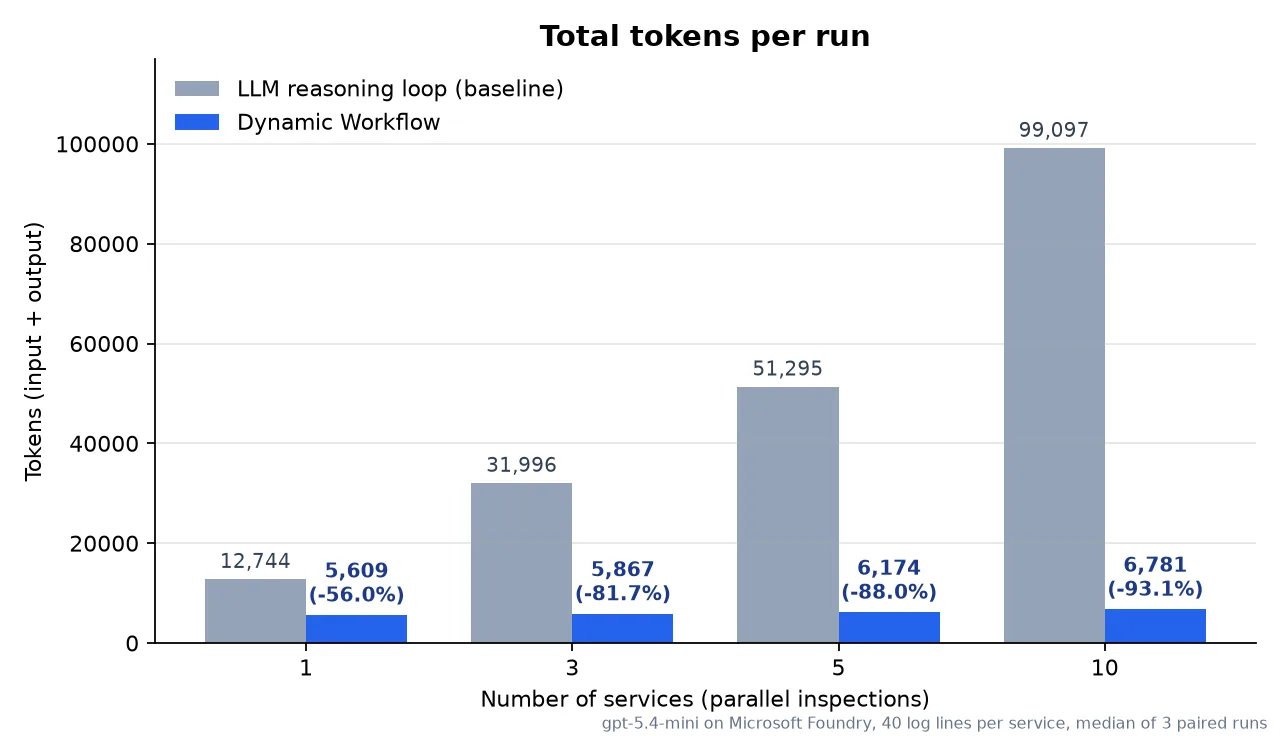
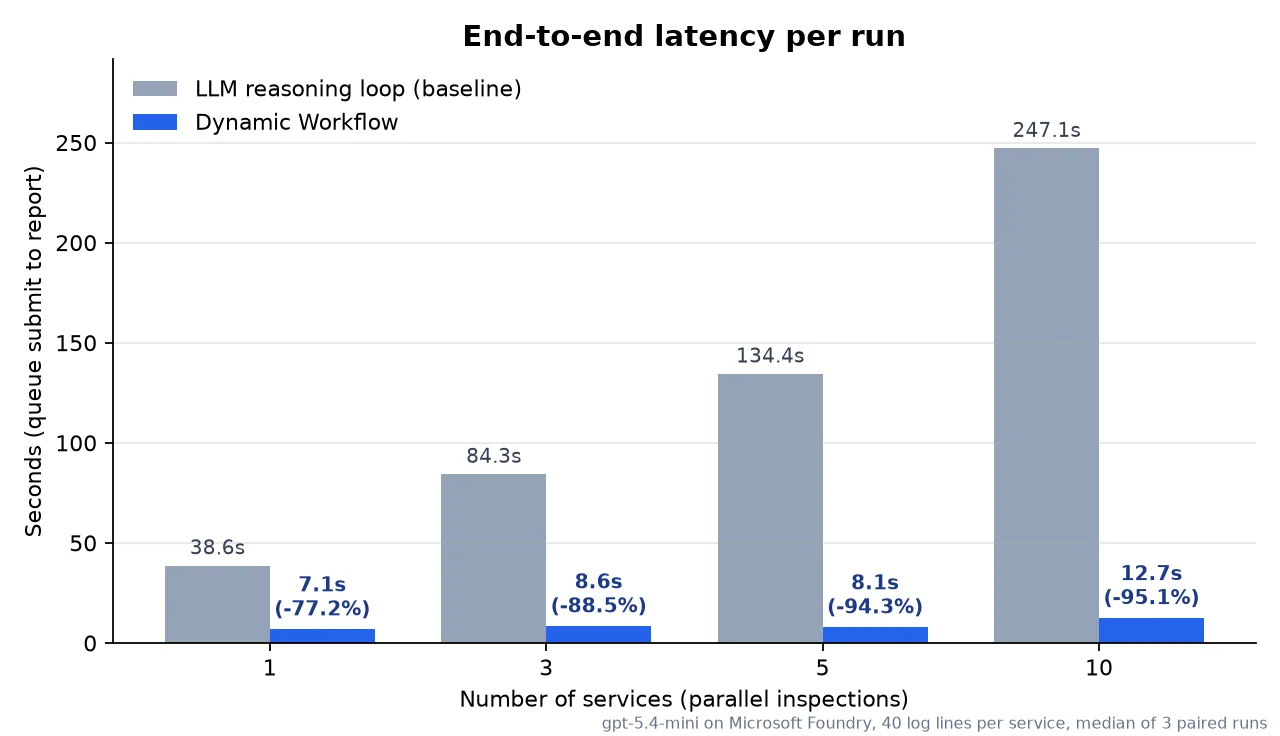
Before the benchmark, I made a prediction. I thought that an LLM reasoning loop would be more efficient with a small number of parallel tasks, and that Dynamic Workflows would become better only after some threshold. But the results were different: Dynamic Workflows used fewer tokens and less time in every configuration. This shows how many turns a normal LLM loop runs to call tools and analyze their results.
| Services | Baseline tokens | Workflow tokens | Decrease | Baseline latency | Workflow latency | Decrease |
|---|---|---|---|---|---|---|
| 1 | 12,744 | 5,609 | 56.0% | 38.6 s | 7.1 s | 77.2% |
| 3 | 31,996 | 5,867 | 81.7% | 84.3 s | 8.6 s | 88.5% |
| 5 | 51,295 | 6,174 | 88.0% | 134.4 s | 8.1 s | 94.3% |
| 10 | 99,097 | 6,781 | 93.1% | 247.1 s | 12.7 s | 95.1% |
Values are the median of three paired runs.
The baseline tokens increase almost linearly with the number of services, by approximately 10,000 tokens for each service. The Dynamic Workflow tokens stay almost constant. From 1 service to 10 services, they increase by only 1,172 tokens, and this increase is mostly the size of the DAG.
When you look at input and output tokens separately, the decrease in output tokens is especially large. At 10 services, the baseline used 23,621 output tokens, and the workflow used 655 (a 97.2% decrease). In the baseline, the LLM must copy the collected results into the arguments of the report tool. In a Dynamic Workflow, the orchestrator moves the results with ${...} references, so the LLM copies nothing.
The quality was the same. A deterministic check compared each report field by field with the expected report, and all 24 outputs matched exactly. An LLM judge (Vally) that did not know the mode gave the maximum score to all 8 outputs. But this benchmark uses a structured task. The results for free-form tasks can be different.
The benchmark code, commands, and raw data are in the token benchmark sample.
Which scenarios are a good fit?
The improvement comes from one thing: intermediate results do not go through the LLM context. Thus, the improvement is larger when the intermediate data is large and the shape of the work is easy to set in advance. A workload is a good fit when it has several of these properties:
| Property | Feature that helps |
|---|---|
| The intermediate data is large, but you need only a summary or an aggregate at the end. | Intermediate results move inside the orchestrator and do not go back to the LLM. |
| The work is the same procedure for N items, or it divides into independent subtasks. | Fan-out/fan-in, for_each |
| You must decide what to process, in which order, and how many items, but the procedure itself is fixed. | The LLM makes only the decisions. The execution is deterministic. |
| The work is mostly non-interactive. | Fire-and-forget, start from a trigger, and send the result in the last task. |
| External systems are unstable, or the work takes a long time. | Durable-native retry, timeout, continue_on_error, and crash recovery |
| The work waits from a few minutes to 24 hours. | Durable timers. While a workflow waits, the app can scale to zero. |
| You must explain what occurred. | The DTS dashboard shows the DAG and the input and output of each step. |
| Only some steps of the work need a specialist hosted skill. | Workflow sub agents (sub_agent tasks) |
Dynamic Workflows are not a good fit for:
- Small tasks that complete in one turn. The orchestration overhead is larger than the savings.
- Tasks that must ask the user questions during the run. A workflow does not stop to wait for an answer from a user.
- Exploratory tasks, where the LLM must think about each result before it can select the next step. For these tasks, a simple LLM reasoning loop is better.
Use this simple test: “Can a person write the procedure as a checklist before the task starts?” If yes, let the LLM write that checklist as a DAG, and let Durable Functions run it.
Event-driven scenarios
An Azure Functions app reacts to events from many triggers: HTTP, timer, queue, blob, Event Grid, Event Hubs, Service Bus, Azure Cosmos DB, SQL, Kafka, and connectors such as Office 365 Outlook. With Dynamic Workflows, the flow is:
- An event triggers the hosted skill, and the LLM reads the event.
- The LLM writes one plan (a DAG) for the work.
- The LLM calls
start_workflow, and the triggering invocation ends. - Durable Functions runs the plan. The workflow is fire-and-forget, so the result does not automatically go back to the LLM. For any trigger, including HTTP, use one or both of these options:
- The last task of the plan is a workflow tool that writes or sends the result, for example to a queue, a database, a webhook, or Microsoft Teams.
- Later, the LLM uses the workflow ID to get the result with
get_workflow_status.

The triggering invocation stays short. The multi-step work is durable, and it continues after the invocation ends. Here are some examples:
Incident triage that starts from an alert. The hosted skill receives an Azure Monitor alert through Event Grid or Service Bus, and identifies the services that the incident can affect. With for_each, the workflow collects the logs, the metrics, and the recent deployments of each service in parallel. A sub agent writes the likely root cause and a rollback recommendation, and the workflow posts them to the on-call Teams channel. Tens of seconds after the alert, the on-call engineer can read a complete investigation report.
Batch processing of invoices or purchase orders. A blob trigger receives tens or hundreds of PDF files. With for_each, the workflow extracts the content of each document and compares it with the purchase order data. With when, the workflow sends only the documents with differences to an exception queue. The document content does not go into the LLM context, so the token use almost does not increase when the number of documents increases. Durable retries handle transient API errors.
Onboarding of new customers or employees. The workflow starts from a registration event in a CRM or HR system, for example through Service Bus or the Azure Cosmos DB change feed. It creates accounts, grants permissions, and assigns licenses in parallel. While it waits for approval, a wait task can wait for up to 24 hours, and the app can scale to zero during that time. Long runs and long waits are a strength of Durable Functions. Programmatic tool calling in a container does not give you this.
Samples
| Scenario | Sample | Trigger | Features |
|---|---|---|---|
| Incident triage | workflow-incident-triage | HTTP (chat UI) | Fan-out/fan-in, asynchronous tools, live progress |
| Scheduled P0 report | workflow-queue-p0-report | Queue | Start from a trigger, delivery in the last task |
| Order recovery | workflow-retry-policy | HTTP | Retry, timeout, continue-on-error, idempotency key |
| PR portfolio report | workflow-subagents-preview | Queue | Map/reduce with sub agents |
| Engineering operations hub | per-agent-workflows | HTTP | Policy and isolation for each agent |
Current limitations
Dynamic Workflows is a preview feature. Before you design a solution, know these limitations:
- Only Python workflow tools. A tool task can call only a Python function that has the
@workflow_tooldecorator in thetools/folder. You cannot add these directly as workflow tasks:- tools from MCP servers, including Connector Namespace MCP servers,
- built-in tools, such as code execution in dynamic sessions,
- shell commands (bash) or binaries.
To use them in a workflow, wrap the operation in a Python
@workflow_toolfunction (for example, call the API or start the process from Python). Or use a sub agent: a sub agent can use its own MCP servers and normal tools. - One level of sub agents. A sub agent is a leaf. It gets only its
taskstring. It cannot start a workflow or delegate to another hosted skill. - The plan is fixed when it starts. The LLM cannot change the DAG during the run.
whensupports onlyequalsandnot_equals, andfor_eachis the only loop. If the next step depends on reasoning about a result, the LLM must start a new workflow on a later turn. - No human-in-the-loop. A workflow cannot ask the user a question during the run.
- Results come later.
start_workflowreturns only a workflow ID. The LLM gets the result on a later turn, or the last task sends it to a destination. Do not use a workflow when the user needs an immediate answer. - Fixed limits. A plan can have up to 50 nodes and 10 parallel tasks, and a
waittask can wait up to 24 hours. A session can have up to 10 active workflows. A retry policy can have up to 5 attempts and a timeout of up to 10 minutes for each attempt. The total of the retry delays can be up to 1 hour. You cannot change these limits. - Keep tool results small. Each tool result must be JSON-serializable, and Durable Functions stores it in the orchestration history. For large data, store it yourself (for example, in a blob) and return a reference.
- At-least-once execution. A task can run more than one time if the process crashes before the result is recorded. Design your tools to be idempotent.
- One Functions app. A workflow runs inside one Functions app. Coordination across apps is not supported.
- The LLM writes all plans. There is no hand-written workflow template format.
Lessons learned
- Event-driven apps get a durable way to run AI-led, multi-step work. The triggering invocation stays short, and Durable Functions continues the work after it ends.
- Token use and latency can decrease by a large amount. In our benchmark, improvements were seen even in simple use cases.
- Workflow execution is reliable. If the app crashes during a run, Durable Functions recovers and continues the run. The orchestrator retries tasks without calls to the planning LLM. A repeated task can still consume tokens if it calls an LLM.
- DTS gives excellent observability. The dashboard shows the plan from the LLM and the input and output of each step.
- Treat a plan from the LLM as untrusted input. Validation at three stages lets the LLM plan freely, but just like any tool that can be called by the LLM, it must be implemented carefully and you should explicitly allow it to be called by a workflow.
- Keep the expressive power small on purpose. Because
whenis not a general expression language, LLMs will interpret them non-deterministically. - Design tools for at-least-once execution. Use the idempotency key that the runtime gives to each task.
Getting started
Option 1: Use the Hosted Skills canvas in GitHub Copilot (recommended)
The fastest way to start is the Azure Functions Hosted Skills canvas in GitHub Copilot. The canvas shows your Function App, the skill instructions, the trigger controls, and the live logs next to your conversation with Copilot. In one window, you can invoke a trigger, read the result, and debug the run.
When the canvas opens, Copilot uses the azure-functions-hosted-skills skill from the azure-functions-skills plugin. This skill gives Copilot the knowledge to scaffold, extend, deploy, and troubleshoot Hosted Skills. It gets the official project template, selects a deployable model for your subscription and region, adds the infrastructure (Bicep and azd), and tests the app after deployment.
1. Install the two plugins. In GitHub Copilot, open Customize > Plugins, select Awesome Copilot, and install Azure Functions Hosted Skills. Then install the azure-functions-skills plugin. For example, in GitHub Copilot CLI, run:
/plugin marketplace add Azure/azure-functions-skills
/plugin install azure-functions-skills@azure-functions-skills
Start a new session, and then enter:
Open Azure Functions Hosted Skills canvas.For other coding agents, such as Claude Code and Codex, install only the azure-functions-skills plugin. See the plugin README and Introducing azure-functions-skills.
2. Describe your scenario to Copilot. Here are two sample prompts.
A prompt for event-driven incident triage:
Use the azure-functions-hosted-skills skill to build an Azure Functions app that triages
incidents with Hosted Skills.

- Trigger: a Service Bus queue named "incident-alerts". Each message contains an alert
  and a list of the services that the alert can affect.
- Enable Dynamic Workflows (workflows.enabled: true). For each alert, the LLM writes
  one workflow and does not call the tools directly.
- In the workflow, run one @workflow_tool task for each service in parallel. Each task
  collects recent logs, metrics, and deployments. Retry transient errors up to 3 times.
- After all the tasks complete, a sub agent named incident_evidence_analyst finds the
  likely root cause and recommends if a rollback is necessary.
- The last task posts the report to our on-call Teams channel.
- Use the Durable Task Scheduler as the Durable Functions backend. Run it locally with
  Azurite and the DTS emulator first, and then deploy with azd up.
A prompt for batch document processing:
Use the azure-functions-hosted-skills skill to build an Azure Functions app that uses
Hosted Skills to process invoices. When a batch manifest is uploaded to the "invoices" blob container, the
LLM starts one Dynamic Workflow. The workflow uses for_each to extract each invoice,
compares it with the purchase order, and sends only the invoices with differences to
the "invoice-exceptions" queue. Make each tool idempotent with the workflow task
idempotency key.
The skill asks you only the questions that it needs, for example about the subscription or the Teams channel. Then it creates the app, deploys it, and runs a smoke test.
Tip: Tell Copilot to use Dynamic Workflows and to read the Dynamic Workflows documentation. This makes sure that Copilot uses
workflows.enabled,@workflow_tool, and the retry and idempotency features correctly.
Option 2: Build it yourself
To build an app by hand, follow the workflow-queue-p0-report sample. This sample receives a queue message, examines the P0 issues of each repository in parallel, and writes an HTML report to Azure Blob Storage. Its README shows all the steps: install the azurefunctions-agents-runtime package, write the .agent.md file and the @workflow_tool tools, set DTS as the backend in host.json, and run the app locally with Azurite and the DTS emulator. For more information, see the documentation and the README of each sample.
We want your feedback
Dynamic Workflows is a preview feature, and your feedback helps us improve it.
- Open an issue to tell us about scenarios that you want to try, or features that you need.
- Bug reports and suggestions are welcome.
- To contribute, see
CONTRIBUTING.md.
Repository: https://github.com/Azure/azure-functions-agents-runtime
From events to durable, AI-led work. Try it, and tell us what you think.


0 comments
Be the first to start the discussion.