


Today we’re announcing azure-functions-skills in public preview: a one-command way to give your favorite coding agent (GitHub Copilot CLI, Claude Code, Codex CLI, VS Code) the skills, agent definition, MCP servers, hooks, and instructions it needs to ship secure-by-default, scale-ready Azure Functions — end-to-end.
AI coding agents now write the first draft of your function, scaffold the infrastructure, and run the deploy command. But ask a general-purpose agent to build for Azure Functions and the output is usually a step behind. It leans on older programming models that have been superseded, and it has no knowledge of newer capabilities: the serverless agents runtime, Flex Consumption defaults, the new Azure MCP template service, the latest binding shapes, this week’s runtime improvements, or Go language support. Worse, the code it produces often leaves hardcoded keys, connection strings, and other secrets sitting in your function for you to clean up later, picks patterns that don’t scale (client-per-invocation, blocking I/O on the hot path), and skips identity-based access entirely. The code compiles, but it isn’t secure, isn’t current, and isn’t using what Azure Functions offers today.
azure-functions-skills closes that gap. The skills steer the agent toward managed identity, Key Vault references, Flex Consumption, and the binding and concurrency patterns that scale — and the built-in doctor catches the rest before deploy.
Try it now: npx @azure/functions-skills install
In about 5 minutes you’ll have a working Functions project scaffolded with managed identity, a deploy-ready workflow, and a doctor HTML report you can wire into CI.
Requirements: Node 18+, an Azure subscription, and one of: GitHub Copilot CLI, Claude Code, Codex CLI, or VS Code.
Availability:
azure-functions-skillsis in public preview on npm as@azure/functions-skillsand on the GitHub Copilot CLI / Claude Code / Codex plugin marketplaces. The skill set is intentionally small at launch and will grow with each Azure Functions release.
What is azure-functions-skills?
azure-functions-skills is a plugin for AI coding agents. It builds on the broader azure-skills plugin for cross-Azure scenarios, and it ships:
- Skills. Task-focused playbooks the agent loads on demand (
setup,create,deploy,diagnostics,best-practices,health-status,inventory,doctor,feedback). - An agent definition (
functions-copilot) that routes user requests to the right skill and proposes the next workflow when one finishes. - MCP server configuration, hooks, and instruction files (
copilot-instructions.md,CLAUDE.md,AGENTS.md). Everything the agent needs to behave consistently across hosts. - A companion CLI,
@azure/functions-skills, that installs all of the above with one command, lets you run the agent (chat), and validates your project before deployment (doctor).
Names you’ll see in this post:
@azure/functions-skills— the npm package and CLI you run.azure-functions-skills— the plugin (skills + instructions) the CLI installs.functions-copilot— the agent definition that routes you to the right skill.
Two design choices shape every feature:
- Skill discovery is a first-class product surface. Skill names and granularity are tuned so the agent picks the right one at the moment a developer asks for it, and so a developer browsing the catalog can recognize what each skill is for. Where a request belongs to the broader Azure surface, we route into the
azure-skillsplugin rather than reinvent it. - The agent responds in the language you write in. Ask in Japanese, get Japanese. Ask in English, get English. The instruction files are wired so the host agent honors the conversation language consistently.
What ships in the preview
Skill catalog
The
azure-functions-agentsskill is included from launch and supports the Azure Functions serverless agents runtime that just launched at Build 2026.
| Skill | What it does |
|---|---|
azure-functions-setup |
Detects Azure CLI / azd / Core Tools / language runtimes / the azure-skills plugin on your machine and walks you through installing what’s missing. |
azure-functions-create |
Scaffolds new Functions projects, or adds functions to an existing project, using the Azure MCP template service so you always start from the latest templates. |
azure-functions-agents |
🚀 Scaffolds, extends, deploys, and troubleshoots event-driven AI agents on the Azure Functions serverless agents runtime (azurefunctions-agents-runtime) that just launched at Build 2026. Picks the best deployable GPT model based on subscription / region quota, wires Microsoft Foundry, Connector Namespaces, and remote MCP servers, and offloads code execution or web browsing to Azure Container Apps dynamic sessions. |
azure-functions-deploy |
Hands off to the azure-skills prepare → validate → deploy workflow with Functions-specific guidance (Flex Consumption, functionAppConfig, private networking, identity). |
azure-functions-best-practices |
Reviews an existing Function App against current best practices and proposes prioritized, approval-gated remediations. |
azure-functions-diagnostics |
Investigates deployment failures, runtime errors, trigger / binding issues, and logging gaps. |
azure-functions-health-status |
Collects the current running state, metrics, Application Insights signals, Resource Health, and Activity Log. |
azure-functions-inventory |
Collects static specifications: SKU, runtime, networking, identity, settings, functions, and trigger inventory. |
azure-functions-doctor |
Pre-deployment validation, used by the doctor CLI command below. |
azure-functions-feedback |
Turns observations from a session into a previewed GitHub issue or PR against this repo. |
The set is intentionally small at launch. It already includes azure-functions-agents so you can scaffold and deploy on the Azure Functions serverless agents runtime that just launched at Build 2026. A skill to assist migrating worker code to Go is next.
Have a skill you’d like to see? Open an issue at https://github.com/Azure/azure-functions-skills/issues, or just run
azure-functions-feedbackmid-session and the skill itself will prepare the issue draft for you.
The CLI: install, chat, doctor
install: one command for every host
Each AI coding agent has its own plugin install flow, and several of them spread the work across multiple steps. The GitHub Copilot CLI plugin, in particular, can only be installed at user scope. That’s useful for skills, but not what you want for project-specific MCP servers, hooks, or instruction files that should live with your repository.
install collapses all of that into one command and applies the right split by default:
- Plugin (skills) → user scope. Available to every project on your machine.
- Workspace artifacts (MCP, agent definition, hooks,
CLAUDE.md/AGENTS.md) → the current directory. Committable alongside your code.
This keeps your user-scope agent context clean and makes the Azure Functions skills findable every time you open the workspace. If you want everything in the project, add --local:
# GitHub Copilot CLI (default: plugin user-scope, workspace artifacts here)
npx @azure/functions-skills install --agent ghcp

# Everything in the project
npx @azure/functions-skills install --agent ghcp --local
Use --agent claude for Claude Code or --agent codex for Codex CLI. The CLI also absorbs future plugin-flow changes so the command stays stable for users.
chat: start the agent with the right context
chat launches your installed agent of choice, already wired into the functions-copilot agent definition.
npx @azure/functions-skills chatA typical first message looks like this:
“Create a Python HTTP trigger that reads from Cosmos DB using managed identity, and add a Service Bus output binding.”
The agent picks the right skills (create, then best-practices), uses the Azure MCP template service for the latest scaffold, and wires identity-based access by default. No keys in your repo.
The first time you run chat in a workspace, the setup skill auto-fires. It walks through prerequisites (Azure CLI, Azure Developer CLI, Core Tools, language runtimes, the azure-skills plugin) and offers to install anything missing, so a developer brand-new to Azure Functions can get to a working environment without bouncing between docs.
After setup, the agent suggests the most useful next skill based on your project state, which makes the rest of the catalog easy to discover.
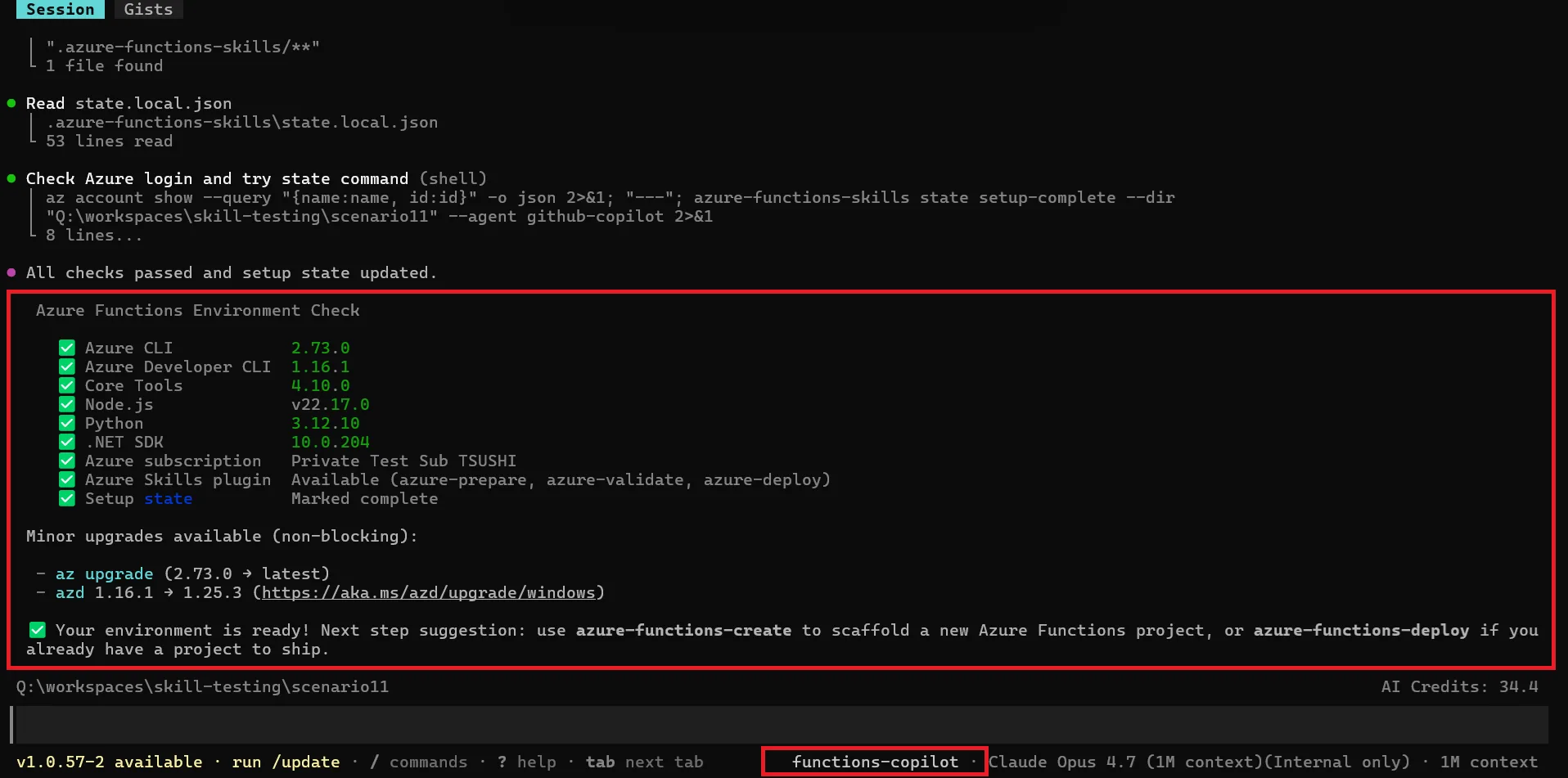
Everything after -- is passed through to the underlying agent, so any agent-native flag you rely on still works. Subsequent chat runs skip setup because the per-workspace state lives under .azure-functions-skills/.
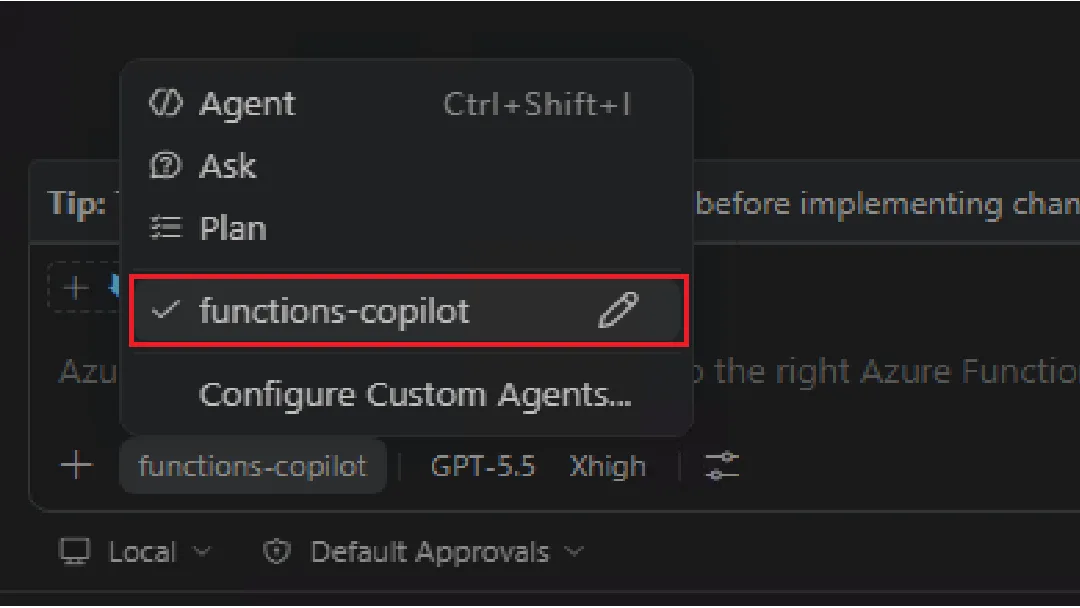
VS Code users get the same experience: open the workspace, pick the functions-copilot agent, and run the setup skill from there.
doctor: shift-left for the two biggest incident causes
Do you know the top two causes of Azure Functions support incidents reported to our team?
- User code defects
- Function App misconfiguration
Together, they account for roughly half of the Azure Functions support incidents we see internally — based on our analysis of Customer Reported Incidents (CRIs) in Q1 CY2026, about 53% were related to customer code or configuration issues. Preventing this class of issue before deploy time eliminates a large fraction of the problems customers report.
doctor checks a workspace for exactly those issues. It runs in two tiers:
- Tier 1 (deterministic, no LLM):
host.jsonshape, runtime version, trigger configuration, extension bundle range, deprecated settings, lockfile presence, tracked.envfiles, and a set of supply-chain checks (lifecycle scripts, unpinned production dependencies, install-script dependencies, and more) informed by the recent npm / PyPI compromises. - Tier 2 (semantic, LLM via
--deep): Uses your coding agent to find issues that need to read the code: client-per-invocation patterns, blocking I/O on the hot path, hardcoded secrets, Durable Functions non-determinism (Date.now(),Math.random(), network calls in orchestrators), credential collection patterns, and more.
Run it locally and get a self-contained HTML report (the --deep --accept-deep-risk flags opt into Tier 2 LLM checks; safe to run locally, see the CI note below before using in pipelines):
npx @azure/functions-skills doctor --dir . \
  --deep --accept-deep-risk \
  --agent github-copilot \
  --format html --output doctor-report.html
A representative run looks like this:
Tier 1 (deterministic)
  ✓ host.json shape ok
  ✓ runtime version pinned (~4)
  ⚠ extension bundle range too broad   host.json:5
  ⚠ unpinned production dependency      semver:^7.0.0 → pin to 7.5.4
  ✗ tracked .env file with secret keys  .env:3

Tier 2 (semantic, via --deep)
  ⚠ blocking I/O on hot path            app/orders.py:42  (use async client)
  ✗ hardcoded connection string         app/cosmos.py:11  (use Key Vault reference)
  ⚠ client-per-invocation pattern       app/blob.py:18    (hoist client to module scope)

Summary: 2 critical, 4 warnings — see doctor-report.html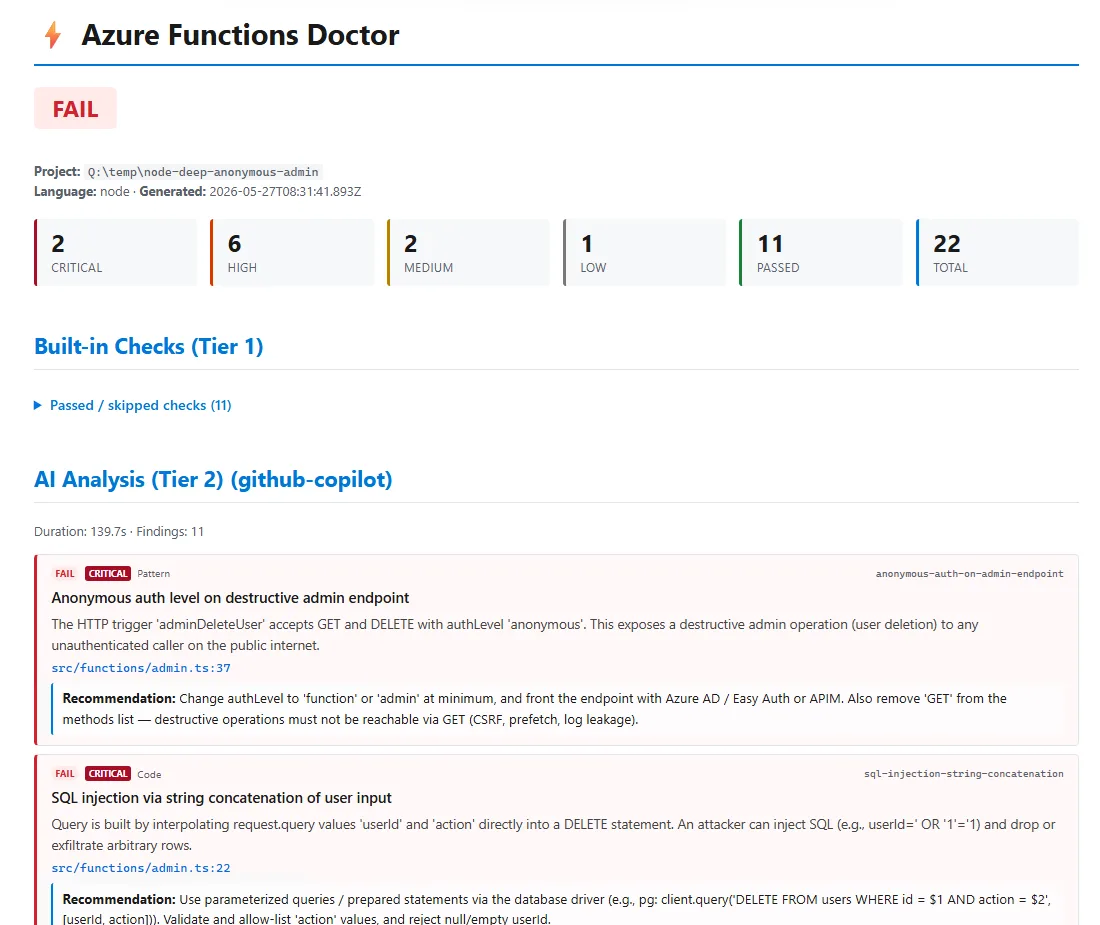
The same command can run in CI. Wire it into your deployment pipeline and you have shift-left for the configuration and code-quality issues that drive the majority of incidents, caught while the developer (or the agent acting for them) can still fix the diff cheaply.
A word on running –deep in CI
--deep runs the coding agent with file-write and shell-execution permissions, so any input the agent sees becomes a potential prompt-injection surface. We default to refusing --deep on pull_request events. You can opt in with AZURE_FUNCTIONS_DOCTOR_TRUST_PR=1 for trusted mirror pipelines.
The recommended pattern:
- PR validation:
--no-deep(Tier 1 only). Fast, deterministic, safe to run on untrusted PR content. - Post-merge / release:
--deeponpush: main, ideally gated behind a GitHub Environment with required reviewers and a scoped secret for the agent token.
See docs/doctor-guide.md and SECURITY.md for the full security model.
Where each skill fits
| When you want to… | Use |
|---|---|
| Get your local environment ready for Functions development | azure-functions-setup |
| Start a new project or add a function | azure-functions-create |
| Build a scheduled or event-driven AI agent (daily briefing, inbox digest, connector-triggered workflow) | azure-functions-agents |
| Deploy to Azure | azure-functions-deploy |
| Catch problems before deployment | doctor CLI (or azure-functions-doctor) |
| Review an existing app against current best practices | azure-functions-best-practices |
| Investigate a failing or misbehaving Function App | azure-functions-diagnostics |
| Check the live health of a running app | azure-functions-health-status |
| Send us feedback or a feature request | azure-functions-feedback |
functions-copilot routes your request to the appropriate skill, and proposes the next step after each workflow.
Getting started
Pick the agent you already use; the rest of the flow is the same.
# 1. Install the plugin (default: skills at user scope, workspace artifacts here)
npx @azure/functions-skills install --agent ghcp     # GitHub Copilot CLI
npx @azure/functions-skills install --agent claude   # Claude Code
npx @azure/functions-skills install --agent codex    # Codex CLI

# 2. Launch the agent (setup skill auto-fires on first run)
npx @azure/functions-skills chat

# 3. Validate before deploy (--deep enables Tier 2 LLM checks; safe locally, see CI note)
npx @azure/functions-skills doctor --deep --accept-deep-risk \
  --agent github-copilot \
  --format html --output doctor-report.html
VS Code: after step 1, open the workspace in VS Code, select the functions-copilot agent in GitHub Copilot Chat, and run the setup skill. Same first-run experience as chat, just inside the IDE.
Prefer the skills scoped to the current project only? Add
--localto step 1.
Full docs, CI recipes, and the supply-chain check reference live at https://github.com/Azure/azure-functions-skills.
We want your feedback
azure-functions-skills is open source, MIT licensed, and developed in the open. The repository is the right place to:
- Ask for skills you wish were there: open an issue, or run
azure-functions-feedbackmid-session and have the skill prepare the draft for you. - Report bugs or suggest improvements. Every issue is read.
- Contribute a skill or doc. See
CONTRIBUTING.md.
Repository: https://github.com/Azure/azure-functions-skills
We’re building the AI-era developer experience for Azure Functions in the open. Star the repo, open an issue, or run azure-functions-feedback mid-session and have the skill draft the issue for you. Tell us what to ship next.



0 comments