

Today we’re sharing a Visual Studio 2019 Release Candidate (RC) – one of the final steps before general availability on April 2 at the virtual launch event. You can download the RC at visualstudio.com/downloads. As always, check out the release notes for the RC for all the details.
Explaining the Release Candidate
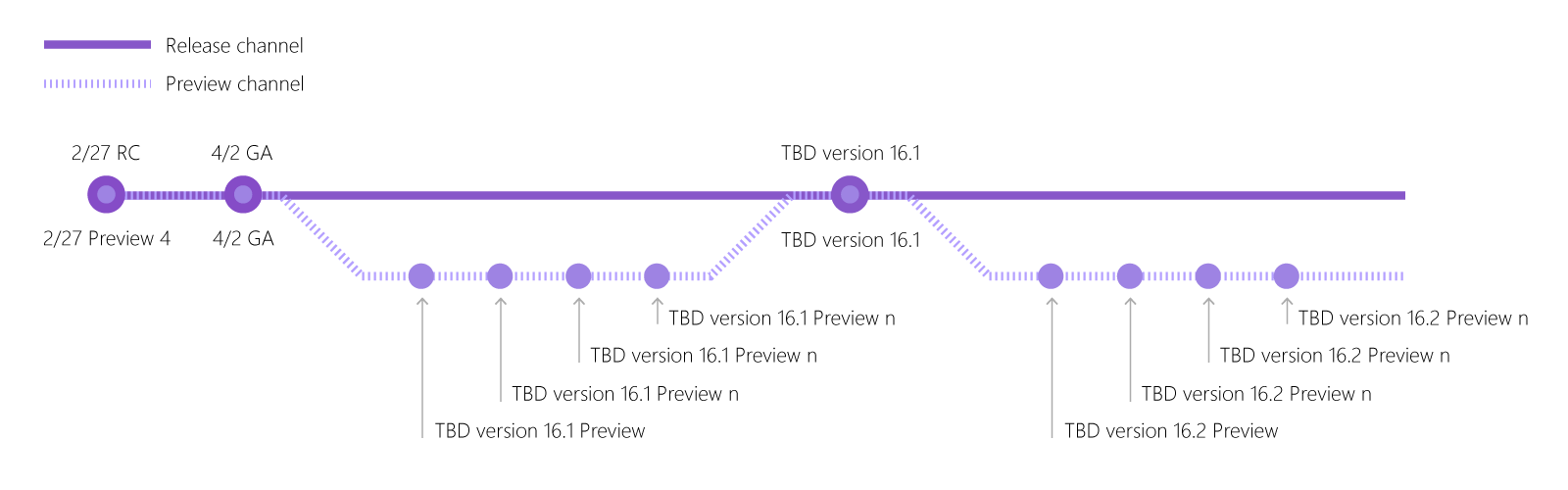
With this release, we’re introducing two product “channels”: the release channel and the preview channel. Starting today, Visual Studio 2019 RC is available in the release channel (visualstudio.com/downloads) and Visual Studio 2019 Preview 4 is available in the preview channel (visualstudio.com/preview). Both versions can be installed and used side-by-side and, right now, both channels contain the same bits.
Starting April 2, the release channel (RC) build can be upgraded to our generally available (GA) release, which will be ready for production use. The preview channel will continue to offer an early look at upcoming features, just as you’ve become accustomed to in Visual Studio 2017.
With today’s releases, we encourage you to install either Visual Studio 2019 RC side-by-side with your existing Preview installation, or start using the RC if you haven’t checked out the Preview releases. Visual Studio 2019 RC, as was the case with RCs of previous versions of Visual Studio, is a supported release and comes with a go-live license, but keep in mind that we’re still finalizing things and some workloads remain in preview until April 2. As mentioned, the RC can be upgraded to (GA) on April 2.
To help explain the two channels between now and GA (and beyond), we’ve put together this chart:
Visual Studio 2019 Editions
On the download or preview page on visualstudio.com, you’ll find that you can now choose to download the Community, Professional, or Enterprise edition for either channel. Up until now, only the Enterprise edition was available in the Visual Studio 2019 preview channel. If you have an Enterprise license and would like to keep using Visual Studio 2019 Preview, you can simply update to Preview 4 in the Visual Studio Installer. For everyone else, you will have to switch to the edition you’re licensed for, either in the preview (Preview 4) or release (RC) channels. We recommend that you first install your licensed edition, and then uninstall the current Visual Studio 2019 Preview if installed.
Visual Studio Professional and Enterprise have different features. For example, Enterprise has IntelliTrace, Live Unit Testing, Embedded Assemblies for mobile apps, Real Time Architecture Validation, and others – features we continue to hone. A couple of items I’ll call out that are a bit newer in Visual Studio 2019 Enterprise:
- The Snapshot Debugger, which enables you to debug production applications in Azure with minimal disruption, adds support for Azure Kubernetes Service (AKS) and Virtual Machine Scale Sets (VMSS).
- In a future release of Visual Studio Enterprise 2019 will add a preview of Time Travel Debugging (TTD) integrated with the Snapshot Debugger. TTD enables you to record a process and then accurately reconstruct and replay the execution path. You can rewind and replay each line of code however many times you want, helping you isolate and identify problems.
For Visual Studio Community 2019, we’re making the References, Application Insights (Requests and Exceptions), and Test (Test Status and Tested By) CodeLens capabilities available, which were only available in Visual Studio Professional and Enterprise previously. This means that any Visual Studio 2019 user can can now get specific insights and information about the code, right within the code editor.
Reaching the home stretch together
We’re incredibly grateful to all the users who have been trying out Visual Studio 2019 since the first preview and have been giving us feedback every step of the way. While our generally available release on April 2 only marks the beginning of Visual Studio 2019 releases, we still encourage everyone to install Visual Studio 2019 RC and help us ship the best of Visual Studio to date. Let us know of any issues you run into by using the Report a Problem tool in Visual Studio or head over to the Visual Studio Developer Community to track your issue or suggest a feature.
I hope you all tune in online on April 2 for the virtual launch of Visual Studio 2019, which will be a fun celebration together with you, the community. You can also attend one of the many local launch events happening between April 2 and June 30. I hope you continue to share your feedback in future releases, so Visual Studio continues to be your development environment of choice. Thank you!


How can I completely uninstall my VS2017 in my windows?
Will Visual Studio 2019 support Cordova projects?
I was using VS2015 with Ionic and tried to upgrade to VS2017. It said that I needed to install task runner, which I did, but still could not get it to work. Some of the forums said that perhaps my node.js was out of date. I updated it and it still didn't work and it also appeared to kill the ripple simulator so I can no longer utilize VS2013. VS2015 gave me an error with something that it was using different versions of node. They were both in essentially the same location, but...
Will VS2019 support Cordova projects?
I downloaded and installed Visual Studio 2019 RC version. But there is something worng with this version.