

While we know that many of you enjoy, and rely on the Visual Studio Command Prompt, some of you told us that you would prefer to have a PowerShell version of the tool. We are happy to share that in Visual Studio 2019 version 16.2, we added a new Developer PowerShell!
Using the new Developer PowerShell
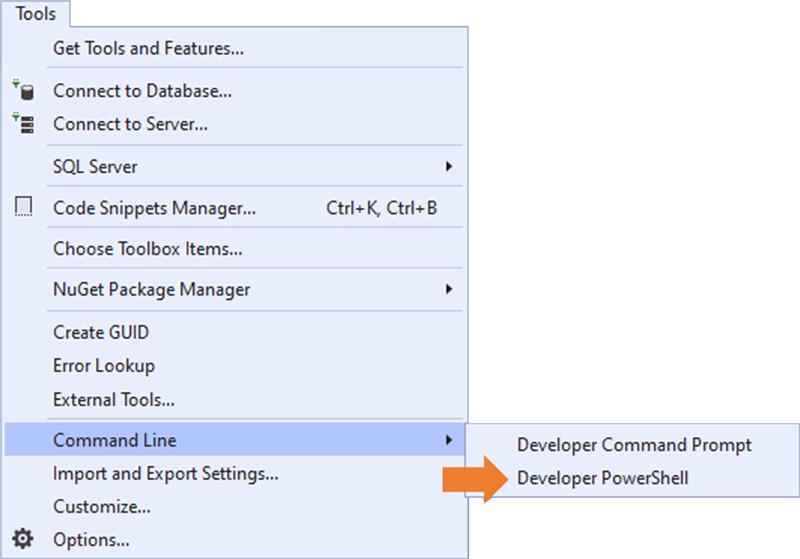
We also added two new menu entries, providing quick access to not just the Developer PowerShell, but also for the Developer Command Prompt. These menu entries are located under Tools > Command Line.
Also, you can access the Developer Command Prompt and Developer PowerShell via the search (Ctrl +Q):

Selecting either of these tools, will launch them in their respective external windows, and with all the predefined goodness (e.g. preset PATHs and environment variables) you already rely on.
Opening them from Visual Studio automatically adjust their directories based on current solution or folder’s location. Additionally, If no solution or folder is open at the time of invocation, their directories are set based on the “Projects location” setting. This setting is located under Tools > Options > Locations.

Try it out and let us know what you think!
We’d love to know how it fits your workflow. Please reach out if you have any suggestions or comments around how we could further improve the experience. Send us your feedback via the Developer Community portal or via the Help > Send Feedback feature inside Visual Studio.


Why not supporting PowerShell Core? I believe this’s the next generation of powershell, more feature added in this version but not for old powershell.
Kann mann die Powershell dirket mit in die IDE irgendwie “einbauen” als User? das wäre praktisch, dann könnte man sehen welche “ergebnisse ” bei gewissen Anwendungen sich ergeben. Ansonsten : sehr praktisch!
Hi! Thanks for the feedback! We recently announced an integrated terminal experience for Visual Studio. You can learn more on this link: https://devblogs.microsoft.com/visualstudio/say-hello-to-the-new-visual-studio-terminal/
To recap, this experience will allow you to run integrated versions of PowerShell in Visual Studio.
Just updated Visual Studio to 16.2.4, and the developer command prompt doesn’t work at all. It seems a specific version of powershell is needed. Cannot load DevShell.dll, … the assembly was built with a newer run-time than the currently loaded one. What are the pre-requisites?
Is this working with powershell 6 (AKA Core) ?
Hi Teodor! No, at this point we don’t offer support for PowerShell Core.