



If you’ve worked with Git submodules for any length of time, you probably have a love-hate relationship with them. They’re genuinely useful for pulling a shared library, an SDK, or common build scripts into your project. But actually working with them usually means tabbing over to a terminal and trying to remember whether it’s git submodule update --init or --init --recursive this time all while a perfectly good IDE sits right in front of you, shrugging.
That’s the part we wanted to fix. Starting in Visual Studio 18.9, Git submodules are a first-class part of the IDE no more bouncing out to the command line just to keep your dependencies in order. It’s been one of the most-requested Git features for a long time, and honestly, it’s about time.
They finally feel like part of Git in the IDE
Submodules aren’t a mystery folder anymore. There’s a dedicated Submodules section in the Git Repository window, they show up properly in Git Changes, and the branch and repository pickers actually understand how your parent repo and its submodules relate.
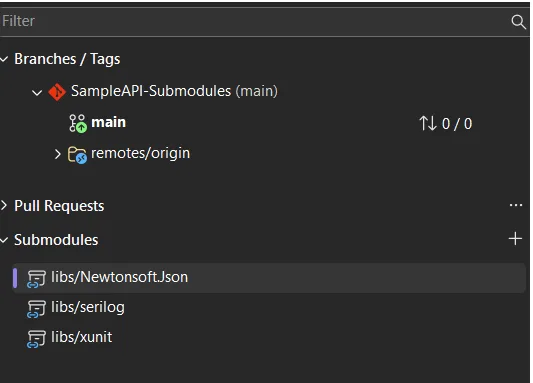
[Image: Submodules section in the Git Repository window)
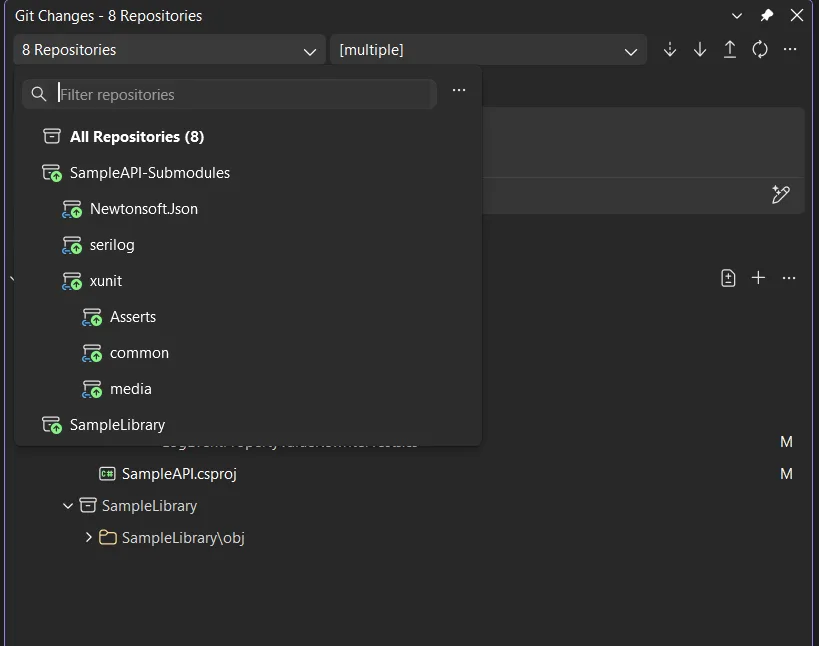
[Image: Submodules in the Git changes window)
Add, update, and delete without leaving your seat
From that Submodules section, you can add, update, or remove a submodule right there no memorized flags, no terminal detour. Open a solution or folder and Visual Studio discovers and activates your submodules automatically, while keeping them out of the main local repositories list so your repo picker doesn’t turn into a cluttered mess.
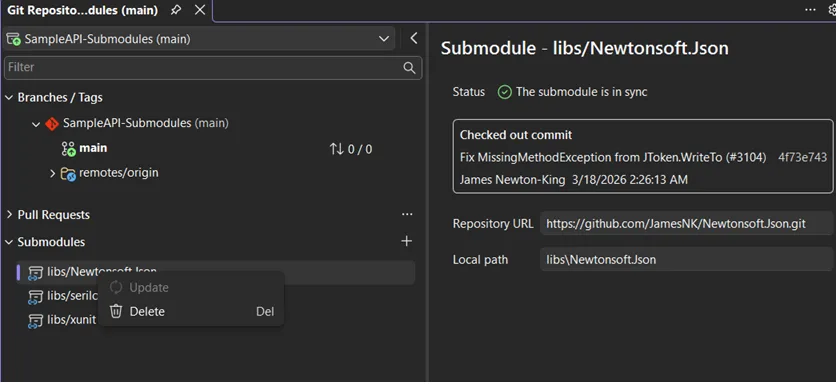
[Image: Selecting a submodule repository in Visual Studio]
Read-only by default
Most of the time you’re just *using* a submodule, not editing it, so Visual Studio treats them as read-only by default. That saves you from accidentally committing changes into a dependency you only meant to reference. When you do want to work *inside* one, it’s a single setting: Tools > Options > Source Control > Git, find Automatically activate multiple repositories, and pick Yes, include submodules.
This is just the start
This is the first milestone, not the finish line. It covers the core of what you need day to day, and there’s more coming in future releases depending on what you tell us.
We’d love to hear from you
This feature exists because so many of you kept asking for it, so keep the feedback coming. Drop your thoughts on the Feature Ticket , and if something breaks, please use the Report a Problem tool in Visual Studio is the fastest way to reach us. You can also find the team on Twitter @VisualStudio, YouTube, and LinkedIn.
Thanks, as always, for coding with us.


That strange…
I receive this upgrade, but use visual studio Installer for obtain MVSC – C.
I use Visual Studio Code for coding in language C. You can explain for me one little about this upgrade?
The github is external package very usage in programming, this was one excellent addictional features.
I like the direction and really excited about it. Submodule support is why I usually go for CLion rather than VS daily. It’s a bit clunky in VS – you have to activate write mode in options and switch to a submodule in the “Git changes” window. I appreciate this is very new, but you should really check out how submodules are handled in IntelliJ IDEs as most of the users will be coming with that experience.
Git submodules….gross