

At Microsoft, our focus is on providing the best possible experience for Python developers – both for everyday coding and for the agentic workflows that are increasingly central to how developers build software. A great type checking experience is a core part of that, not only for surfacing accurate and actionable diagnostics and providing a strong foundation for Intellisense, but as the bedrock of static semantic intelligence for software agents. Today we’re announcing the Type Server Protocol (TSP) and our partnership with Meta to bring Pyrefly support to Pylance.
Introducing the Type Server Protocol
TSP is an open standard that extends LSP – the Language Server Protocol that underpins editor integrations across the industry – designed to allow any editor or tool to integrate type checkers as first-class backends.
Until now, Pylance and Pyright were tightly coupled. TSP creates a clean separation between the two: Pylance becomes the VS Code IDE intelligence layer for Python, and the type checker becomes an interchangeable static analysis component underneath it. Pyright remains the default and continues to power the experience for the vast majority of users. But for developers who have a strong preference – or whose codebase is better served by a different checker – switching is now a straightforward operation, right from the VS Code status bar.
What stays constant regardless of which checker you use is Pylance’s completions, Quick Info, environment management, and critically its deep integration with GitHub Copilot. Those experiences are built on Pylance, not on any individual type checker. TSP means you can bring the checker you want without giving up any of those features that you know and love.
Partnering with Meta to bring Pyrefly to Pylance
We are excited to announce that we have partnered with Meta to design and implement the TSP protocol and make sure that Pyrefly fully supports it. This collaboration is built on a shared belief that the Python ecosystem is better served by interoperability than by fragmentation. Meta brings deep expertise in fast static type analysis and a particular strength in AI/ML library support. Microsoft brings the VS Code IDE integration layer and the GitHub Copilot experience. TSP is the protocol that makes them work together.
Meta has been at the forefront of Python typing longer than almost anyone. Since 2017, they have been solving type checking at scale on some of the world’s largest Python codebases, including Instagram. That experience shaped every design decision in Pyrefly, which checks code at 1.8 million lines per second and was built from the ground up to deliver a consistent experience in both CI and the IDE. Meta has also invested heavily in the broader ecosystem, bringing NumPy to nearly 90% type completeness, completing pandas‘ public API type coverage, and publishing the most comprehensive public performance benchmarks for Python type checkers.
We are proud to partner with Meta on bringing Pyrefly to Pylance and we look forward to the ecosystem growing around this open standard, and to bringing even more choice to Python developers in the future.
Why Pylance + TSP + Pyrefly instead of Pyrefly standalone?
This is the right question to ask. Pyrefly already has a highly performant VS Code extension and is an excellent choice for type checking in continuous integration (CI). Why use it through Pylance instead of directly?
Pylance provides tight integrations with the GitHub Copilot experience that a standalone type checker extension can’t replicate – context provision for AI completions, intelligent code understanding that feeds into GitHub Copilot Chat, MCP tools for Python codebases, and the full suite of Python developer tooling that Pylance has built over years in production. In decoupling Pyright from Pylance we now have a clear separation of concerns where pylance can provide an intelligence layer for Python developers and delegate the heavy lifting of type checking. By using Pyrefly with Pylance via TSP, you get Pyrefly’s type analysis powering the engine, with Pylance’s AI-aware intelligence layer on top. You don’t have to choose.
How to try it
TSP support with Pyrefly requires a Pylance version of 2026.4.1 or newer. Here’s how the experience works.
Automatic detection
When you open a workspace, Pylance checks your Python environments for a Pyrefly installation.
If it finds one – whether installed in your virtual environment or signaled by a pyrefly.toml or tool.pyrefly config in your pyproject.toml – you’ll see a notification:
Pyrefly was found in your Python environment. Would you like to use it as your source of diagnostics in VS Code?
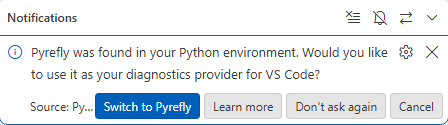
Click Switch to Pyrefly and Pylance will activate Pyrefly as your diagnostics source immediately, registering the path to the Pyrefly executable automatically. No manual configuration needed. and the choice to “Switch to Pyrefly” can always be reverted or reenabled via Settings.
Manual setup via settings
You can also switch at any time through the VS Code Settings UI. Under Python › Analysis: Diagnostics Source, you’ll find a dropdown with three options:
- Pylance – default, uses Pylance’s built-in analysis
- Pylance + Pyright – explicitly routes diagnostics through Pyright
- Pylance + Pyrefly – uses Pyrefly as the diagnostics engine
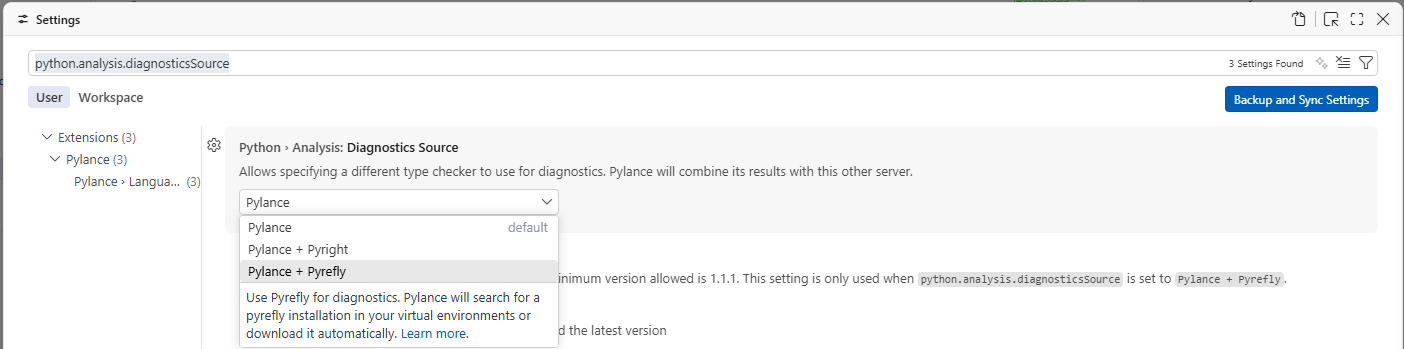
When Pylance + Pyrefly is selected, Pylance will search for a Pyrefly installation in your virtual environments or download it automatically.
A companion Python › Analysis: Pyrefly Version setting lets you pin a specific version, point to a local executable, or leave it empty to always use the latest. The minimum supported version is 0.60.0.
Status bar
Once active, the status bar shows Diagnostics Source: Pylance + Pyrefly alongside your interpreter and environment.
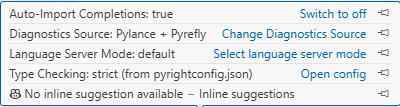
Clicking it opens the Python › Analysis: Diagnostics Source setting.
What do you think?
Try the new Pylance + Pyrefly experience today in VS Code and let us know your thoughts. Share any feedback by opening an issue or voting on an existing one. You can also leave a comment below or reach us on X.
The Pyrefly team have their own blog post on TSP and the work we have done together.


0 comments
Be the first to start the discussion.