


Historically, Power Platform administrators and developers have automated management tasks through a mix of tools. A capability might exist in the admin center, use a different name in PowerShell, have a custom shape in a connector, or not yet be available in the command line. Each tool could be valuable, but moving between them often meant relearning commands, payloads, authentication patterns, and coverage.
Last year, we shared how Power Platform is moving from a UX-first model to an API-first ecosystem. Today, we’re bringing one of the clearest results of that strategy directly to the terminal: auto-generated Power Platform API command groups in Microsoft Power Platform CLI are now available in public preview.
One specification built monthly
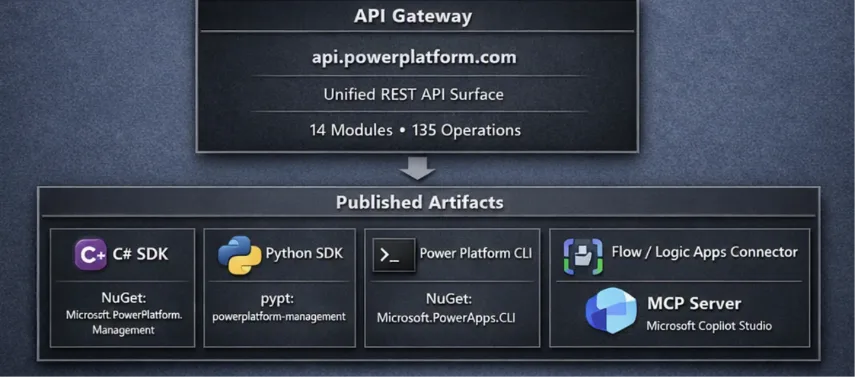
The Power Platform API is the customer-facing management plane for Power Platform. Instead of implementing each automation surface independently, we define public management capabilities once in the API specification and generate tools on top of that contract.
That source already drives the Microsoft.PowerPlatform.Management SDK for .NET, the powerplatform-management SDK for Python, and the Power Platform for Admins V2 connector. With this public preview, it also generates PAC CLI command groups. API namespaces become top-level pac command groups, and API operations become discoverable commands with consistent help and inputs.
Why generated commands matter
Generation is more than a faster way to create commands. It changes how quickly and consistently management capabilities can reach the tools you use.
- Consistent coverage The CLI is designed to grow with the Power Platform API, reducing the lag and uneven coverage that can occur when each tool is implemented by hand.
- A predictable command model Namespaces and operations follow a consistent structure, so discovering a new area feels familiar: pac
help, followed by the operation you need. - Use the tool that fits Move between REST, .NET, Python, Power Automate, and the CLI without changing the underlying management model.
- No separate authentication setup Generated commands use your active pac auth profile, including the tenant and cloud you already selected.
- Agentic management without capability cliffs GitHub Copilot and Anthropic’s Claude Code already use PAC CLI as an execution harness. Broader API coverage lets agents stay in one predictable tool instead of stopping when a required operation exists only in another surface.
Critical scenarios unblocked
As features related to our business applications and low-code offerings rapidly evolve, we are making a concerted effort to ship API-first. This supports a tighter feedback loop before we bring capabilities to the Power Platform admin center. With the ease of use of the CLI, this now unlocks several new scenarios for Dynamics 365 finance and operations apps for managing versioning and updates of the software, Copilot Studio agent ownership reassignment and quarantine, as well as Copilot credit allocations and whether to draw from the tenant capacity pools.
In addition, we will update our SDKs and CLI now every month as we have done consistently the past two years. However, new APIs can be released daily and so we have followed in the footsteps of Azure CLI by providing a capability to get a token for Power Platform API so that you and your agents can invoke endpoints that are hot off the press even before they become available in the CLI:
|
pac auth token |
More than 200 commands across 15 command groups
At public-preview launch, the generated experience spans 15 Power Platform API namespaces and more than 200 commands. The command groups cover scenarios ranging from environment lifecycle and licensing to governance, Power Pages, Copilot Studio, and role-based access control.

|
Command group |
Commands |
Representative command |
|---|---|---|
|
pac analytics |
6 |
get-recommendations |
|
pac app-management |
4 |
install-application-package |
|
pac authorization |
10 |
list-role-definitions |
|
pac connectivity |
3 |
list-connectors |
|
pac copilot-studio |
11 |
reassign-copilot-agent |
|
pac dynamics |
2 |
get-fin-ops-maintenance-settings |
|
pac environment-management |
41 |
list-environment-groups |
|
pac governance |
20 |
list-rule-based-policies |
|
pac licensing |
47 |
list-billing-policies |
|
pac power-apps |
2 |
get-admin-apps |
|
pac power-automate |
3 |
list-cloud-flows |
|
pac power-pages |
35 |
create-website |
|
pac resource-query |
1 |
query-resources |
|
pac user-management |
1 |
apply-admin-role |
|
pac workflows-agent |
16 |
get-flows |
Start with the interface you already know
If you already use PAC CLI, there is no separate preview package or feature flag to configure. Install or update the latest CLI, use your existing authentication profile, and explore the generated groups alongside the commands you already know.
Install or update Power Platform CLI
|
# Windows launcher # .NET global tool |
Create or select an authentication profile
|
pac auth create |
Discover the generated command groups
|
pac help |
Run a command against the tenant in your active profile
|
pac environment-management list-environment-groups |
The same pattern works across the preview. For example, you can inspect Power Apps and cloud flows, manage environment lifecycle operations, review licensing resources, administer Power Pages sites, and query role definitions and scoped assignments.
Agentic management without capability cliffs
A command line is valuable for more than interactive administration. It is easy to compose in scripts, pipeline steps, runbooks, and operational playbooks. It is also a natural execution surface for AI-assisted development: agents can read command help, construct a command, explain the effect, and reuse the same pattern across namespaces.
We already see developers using GitHub Copilot and Anthropic’s Claude Code to drive PAC CLI today. These harnesses are most effective when the execution surface is predictable and complete. If an agent can discover an environment but must switch tools, authentication models, or payload shapes to manage its lifecycle, the workflow reaches a capability cliff.
Expanding PAC CLI to reflect the Power Platform API helps remove those cliffs. An agent can remain in one authenticated, discoverable surface as it identifies a resource, plans an action, executes the command, and verifies the result. As the API grows, generated commands give human operators and agents the same expanding vocabulary for managing the platform.
Join the journey
Whether you’re an administrator building a repeatable runbook, a professional developer creating an automation pipeline, or a team using coding agents to accelerate operations, this public preview is for you.
Update Power Platform CLI, run pac help, and try a generated command group – directly or with GitHub Copilot or Claude Code guiding the workflow. Tell us which scenarios work well, where command help or output can improve, and which Power Platform API capabilities you want to automate next.
Get started: Install and configure Microsoft Power Platform CLI
Explore commands: Power Platform CLI command reference
Understand the strategy: Power Platform programmability and extensibility
Follow monthly releases: What’s new or changed
Share feedback: Power Platform Build Tools discussions


0 comments
Be the first to start the discussion.