

Dataverse Native Authorization Model for Power Pages
How mapped identities, security roles, and record filters move external-user authorization closer to the data.
We’re introducing a major update to the Power Pages security model: authorization for external users is now enforced natively in Dataverse. Customers can opt in to this feature as they transition to the new model.
This architecture moves Power Pages authorization closer to the data by translating Power Pages concepts into Dataverse-native security constructs. Instead of relying on Power Pages at runtime to reconstruct authorization for every request, Power Pages now materializes those permissions directly in Dataverse through mapped identities, mapped roles, and record filters.
It’s a meaningful step forward for how customer-to-business access is enforced across Power Platform. The maker model stays familiar, while Dataverse now evaluates access for external users natively at the platform layer using record-filter-based authorization.
What changed
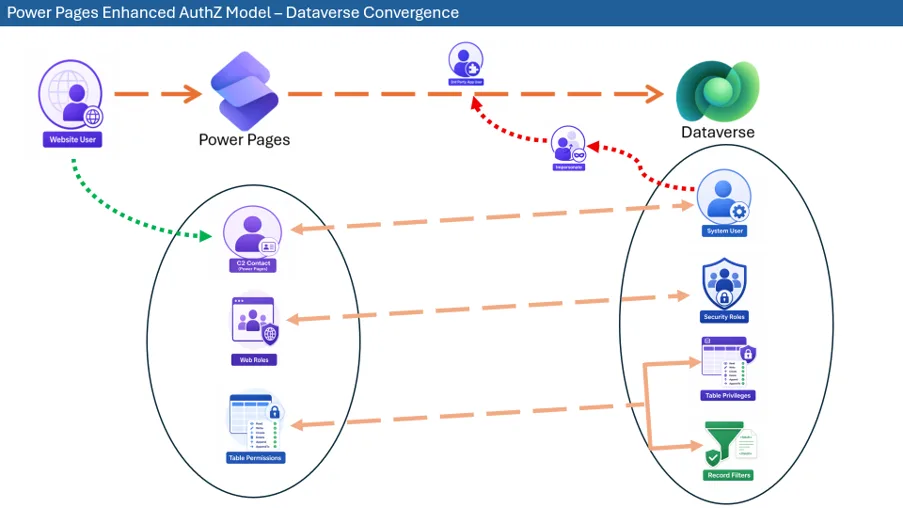
With this feature, the Power Pages authorization model is projected into Dataverse through a small set of core mapping constructs.
Contact-to-user mapping
Each Power Pages external user, represented by a contact, is mapped to a Dataverse system user. Because authorization can vary by site, this mapping is site-aware, allowing a single contact to map to a different system user for each website.
This design preserves site-specific authorization boundaries while enabling Dataverse to enforce access using its existing user-based security model.
This mapping is stored in the PowerPagesUserMapping table.
These system users are managed internally, do not provide direct access to Dataverse, and do not require additional licensing. Access continues to be governed by Power Pages licensing.
Web roles become security roles
Each Power Pages web role is mapped to a Dataverse security role.
This allows the role assignments configured in Power Pages to be represented in Dataverse using native role-based security. As web roles are assigned to a contact, the corresponding mapped security roles are associated with that contact’s mapped system user.
The mapping between the web role and the security role is added as part of the adx_webrole table for SDM and the powerpagecomponent table for EDM.
Table permissions become record filters
Each Power Pages table permission is translated into privileges that use record filters for each operation and are associated with the mapped security role.
These filters capture the access scopes already familiar to Power Pages makers, including:
- Global Scope
- Contact Scope
- Account Scope
- Parent Scope
A new scope called “Custom Scope” is introduced, which is available only when this feature is opted in. Custom Scope permissions provide more granular, record-level security control by allowing makers to define access based on conditions specified using FetchXML filters.
Consider an Event table in Dataverse that does not have any relationship with the Contact or Account tables. The Event table can contain Free, Standard, and Premium events. Previously, Power Pages could configure only global-scope permissions for anonymous, standard, and premium users. With Custom Scope permissions, makers can add FetchXML filters to show free events to anonymous users, standard events to standard users, and premium events to premium users.
By materializing these scopes as Dataverse-native privileges using record filters, authorization can now be enforced directly by the platform rather than reconstructed in the middle tier.
Anonymous access stays site-aware
For anonymous scenarios, each website has a mapped anonymous system user associated with the Anonymous web role’s mapped security role, if one exists. This allows unauthenticated access patterns to follow the same Dataverse-native enforcement model as authenticated users.
Real-world scenario: tiered event registration
Consider a customer portal for event registration. The organization publishes events in Dataverse and wants different visitors to see different records: anonymous visitors can browse only free events, signed-in standard members can view standard events, and premium members can view premium events.
When Priya signs in to the portal, her Power Pages contact is mapped to a site-specific Dataverse system user. If Priya is assigned the Premium Member web role, that web role is represented as a mapped Dataverse security role and associated with her mapped system user. The Event table permission for Premium Member is translated into Dataverse privileges that include a record filter, allowing read access only where the event category is Premium.
At runtime, Power Pages calls Dataverse in the context of Priya’s mapped system user. Dataverse evaluates the mapped security role and Event record filter natively, returning only the premium events that Priya is authorized to see.
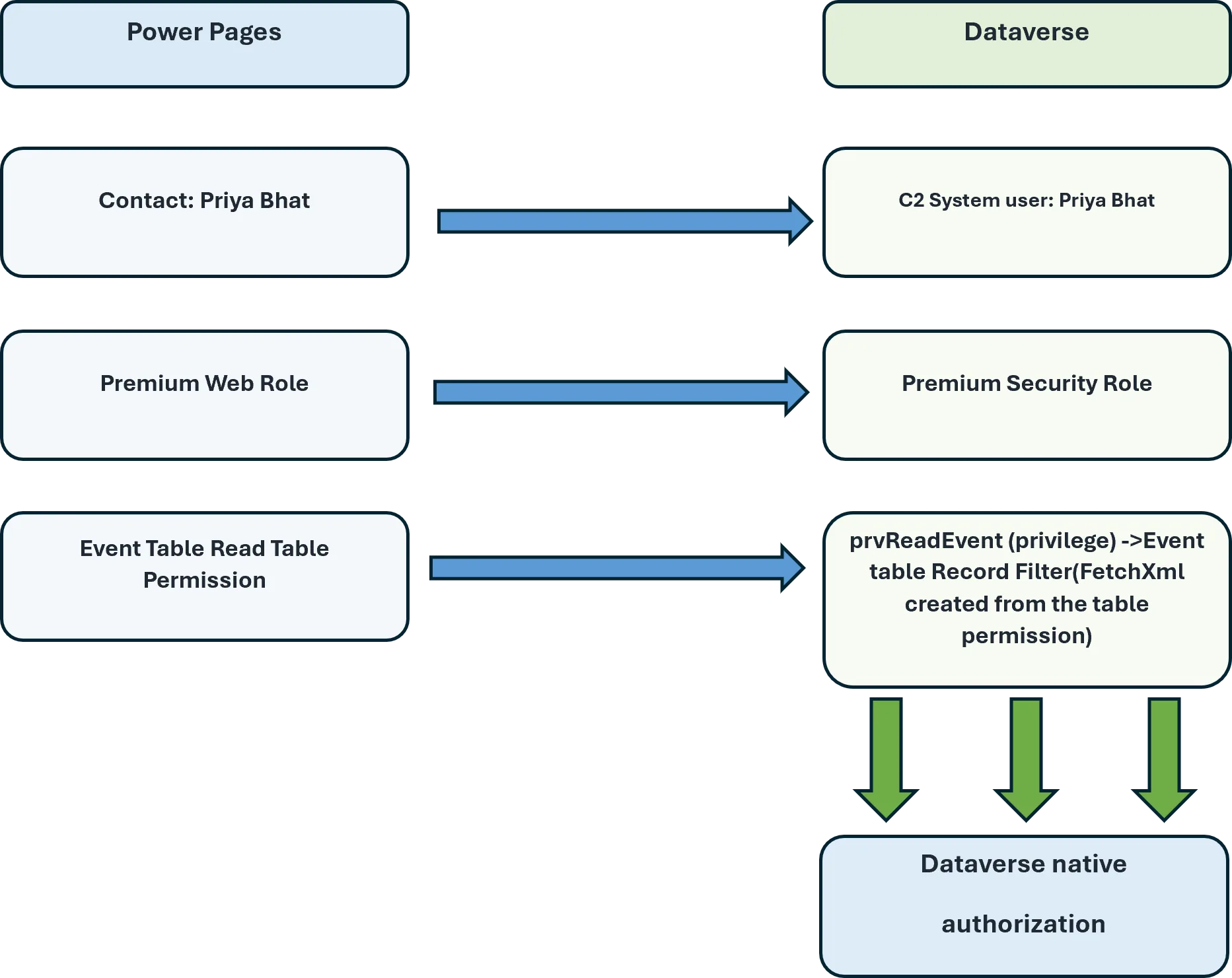
This is the practical value of the mapping layer: makers continue to describe access in Power Pages terms, while Dataverse receives a concrete user context, role assignment, and record filter that it can evaluate consistently at the data boundary.
How it works
Runtime flow
At runtime, Power Pages resolves the mapped Dataverse system user for the current user and website, then issues requests to Dataverse in that user context.
- A user signs in to a Power Pages site or accesses the site anonymously.
- Power Pages resolves the mapped system user for that site and user context.
- Power Pages calls Dataverse while impersonating the mapped system user.
- Dataverse evaluates permissions using record filters and returns only the authorized data.
This moves the enforcement point from the Power Pages runtime to Dataverse itself.
Migration
When a maker opts in to Enhanced Authorization, the existing site configuration is translated into the new mapped model. Web roles map to Dataverse security roles, and table permissions are materialized into record-filter-based privileges. The feature is enabled only after migration completes successfully. Contact-to-system-user mapping occurs when a contact signs in to the site for the first time after the feature is enabled.
At design time, makers continue to use the existing Power Pages experience to configure contacts, web roles, and table permissions.
The mapping model is maintained as site configuration evolves. When contacts, web roles, or table permissions are created or updated, the corresponding Dataverse mappings are created or refreshed.
Why this matters
Enforcement moves to the platform boundary
Authorization is now enforced where the data lives. This reduces the need for Power Pages at runtime to reconstruct permission filters or apply compensating logic across different access paths.
Power Pages continues to provide the maker-facing authorization model, while Dataverse becomes the system of enforcement. This creates a clearer separation between experience definition and data access control.
Relationship-based access fits more naturally
Because table permissions are expressed as record-filter-based privileges, relationship-driven access patterns map more naturally to platform enforcement. This makes contact, account, parent, and custom-scope scenarios easier to represent consistently without relying on Power Pages runtime-specific logic.
Auditing gets better
Because requests execute in the context of a mapped external user, Dataverse can associate actions more accurately with the effective user context, improving traceability and auditability. Auditing now identifies the system user mapped to the external user who made the change, rather than showing the Portal app user for all changes made through Power Pages.
Why the mapping layer is the real shift
The key innovation is not a parallel authorization system. It is the mapping layer that connects the existing Power Pages model to Dataverse-native enforcement.
Contacts remain the identity model that makers work with in Power Pages. Web roles remain the way access is organized. Table permissions remain the way access intent is defined.
What changes is where that intent is enforced.
By translating those constructs into Dataverse system users, security roles, and record-filter-based privileges, Power Pages preserves its existing maker experience while Dataverse enforces access directly at the platform layer.
This also closes the gap between the security capabilities supported by Power Pages and Dataverse.
Dataverse column security for secured fields now works seamlessly in Power Pages. Secured Dataverse fields are protected in Power Pages by default. To grant access, the external user’s mapped system user must be added to a Column Security Profile that provides the required read, write, or create permissions for the secured field.
Impact on plugins
Previously, plugins triggered by actions performed through Power Pages ran in the Portal App User context, which had broad access. With Enhanced Authorization, plugins run in the external user’s mapped system-user context.
Because the mapped system user may not have all required permissions, some plugins could fail. If a plugin must continue to run in the Portal App User context, update the plugin’s Run As configuration accordingly.
What this unlocks next
This release is a foundational step in the continuing evolution of Power Pages security.
By bringing external-user authorization into Dataverse through explicit identity, role, and permission mappings, the model becomes more native to the platform, easier to reason about, and better aligned with the long-term direction of Power Platform security.
Power Pages still defines access. Dataverse now enforces it natively.


0 comments