

Keep destination rules outside your agent code. Observe real calls, then test an explicit outbound boundary
Preview. This walkthrough is for development and evaluation. Network egress controls are not GA, have no preview SLA, and are not intended for production use. [1]
Imagine an invoice agent that looks up a vendor and checks a payment record. Its job needs two APIs. Then a document includes an unfamiliar upload link, or a new helper library follows a URL you did not expect. The question is no longer just “Which tools did I give the agent?” It is “Where can this process send a request?”
In this walkthrough, we will give that invoice agent an explicit destination policy, observe its calls in a test environment, and check that an unapproved destination stays unreachable when enforcement is enabled. The application still owns its business logic and authentication. The outbound policy becomes a separate thing you can review.
A tool list is not a network boundary
A rule inside one HTTP wrapper only helps when a call uses that wrapper. Our sample puts the destination decision on the hosted-agent definition instead. The public egress sample demonstrates this separation using ordinary outbound HTTP calls. [4]
| Application-only checks | An explicit egress policy |
|---|---|
| Review every client and helper for destination checks. | Review a named, ordered set of destination rules. |
| A successful tool response is your main signal. | Test both a permitted call and a deliberately denied call. |
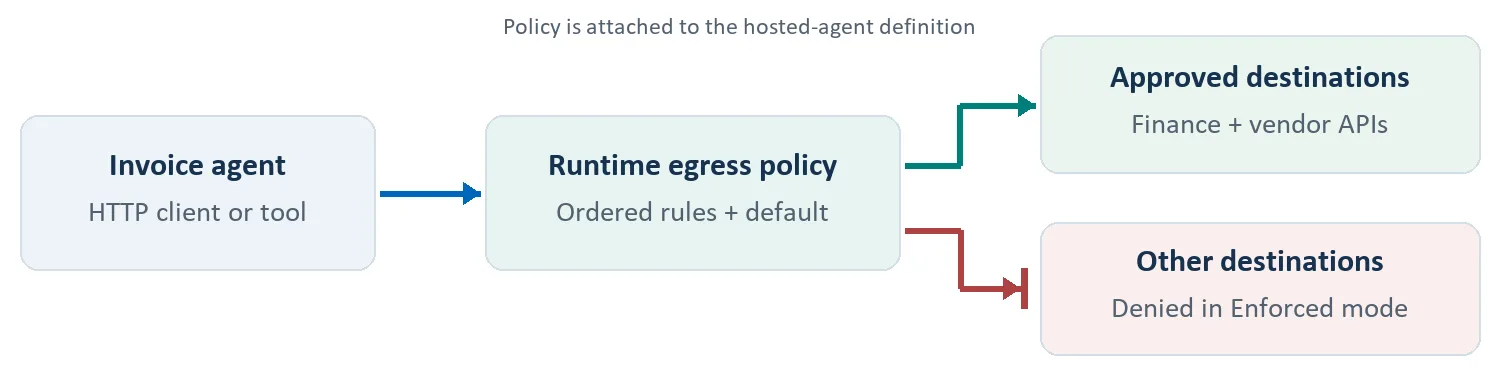
Conceptual application-traffic view. Foundry’s required platform connectivity is separately allowed; a deny default is not a claim that every runtime connection is blocked. [1]
1. Define the destinations your agent needs
For this example, approve a finance API and a vendor API. Do not approve the test upload destination. Start with exact hostnames so a reviewer can understand the intended boundary without interpreting a broad wildcard.
Before you start: use a test Foundry project, a deployable hosted-agent image, permission to create an account-level RAI policy, and controlled HTTPS endpoints. Replace every .example hostname below with a host you own. These names are placeholders, not live services.
Save this new policy body as invoice-egress.json. It uses the documented ARM resource shape and deliberately sets both the network mode and default action. [2]
JSON | new RAI policy body
{
  "properties": {
    "basePolicyName": "Microsoft.DefaultV2",
    "mode": "Blocking",
    "egressPolicy": {
      "mode": "Audit",
      "defaultAction": "Deny",
      "rules": [
        {
          "name": "allow-finance",
          "ruleType": "Fqdn",
          "match": { "host": "finance.contoso.example" },
          "action": { "actionType": "Allow" }
        },
        {
          "name": "allow-vendors",
          "ruleType": "Fqdn",
          "match": { "host": "vendors.contoso.example" },
          "action": { "actionType": "Allow" }
        }
      ]
    }
  }
}
From the directory containing invoice-egress.json, run the following Bash commands with Azure CLI installed. Replace the three resource values and sign in with an identity that can write RAI policies on the account. az rest obtains the Azure Resource Manager token from your signed-in CLI session and sends the JSON file as the request body. Keep RAI_POLICY_ID exported for the Python attachment step. Azure CLI authentication and request-body reference.
Bash | authenticate and create the Audit policy
SUBSCRIPTION_ID="<your-subscription-id>"
RESOURCE_GROUP="<your-resource-group>"
ACCOUNT_NAME="<your-foundry-account>"

az login
az account set --subscription "$SUBSCRIPTION_ID"

ACCOUNT_ID="/subscriptions/${SUBSCRIPTION_ID}/resourceGroups/${RESOURCE_GROUP}"
ACCOUNT_ID="${ACCOUNT_ID}/providers/Microsoft.CognitiveServices/accounts/${ACCOUNT_NAME}"
export RAI_POLICY_ID="${ACCOUNT_ID}/raiPolicies/invoice-egress-audit"
POLICY_URL="https://management.azure.com${RAI_POLICY_ID}?api-version=2026-05-15-preview"

az rest --method put --url "$POLICY_URL" \
  --headers "Content-Type=application/json" \
  --body "@invoice-egress.json"
Read the saved policy back before creating an agent version. Confirm that its ID matches RAI_POLICY_ID, its network mode is Audit, its default is Deny, and both intended hostnames are present.
Bash | verify the configured policy
az rest --method get --url "$POLICY_URL" \
  --query "{id:id,egressPolicy:properties.egressPolicy}" \
  --output json
This GET verifies the stored configuration, not runtime enforcement. The allow/deny probes in step 3 provide the runtime check.
Here, properties.mode is the content-safety setting. The network setting is properties.egressPolicy.mode. In the egress rules, the first match determines the action; otherwise the default applies. [2]
Use a new resource for this exercise. Do not replace an existing mixed content-safety/network policy with this abbreviated example. Keep its other controls intact.
2. Attach the policy to the hosted agent
The Python SDK expresses the attachment with RaiConfig. Set RAI_POLICY_ID to the full ARM ID, not just invoice-egress-audit. The following version-creation example targets a container that already implements the Responses protocol. [1][3]
Use azure-ai-projects>=2.2.0 and azure-identity in your deployment environment. Authenticate with an identity authorized for your project. Before building the test image, add the diagnostic function described in step 3, include requests, and register the function with the agent’s tool or request dispatcher. Set FOUNDRY_PROJECT_ENDPOINT to the project URL, AGENT_IMAGE to that accessible container image, and RAI_POLICY_ID to the policy from step 1. [1]
Python | create an agent version with the RAI policy attached
import os
from azure.identity import DefaultAzureCredential
from azure.ai.projects import AIProjectClient
from azure.ai.projects.models import (
    AgentEndpointProtocol, ContainerConfiguration,
    HostedAgentDefinition, ProtocolVersionRecord, RaiConfig,
)

with AIProjectClient(
    endpoint=os.environ["FOUNDRY_PROJECT_ENDPOINT"],
    credential=DefaultAzureCredential(),
    allow_preview=True,
) as project:
    version = project.agents.create_version(
        agent_name="invoice-agent",
        definition=HostedAgentDefinition(
            cpu="1",
            memory="2Gi",
            container_configuration=ContainerConfiguration(
                image=os.environ["AGENT_IMAGE"],
            ),
            protocol_versions=[
                ProtocolVersionRecord(
                    protocol=AgentEndpointProtocol.RESPONSES,
                    version="2.0.0",
                )
            ],
            rai_config=RaiConfig(
                rai_policy_name=os.environ["RAI_POLICY_ID"],
            ),
        ),
    )
    print(f"Created {version.name}, version {version.version}")
Finish the normal hosted-agent deployment/startup flow and direct the test traffic to this exact version. Read the version back and check its policy reference. Then test the runtime: an object returned by an authoring API is not enough evidence for an outbound boundary. [1][4][6]
The application still authenticates to its APIs. Allowing a destination does not grant permission at that destination. Keep the finance and vendor API credentials and authorization checks separate from the network policy.
If you use the Foundry portal instead, the public guide walks through creating a guardrail, adding Network egress rules, and assigning it to the hosted agent. The policy is still the reviewable artifact; it is not a prompt instruction. [1]
3. Test the boundary, not the agent’s answer
Give your test agent two harmless probe URLs. One must match the finance host in the policy; the other must be a controlled, non-platform host that is not allowed. Configure both endpoints to return 200 for the probe and record incoming requests. Use synthetic data only.
Add this probe to the test agent image as a diagnostic tool or request handler before deployment; managed hosted-agent containers do not offer an interactive shell for this walkthrough. Include requests, and configure INVOICE_ALLOWED_PROBE_URL and INVOICE_BLOCKED_PROBE_URL in the test runtime. Register run_egress_probe with your framework’s dispatcher and invoke it through the deployed agent’s Responses endpoint, returning its result through the protocol. Confirm that the diagnostic actually ran. Running the same code on your workstation does not test the hosted-agent egress boundary. Keeping redirects off makes the destination under test unambiguous.
Python | diagnostic function to register in the test agent
import os
import requests

def run_egress_probe() -> dict[str, int]:
    targets = {
        "allowed": os.environ["INVOICE_ALLOWED_PROBE_URL"],
        "blocked": os.environ["INVOICE_BLOCKED_PROBE_URL"],
    }
    ca_bundle = os.environ["REQUESTS_CA_BUNDLE"]
    results = {}
    for label, url in targets.items():
        response = requests.get(
            url,
            verify=ca_bundle,
            timeout=10,
            allow_redirects=False,
        )
        results[label] = response.status_code
    return results
In Audit, compare the observed calls with the would-deny evidence. Inspect the invocation’s network egress decision spans or its project’s Application Insights records. Do not treat a missing event as proof that a call was allowed. [1]
For the enforcement trial, create invoice-egress-enforced from the same source body, changing only the network mode to Enforced. Attach that new policy to a new test version and repeat the probes against it. Keep the Audit version separate rather than assuming an edit instantly changes every running session. [2][4]
| Probe | Audit trial | Enforced trial |
|---|---|---|
| Approved finance endpoint | 200; request reaches the endpoint. | 200; request reaches the endpoint. |
| Unapproved test endpoint | 200; would-deny evidence. | Proxy 403; no request at the endpoint. |
These are expected results for healthy, controlled endpoints, not captured test output. A destination can also return 403, and a DNS or TLS failure is not a successful denial. Correlate the policy decision with the destination’s receipt log before calling the test passed. [1][4]
Keep TLS verification enabled. The probe uses the runtime-provided CA bundle. Do not copy that bundle into your image or disable verification to make the test pass; consult the certificate-handling guidance. [1]
When a simple allow list is not enough
Suppose the vendor service asks for a non-secret workload tag on every request. A Transform rule can add or replace that header. If an approved service moves behind another endpoint, a Rewrite rule can change the destination. Those are deliberate request changes, not just allow-or-block decisions. [2][4]
Rule order matters here. An Allow that wins before a Transform means the later header edit does not run. Put the required behavior in the matching rule, and test what the destination actually receives. The egress sample includes separate header and rewrite exercises. [2][4]
Audit is not a dry run for every action. Deny stops blocking in Audit, but Transform and Rewrite still execute. Use non-sensitive static values for this walkthrough. Managed identity value references are supported when the deployed agent’s identity has the required RBAC role on the target resource, but secret value references are not supported during preview. [1]
Keep each control’s job clear
For the invoice agent, ask three questions separately: Is this the right destination? Is the caller authorized there? Is this appropriate data to send? A destination rule answers only the first. An approved vendor can still receive the wrong invoice, and an allowed API can still reject an unauthorized caller.
Keep your existing application validation, identity controls, and network design. Scope this walkthrough to the documented hosted-agent HTTP/HTTPS path; do not extrapolate the result to arbitrary protocols or other agent types.
The reference Toolbox article tackles who an agent acts as when it calls a tool. This example asks where a hosted agent connects. They are different design questions, and neither removes the need to verify the other. [5]
Try it with one agent and two destinations
Start small: one useful application call, one deliberate negative test, and a policy you can explain line by line. Review the Audit evidence. Then repeat the same experiment under Enforced and check both ends of the connection.
For our invoice agent, the result we want is specific: finance lookups keep working, and the test upload endpoint receives nothing. That is a stronger release check than the agent saying it followed an instruction.
Follow the hosted-agent egress walkthrough for setup, attachment, diagnostics, and current preview limitations.
Explore the hosted-agent egress sample for additional rule patterns. Follow the current Learn TLS guidance when adapting it.


0 comments
Be the first to start the discussion.