


Enterprise content is no longer just something people consume. As organizations increasingly rely on AI to extract and act on information from documents, images, audio, and video, Azure Content Understanding is expanding support for the GPT-5 series and improving grounding and confidence to deliver greater flexibility, efficiency, and quality.
This expanded model catalog enables organizations to choose the right level of intelligence for each workload, helping reduce costs for high-volume processing while preserving access to advanced reasoning capabilities where needed. It also provides optimized pipelines tuned for each model. Preprocessing allows the models to support larger files and higher quality than the simple LLM document pipelines. Generating grounding and confidence scores enables automated validation and higher straight-through processing rates. It also provides a clear path forward as older foundation models retire, allowing customers to transition to newer generations of models without redesigning their Content Understanding workflows.
What’s New
This release expands Content Understanding support to the GPT-5, GPT-5.1, GPT-5.2, GPT-5.4, and GPT-5.5 series including standard, mini, and nano models across document, image, video, and speech analysis.
Just as important, the release introduces an updated grounding and confidence scoring method that generates higher quality outputs and reduces overall cost. In our tested configurations, it consumed up to 28% fewer total inference tokens and the full-inference LLM cost decrease by up to 25% while improving confidence scores accuracy and grounding accuracy by up to 14% and 3% respectively (measured by AUROC and grounding exact match).
Choosing the Best Model for Your Task
Think of model selection as a mixing board, with quality on your content and end-to-end cost as the two faders to adjust. A model that excels on forms may not lead on other tasks such as video segmentation, speech classification, or image generation. As organizations increasingly leverage AI to extract information from content selecting the right model is critical for balancing accuracy, cost, latency, throughput, compliance, and regional deployment requirements.
While we cannot benchmark every combination of input types, schema definitions, and deployment topologies, below is a set of starting points and recommendations based on our testing of the most common scenarios.
We encourage customers to leverage the table above to choose a model short list, and then evaluate on your own data to make the decision. Meanwhile, you should consider other factors such as your budget, quality bar, regional availability, throughput target, and existing capacity.
Table 1: General Model Selection Guidelines
| Modality | Balanced recommendation | Best quality | Lower-cost choice |
| Document | GPT-5.1 or GPT-5.2 | GPT-5.5 about +2% better quality at about 101% higher cost | GPT-5.4 Mini costs about 50% less with an average –2% lower quality on our answer match metric than balanced GPT-5.2 |
| Video | GPT-5 or GPT-5.1 | Same as balanced for this use case | GPT-5 Mini costs about 28% less than GPT-5 with about –7% lower overall Generation F1 |
| Speech1 | GPT-5.1 or GPT-5.2 | GPT-5.5 about +2% better quality than GPT-5.2 at about 101% higher cost | GPT-5.4 Mini costs about 48% less with about –2 Answer Match points lower quality than balanced GPT-5.2 |
| Image | GPT-5.1 | GPT-5.5 delivers about +3% better quality for about 130% higher cost | For classification, GPT-5 Mini costs about 52% less than GPT-5.1 with about –12% lower Classify F1 |
1 Note: Speech and document extraction are similar tasks, so we currently recommend the same models for both.
Detailed model quality and cost analysis is included in the Appendix.
Grounding and Confidence improvements
In this release, we also improved grounding efficiency and refreshed the underlying confidence scoring method, so customers can get more useful evidence and ranking signals without building complex post-processing systems.
Grounding: Fewer Tokens Consumed
The updated grounding system more efficiently identifies the source for the extracted data. Across all model types, we observed 20-30% fewer input tokens and 18-28% fewer total inference tokens per document.
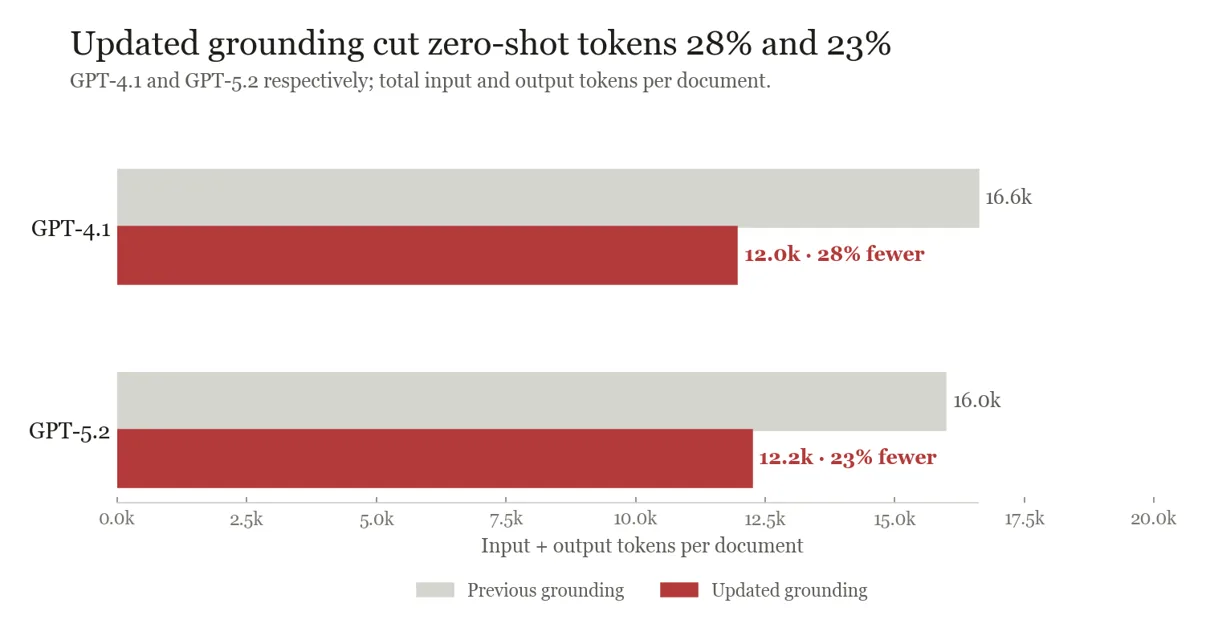
Those reductions lowered the full-inference LLM bill by 11-25% across the tested model-and-labeled-sample configurations and reduced P50 and P95 latency. Grounding accuracy remains similar to the previous method.
Confidence: Improved Accuracy and Generalizability
We crafted a new confidence scoring method that is applicable to a broader set of models. Measured by AUROC, which measures how reliable the confidence scores rank correct fields above incorrect fields across various threshold, the new confidence scoring system improved by about 9% for GPT-4.1 and 14% for GPT-5.2 against the previous method.
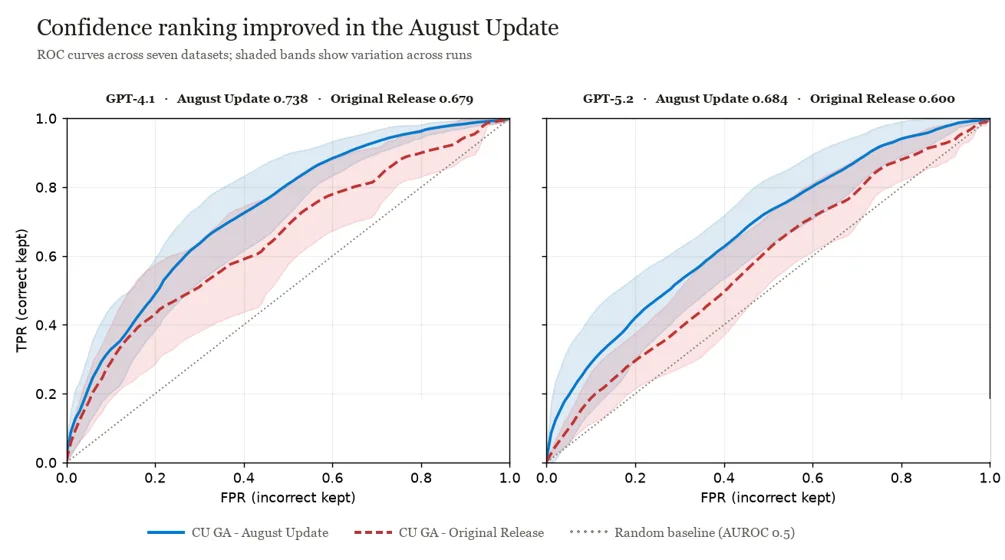
A field’s baseline confidence score combines several inputs, and score distributions can differ by field type. For straight-through processing, set acceptance thresholds field by field and recalibrate them whenever you switch models.
Appendix: Detailed Model Quality/Cost Analysis
In this Appendix, we present more details on the model quality and cost analysis conducted in-house. These results may not be representative for every production workload, but it should be helpful to the reader as a guidance for model selection.
Documents/Speech: Finding the Right Balance
Dataset
The evaluation dataset span from structured to semi-structured to unstructured documents, with a total of 71 document types. Since Content Understanding supports field extraction with and without labeled samples, we tested configurations where there are zero, one, five, and all available labeled samples, and average across them to calculate the average accuracy of a given model.
Quality is reported as a macro average across leaf fields and analyzers, excluding container fields such as arrays and objects. The evaluated documents averaged 3.35 pages. Note workloads with substantially longer files, different schemas, or different training-example strategies may see a different cost and quality frontier.
We use these document results to guide the current speech recommendation because both tasks extract structured fields from source content. We are not publishing a separate speech accuracy graph.
Results
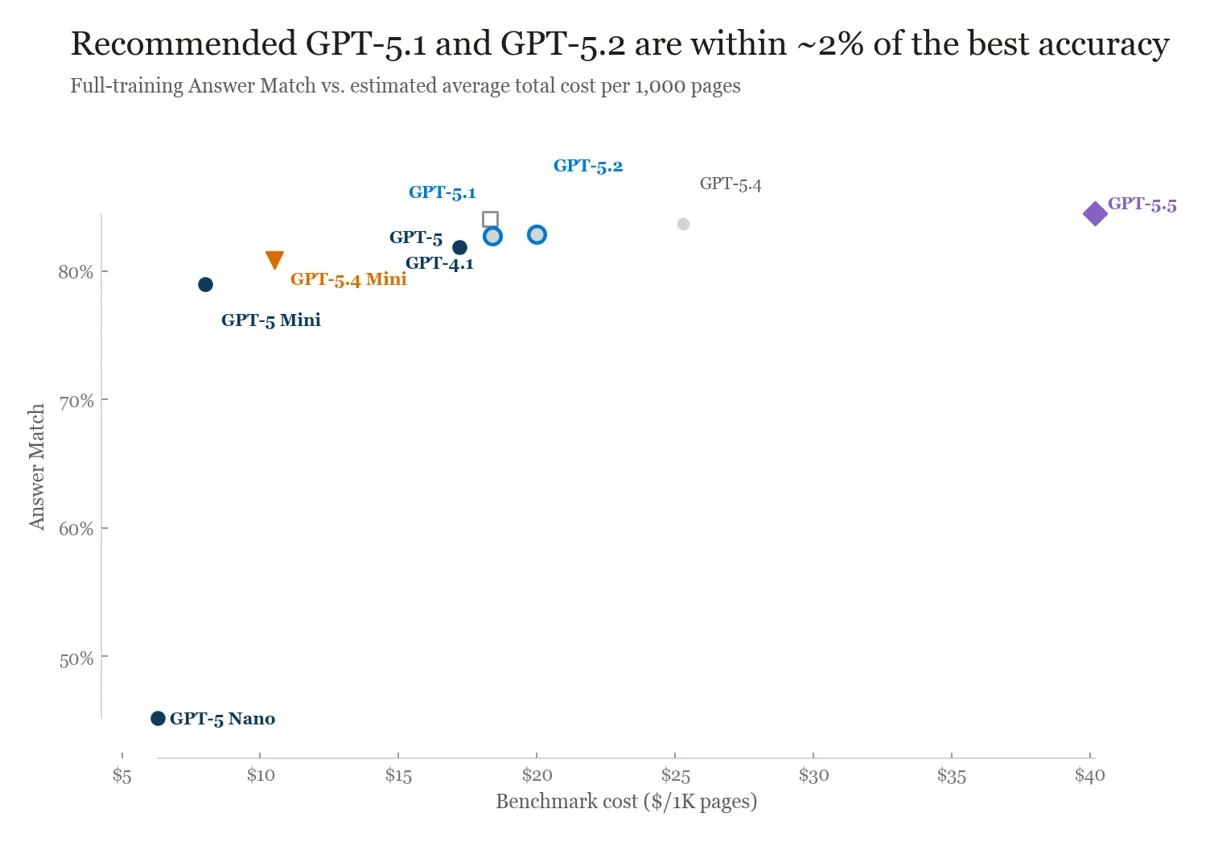
In the figure below, GPT-5.1 and GPT-5.2 stand out as well-balanced models between AI quality and cost, and they differ by about 1% in Answer Match score. At the top of the quality range, GPT-5.5 delivers about 2% more Answer Match than GPT-5.2, but increases estimated average cost by about 101%.
Compared with GPT-5.2, GPT-5.4 Mini reduces estimated cost by about 48% while giving up about 2% in Answer Match. We recommend customers to start with GPT-5.1/5.2 or GPT-5.4 mini, then add GPT-5.5 when its quality improvement can justify the premium.
Video: the Biggest Model is not the Best Model
Dataset
The video evaluation combined two distinct workload shapes: a segmentation-focused, 60-minute video dataset, and a short whole-video dataset averaging just under one minute. We compute generation F1 score covering both scalar answer fields and timestamped custom segments, e.g., semantically relevant time windows such as when a logo appears on screen, the duration of a news segment, or an ad break.
This benchmark is most relevant to workloads that extract both video-level facts and segments from long media. Short clips, different frame density, or schemas without segmentation may produce a different ranking.
Results
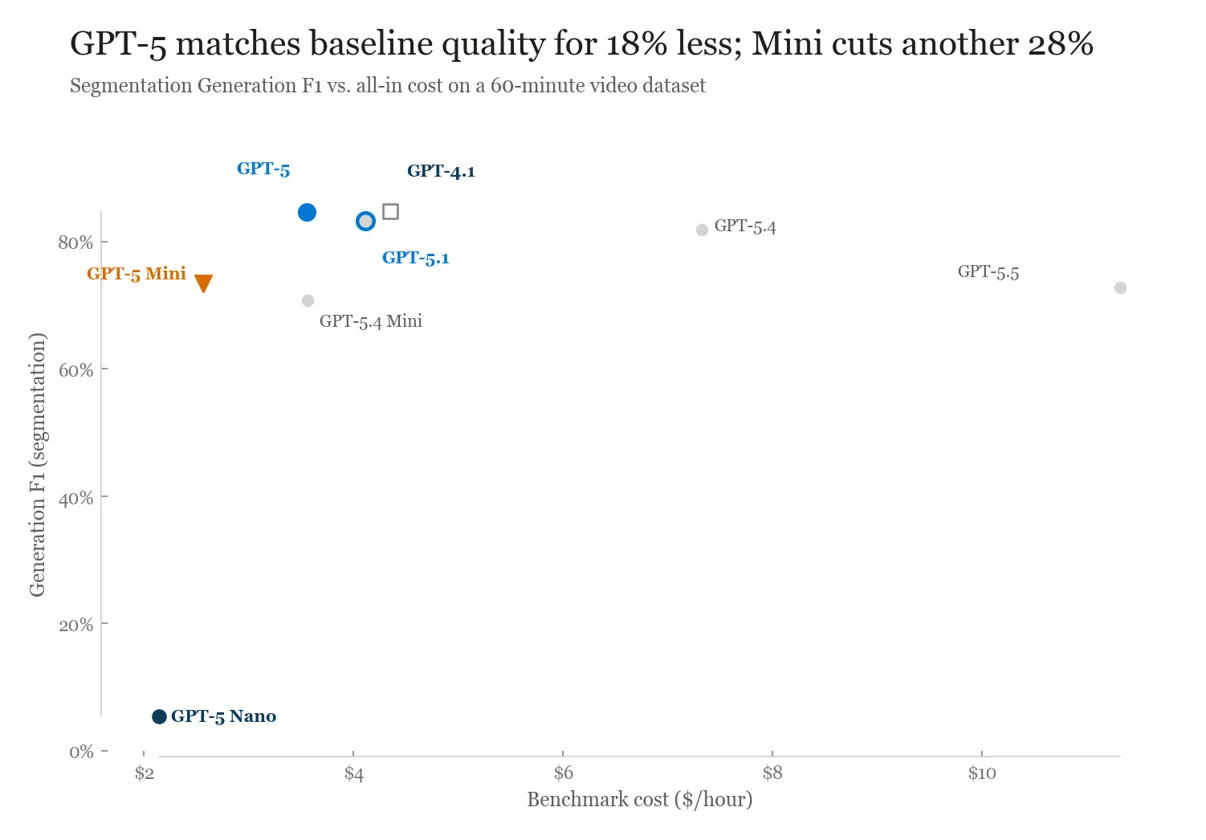
As shown in the figure below, GPT-5 reached 89.0% overall Generation F1, GPT-5.1 reached 88.6%, and GPT-5.4 reached 87.5%. GPT-5 and GPT-5.1 form both the balanced and best-quality pair for this use case; GPT-5 also cost about 18% less than the GPT-4.1 baseline in the release summary.
For a lower-cost video option, we recommend customers start with GPT-5 Mini. It cost about 28% less than GPT-5 on the segmentation-focused benchmark while giving up about 7% overall Generation F1.
GPT-5 matches baseline video segmentation quality at 18% lower benchmark cost
Images: Select Different Models for Classify and Generate tasks
Dataset
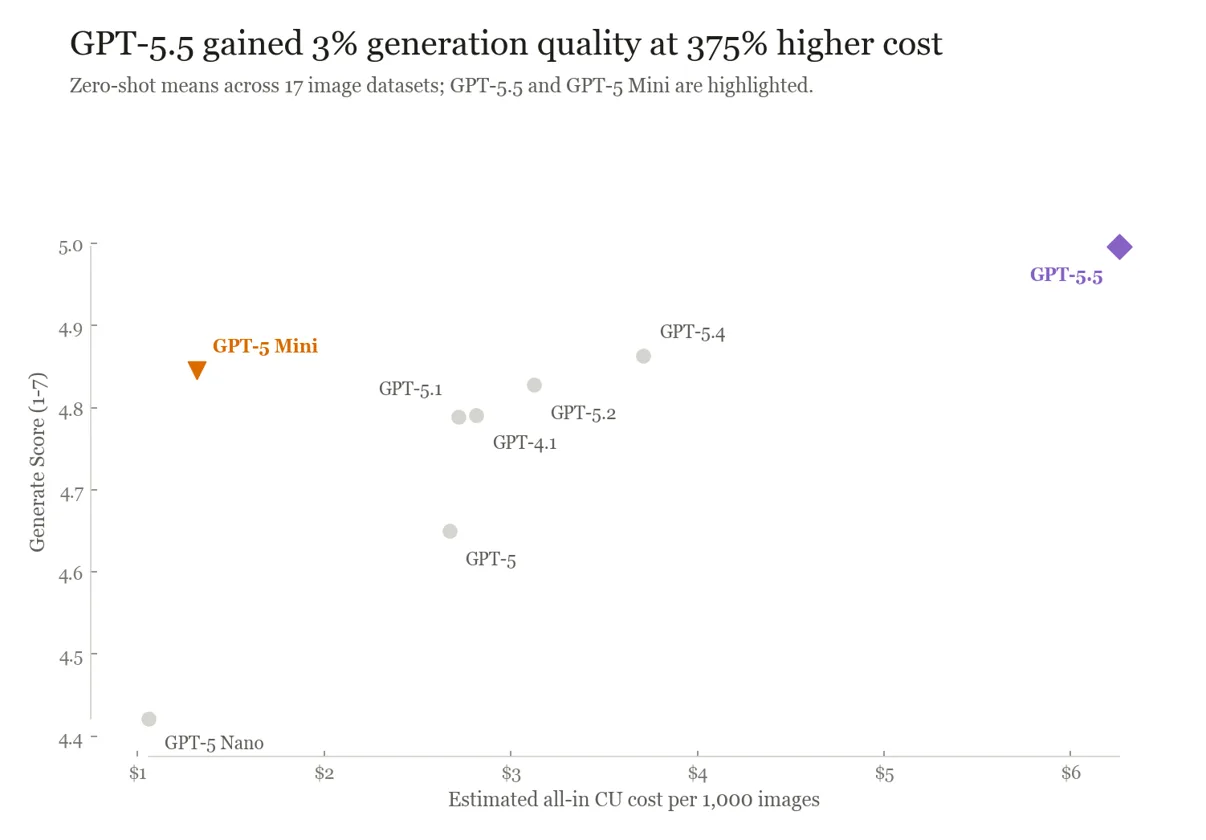
The image evaluation covered 17 zero-shot datasets with five repeats. The set spanned classification and generative tasks across product, apparel, industrial-defect, scene, and object-oriented content.
Classification used F1 as metrics. Generative fields used a 1-7 rubric score, so the two quality axes answer different questions and should not be collapsed into one winner.
Results
As shown in the figure below, GPT-5.1 led classification at 69.5% Classify F1, making it an attractive choice for that use case. For generation, GPT-5.5 led at 5.0 out of 7, about 3% higher than GPT-5 Mini at about 375% higher cost.
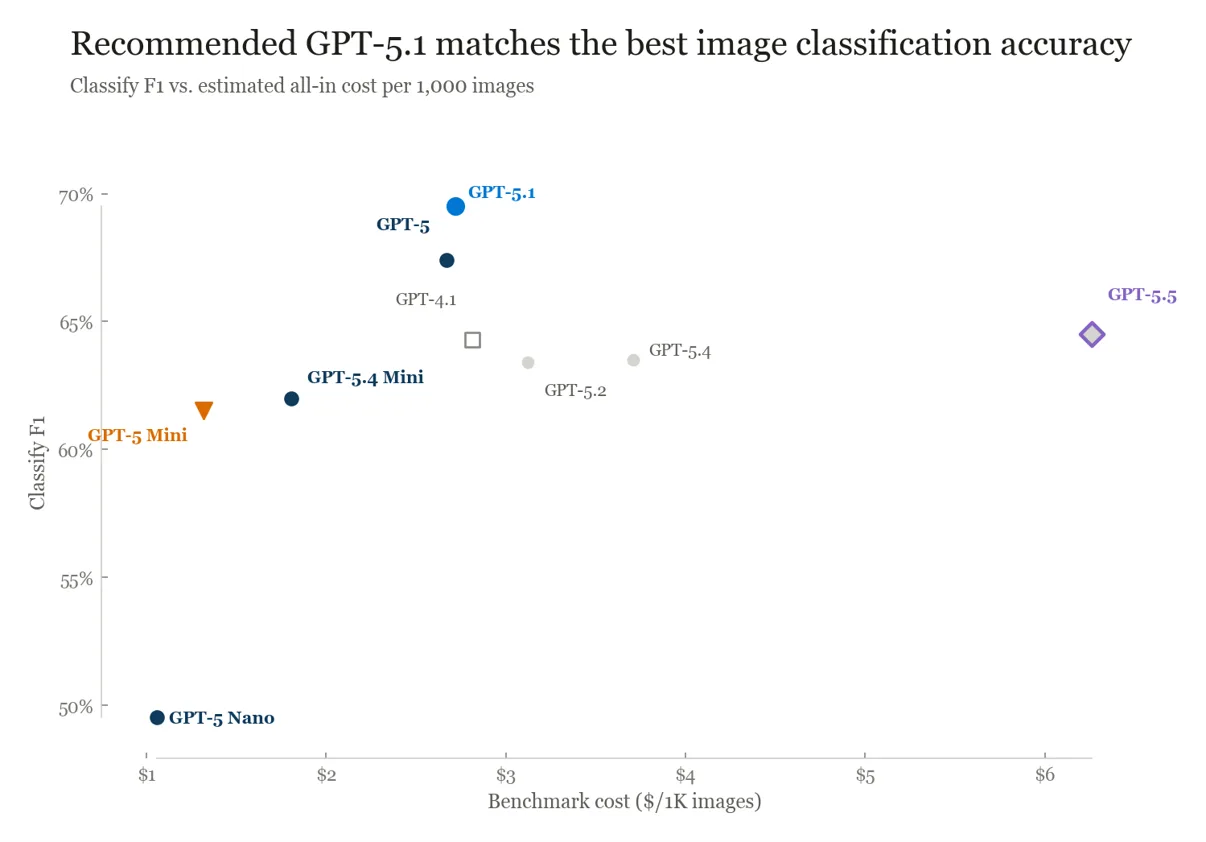
For a lower-cost classification option, GPT-5 Mini cost about 52% less than GPT-5.1 while giving up about 12% Classify F1. We recommend customers to start with GPT-5.1 for classification-led workloads, and GPT-5 Mini for generation-led workloads. If necessary, test if GPT-5.5’s quality gain could justify the premium.
So what should teams do next?
The expanded catalog gives every channel on the mixing board a wider range. The next step is to choose two or three candidates for your workload and test which combination of quality, cost, availability, and throughput deserves the final setting.
Keep the comparison simple: use the same analyzer, schema, representative input set, and labeled examples for every run. Change only the model deployment, then compare output quality, latency, token usage, and failure rate. Before testing, check the analyzer’s supportedModels response and confirm that each candidate is available in your region.
Start in Content Understanding Studio
- In Content Understanding Studio, open Settings, add your Foundry resource, and configure its default model deployments. Studio can deploy required models automatically when no suitable default exists.
- Follow the Content Understanding Studio quickstart to select an analyzer and run it on your own representative content.
- Test each candidate against the same files. Review the extracted fields and raw response, and record the quality, latency, and usage that matter to your workload.
Or compare deployments through the REST API
For a repeatable evaluation, pass a different modelDeployments mapping in each analyze request. A request-level mapping overrides the resource defaults, so you can keep the analyzer and inputs unchanged while swapping the completion deployment.
For example, you can call:
POST /contentunderstanding/analyzers/myInvoice:analyze

{
  "inputs": [
    {
      "url": "<representative-input-url>"
    }
  ],
  "modelDeployments": {
    "prebuilt-analyzer-completion": "<candidate-deployment-name>",
    "prebuilt-analyzer-embedding": "<embedding-deployment-name>"
  }
}
Run the same request once per candidate, then compare the extracted results and the response’s usage data. Start with the balanced recommendation, add the lower-cost option, and include the best-quality model only when the remaining accuracy gap matters to the workflow.
Additional Links
- For more on new capabilities in the latest Content Understanding Preview release – From Sync APIs to support for the GPT-5 model series and agentic
- To try out Content Understanding in CU Studio – Quickstart Try out Content Understanding Studio or Foundry portal – Foundry Tools | Microsoft Learn
- To use the CU APIs and SDK see – Quickstart: Azure Content Understanding in Foundry Tools – Foundry Tools | Microsoft Learn


0 comments
Be the first to start the discussion.