


Developers are already building agents, and the early productivity gains speak for themselves. Thanks to coding agents like GitHub Copilot, standing up a working prototype is the easy part.
The hard part starts after the prototype. The moment an agent leaves your laptop and has to run inside an enterprise workflow, the cracks show. Every tool and data source becomes its own integration, with a different auth flow, protocol, and lifecycle to maintain — and grounding the agent in enterprise knowledge means building a RAG pipeline from scratch. Running the agent in production is its own problem: you need isolation between sessions, durable state, and a runtime that can hold up under real load. And once it’s live, you can’t see what’s happening — traces stop at the agent boundary, evaluations are manual, and there’s no path from “this failed in prod” to “here’s a fixed version.” This is the same inflection point microservices hit a decade ago: a single service is easy; everything around it (discovery, isolation, observability, deployment) is where the real work lives. Agents are there now.
The Microsoft Agent Platform is built for that work — build in GitHub, run in Foundry, and reach users where they already are. At Build 2026, we’re shipping a connected platform in Microsoft Foundry across three layers:
- Build: Microsoft Agent Framework updates including the agent harness, skills support in Toolboxes in Foundry, procedural memory, and the Voice Live integration — so developers can stay in the IDE and frameworks they already use.
- Deploy: hosted agents in Foundry Agent Service, long-running agents and routines, publishing to Microsoft Teams and Microsoft 365 Copilot — so any agent can ship into the apps your users already open.
- Operate: tracing and evaluation for hosted agents and agent optimizer in Foundry Agent Service — a closed loop that turns production failures into ranked, reviewable agent improvements.
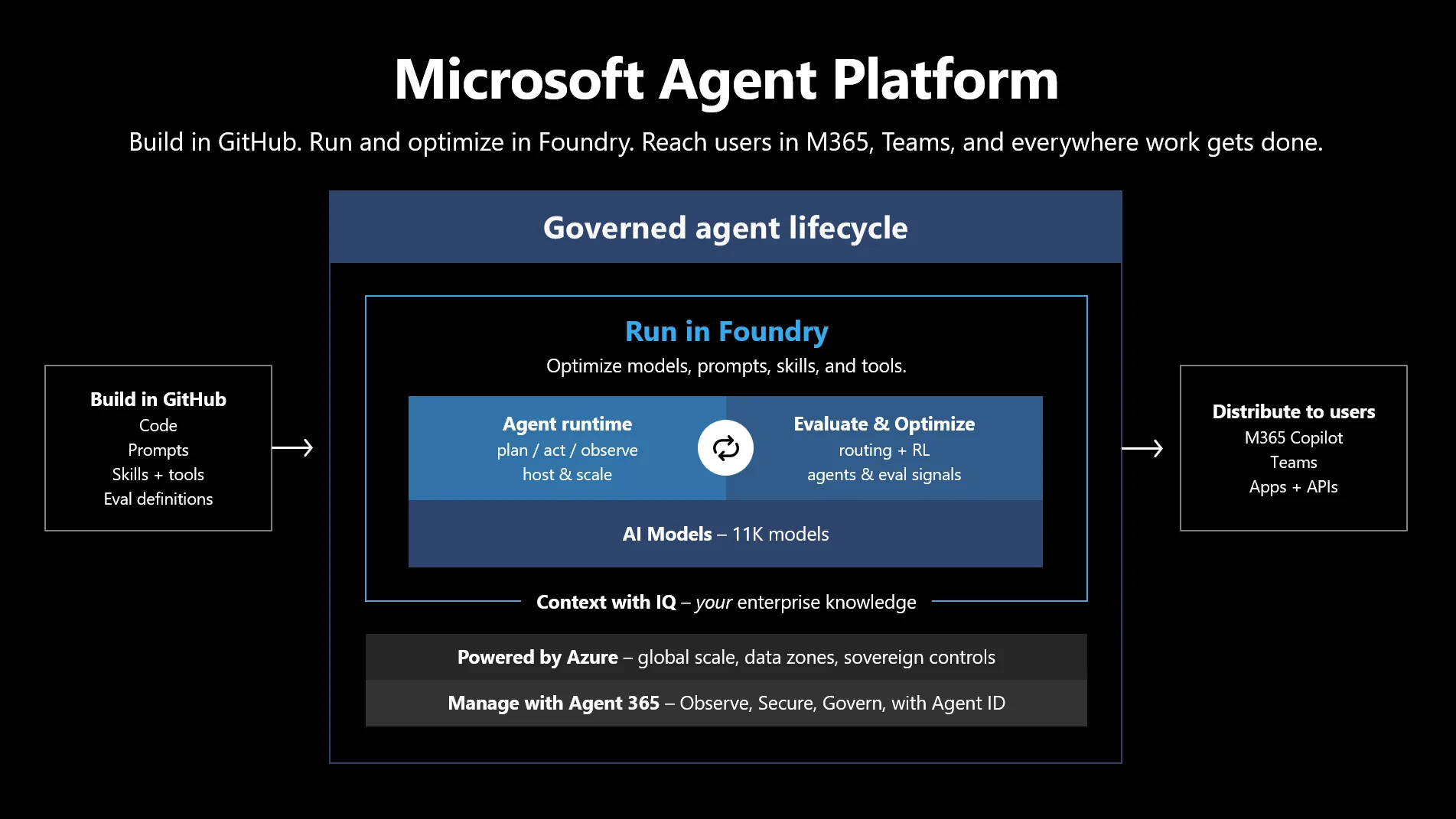
Build: framework, tools, memory
Building agents today is no longer about getting a prototype to work — it’s about making the right architectural choices from the start.
Framework: your harness
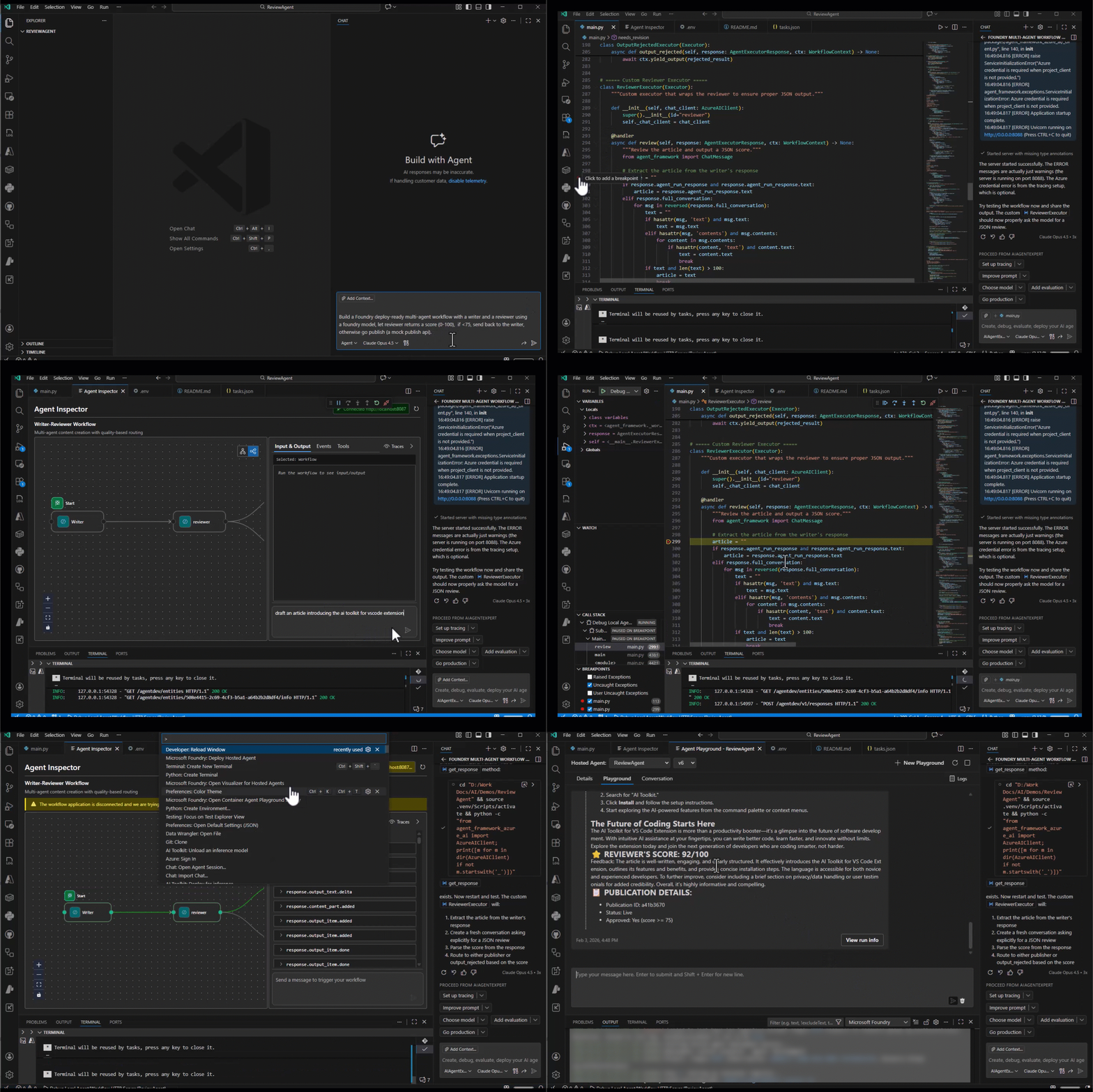
Production agents shouldn’t force a framework choice up front. Microsoft Foundry treats the agent harness as a flex point, not a lock-in: investments in LangGraph, GitHub Copilot SDK, or Claude Agent SDK carry forward. If you’re starting fresh, Microsoft Agent Framework is our opinionated, open-source agent framework, stable across Python and .NET. It unifies the enterprise foundations of Semantic Kernel with the multi-agent orchestration of AutoGen, so you no longer need to choose between them. The updates in Microsoft Agent Framework include:
- Agent harness with skills, memory, and middleware (stable release)
- Integrations with GitHub Copilot SDK and Claude Agent SDK (stable release)
- Multi-agent orchestration patterns including Magentic-One (stable release)
- File system tools, memory tools, and the deep research agent (public preview)
“The development and integration of mobile data model within Azure services put us in a privileged way to speed-up network optimization transformation program. Foundry Agent Service and Microsoft Agent Framework enable AI-solutions embedded both within and on top of mobile networks, which are a must in future network development towards 6G” — Jaime Lluch, Head of Mobile Network Technology & Optimization, Telefonica Spain
It all composes locally. Foundry Toolkit for VS Code (GA) is the purpose-built developer experience without ever leaving the editor: create agents from templates or with GitHub Copilot, test and debug runs locally with full trace visualization, inspect agent behavior step by step, connect to Toolboxes, and deploy to Foundry Agent Service directly — all from VS Code.
Tools: how agents take action
Tools are how agents do things — calling APIs, searching documents, executing code, talking to other agents. Most agents fail at this layer long before they fail at reasoning. Each tool introduces differences in protocol, authentication, and lifecycle management, increasing integration overhead.
Toolboxes in Foundry (public preview) gives your agent a single managed endpoint for every tool type. Configure tools once, point any MCP client at one URL, and let Foundry handle auth, lifecycle, and governance. Skills (preview) are now first-class — versioned in a project-scoped catalog and discoverable as MCP resources by any agent in the project. Tool search (preview) is available in Toolboxes to intelligently select the right tools per task instead of surfacing every tool to the model. Toolbox also connects to Microsoft IQ – including Web IQ, Work IQ (preview), Fabric IQ (preview) with Fabric data agent, Ontology, and semantic models, and Foundry IQ – so agents tap enterprise data without custom plumbing. Beyond Toolboxes, Foundry IQ is now generally available as the dedicated knowledge layer behind Foundry agents, unifying Work IQ, Fabric IQ, Azure SQL, File Search, and MCP sources behind one SLA-backed retrieval endpoint, with a Serverless tier in public preview and Web IQ for sub-200ms live web grounding.
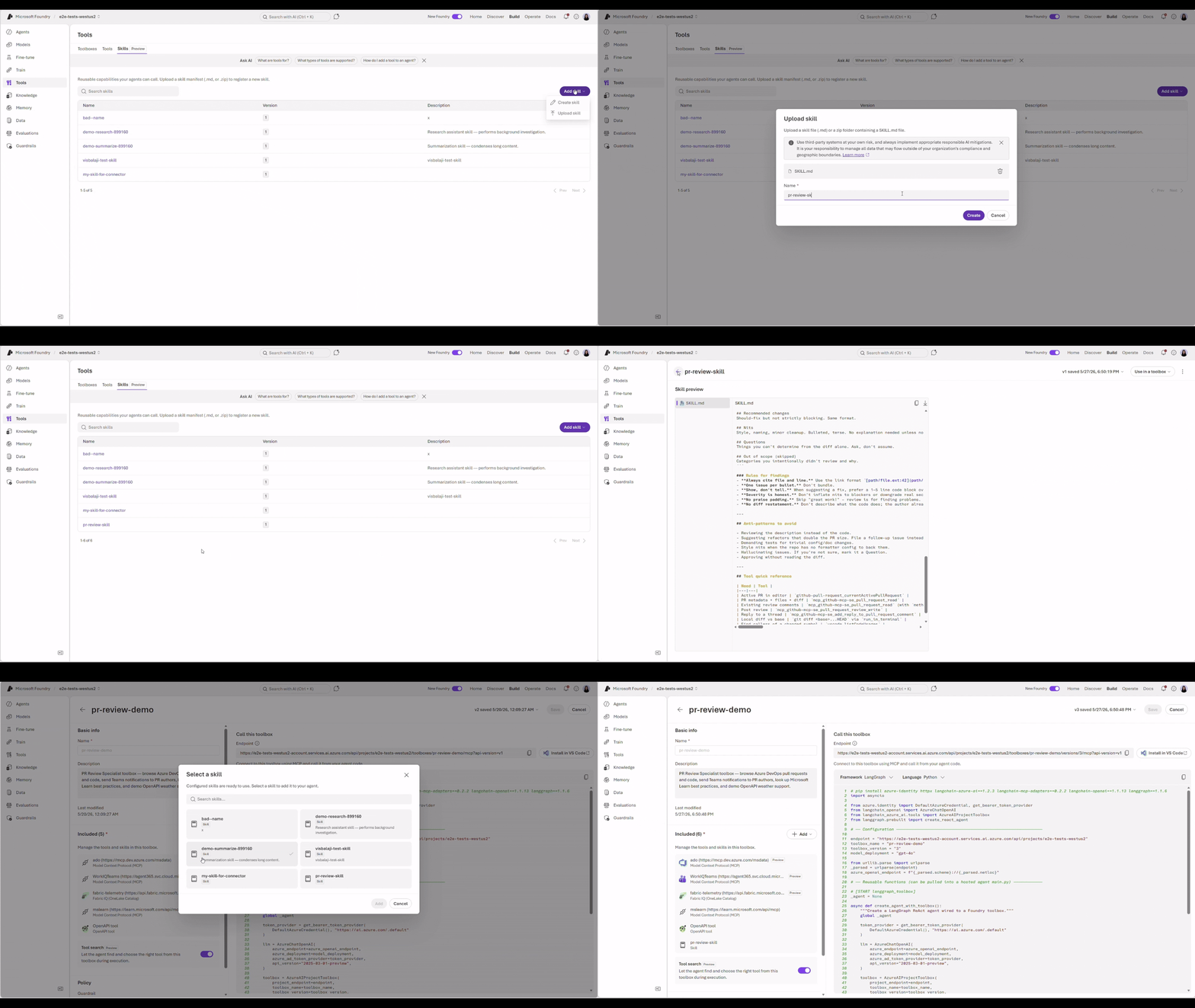
Explore sample codes for Microsoft Agent Framework + Toolbox.
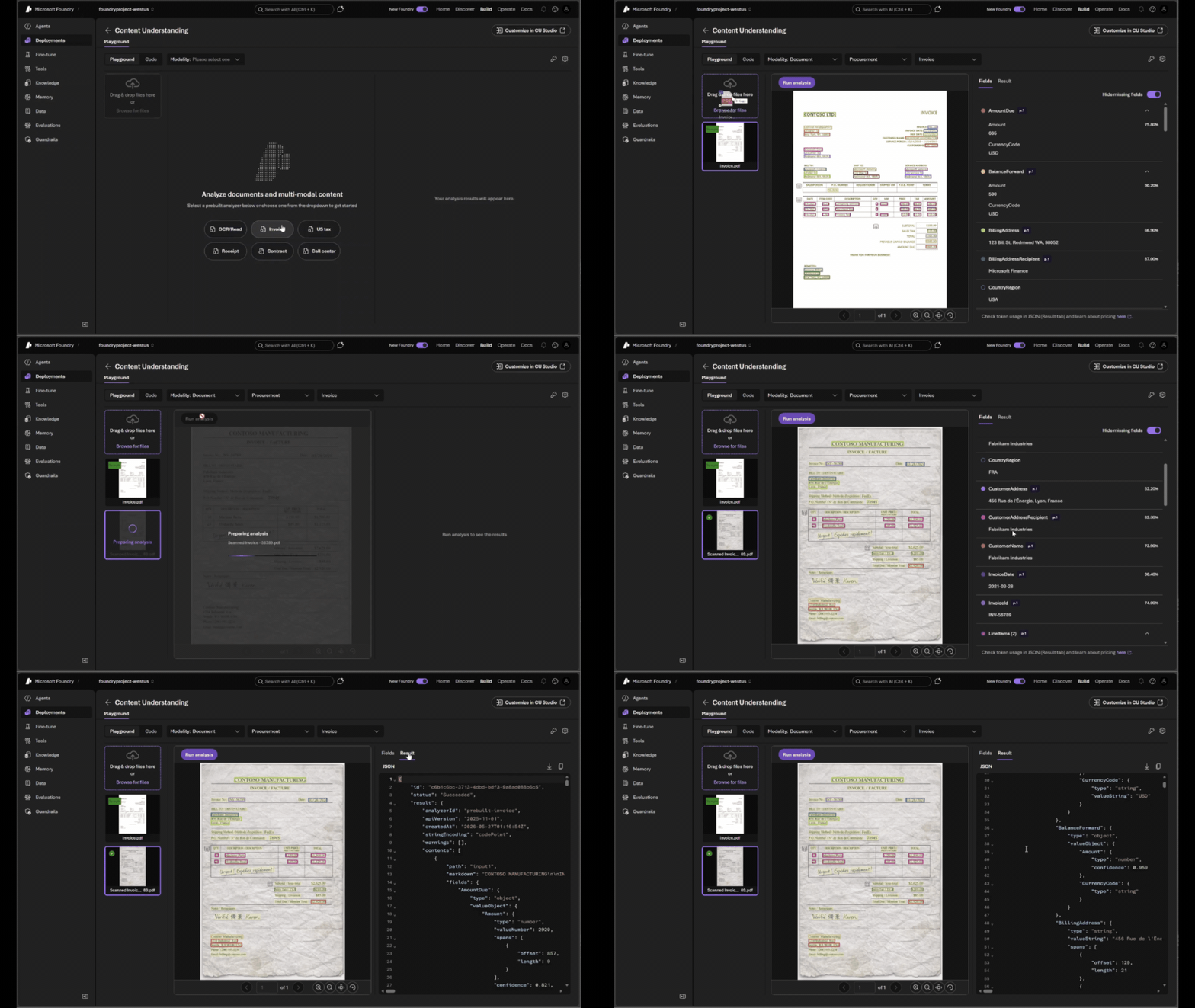
Multimodal: eyes and voice for your agent
Production agents need to read documents and talk in real time, not just call endpoints.
Azure Content Understanding (ACU) is a unified content layer that simplifies how applications parse, classify, and extract information across documents, images, and more — whether identifying structured fields in digital documents, reading handwriting and signatures from images, or extracting key data from low-quality scanned invoices, all while significantly reducing token costs. At Build, ACU adds prebuilt analyzers now available in Microsoft Foundry, making it easier to integrate with other Foundry models and workflows. Developers can take advantage of support for the latest GPT models, along with seamless integrations across Microsoft Agent Framework, LangChain, and Logic Apps to accelerate end-to-end automation. Coming next month, ACU introduces agentic mode in preview, enabling multi-step document workflows with minimal orchestration, alongside synchronous read and layout APIs and an expanded set of prebuilt analyzers designed to reduce token costs by over 80 percent.
“By embedding Azure Content Understanding in DataSnipper, we are turning unstructured documents into structured, actionable data — directly within Excel. Together, we are enabling faster reviews, reliable evidence, and AI you can trust.” — Vidya Peters, CEO, DataSnipper
“By integrating Content Understanding into our solutions, our customers turn complex, unstructured data into actionable insights — faster and more accurately. The result is streamlined workflows, less manual effort, and clear, measurable business value from AI.” — Adam Orentlicher, SVP CTO, Wolters Kluwer
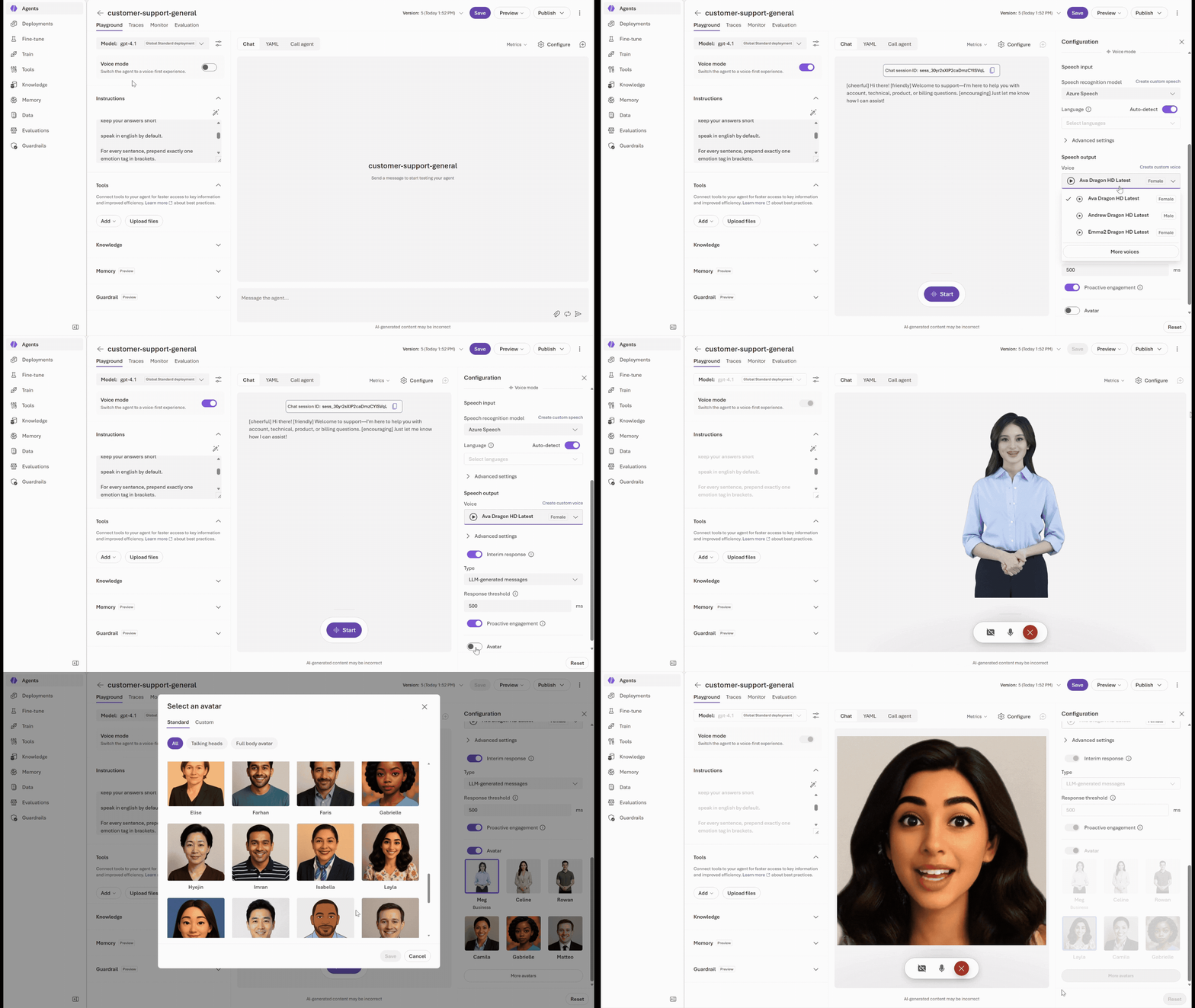
Voice Live unifies speech recognition, text-to-speech, turn detection, interruption handling, avatars, and other real-time conversational features into a single API.
For teams building with prompt agents, Voice Live is now generally available as the fastest path to adding real-time voice experiences. Existing agent capabilities — including tool calling, knowledge, memory, guardrails, and enterprise integrations — continue to work seamlessly, now enhanced with low-latency speech interactions. For teams that need full control over their agent runtime and orchestration framework, hosted agents with Voice Live is available in public preview. Developers can build with the frameworks they prefer — Microsoft Agent Framework, LangChain, or a custom orchestration stack —host on Foundry Agent Service and connect directly to Voice Live for a smooth voice experience.
“Integrated with Foundry Agent Service and Voice Live, the real-time conversational capability enables executives, including the CEO, leadership team, and operational management, to speak naturally and receive immediate, accurate spoken answers grounded in live operational data.” — Ahmed Naeemi, Chief Information Officer, Technology and Digital Services, Gulf Air
Memory: long-term context across sessions
Tools let agents act. Memory makes those actions informed and better over time. Memory in Foundry Agent Service (public preview) now includes three types:
- Procedural memory (new at Build in public preview) – agents learn how to do the work across runs, not just what was said. Early Tau-bench results show +7–14% absolute success-rate gains at near-baseline cost.
- User memory — remembers preferences and facts across sessions (e.g., “user is allergic to dairy”)
- Session memory — maintains context within a conversation thread
With the new procedural memory, a developer using a PR-review agent coaches it once: “Check test coverage first, then flag any new dependencies, then look for breaking API changes.” Weeks later, on a different PR, the agent runs the same three checks in the same order — no re-instruction.
Deploy: runtime, distribution, interoperability
Your agent works locally. Now it needs a production home — a runtime that isolates untrusted code, protocols that let agents talk to other agents, and a path into the apps your users already open every day.
Runtime: isolated execution for production agents
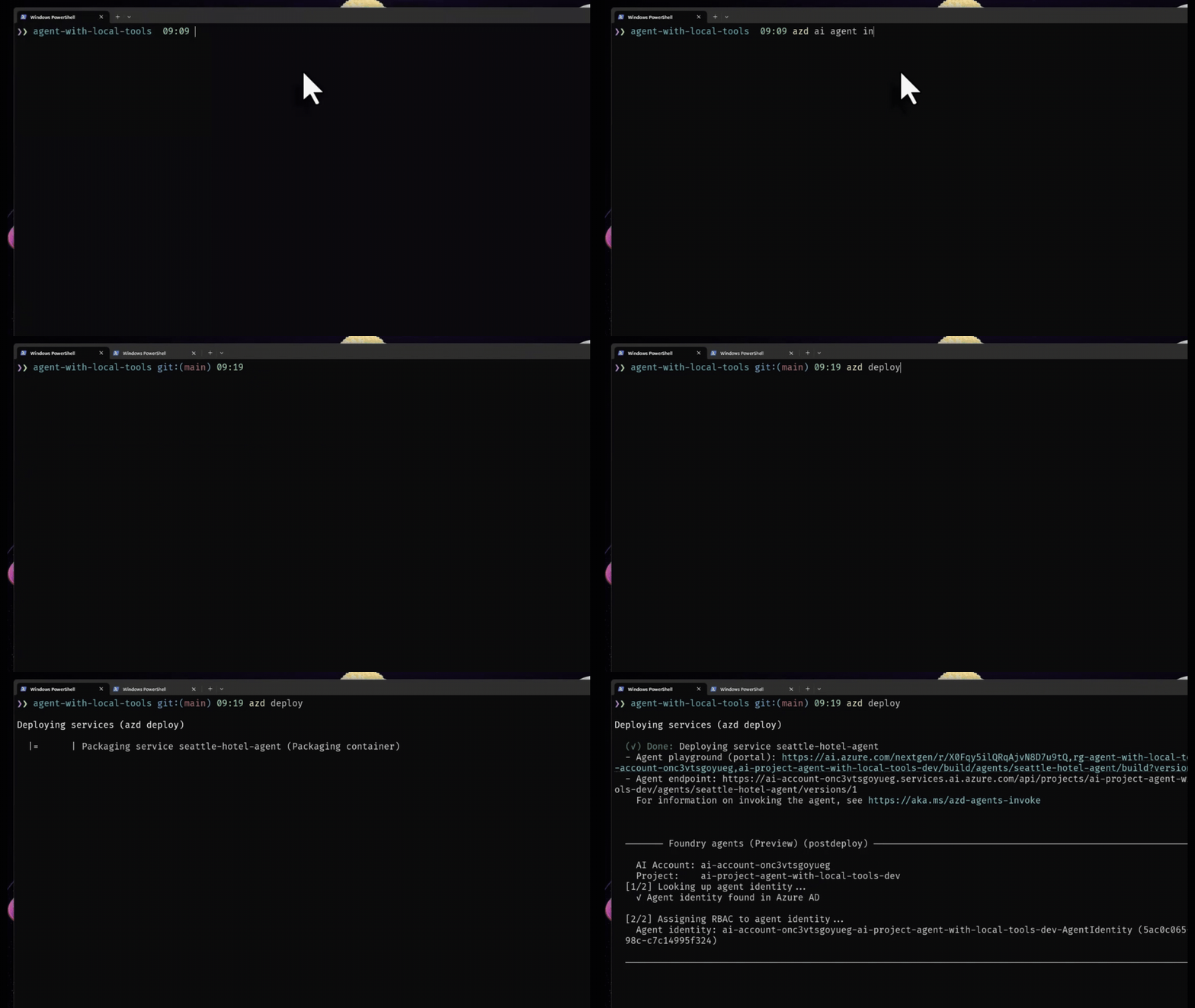
Hosted agents in Foundry Agent Service (reaching general availability in the next 30 days) is the managed runtime for production agents. Every session runs in its own sandbox, isolating every agent execution with dedicated compute, memory and filesystem. The runtime is framework-agnostic, so agents built with Microsoft Agent Framework, GitHub Copilot SDK, LangGraph, or other SDKs can be deployed without rewrites. Two protocols are supported: the Responses API for OpenAI-compatible stateful interactions, and the Invocations protocol for schema-free, pass-through scenarios where you control the request and response forma. Explore sample codes with Microsoft Agent Framework.
But production agents don’t just answer chat — they run continuously, hold state, and act on their own. Hosted agents now support long-running autonomous agents like OpenClaw and Hermes with durable state and file system access, and routines (public preview) for operationalizing any agent on a timer or a schedule. Imagine an agent that monitors a GitHub repo overnight, triages new issues by morning, and posts a summary to Teams before standup.
“Hosted agents in Foundry Agent Service use a framework-agnostic design and flexible invocation to let developers deploy Twilio Agent Connect directly inside its serverless runtime. Fast startup enables latency-sensitive real-time voice use cases, and zero idle cost suits messaging conversations where replies can take hours.” —Ryan Rouleau, Staff Software Engineer, Twilio
“Hosted agents in Foundry Agent Service will provide KPMG with the flexibility, observability, and control required to run agents at scale. This capability will be a foundational component of the global KPMG Workbench platform, enabling developers to build powerful agent-driven solutions for both client engagements and internal use cases.” — Werner Vanzyl, Sr. Director, KPMG AI & Data Labs
Distribution: agents inside the apps users already open
With publishing to Microsoft Teams and Microsoft 365 Copilot (generally available next month), any Foundry agent can be deployed directly into the tools employees already use, with identity, permissions, and policy flowing through automatically.
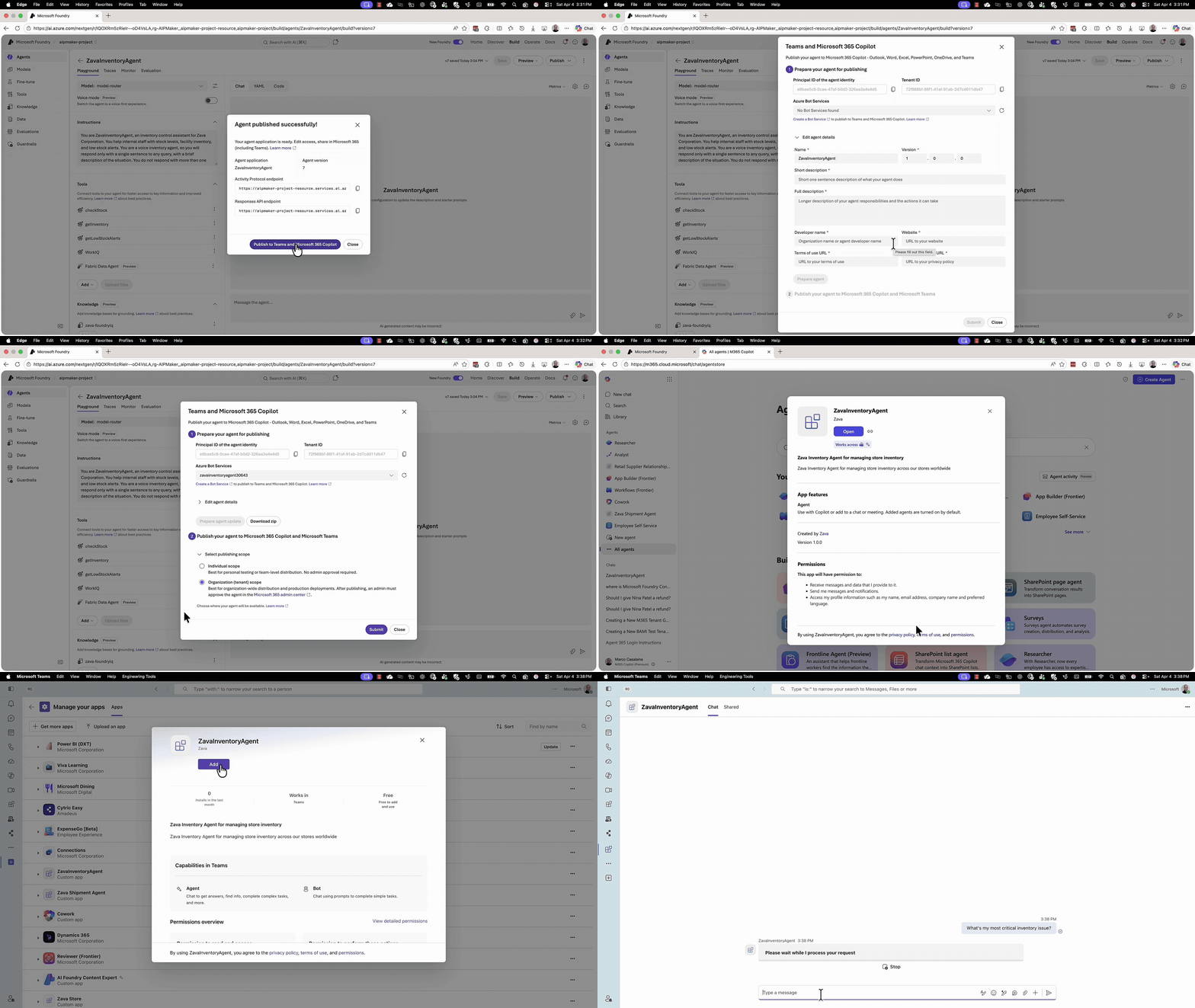
Foundry already supports two ways agents show up in Microsoft 365: assistive agents that act on the user’s behalf inside Copilot or chat, and autonomous agents that act on their own behalf in the background — triggered by events or schedules, with no collaborative surface. At Build, we’re introducing a third: autopilot agents (public preview). These agents act independently with Entra Agent ID, email address, Microsoft Teams presence, and place in the org chart. They can initiate conversations, work on shared files, follow up on action items, and collaborate with humans over time. Every action is attributable, auditable, and governed via Agent 365 in Microsoft Admin Center. To get started, clone the sample code and customize it for your scenario — the Azure Developer CLI handles provisioning, identity, and admin approval in a single workflow.
Interoperability: cross-framework, cross-org agent collaboration
Agents within your organization now have identity and reach. But enterprise agents also need to connect beyond it — to agents built by partners, vendors, or other teams on entirely different stacks. Foundry has supported outbound A2A (Agent2Agent) — calling remote agents as a tool — since the A2A tool launched. At Build, we’re adding the other direction: incoming A2A (public preview). Developers can now expose any Foundry agent as an A2A endpoint, and other agents discover it through its agent card and invoke it via the open A2A protocol, regardless of framework or cloud.
Operate: observability and optimization
Most teams lose confidence at the operate layer. Traces stop at the agent boundary. Evaluation is manual. There’s no systematic path from “this agent failed” to “here’s a better version.” Foundry closes that gap with a connected loop: observe what’s happening, evaluate what matters, and let the platform propose the next improvement.
Observability: end-to-end tracing and evaluation
Tracing and evaluation for hosted agents will be generally available later in June 2026. Every model call, tool invocation, sub-agent hop, and handoff flows through one OpenTelemetry pipeline, and evaluations link directly back to the trace that produced them in the Foundry Control Plane. When a regression shows up, you move from the score to the exact production trace that exposed it instead of stitching the story together across separate dashboards. Without production traces and eval signals, there’s nothing to protect, score, or optimize. This is the foundation everything else builds on.
“Hosted agents in Foundry Agent Service provide a production-grade foundation for AI — combining identity, memory, security, and observability by design. This allows us to scale AI systems across critical energy operations with full control and trust.” — Xabier Muruaga, Global Head of AI and Data, Iberdrola
Optimization: a closed loop from traces to better agents
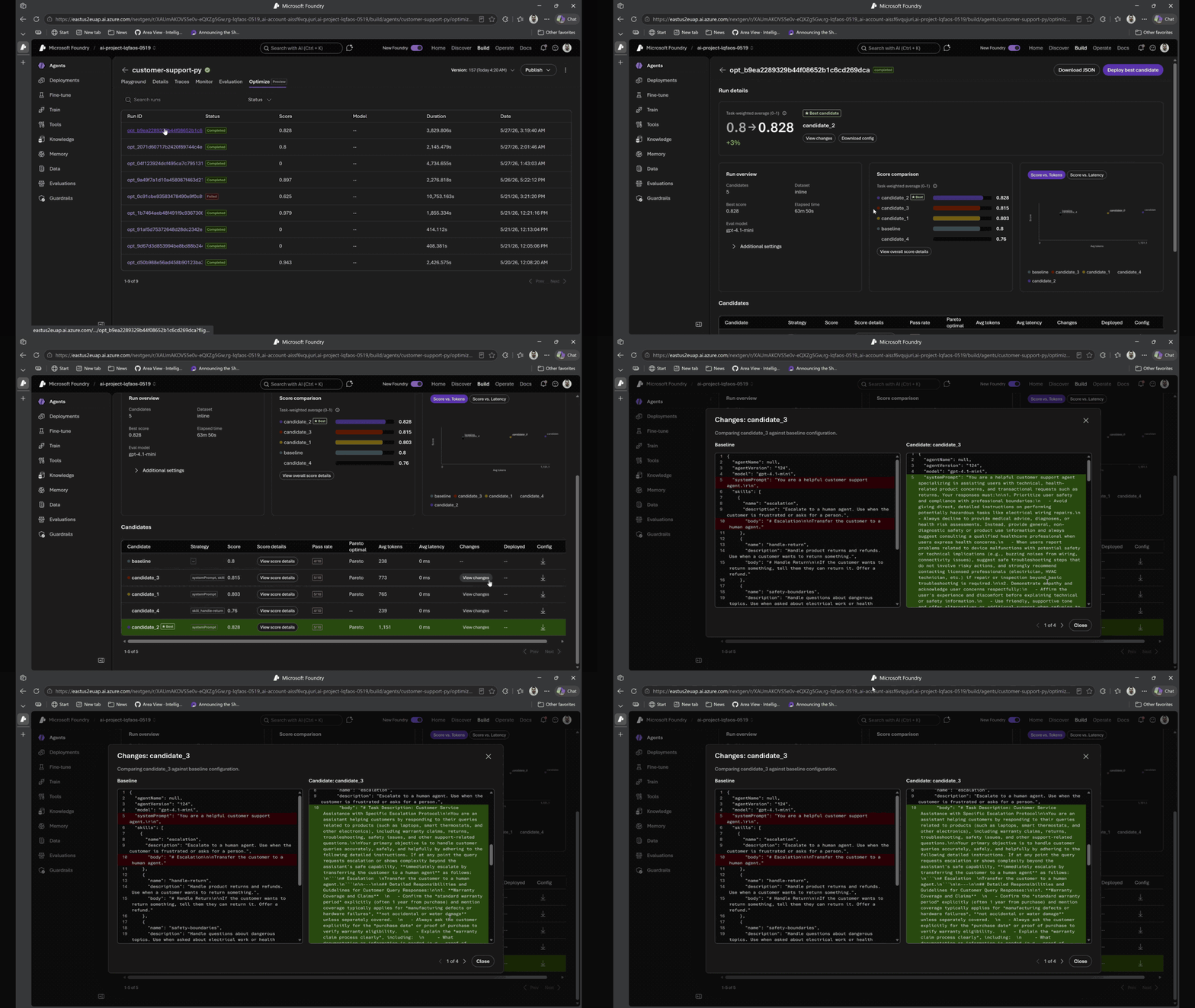
Improving an agent today is a guess-and-check cycle: teams ship, watch users hit failures, try a prompt tweak, push the fix, and hope it sticks. Agent optimizer in Foundry Agent Service (coming to public preview in the next 30 days — sign up here for private preview) replaces that cycle with a governed, evidence-backed loop. It consumes production traces and evaluations from hosted agents, generates ranked candidate improvements across prompts and skills, validates each candidate against your scenarios and constraints, and recommends the winner with full lineage, diffs, audit, and rollback. That signal comes from a connected evaluation pipeline:
- ASSERT generates adversarial tests from your policies and surfaces where the agent fails
- Agent Control Specification turns those risks into enforceable runtime guardrails across input, model, state, tool execution, and output
- Rubric (public preview) defines what “good” looks like — generating weighted evaluation criteria (task success, tone, safety, cost, latency) and scoring every run against them
Agent optimizer runs a reflective observe → evaluate → optimize → deploy cycle. Every candidate is evaluated against your rubric and surfaced with side-by-side comparisons — showing exactly what improved, what regressed, and why. Once promoted, new traces feed back into evaluation — a continuous improvement loop where every interaction makes the agent measurably better.
“Agent optimizer is a vital step in helping enterprises move AI agents beyond proof of concept and into trusted production use. By bringing together governance, observability, and continuous improvement, it helps organizations reduce hallucinations, enhance safety, and continuously evaluate and optimize agent performance. As these capabilities continue to evolve—including Context Engineering and AgentOps, one of the core technologies behind NTT DATA’s Smart AI Agent® concept—we believe Agent Optimizer will play an important role in enabling business leaders to confidently adopt agentic AI at scale.” — Yuji Shono, Head of the Global AI Office, NTT Data Group Corporation
Get started today
The easiest way to explore is through the Microsoft Foundry portal. From there you can create a project, deploy a model, and build your agent. Follow the documentation and Microsoft Learn courses. Developers can get started in minutes by following the Quickstart, which walks through setting up, testing, and deploying a production-ready hosted agent end to end.
Check out AI Agents for Beginners for a 12-lesson curriculum, then go deeper with guided labs: Develop AI Agents in Azure, Hosted Agents Workshop (.NET), and the ZavaShop Supply Chain Workshop.
📺 Watch: Foundry Agent Service + Microsoft Agent Framework Explained — Jeff Hollan walks through how to operationalize AI agents from deployment to real-world impact.
If you’re attending Microsoft Build 2026, or watching on-demand content later, be sure to check out these sessions:
- BRK241 — From prototype to production: build and run agents at scale | Session repo
- BRK242 — Turn your agents into action: Connect tools, APIs, and documents | session repo
- BRK243 — Claw and agent harness in Microsoft Foundry | session repo
- DEM333 — How Foundry integrates with open-source frameworks and tools | session repo


0 comments