


Azure Content Understanding (CU) in Foundry Tools is Microsoft’s comprehensive content AI service. It ingests diverse data types — documents, audio, images, and video — and extracts the most critical information to power well-grounded, reliable generative AI and agentic solutions. Azure Content Understanding brings together Azure Document Intelligence’s proven traditional AI with advanced LLM-based content reasoning, enabling both structured and unstructured content extraction, as well as multimodal understanding to address your full spectrum of processing needs.
Accelerating customer momentum
Leading organizations are already using Content Understanding to move from unstructured content to production-scale automation.
DataSnipper is bringing AI-powered document analysis directly into Excel workflows
DataSnipper is embedding Content Understanding into everyday financial and audit workflows, allowing professionals to work directly with structured data derived from unstructured documents. As Vidya Peters, CEO of DataSnipper, shares, “By building with Azure Content Understanding, DataSnipper is turning unstructured documents into structured, actionable data, directly inside Excel. Together, we are enabling faster reviews, reliable evidence, and AI you can trust.”
FinHero is advancing from traditional document processing to LLM-powered understanding
FinHero is evolving from traditional document processing approaches with Azure Document Intelligence to more advanced, LLM-powered contextual reasoning using Content Understanding. By leveraging structured outputs across more complex document types and workflows, they are expanding automation beyond basic extraction into richer, end-to-end processing scenarios that support analytics and agent-driven applications.
Wolters Kluwer is automating tax workflows at scale with CU
Wolters Kluwer, for example, is applying CU across tax and financial workflows to provide measurable business outcomes. Adam Orentlicher, SVP CTO at Wolters Kluwer, noted “By integrating Content Understanding into our solutions, our customers turn complex, unstructured data into actionable insights—faster and more accurately. The result is streamlined workflows, less manual effort, and clear, measurable business value from AI.”
The signal from enterprise customers is clear: Azure Content Understanding is how enterprises operationalize unstructured content—at scale, across modalities, and in production.
Azure Content Understanding is advancing across the full developer workflow—from higher-quality extraction with GPT 5.2, to a more unified experience in Microsoft Foundry, to broader native file support and new integrations for agent and Markdown workflows. With SDKs for Python, Java, .NET, JavaScript, and TypeScript that are now generally available, these capabilities are ready to put into practice today across automation, RAG, and document processing scenarios. We’re also sharing an early look at what’s next in July, including new capabilities enabled by the next Content Understanding API version.
Improve extraction quality with the GPT 5 model family
Analyzers in Content Understanding are powered by LLM and embedding models you deploy in Microsoft Foundry. At Build, we’re expanding LLM support to include the latest GPT 5 model family (GPT 5.x), starting with GPT 5.2 (available now). With GPT 5.2, custom field extraction is enhanced, avoiding the need for prompt engineering gymnastics. Whether it’s mixed layouts, domain-specific language, or multiple languages, extraction is more accurate right out of the box. Existing analyzers built on GPT 4.1 continue to run unchanged.
Try it out
The upgrade is a two-step path you can typically complete in under 5 minutes:
- Deploy GPT 5.2 in Microsoft Foundry. In the Foundry portal, open your Foundry resource and go to Deployments → Deploy model → Deploy base model. Search for “gpt-5.2”, click Confirm, and click Deploy. (Learn more about this in the models and deployments guide.)
- Create new custom analyzers with your new deployment in the Content Understanding Studio. Click the Create custom project button. Enter a name for your custom project, and open the Advanced settings panel. In the Model for analysis dropdown menu, select the name of your GPT 5 model deployment. (Custom analyzers are not available in Microsoft Foundry.)
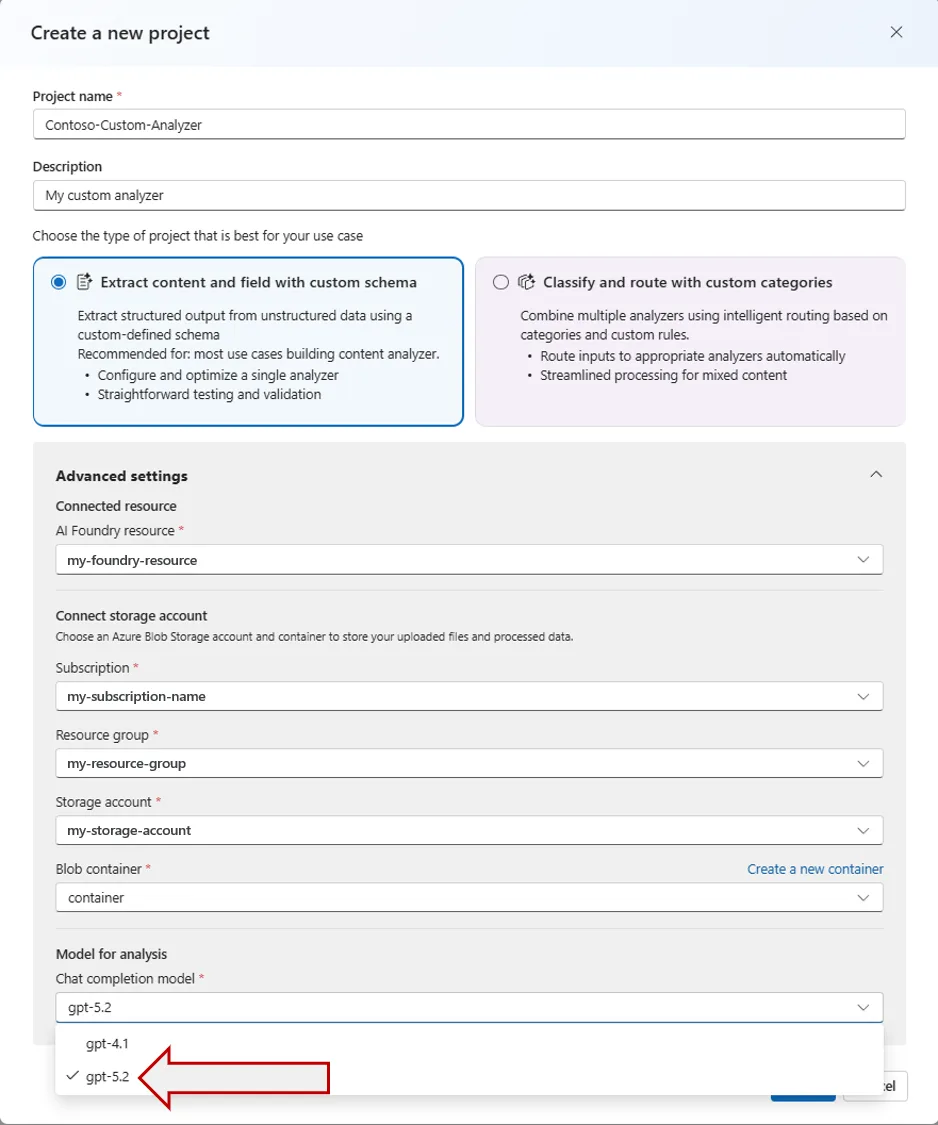
As always, we recommend running side-by-side against your existing eval set before flipping production traffic, as confidence scores, latency, and output accuracy can all shift with a new model.
Build and run Content Understanding directly in Microsoft Foundry
Microsoft Foundry brings all of your AI tools into a single, unified environment for building modern AI applications. We’re excited to announce that Content Understanding is now a first-class citizen in the new Microsoft Foundry portal. Instead of stitching together multiple tools and services, developers can now access Foundry models, prebuilt analyzers, and agentic integrations in one place, reducing the friction from experimentation to production.
With Content Understanding prebuilt analyzers now integrated into Foundry, you can:
- Work with the latest AI models and services in one environment. Deploy and use advanced GPT models alongside Content Understanding analyzers, and combine them with capabilities like translation, PII detection, and search without switching tools.
- Move faster from idea to working solution. Foundry provides a streamlined experience for building agentic document-processing workflows, eliminating the need to jump between separate portals or tools.
- Prototype and validate in real time. The built-in playground experience allows you to upload documents and immediately inspect structured output side by side, reducing iteration time.
- Deep link to Content Understanding Studio. For building custom analyzers for unique use cases, one click takes you into CU Studio with your project context preserved to get started with schema design and evaluation.
Try Content Understanding in Microsoft Foundry
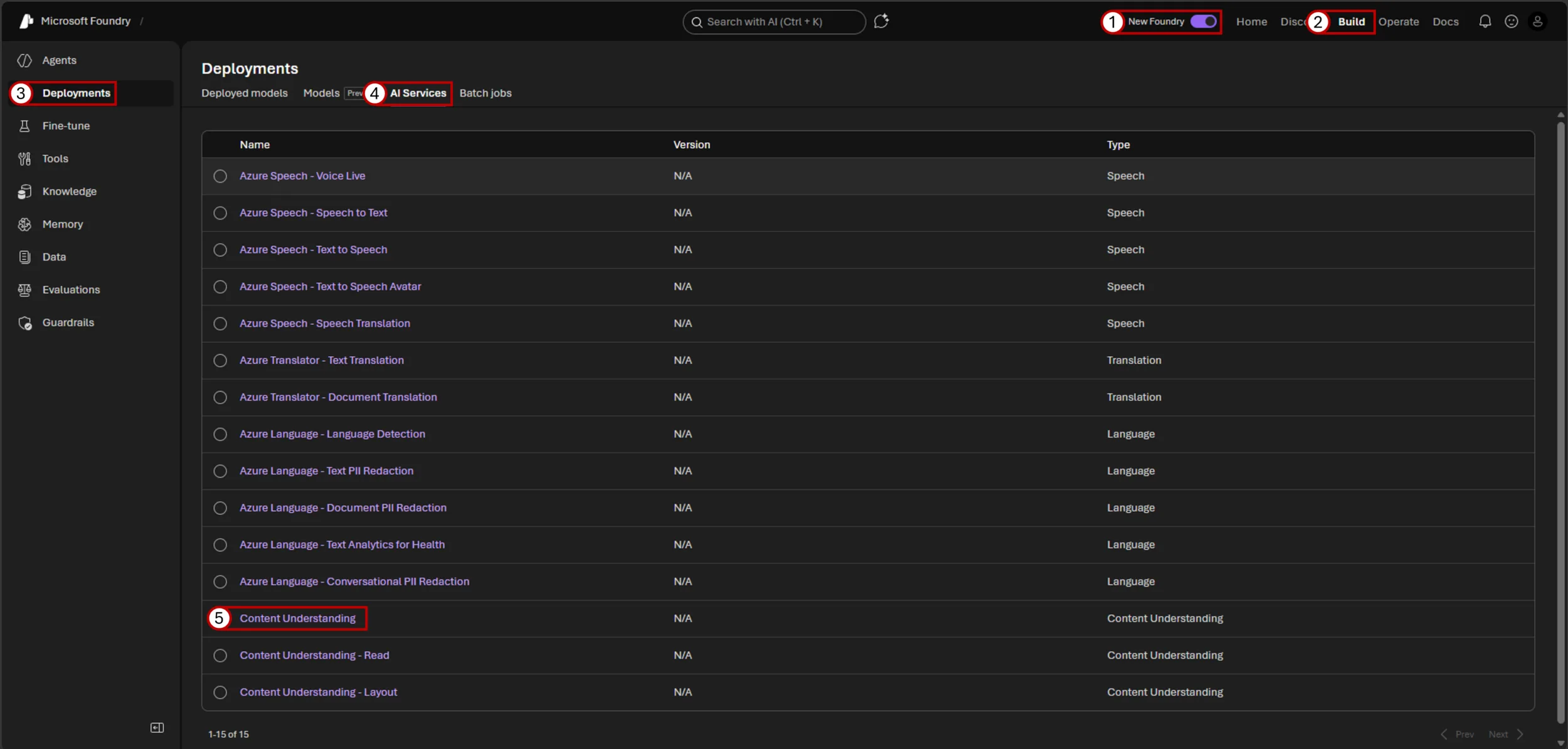
- Open the Foundry portal and ensure the New Foundry experience is enabled from the top navigation.
- Select Build, then open Deployments from the left navigation. Under AI Services, choose Content Understanding (Read and Layout analyzers are also available here).
- Choose a category of prebuilt analyzers in the middle pane, then select the analyzer that best matches your document type, such as invoices, tax forms, or general layout extraction in the dropdown menu.
- You can run a sample document or drag and drop your own file to see results instantly. The output appears alongside the document, making it easy to understand what is extracted and how it is structured.
You’re now ready to move to production. Once you are satisfied with the results, select the key icon to retrieve your endpoint and API key, and use the provided code snippets to integrate the analyzer into your application.
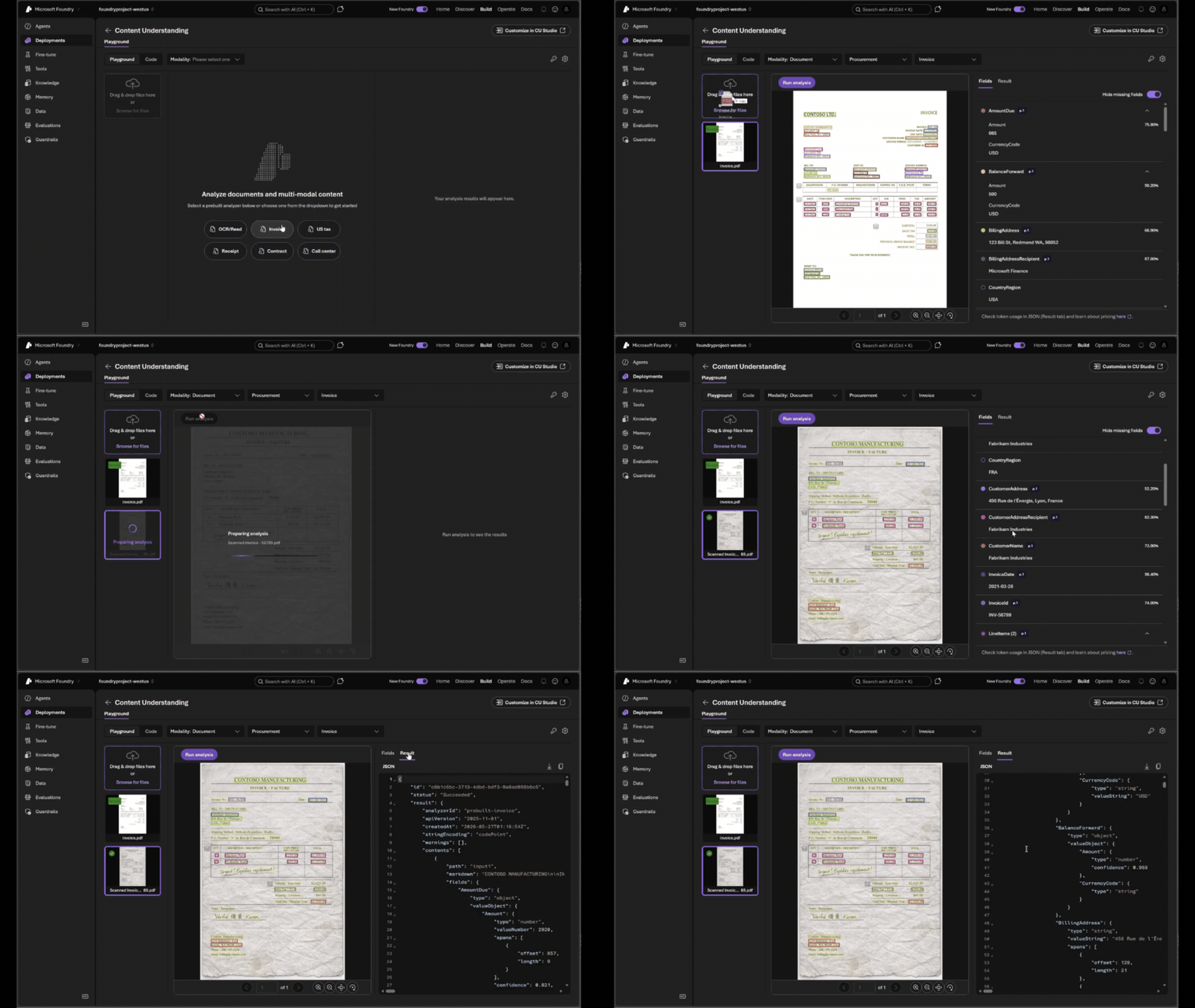
Interested in building a custom analyzer? Click Customize in CU Studio from the resource page.
Learn more: Foundry vs. Content Understanding Studio · Create a Microsoft Foundry resource
Unlock deep understanding across more file types
The shortest path from “I have a document” to “I have structured data” is the one where you don’t have to convert the file first. Azure Content Understanding now ingests a wider set of file types, gathering the context of these files without needing to convert the file types before processing.
What’s new
- Email and message formats — .eml and .msg are now supported.
- Legacy and open Office formats — .doc, .xls, .ppt, and the OpenDocument family (.odt, .ods, .odp) are now supported directly, without an upstream conversion step.
- Extract embedded images in Office files — Customers can now extract figures (images, charts, diagrams) embedded in Office documents like .docx, .pptx, and .xlsx. Each figure can be retrieved using (The figureId is referenced in the markdown output for the document.):
GET /contentunderstanding/analyzerResults/{operationId}/files/figures/{figureId}
Learn more: Supported document formats
Accelerate agentic workflows with Content Understanding
We’re excited to announce that Content Understanding is now integrated with some of the most popular ways developers are building today, including Microsoft Agent Framework, Foundry IQ (Standard mode), LangChain, and MarkItDown. CU is able to meet developers in the middle of their favorite frameworks to make multi-modal building easier. With the Microsoft Agent Framework integration, for example, an agent can hand off a PDF or image mid-turn and get back structured fields or layout-aware Markdown without your code needing to orchestrate the call. We’re also bringing CU to open-source tools like, like MarkItDown, the converter for turning any document into clean Markdown for LLM consumption. By bringing the power of Content Understanding Layout into MarkItDown, developers can generate layout-aware Markdown that preserves key structures like tables, headings, and figure descriptions. CU is also integrated into LangChain, for easily transforming unstructured content into structured Document objects, and Foundry IQ (standard mode) for built-in content extraction in Microsoft’s retrieval and agent workflows.
How to use Content Understanding from Microsoft Agent Framework
Register Content Understanding as a tool on your agent. The agent’s planner will call it whenever it needs to read a document:
# pip install agent-framework-azure-contentunderstanding

from agent_framework_azure_contentunderstanding import (
    ContentUnderstandingContextProvider,
    AnalysisSection,
    ContentLimits,
)

# Minimal setup (uses prebuilt-read analyzer by default)
cu = ContentUnderstandingContextProvider(
    endpoint="https://my-resource.cognitiveservices.azure.com/",
    credential=DefaultAzureCredential(),
)

# Full configuration with a custom analyzer
cu = ContentUnderstandingContextProvider(
    endpoint="https://my-resource.cognitiveservices.azure.com/",
    credential=DefaultAzureCredential(),
    analyzer_id="my-custom-analyzer",
    max_wait=10.0,
    output_sections=[
        AnalysisSection.MARKDOWN,
        AnalysisSection.FIELDS,
        AnalysisSection.FIELD_GROUNDING,
    ],
    content_limits=ContentLimits(max_pages=50, max_file_size_mb=50),
)

# Snippet for use with agent
async with cu:
    agent = Agent(client=llm_client, context_providers=[cu])
    response = await agent.run(...)
The agent decides when to call analyze_document, you don’t have to. For domain-specific extraction, swap prebuilt-layout for one of the prebuilt analyzers or your own custom analyzer ID.
Learn more: Microsoft Agent Framework overview · Tool calling patterns
How to use Content Understanding with MarkItDown
Install MarkItDown and configure it to use Content Understanding as the extraction backend. From there, any file you pass through convert() goes through CU and comes out as clean, layout-aware Markdown:
# pip install 'markitdown[az-content-understanding]'


from markitdown import MarkItDown

# Zero-config — auto-selects analyzer per file type

md = MarkItDown(cu_endpoint="<content_understanding_endpoint>")
result = md.convert("report.pdf")   # documents → prebuilt-documentSearch
result = md.convert("meeting.mp4")  # video → prebuilt-videoSearch
result = md.convert("call.wav")     # audio → prebuilt-audioSearch
print(result.markdown)

)

# Full configuration with a custom analyzer

md = MarkItDown(
    cu_endpoint="<content_understanding_endpoint>",
    cu_analyzer_id="my-invoice-analyzer",

)

result = md.convert("invoice.pdf")
print(result.markdown)

# Output includes YAML front matter with extracted fields:
# ---
# contentType: document
# fields:
#   VendorName: CONTOSO LTD.
#   InvoiceDate: '2019-11-15'
# ---
# <!-- page 1 -->
# ...
The result is Markdown with headings, tables, and figure descriptions inline — exactly the shape downstream chunkers and embedding models prefer.
Learn more: MarkItDown on GitHub · Build a RAG solution with Content Understanding
Everything above is available for you to try out today, but we have even more exciting features coming in July.
Coming in July: even more capabilities for Content Understanding
Here’s a sneak peek at what’s landing in July 2026:
- Real-time results, with a new Content Understanding synchronous API for Read and Layout — Get results instantly without managing asynchronous workflows, making it easy to power faster, more responsive experiences.
- An agentic understanding mode for complex documents — A new mode that doesn’t shy away from deep reasoning for your most complex documents. We’ll show this end-to-end in our session at Build and ship it for everyone to try in July.
- Flexible processing, built for global scale with data zone and global zone support — Choose how and where your data is processed to meet performance, scale, and residency needs, while simplifying capacity management across regions.
- Improved training for custom analyzers — Improve extraction quality using your own examples and domain context, reducing manual review and enabling more reliable automation for real-world workflows.
- Labeled training data no longer stored in CU for privacy-first training — Keep full control of your data by using your own storage for training inputs, helping you meet compliance requirements without sacrificing model performance.
- Better grounding and field normalization
- Even broader support for the GPT-5 family models
- New prebuilt analyzers and digital-only variants
If you’re attending Build 2026, join us at Session BRK242 — “Turn your agents into action” (recorded), where we’ll go deep on the agentic understanding mode demo and the Foundry IQ integration. If you’re not at Build, the recording will be online right after the session, and we’ll publish a follow-up dev blog when the July release ships, including more working code, region availability, and migration guidance for every customer currently on GPT 4.x.


0 comments