




🚨 Attention: We are accepting a final round of preview requests, with those organizations scheduled for enablement beginning the second week of July.
Requests submitted after July 3 will not be accepted into the preview program.
Over the last several years, we have encouraged customers to move their repositories from Azure Repos to GitHub to take advantage of the latest AI powered and agentic development experiences that GitHub is delivering.
At the same time, we recognize that migrating repositories to GitHub can vary significantly in complexity depending on an organization’s size, customizations, compliance requirements, tooling, and industry constraints. While many customers are actively planning and executing migrations to GitHub, many others are not yet ready to move and continue to rely on Azure Repos for day-to-day development.
For customers continuing to build on Azure Repos, we have exciting news. We are announcing a limited public preview that brings GitHub Copilot code reviews directly to your pull requests in Azure Repos.
🪧 Sign up for the Technical Preview
We are making the technical preview available through a sign-up process. Customers interested in participating can request access, and we will enable the feature for their organization as capacity allows.
Access will be granted in waves based on when requests are received, so enablement may take one or weeks. We will notify each customer by email once the feature has been enabled for their organization.
This phased rollout allows us to closely monitor usage, collect feedback, and validate the experience before making the feature more broadly available.
If you are interested in participating in the preview, you can sign up today.
🚛 Getting Started
Once we enable the feature, there are a few setup steps required before it can be used. First, Copilot code review must be enabled at the organization level. This allows the feature to then be enabled on individual repositories. This step must be completed by an organization administrator.
Go to Organization Settings > Repositories

Once the organization level setting has been enabled, repository administrators can enable Copilot Code Review for individual repositories.
To enable the feature, go to Project > Repositories > Manage Repositories and select the desired repository. From there, you will see the option to enable Copilot Code Review for pull requests in that repository.
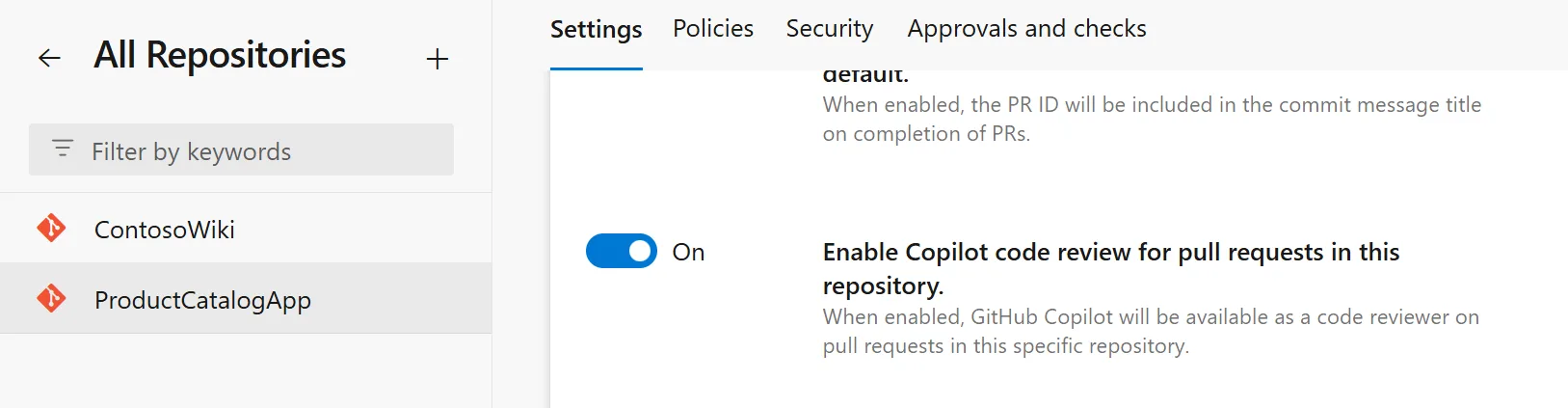
Lastly, the feature must be enabled for users. This can be done either at the individual user level or by an organization administrator enabling it for all users.
To enable the feature, go to the Preview Features panel and turn on Copilot Code Review for Pull Requests.
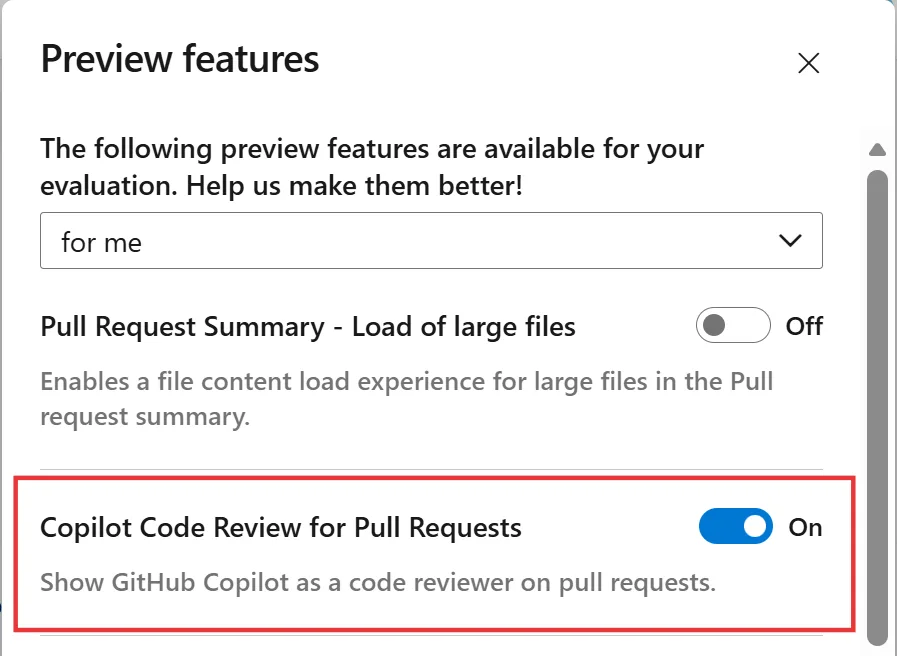
🤖 Code Review Process
Once you have completed the getting started steps, initiating a Copilot Code Review is straightforward. First, make your code changes and create a pull request. When the pull request is ready for review, you can request a Copilot review by clicking the Request button next to Copilot Code Review in the Reviewers section.
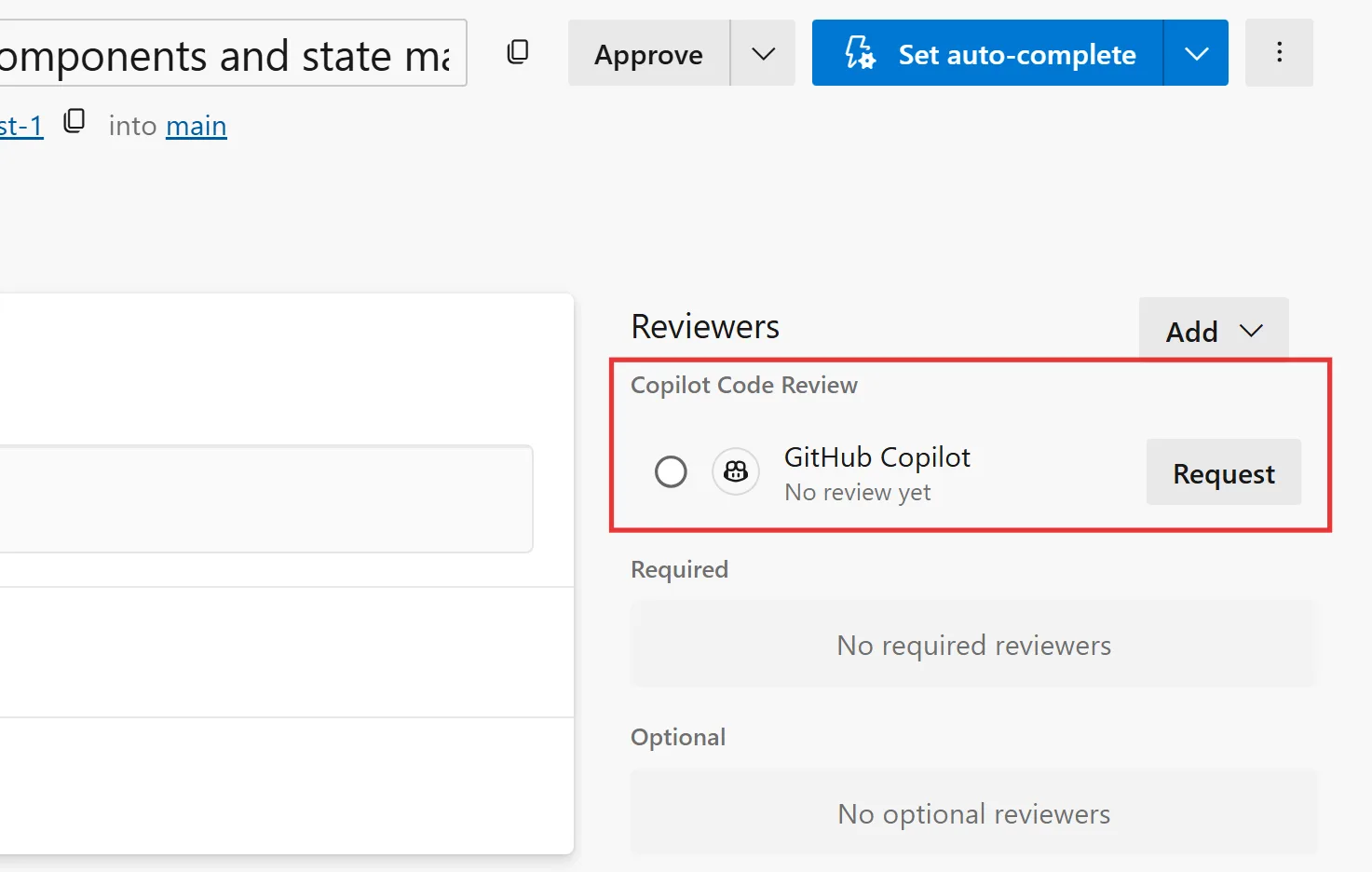
The code review may take a few moments to complete, depending on the size of the repository and the number of changes included in the pull request. Once the review is complete, the status of the code review will change to Review completed.
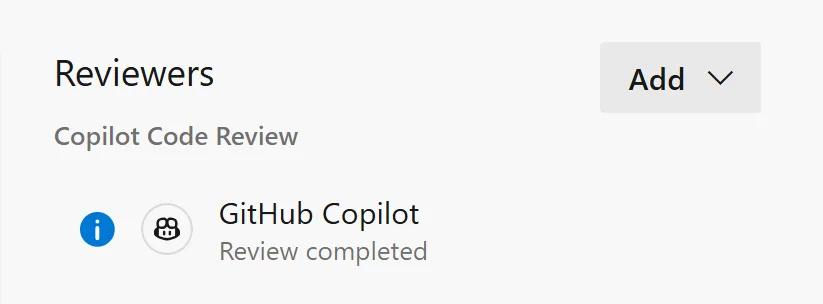
If Copilot identifies potential issues in your pull request, it will add comments and suggestions directly to the review for you to examine and address.
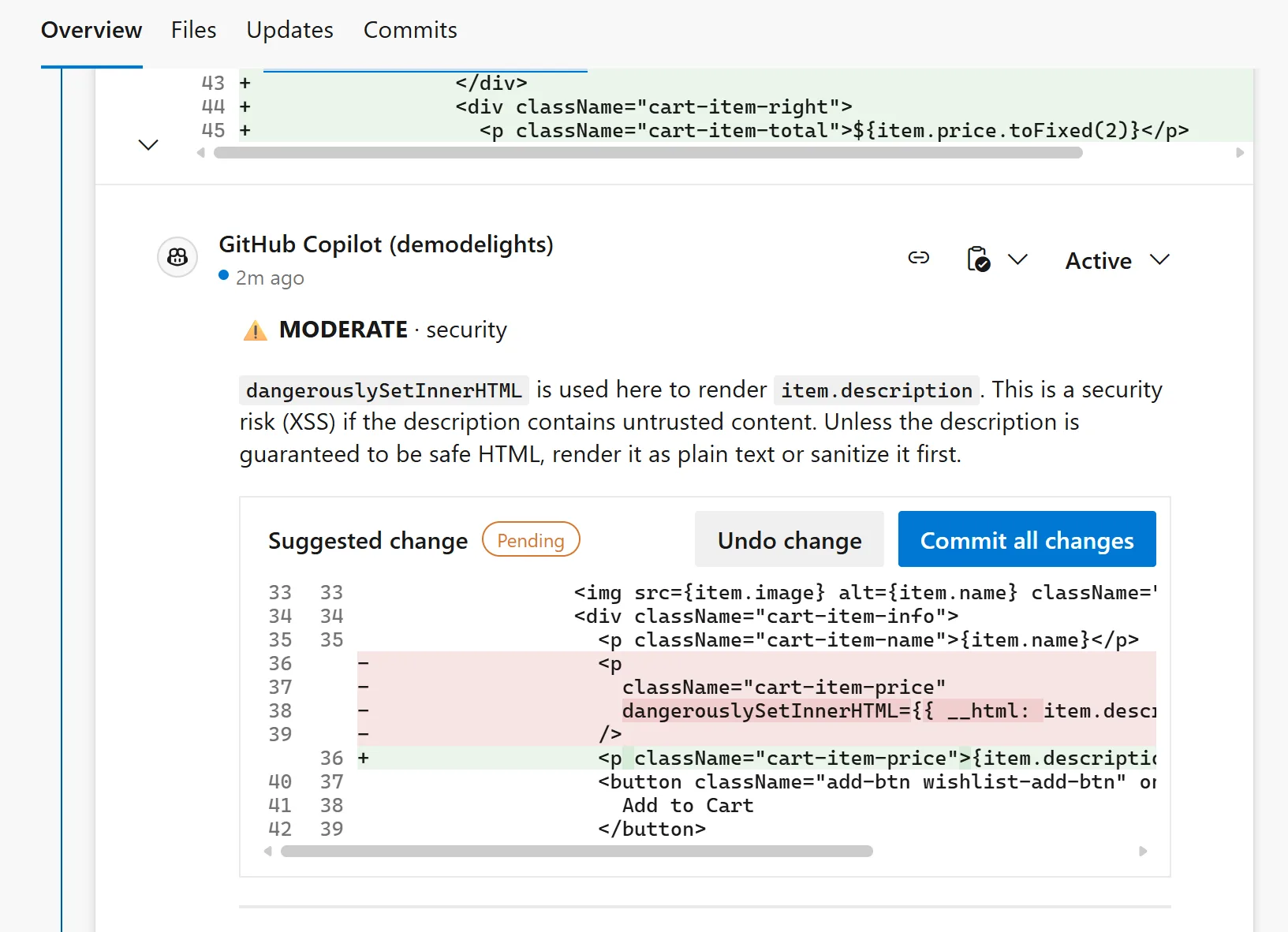
From here you can apply changes recommended by Copilot or you can go back to your IDE, make the necessary changes, and re-commit. Once you create another commit, you can elect to run another Copilot code review.
🚂 Guardrails and Limits
For customers interested in trying this feature during the preview, there are a few limitations and guardrails to be aware of. These are in place to help ensure a stable experience as we onboard additional organizations and continue to learn from real-world usage during the rollout.
The following limits will apply during the preview and our subject to change.
| Item | Limit |
|---|---|
| Repository size | 10 GB |
| Pull request changed files | 100 files |
| Pull request status | Must be Active |
| Pull request merge status | Must have no merge conflicts (Merge Succeeded) |
| Duplicate review on same PR version | 1 completed review per merge commit |
| Concurrent reviews per pull request | 1 |
| Concurrent reviews per organization | 5 |
| Concurrent reviews per user | 2 |
🪙 Billing
Each completed code review consumes tokens, including input tokens sent to the model, output tokens generated by the model, and cached tokens that reuse existing context.
To simplify billing, the tokens used for each review are converted into a standard billing unit called a GitHub AI credit, where 1 credit equals $0.01 USD. Charges are billed to the Azure subscription linked to your Azure DevOps organization and appear as a separate meter in Azure Cost Management.
The cost of each review will vary depending on factors such as pull request size and the number of lines changed. To estimate expected costs in your environment, we recommend enabling the feature for one or two repositories first and monitoring daily usage.
To monitor your daily charges, go into your Subscription > Resources > Cost Management > Cost analysis.
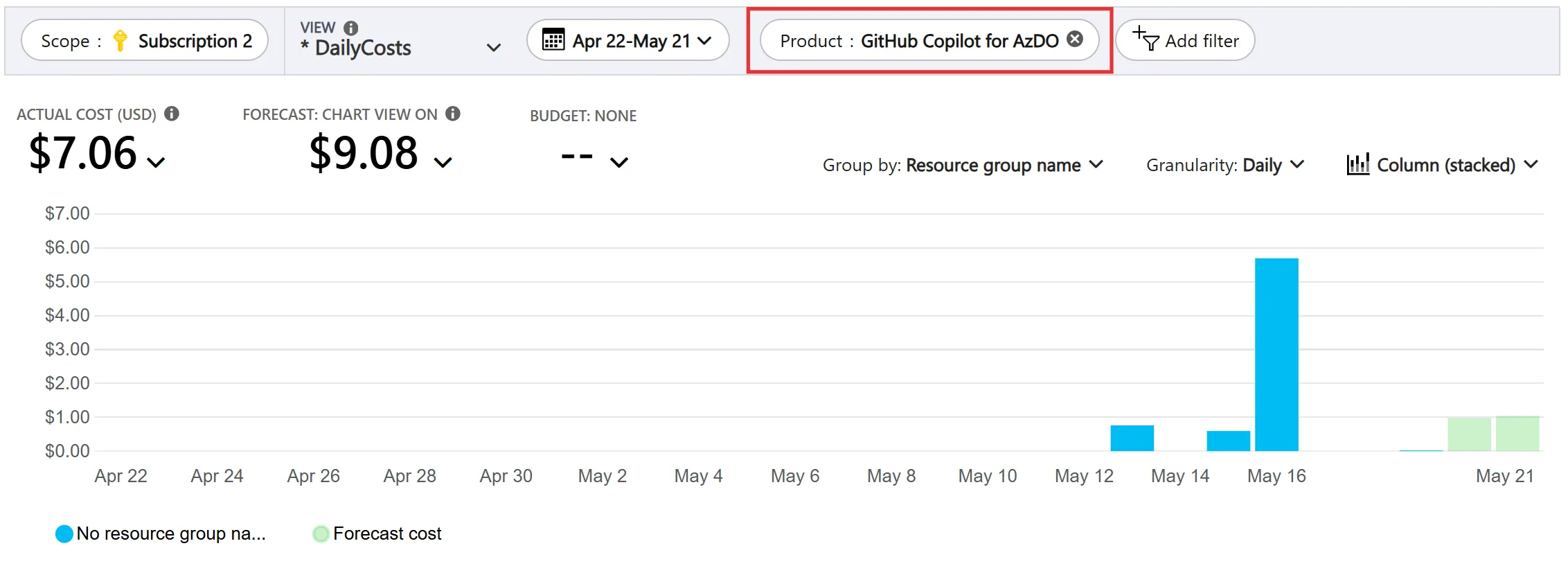
From here, you can filter by product to view the organization’s daily costs. Please note, it does take 24-48 hours for the usage information to show up in the azure portal.
💬 Feedback
We expect to remain in limited public preview over the next couple of months as we continue refining the experience, adding new features, and incorporating customer feedback. Your input is vital to making this experience successful.
If you are interested in participating, please sign up for the limited public preview. We will follow up with all the information you need to get started.


I would like to know more about the data protection and privacy policies concerning Copilot Code Reviews in Azure Repos.
Specifically, is there any official documentation on how prompts, prompt context, and repository code are handled? Are these inputs stored or retained in any form, and are they used for model training or service improvement?
Additionally, does this feature follow the same enterprise data protection guarantees as GitHub Copilot (e.g. no training on customer code), or are there differences for Azure DevOps usage?
It is essential to continue investing in Azure DevOps rather than prioritizing GitHub for enterprise workloads.
Azure DevOps is critical for our SRE automation due to its consistent uptime. GitHub’s frequent stability issues disrupt automated CI/CD pipelines. Additionally, Azure DevOps offers native Azure Cloud integration and straightforward management of self-hosted build agents within isolated internal networks.
It remains the most practical tool for our operational and security requirements.
this comment has been deleted.
Is there any plan to implement this also in Azure DevOps Server (on-premise)?
This feature is brand new and we just started the preview phase. TBD on if we can bring this into on-prem in the future.
We where already trying to build something for this feature ourselves using a build pipeline… also we already having some copilot codereview instructions included in our repo for this. Cant wait to start testing with this feature!