
Develop from the cloud
Build apps from the cloud with Dev Box, Azure Deployment Environments & more
Featured posts
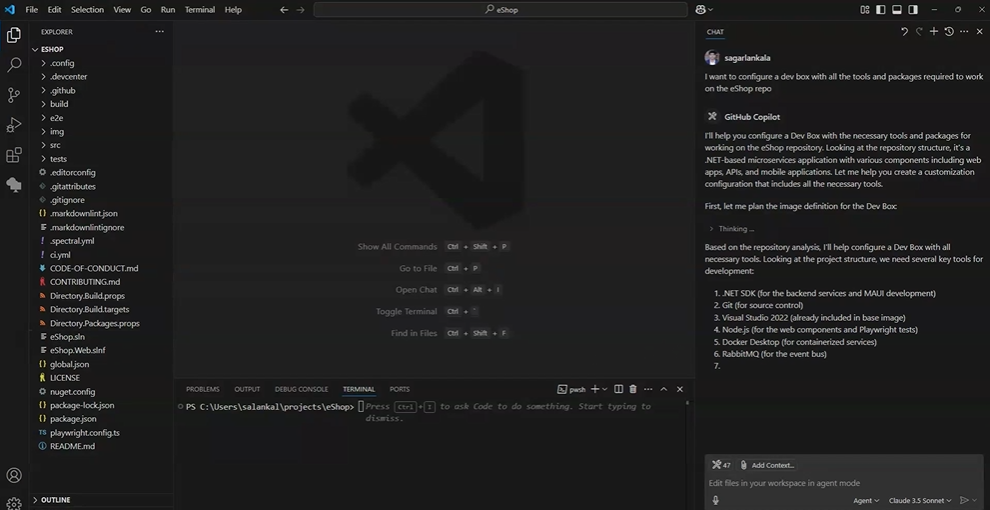
Unlock developer potential with Microsoft Dev Box

AI agents, model context protocols (MCPs), and emerging AI workflows are fundamentally transforming software development paradigms and broadening the range of a...
Latest posts

Streamlined Setup, Stronger Guardrails for Microsoft Dev Box

We’re excited to introduce a new capability that simplifies Dev Box setup—enabling platform engineers and project admins to specify images and SKUs directly when configuring Dev Box pools, without needing to create Dev Box definitions at the Dev Center level. 🔄What’s changing Until now, configuring Dev Box pools with Azure Marketplace images or custom images from Compute Galleries required a pre-defined Dev Box definition at the Dev Center. These definitions packaged the image along with compute and storage SKUs, and were then referenced by project-level pools. While this model provided centralized control, ...
🎉Enhancing security and streamlining configuration with Lab Secrets in Azure DevTest Labs

For platform engineers, securely managing sensitive information across dev and test environments is a critical responsibility. Each workflow, from provisioning virtual machines to deploying artifacts and automating environment setup, often involves handling credentials, SSH keys, and API tokens. Sharing these in chat, hardcoding them into scripts, or keeping them in plain text is not secure. We consistently heard this feedback from our customers; in the absence of a centralized solution, secrets can end up distributed across emails, chat threads, and scripts. This distribution can elevate the risk of unintended e...
🎉 Now in Public Preview: Create Dev Boxes on Behalf of Your Developers

We’re excited to announce that one of our most-requested features is officially in Public Preview: You can now create Dev Boxes on behalf of your developers. Waiting around to get started is a thing of the past. Whether you're onboarding a new hire, running a hackathon, or setting up for a customer demo, this feature makes it easy for admins to set developers up for success. No “how do I do this?” required. ✨ Why We Built It From Ignite sessions to customer labs to hallway chats, the feedback was clear. You needed a faster, more flexible way to spin up Dev Boxes for your team. Here are just a few re...
💻 Spring Cleaning for Dev Boxes: Mastering Manual & Automatic Offboarding
Let’s face it. Sometimes your Dev Box just… hangs around too long. Whether you’ve moved to a new project, left the company, want to create a new dev box with the latest tools, it's time to clean things up. 🎯 With Dev Box Auto-Deletion now in public preview, offboarding just got a whole lot easier. Here's everything you need to know to keep your environment tidy and your costs under control (without deleting anything you still need!). 🚀 Step 1: Enable the Auto-Deletion Preview Feature Before anything else, you need to register the preview feature in your Azure subscription: ✨ You're now r...
Balance governance and flexibility with Dev Box project policies

As organizations scale their development efforts, managing access to cloud resources becomes critical. Platform engineers need to strike a balance between enforcing governance and enabling developer agility. At Build 2025, we announced the general availability of project policies in Microsoft Dev Box, which provides a powerful way to improve resource control and governance for cloud development environments while boosting security and compliance. What are project policies? With project policies, platform engineers can set guardrails on a per-project basis, to ensure that each project has access only to the nece...
Control cloud costs with Dev Box hibernation features
Cost is one of the most important concerns in any cloud-native rollout. IT admins need powerful tools to control costs without slowing development. At Build 2025, we were excited to announce the general availability of hibernation in Microsoft Dev Box. This feature empowers platform engineers to optimize resource usage while empowering developers to get what they need when they need it. Core cost-saving features—auto-stop schedules, hibernate on disconnect, and hibernate on no connect—offer different ways to automatically hibernate idle dev boxes, ensuring that resources aren’t wasted and budgets stay predic...
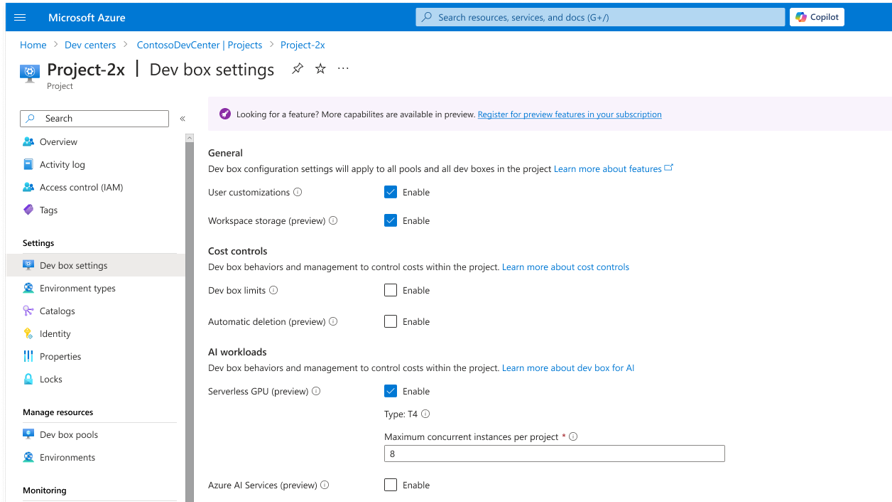
Supercharge AI development with new AI-powered features in Microsoft Dev Box
AI is reshaping how we build, deploy, and scale software. As more apps become AI-powered, developers need environments that can keep up with speed and demands of innovation. We've heard from customers just how critical it is to have a zero-config experience when building AI applications, with streamlined access to compute, prebuilt models, and environment configuration tools. We’ve been listening—and are excited to announce a new wave of capabilities in Microsoft Dev Box to accelerate AI development. Dev Box now empowers you to get started rapidly with ready-to-code cloud development environments optimized for...
Unlock developer potential with Microsoft Dev Box
AI agents, model context protocols (MCPs), and emerging AI workflows are fundamentally transforming software development paradigms and broadening the range of applications we can create. Developers are expected to keep up with the pace of innovation, but that’s hard to do when working from traditional development environments or legacy VDI solutions. With Microsoft Dev Box, developers get AI-powered, ready-to-code cloud dev environments with the tools they need for AI development, and platform engineers stay in control, with built-in tools to manage and secure everything at scale. Accelerate AI development an...
Elevate Your Virtual Machine Management with Multi-Select, Sorting, Grouping, and Tags in Azure DevTest Labs

We are thrilled to unveil exciting new enhancements in the My Virtual Machine view within Azure DevTest Labs that will revolutionize your VM management experience. With these updates, managing your virtual machines has never been easier or more efficient. Imagine being able to multi-select VMs to start, stop, restart, or delete them all at once – saving you valuable time and effort. But that's not all! You can now sort your VMs and group them by various attributes such as type, status, size, and more, making it simpler to organize and locate the VMs you need. Additionally, the My Virtual Machine view now suppo...

How Xi’an Jiaotong-Liverpool University scaled hands-on learning with Microsoft Dev Box

As AI and data science rapidly reshape industries, universities worldwide are rethinking how they deliver hands-on learning. At Xi’an Jiaotong-Liverpool University (XJTLU) in China, the School of AI and Advanced Computing embraced Microsoft Dev Box to give students a modern, scalable, and real-world development environment—right from their first year. Here’s how XJTLU transformed their curriculum and operations with Dev Box, helping 460+ students access powerful computing resources effortlessly. 🎯 The challenge XJTLU is a leader in AI and data science education, with over 700 new students joining each ye...
How to get started quickly with setting up the Microsoft Dev Box service
Last updated: April 21, 2025 🎯 Introduction Are you an IT admin, platform engineer, or a developer looking to explore a developer-centric, cloud-powered workstation experience? In this post, I’ll show you how to start quickly and try out Microsoft Dev Box using either a Microsoft 365 Business Premium or Microsoft 365 E3 plan — both of which come with licenses of Windows 10/11, Microsoft Entra ID, and Microsoft Intune and offer free trials. Check out my other post about subscriptions and licensing requirements for Microsoft Dev Box to understand what subscriptions and licenses are required to successfully ge...

Microsoft Dev Box subscriptions and licensing requirements demystified: What You Need and Why
Thinking of deploying Microsoft Dev Box service but want to understand the licensing and subscription requirements first? Then, you have come to the right place. This blog post breaks it all down—clearly and simply—so you know exactly what you need and why, whether you’re an IT admin, platform engineer, developer, or a decision-maker. Microsoft Dev Box is a cloud-based service that provides secure, fully managed developer workstations (virtual machines) hosted in Azure. It’s designed for organizations that want fast, scalable, and policy-compliant dev environments for their developer teams. But before you spin...
Hola, Spain Central! Microsoft Dev Box Expands in Europe
You asked, we built it. We’re thrilled to announce that Spain Central is now a supported region for Microsoft Dev Box! 🎉 That’s right — starting today, you can spin up Dev Boxes in Spain Central and get all the benefits of fast, secure, ready-to-code workstations, now closer to your European teams and data. To start creating dev boxes in Central Spain, request quota for this new region. Interested in trying out Microsoft Dev Box? Start here! 🛡️ Why Spain Central? Many of our customers shared a clear message: “We need more European regions to help protect our data and meet local compliance require...
Improve the security of Generation 2 VMs via Trusted Launch in Azure DevTest Labs
We're thrilled to announce the public preview of the Trusted Launch feature for Generation 2 (Gen2) Virtual machines (VMs) in Azure DevTest Labs! 🌟 This game-changing feature is designed to enhance security of virtual machines (VMs), protecting against advanced and persistent attack techniques. Here are the key benefits: Trusted Launch integrates several infrastructure technologies that can be enabled independently, each adding a layer of defense against sophisticated threats. Secure Boot At the core of Trusted Launch is Secure Boot, which protects against malware-based rootkits and boo...
Azure DevTest Labs’ feedback forum has a new home!
We're thrilled to announce that Azure DevTest Labs has joined the Visual Studio Developer Community to collect valuable feedback and suggestions from our customers. 🌟 This fantastic feedback portal is here to make your experience smoother and more engaging. It's your go-to place to connect with the Azure DevTest Labs product and engineering teams to report any issues and suggest amazing new features. We can't wait to hear your thoughts and ideas. 💬 Your feedback is invaluable and helps us focus on what truly matters to you, delivering even greater value. So, what are you waiting for? Dive into the Azure ...
Improve performance and security using Standard Load Balancer and Standard SKU public IP addresses in Azure DevTest Labs
We are excited to announce preview of enhancements in Azure DevTest Labs designed to accommodate two upcoming retirements in Azure: These retirements will not impact VMs with Private IPs. However, they will impact VMs with Public or Shared IPs in the following ways: Impact on VMs with Public IPs: Impact on VMs with Shared IPs: Please check out the Azure DevTest Labs public documentation related to these changes. These changes in Azure DevTest Labs are being rolled out to different regions in phases. We expect to complete the ro...

Microsoft Dev Box roadmap update
This post discusses Dev Box roadmap update. We continue to evolve, providing a secure, scalable, and ready-to-code cloud-based development environment. Over the next few months, significant improvements will focus on three key areas: By prioritizing these enhancements, Microsoft aims to boost developer efficiency, reduce IT overhead, and offer a more flexible, secure, and responsive cloud-based development experience. These updates will enable teams to work more effectively, whether they are onboarding new developers, managing resources at scale, or ensuring reliable performance. For full deta...
Self-Serve Restoration in Microsoft Dev Box

Developers grapple with the anxiety of potential data loss due to unforeseen issues, such as accidental deletions, system failures, or even corrupt files. The Dev Box team is addressing this concern with the self-service restoration feature for the Dev Box, designed to put you back in control. This functionality streamlines recovery by allowing direct restorations within the Dev Box interface, eliminating the need for on-call support. Whether rolling back after a problematic update or recovering from accidental deletion, you now have the power to address issues swiftly. You can experiment freely with new features...