

We know that slow builds are a consistent theme in feedback from C++ developers. Your feedback helped us to shape GitHub Copilot build performance for Windows, an agent that can trace your build, find bottlenecks, apply optimizations, and measure the result.
When using the agent, the clearest outcome is a straightforward win. The agent changes your project, rebuilds it, and shows how your build is made faster. Sometimes, a change may make a clean rebuild slightly slower while improving the incremental builds you run throughout the day. At other times, we also observed that optimizations may help without reaching the agent’s improvement threshold. In addition, the project may already be well tuned, leaving the agent without a measurable improvement to make. Thanks to your feedback, we learned that when the result was not a clear win, it may be difficult to understand what the agent measured, why it stopped, or what you should do with its changes.
We are happy to share that GitHub Copilot build performance for Windows now displays clearer, deterministic result messages. The new experience reports what happened using measured build results and consistent language, so you can understand the outcome and decide what makes sense for your project.
These improved messages are available now on the Visual Studio 2026 Insiders Channel.
Clearer Results from Every Optimization Run
The agent will now provide a specific outcome when it finishes or stops an optimization workflow. These messages cover four common scenarios:
- The build was too short to analyze
- The agent found an improvement below its success threshold
- The attempted changes did not improve measured performance.
- The build was successfully optimized
For successful optimization cases, you will continue to see the result that tells you how much faster the build became and how much time the change saved. The summary includes the baseline build time, final build time, and measured improvement. If the iterative build workflow ran, the agent will also explain how the change affected that workflow.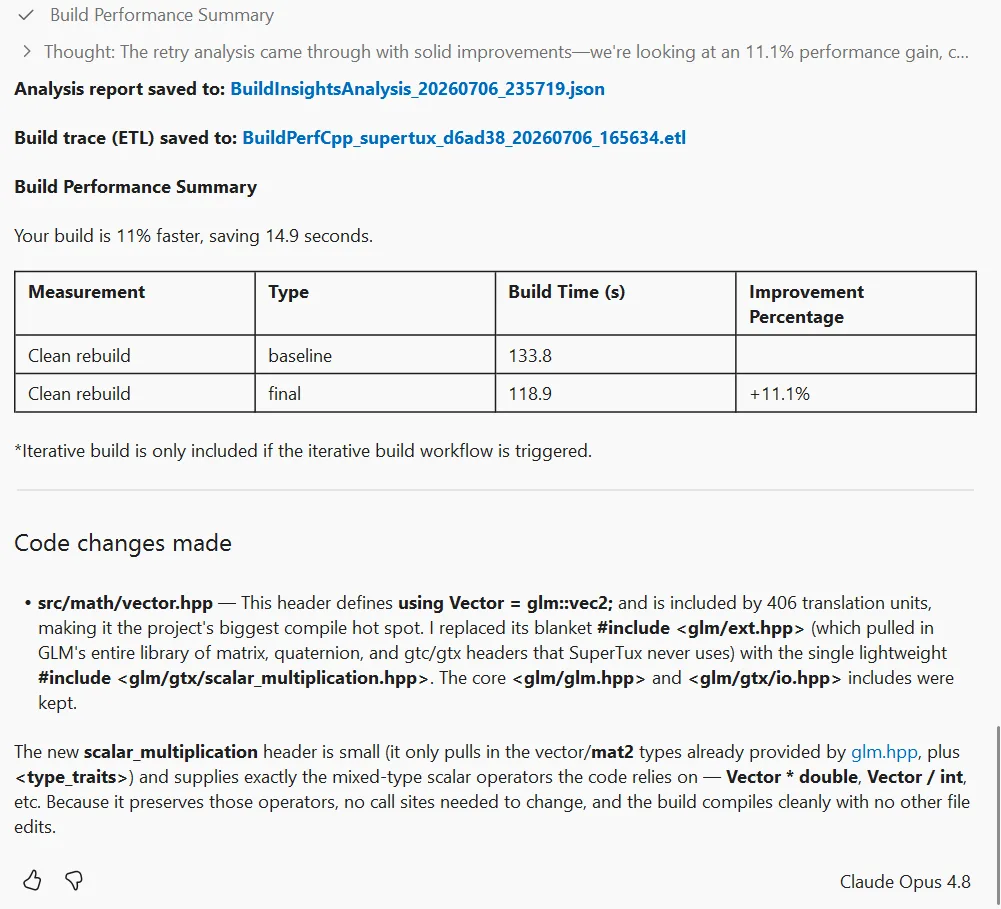
The more important changes are in the less obvious cases below.
When an Improvement Falls Below the Threshold
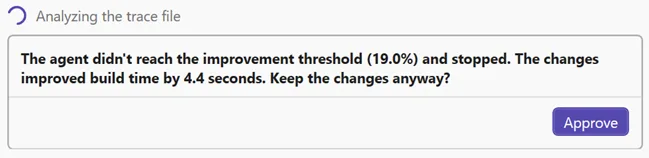
In some cases when the agent finds a real improvement, the difference may be smaller than the threshold used to identify a meaningful win for a build of that size. Previously, the results could read like a failure even though the build was measurably faster.
Now, the agent will tell you exactly what happened. For example, it may report that the changes saved 0.4 seconds but did not reach the improvement threshold. You can then choose whether to keep the changes or return the files to their original state.
A small improvement may be worthwhile in a build that runs hundreds of times each day. In a different project, the added complexity may not justify the time saved. You are ultimately in control whether to keep the optimization.
Understanding a Negative Build Result
A negative build result means the attempted change did not improve your build time. It does not necessarily mean that the agent regressed your codebase, and it does not always mean that the optimization has no value.
Clean and incremental builds can respond differently to the same change. A precompiled header, for example, adds work to a clean rebuild but may reduce compilation time during the edit-build-debug loop. If a change makes the clean rebuild slower, the agent will explain that incremental performance has not been measured yet and ask whether you want to continue with an iterative build experiment.
If both clean and incremental measurements show no improvement, the final message will say so clearly and restore the project to the appropriate state. This can happen when the relevant parts of a build are already well tuned. In that situation, a result showing that the agent tested an optimization and rejected will still provide meaningful information.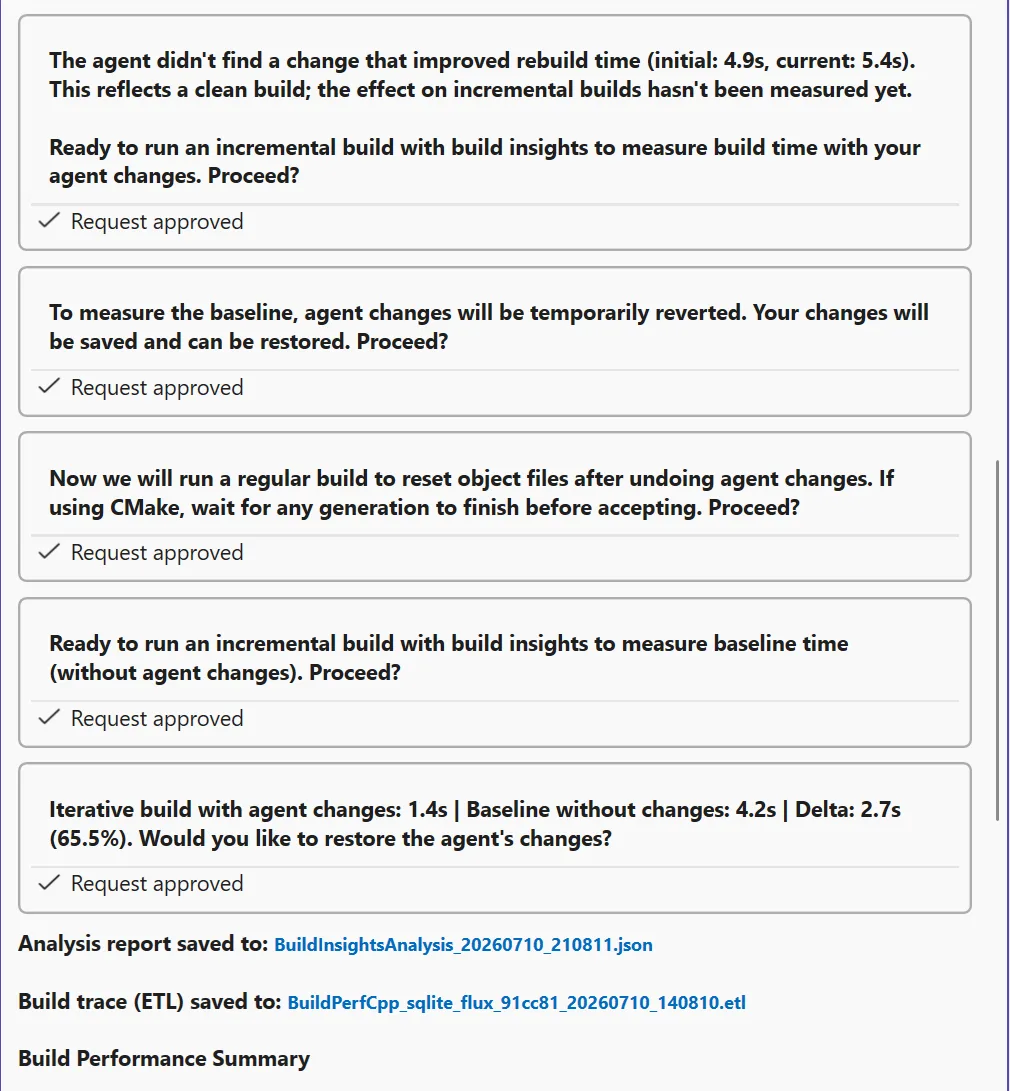
Explaining When Optimization Does Not Run
Very short builds do not provide enough work for a useful optimization attempt. When a build completes in less than two seconds, the agent will stop and explain that optimization requires a longer build instead of appearing idle or failing without context.
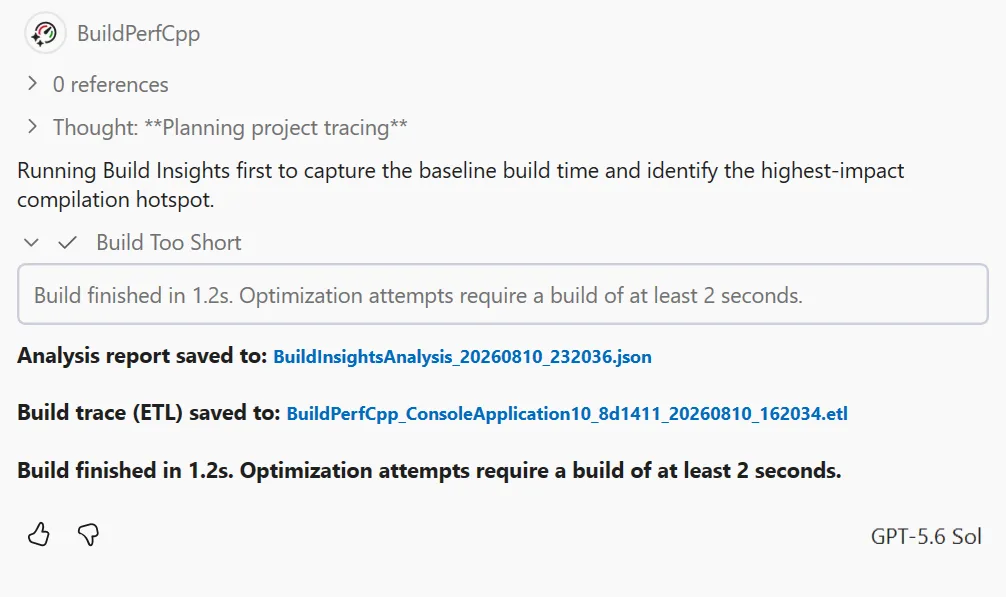 While this is a small messaging change, it answers an important question immediately: the workflow stopped because of the measured build duration, not because the agent failed to start.
Conclusion
In this updated version of GitHub Copilot build performance for Windows, you will see that build times, percentages, and workflow state are presented directly rather than being interpreted differently from one run to another. This makes it easier to compare experiments, understand why the agent stopped, and review the result with the rest of your team.
Build optimization is often a tradeoff rather than a single number. With these improvements, GitHub Copilot build performance for Windows gives you a clearer view of that tradeoff, especially when the best result is not a straightforward win.
Share Your Feedback
This update came directly from feedback about how the agent communicates optimization results. We would like to hear whether the new messages give you the information you need, particularly when an improvement is below the threshold or when clean and iterative build measurements point in different directions.
Please share your feedback through Help > Send Feedback in Visual Studio, in the comments below, in this survey, or on X at @VisualC. Your feedback continues to guide how we improve C++ build performance tools in Visual Studio.


0 comments