


Today, we are excited to announce the public preview of the Azure Cosmos DB Migration Assistant for RDBMS to NoSQL, now available in the Azure Cosmos DB extension for Visual Studio Code.
📈 Modernize with confidence
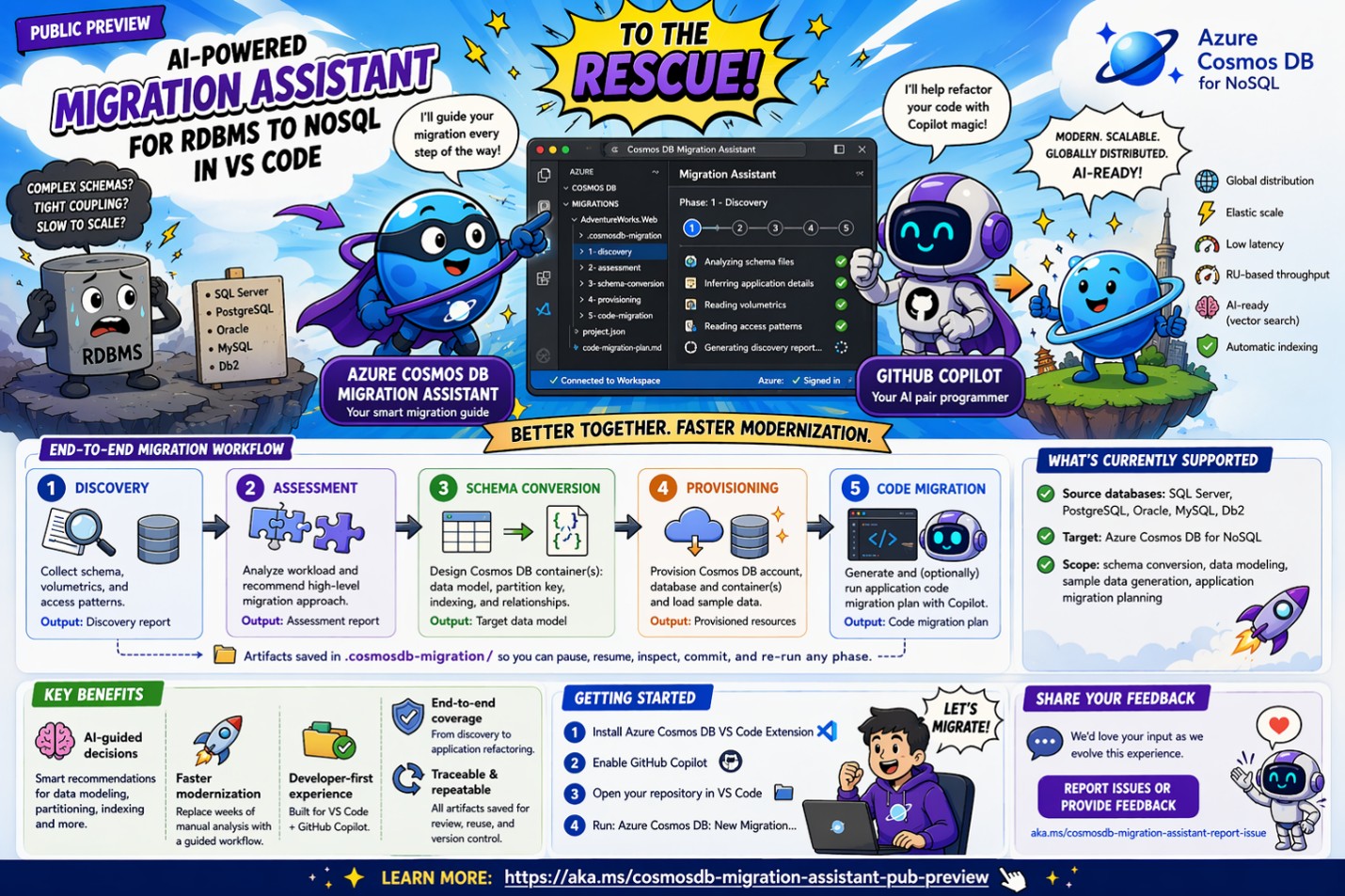
Why migrate from RDBMS to Azure Cosmos DB?
Modernizing relational workloads has traditionally been complex, time-consuming, and risky. This new AI-assisted, phase-based workflow replaces manual analysis with structured recommendations and helps you navigate key design choices such as denormalization, partitioning, and NoSQL data modeling. It helps you move from relational databases (SQL Server, PostgreSQL, Oracle, MySQL, Db2) to Azure Cosmos DB for NoSQL faster, more safely, and with greater confidence, while following best practices that help avoid early mistakes and poor design decisions.
But manually modernizing a relational application for NoSQL is difficult and time-consuming. Developers must make high-impact choices—such as denormalization, partition key selection, and indexing—that require deep knowledge of both relational databases and NoSQL technologies. In practice, teams often stitch together many inputs and manually translate schemas and access patterns into a Cosmos DB design. Refactoring application code to match the new NoSQL model adds further complexity and increases the risk of defects.
This is where the Migration Assistant helps—replacing lengthy manual efforts with AI-driven recommendations and guided decisions powered by Azure Cosmos DB Agent Kit.
✨ What is Azure Cosmos DB Migration Assistant?
The Azure Cosmos DB Migration Assistant is an end-to-end, AI-guided experience inside the Azure Cosmos DB extension for Visual Studio Code that helps automate and accelerate the core phases of a migration project:
- Analyzes your schema, code, and access patterns
- Designs optimal Cosmos DB NoSQL data models
- Recommends partitioning and indexing strategies
- Provisions target resources and loads converted sample data
- Generates and executes an AI-driven application code migration plan
As part of this process, all artifacts generated by the assistant are persisted locally in the .cosmosdb-migration/ project folder, making the process traceable, repeatable, and versionable. This allows you to iterate on and refine design decisions and code artifacts for each migration phase, while applying the same version controls you use for your application and database code.
🧭 End-to-end Migration Workflow
The assistant guides you through five connected phases, each designed to reduce risk and make the move from relational to NoSQL more predictable.
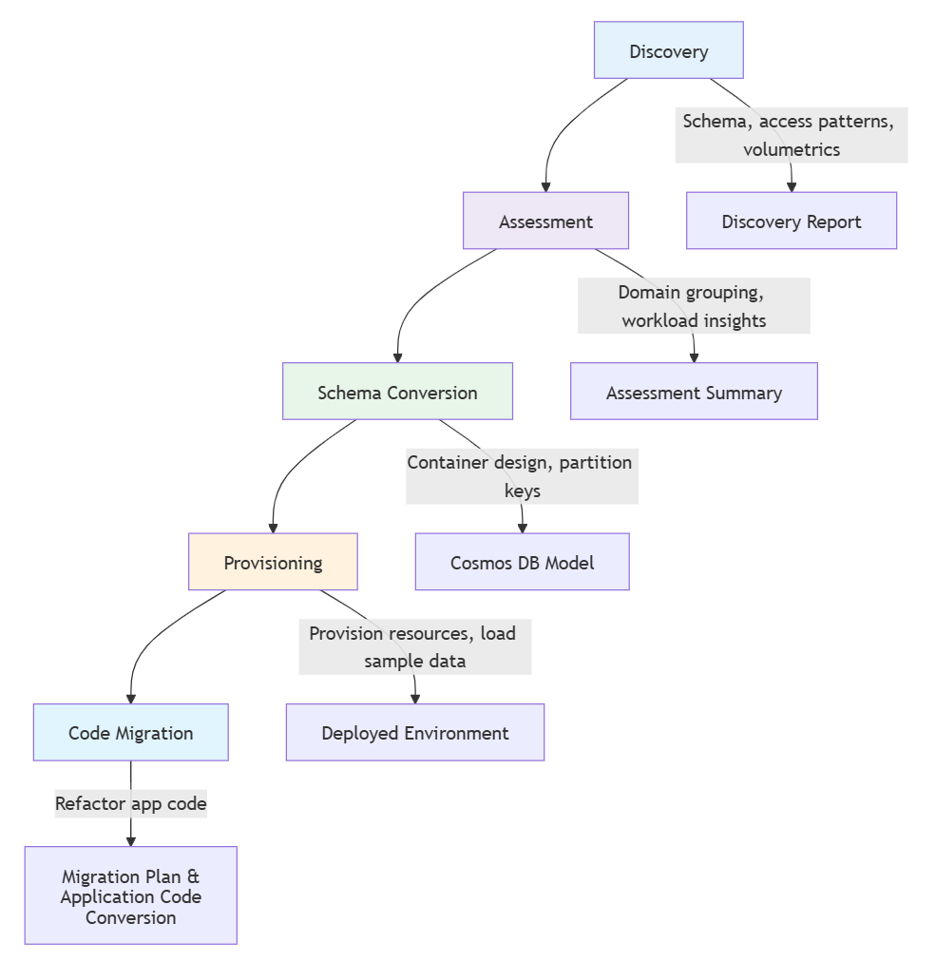
🔍 Step-by-step: How it works
- Discovery
Migration starts with discovery, where the assistant builds a clear picture of the source application before any design decisions are made. It takes schema DDL, optional volumetrics, optional access patterns, and application repository signals such as language, framework, ORM, and deployment context as inputs. The main challenge at this stage is incomplete or uneven source information, so the assistant combines these inputs into a Discovery Report that captures the current application shape and establishes a reliable migration baseline. Its output is a Discovery Report grounded in both schema and application context.
This baseline helps later phases avoid generic recommendations and prevents design choices from being made too early without enough workload context.
- Assessment
Assessment turns discovery artifacts into a domain-oriented view of the system. It uses the discovery report, normalized access patterns, and relational table relationships as inputs. The key challenge is avoiding a table-by-table carryover from the relational model, so the assistant groups related entities into candidate business domains, clarifies the boundaries that matter for NoSQL modeling, and produces a detailed report of the domain-level decomposition that breaks the migration into manageable units.
This phase helps shift the focus from RDBMS tables to aggregates and application data access scenarios.
- Schema Conversion
Schema conversion translates each assessed domain into a Cosmos DB NoSQL container design. It takes domain definitions, access patterns, and source schema details as inputs. The main challenge here is balancing document shape, partition key selection, and indexing so the model supports real reads and writes without unnecessary cost.
This phase is the most critical because it helps avoid common RDBMS-to-NoSQL schema design anti-patterns, supports the selection and validation of the best partition key candidates and indexing strategies early in the design process, and applies NoSQL design optimizations for scale, performance, and cost from the start.
Main output here: an optimized target NoSQL model that is ready for provisioning and application migration planning.
- Provisioning
Provisioning turns the target design into a runnable environment. Based on the generated target model and your chosen environment, the assistant creates your Azure Cosmos DB environment, database, and containers with the appropriate permissions, and can also prepare and load sample data for testing and access pattern validation.
You can choose a ready-to-test target environment that matches the stage of your migration effort:
- Local emulator (early dev/test)
- Existing account
- New Azure environment
The output of this phase is provisioned Azure Cosmos DB resources, optional sample data, and access setup for validation.
- Application Code Migration (Plan and Execute)
Once the design and environment are ready, the assistant prepares and executes application code migration with GitHub Copilot. This phase has two steps:
- Plan Migration → prepare and review
- Start Migration → apply changes
In the Plan Migration step, the assistant uses all artifacts from discovery, assessment, schema conversion, and provisioned resources to build a context-rich migration plan that is ready to review and customize.
After the migration plan is validated, the Start Migration step can apply those changes in the workspace and convert the application repository code to use Azure Cosmos DB.
🎯 Key benefits
Migration Assistant reduces the hardest parts of modernization by replacing manual analysis with AI-assisted guidance across data modeling, partitioning, and indexing. Instead of forcing teams to piece together design decisions from scratch, it provides a structured workflow that helps move relational applications to Azure Cosmos DB for NoSQL faster and with fewer early design mistakes.
It also provides an end-to-end experience that carries the migration from schema discovery through application code conversion automation, all inside a developer-first workflow built into Visual Studio Code and GitHub Copilot. Instead of stopping at schema recommendations, the assistant can generate a context-rich migration plan and help automate the refactoring of data access code, reducing the manual effort and risk involved in converting the application to Azure Cosmos DB for NoSQL. Because the assistant persists artifacts in the .cosmosdb-migration/ folder, teams can pause and resume work, review outputs between phases, and keep the entire migration process traceable, repeatable, and friendly to source control.
🎥 See it in action
📌 Below is a short demo showing the migration of the popular PetClinic Java Spring-based application from PostgreSQL to Azure Cosmos DB for NoSQL.
📦 What’s currently supported
- ✅ Source databases: SQL Server, PostgreSQL, Oracle, MySQL, Db2
- ✅ Target: Azure Cosmos DB for NoSQL
- ✅ Scope includes:
-
- Schema conversion
- Data modeling
- Sample data generation
- Application migration planning
🚀 Getting started
To try it today:
- Install Azure Cosmos DB VS Code Extension
- Switch to the Pre-Release Version by selecting “Switch to Pre-Release Version” in VS Code

- Ensure GitHub Copilot is enabled
- Open your application workspace

- Run Azure Cosmos DB: New Migration…
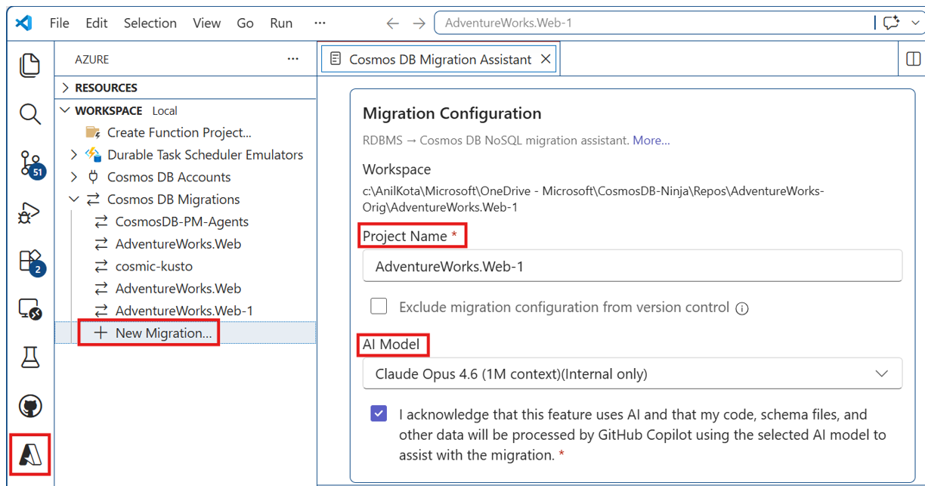
To learn more, visit the Azure Cosmos DB Migration Assistant public preview page.
💬 Share your feedback
We’d love your input as we evolve this experience:
👉 Report issues or provide feedback
📚 Learn more
- Azure Cosmos DB NoSQL
- Relational vs. NoSQL data modeling
- Azure Cosmos DB data modeling patterns
- Migration guidance for relational data
About Azure Cosmos DB
Azure Cosmos DB is a fully managed, serverless NoSQL and vector database for modern app development, including AI applications. With its SLA-backed speed and availability, as well as instant, dynamic scalability, it is ideal for real-time NoSQL and MongoDB applications that require high performance and distributed computing over massive volumes of NoSQL and vector data.
To stay in the loop on Azure Cosmos DB updates, follow us on X, YouTube, and LinkedIn.


0 comments