


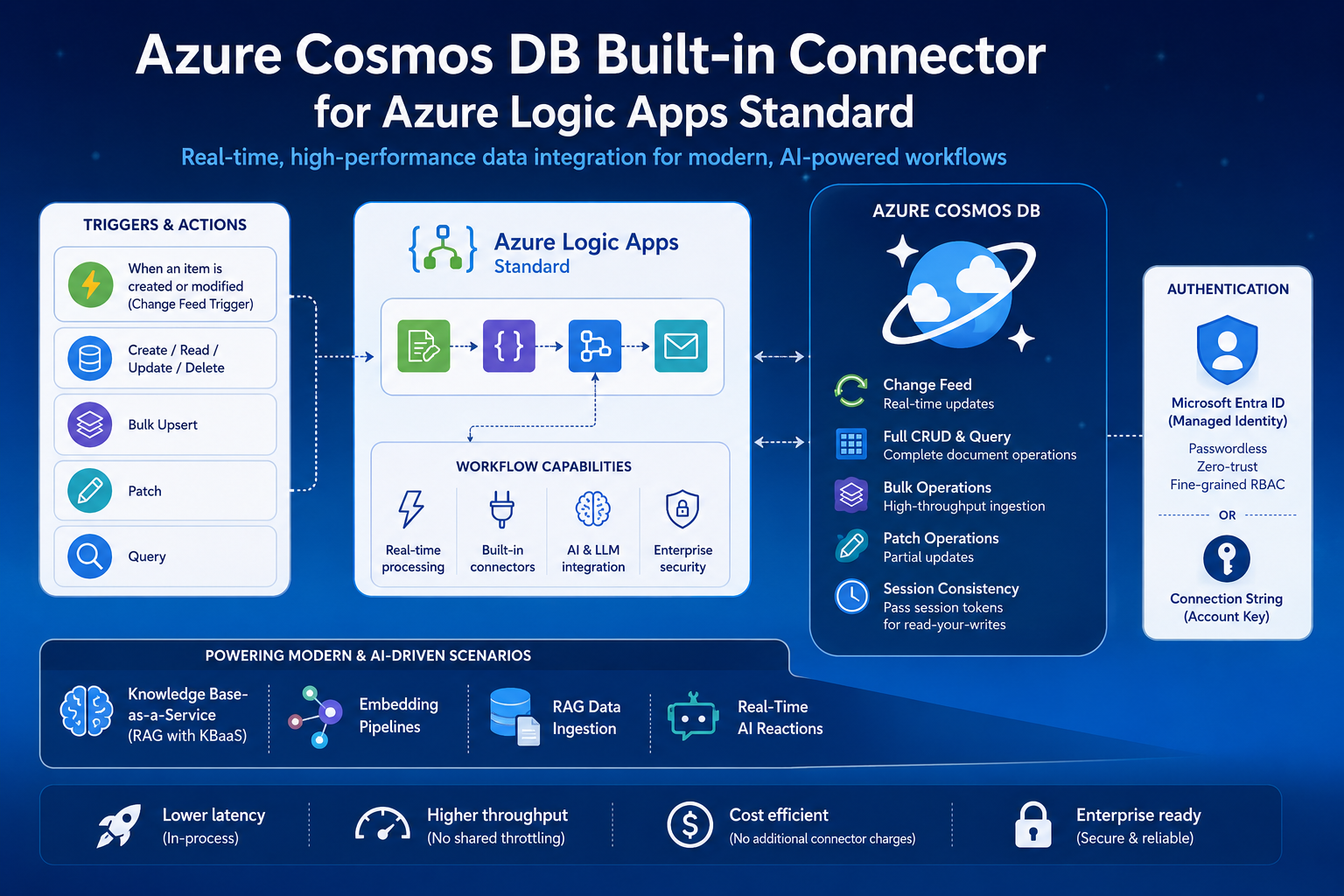
Today, we’re excited to announce the general availability of the Azure Cosmos DB built-in connector for Azure Logic Apps Standard. This connector gives you a native, high-performance way to integrate Azure Cosmos DB into your Standard logic app workflows, with better throughput, lower latency, and richer functionality than the managed connector. That includes real-time change feed processing, bulk operations, and Microsoft Entra ID authentication.
If you’ve been building integration workflows that read, write, or react to data in Azure Cosmos DB, this GA release means you can do all of that with production-grade reliability, enterprise security, and the performance benefits of a connector that runs in-process alongside your logic app runtime.
Why a Built-in Connector?
Azure Logic Apps offers two types of connectors: managed connectors that run in shared, multitenant infrastructure, and built-in connectors that run directly in the single-tenant Logic Apps runtime. Built-in connectors have some significant advantages:
-
Lower latency. Operations execute in-process, so you eliminate the network hop to an external connector service.
-
Higher throughput. No shared connector throttling. Performance scales with your Logic Apps plan.
-
Richer functionality. You get access to capabilities like the change feed trigger that simply aren’t available in the managed connector.
-
Better cost efficiency. Built-in connectors run on the Logic Apps compute and are not billed separately, which often means lower costs at scale.
The Azure Cosmos DB built-in connector brings all of these benefits to your Azure Cosmos DB integration scenarios.
What’s Included?
Real-Time Change Feed Trigger
The built-in trigger, When an item is created or modified, uses the Azure Cosmos DB change feed to fire your workflow whenever documents are created or updated in a monitored container. This is the same battle-tested change feed pattern used in Azure Functions and the change feed processor, now available directly in your Logic Apps workflow.
Use it to:
- Sync data to downstream systems in real time
- Trigger notifications when orders, profiles, or inventory items change
- Feed AI pipelines with fresh data as it arrives
- Build event-driven architectures without custom code
The trigger manages checkpointing for you via a lease container. You’ll need to either point it at an existing lease container, or set Create Lease Container to true so the connector creates one automatically. (Note that createLeaseCollectionIfNotExists defaults to false, so if you skip this step the trigger won’t fire.) Once that’s in place, you point it at your database and monitored container, and it handles the rest.
Full CRUD and Query Actions
The connector provides a complete set of document operations:
| Action | Description |
|---|---|
| Create or update item | Create a new item or replace an existing one (upsert supported) |
| Create or update many items in bulk | Batch upsert multiple items in a single operation |
| Read an item | Point-read a document by ID and partition key |
| Query items | Run Azure Cosmos DB SQL queries with full parameterization |
| Patch an item | Apply partial updates without replacing the entire document |
| Delete an item | Remove a document by ID and partition key |
Each operation returns detailed metadata including request charges, ETags for optimistic concurrency, session tokens for consistency, and activity IDs for diagnostics.
Bulk Operations
The Create or update many items in bulk action is purpose-built for high-volume data ingestion. Whether you’re loading data from an external system, processing batch files, or hydrating a container as part of an AI pipeline, bulk operations let you write many items in a single action with optimized throughput.
Patch Operations
The Patch an item action lets you do partial document updates. You can modify specific properties without reading and replacing the full document. This is great for workflows that update status fields, append to arrays, or increment counters without the overhead of a full read-modify-write cycle.
Microsoft Entra ID Authentication
Security-conscious organizations can now authenticate to Azure Cosmos DB using Microsoft Entra ID with managed identities, meaning you no longer need to rely on access keys if you don’t want to. The connector still fully supports connection-string (account key) authentication, but Entra ID gives you a passwordless option that aligns with Azure’s zero-trust security model:
-
Managed Identity support. Authenticate using your Logic App’s system-assigned or user-assigned managed identity.
-
Fine-grained RBAC. Assign the Cosmos DB Built-in Data Contributor or Cosmos DB Built-in Data Reader roles for least-privilege access.
-
No secrets to rotate. If you go the Entra ID route, you eliminate the operational overhead of managing and rotating access keys.
This is especially important for enterprise scenarios where security policies prohibit storing connection strings or keys, and for organizations that are adopting passwordless authentication across their Azure estate.
👉 Learn more about Microsoft Entra ID authentication for the Azure Cosmos DB connector
AI and Intelligent Workflow Scenarios
The combination of the change feed trigger, bulk operations, and query capabilities makes this connector a natural fit for AI-powered workflows.
Built-in knowledge for Azure Logic Apps
Azure Logic Apps recently introduced a Knowledge Base-as-a-Service (KBaaS) capability that uses Azure Cosmos DB as its underlying data and vector store. With KBaaS, you can upload unstructured documents (PDFs, Word files, spreadsheets, and more) and the service automatically parses, chunks, summarizes, and vectorizes the content, storing everything in Cosmos DB containers with the right indexing policies already configured.
When an agent loop in your agentic workflow queries the knowledge base, the service rewrites the query if needed, generates a vector embedding, performs a semantic search against Cosmos DB, and returns the most relevant chunks to your LLM for response generation. It’s a fully managed RAG pipeline that runs entirely within your Logic Apps Standard environment, with no custom code required.
This is a great example of what the Cosmos DB built-in connector enables at a platform level: deep, native integration between Logic Apps and Cosmos DB that powers higher-level AI capabilities without you having to wire up the plumbing yourself.
Embedding Pipelines
You can also build your own custom embedding pipelines that trigger when new documents land in Cosmos DB. Use the change feed trigger to detect new items, call an embedding model (via the Azure OpenAI connector or an HTTP action), and write the vector back to the same or a different container. All of this happens within a single Logic Apps workflow. No custom code, no separate infrastructure to manage.
RAG Data Ingestion
For custom Retrieval-Augmented Generation (RAG) applications where you need more control than KBaaS provides, you can use Logic Apps Standard workflows to orchestrate the full data preparation pipeline:
- Ingest documents from any source using Logic Apps’ 400+ connectors
- Transform content (chunk, clean, enrich) using inline code or external services
- Embed text using Azure OpenAI or other model endpoints
- Store documents with vectors in Azure Cosmos DB using the bulk upsert action
This pattern pairs naturally with Azure Cosmos DB’s vector search capabilities and integrated embeddings for end-to-end AI application scenarios.
Real-Time AI Reactions
You can also combine the change feed trigger with AI services to build workflows that react intelligently to data changes:
- A new support ticket comes in, gets summarized by an LLM, and is routed to the right team
- A product review arrives, gets sentiment analysis, and negative reviews are flagged for follow-up
- A customer profile is updated, recommendations are re-computed, and the personalization cache is refreshed
Session Consistency
The connector exposes session tokens as both an input and output on each operation, which gives you session-level consistency guarantees. In practice, this means you can read your own writes within a workflow by passing the session token returned from a write action into the next read or query action. Wire up that token, and you’re guaranteed to see your update. This is critical for workflows where later operations depend on earlier results within the same run.
Learn More
📘 Azure Cosmos DB built-in connector reference
📘 Connect to Azure Cosmos DB from workflows in Azure Logic Apps
📘 Create Knowledge Bases for Agentic Workflows
📘 Microsoft Entra ID authentication for the connector
About Azure Cosmos DB
Azure Cosmos DB is a fully managed and serverless NoSQL and vector database for modern app development, including AI applications. With its SLA-backed speed and availability as well as instant dynamic scalability, it is ideal for real-time NoSQL and MongoDB applications that require high performance and distributed computing over massive volumes of NoSQL and vector data.
To stay in the loop on Azure Cosmos DB updates, follow us on X, YouTube, and LinkedIn. Join the discussion with other developers on the #nosql channel on the Microsoft Open Source Discord.


0 comments