


Today we’re thrilled to announce the public preview of Semantic Reranker in Azure Cosmos DB for NoSQL, a new AI-powered capability that improves the relevancy of your search results with just a few lines of code. If you’ve ever run a vector, full-text, or hybrid search and wished the most relevant documents bubbled to the very top, this one’s for you.
Semantic Reranker uses an AI model to score and reorder the results of any query based on how well each document matches the user’s intent. It’s built right into the Azure Cosmos DB SDKs (Python, .NET, and Java), so you can reorder results from any container with minimal code changes. Whether you’re building a search experience or grounding an agent with Retrieval Augmented Generation (RAG), better ranking means better answers.
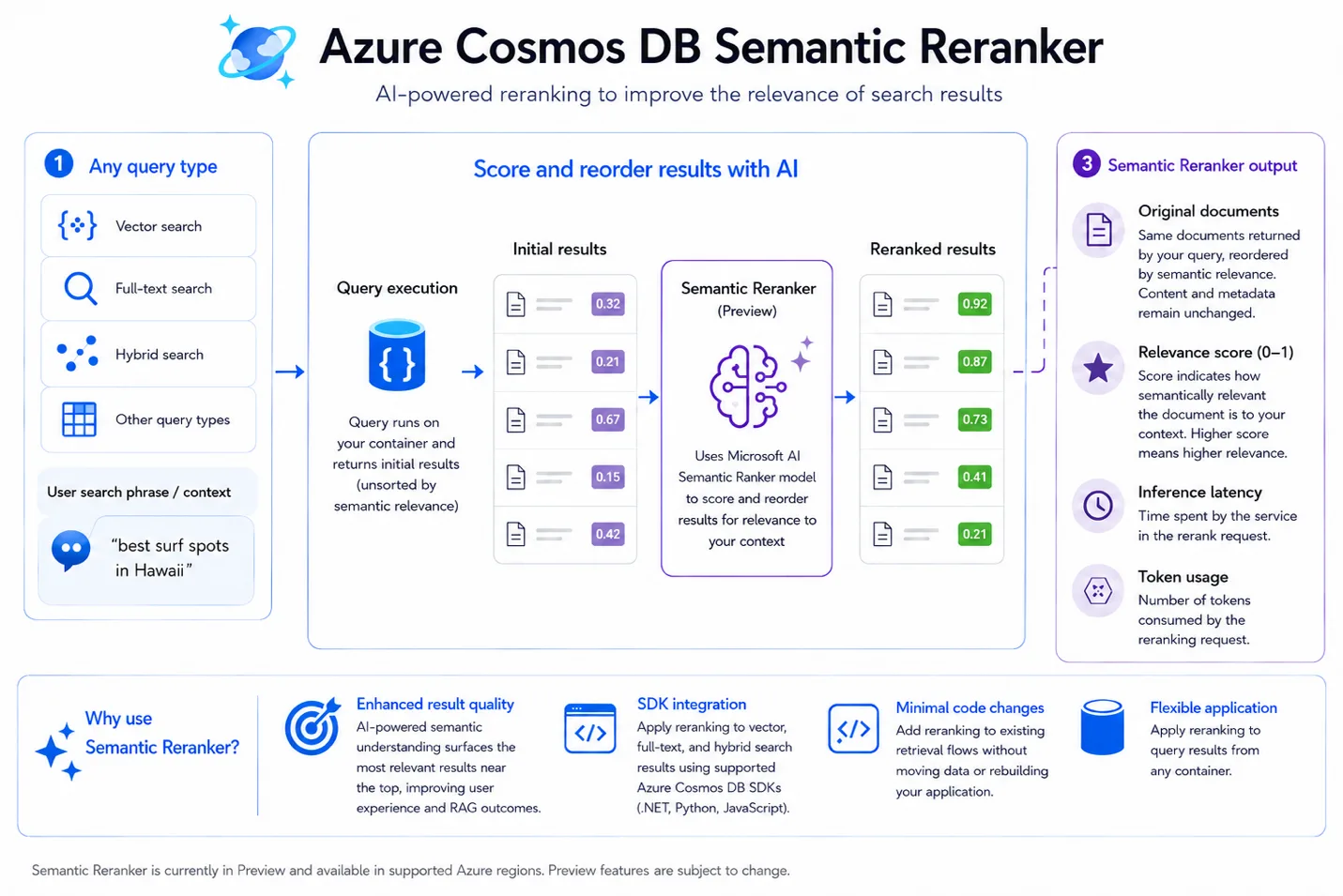
What is it?
Semantic Reranker takes the results from a query you’ve already run (e.g., vector search, full-text search, hybrid search, or any other query) and uses an AI model to rescore and reorder them based on relevancy to a user’s search phrase or context. Under the hood it uses the Microsoft AI Semantic Ranker model.
Each reranked result comes back with a few useful pieces of information:
- Original documents: the same documents from your query, reordered by semantic relevance. Content and metadata are unchanged.
- Relevance score: a score from 0 to 1 for each document,the higher the score, the more relevant the result. Great for filtering or thresholding.
- Inference latency: the time the service spent on the rerank request.
- Token usage: the number of tokens consumed by the reranking request.
Why is this important?
When you evaluate a search or retrieval system, a few metrics shape the end-user experience: accuracy/recall (how closely results match the ground truth), latency (how fast results come back), and relevancy (how well results match the user’s actual intent).
Vector and hybrid search are great at recall, they find the candidate documents. But the order of those candidates doesn’t always reflect what the user really wants. Consider a search for “best surf spots in Hawaii”: a curated surf guide is far more relevant than a general Hawaii travel article, even if both score similarly on raw similarity. That’s exactly the gap Semantic Reranker closes.
Why developers will love it:
- Enhanced result quality: AI-powered semantic understanding surfaces higher-quality results near the top, improving the end-user experience and enriching agents with more relevant context for RAG.
- Seamless SDK integration: works with your existing vector, full-text, and hybrid search queries.
- Minimal code changes: a single call on the container you’re already using.
- Flexible application: rerank results from any query against any container.
A note on tradeoffs: reranking adds another network call plus model inference time, so it increases overall search latency. It also won’t help every workload equally. Our advice: measure relevance before and after enabling the reranker to confirm it delivers a measurable win for your scenario.
How does it work?
Set up Semantic Reranker
Getting started takes just a few steps in the Azure portal:
- Go to your Azure Cosmos DB account in the Azure portal and find the Semantic Reranker setup experience in the menu under AI Capabilities.
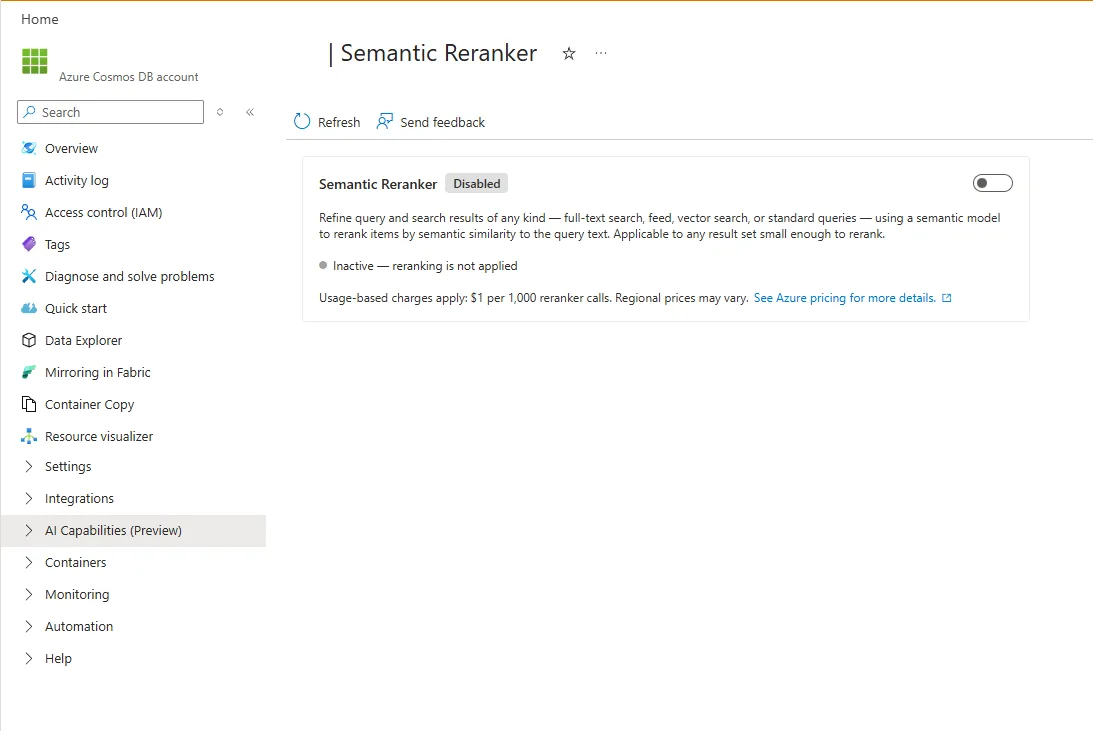
- Review the preview information and enable the feature for your resource.
- Configure the reranker settings for your account and workload.
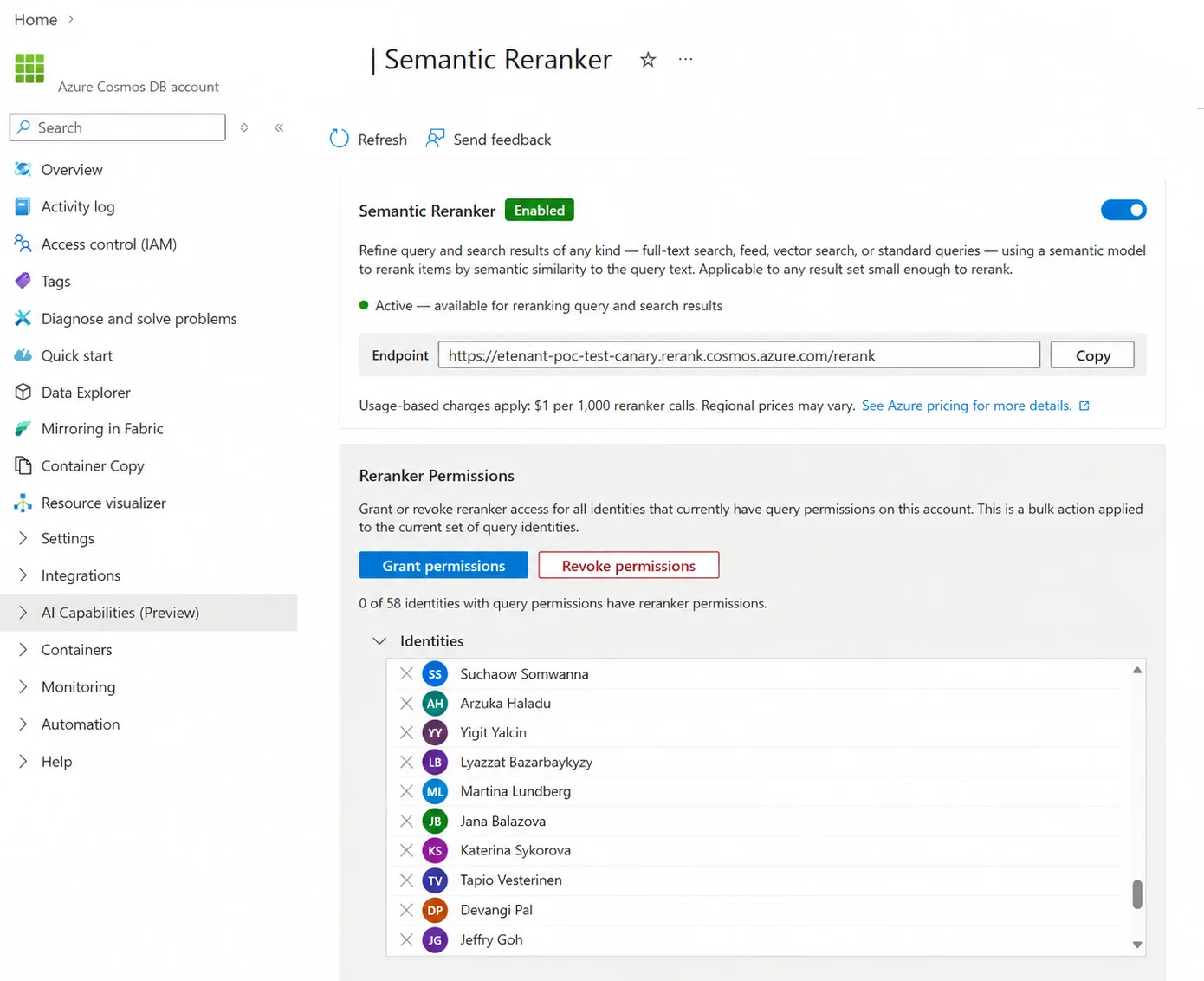
- Review your configuration and save your changes.
Heads up: Semantic Reranker is in preview. After you enable it in the portal, allow up to 1 hour for activation.
Next, assign the appropriate roles to the identities that configure or call the feature. Semantic Reranker uses account-level RBAC roles, grant each identity only what it needs:
| Role | What it allows |
|---|---|
| Inference Account Operator | Enables and disables Semantic Reranker on an account, but doesn’t allow runtime reranker calls. |
| Inference Account Owner | Enables and disables Semantic Reranker on an account and allows runtime reranker calls. |
| Semantic Reranker User | Allows an application, managed identity, service principal, or user to run Semantic Reranker queries against an account. |
Using it from the SDK
The pattern is simple: run your query as you normally would, then pass the results plus a reranking context (the user’s question or task) to the reranker. The context represents user intent; the documents are the candidate results from vector, full-text, hybrid, or any other search.
Here’s a Python example. It runs a full-text search, then reranks the results against a context string:
import json
import os
from azure.cosmos import CosmosClient
from azure.identity import DefaultAzureCredential

os.environ["AZURE_COSMOS_SEMANTIC_RERANKER_INFERENCE_ENDPOINT"] = "https://mytestaccount.eastus2.dbinference.azure.com"

endpoint = "https://mytestaccount.documents.azure.com:443/"
database_name = "testdatabase"
container_name = "testcontainer"
credential = DefaultAzureCredential()

client = CosmosClient(endpoint, credential=credential)
database = client.get_database_client(database_name)
container = database.get_container_client(container_name)

query = """

SELECT TOP 15 c.id, c.Title, c.Studio, c.Description, c.YearReleased
FROM c
WHERE FullTextContainsAny(c.Description, "Sandra Bullock", "Johnny Depp", "comedy")
ORDER BY RANK FullTextScore(c.Description, "comedy")

"""

documents = list(container.query_items(
query=query, enable_cross_partition_query=True))

reranking_context = "audience rated PG-13 and public sentiment strong and positive"

reranked_results = container.semantic_rerank(context=reranking_context, documents=[json.dumps(document) for document in documents],

options={
"return_documents": True,
"top_k": 5,
"sort": True,
"document_type": "json",
"target_paths": "Description",
})

for score in reranked_results["Scores"]:
     print(f"index: {score['index']}, score: {score['score']}, document: {score['document']}")
The reranker accepts a context string and a list of candidate documents, along with a few optional knobs to shape the output:
- return_documents – include the original documents in the response (default true).
- top_k – limit the number of reranked results returned.
- sort – sort the response by reranking score.
- document_type – identify the document format, such as json.
- target_paths – identify the document field(s) to consider for reranking.
The same conceptual inputs are available in the .NET and Java SDKs with language-specific parameter names, so you can drop reranking into whichever stack you’re already building on.
Limitations
A few things to keep in mind while Semantic Reranker is in preview:
- Semantic Reranker supports a maximum of 50 documents per rerank call.
- A single context-document pair should be at most 2,048 tokens.
- Reranking adds a network call and model inference time, so it increases overall search latency,always measure relevance before and after to confirm the benefit.
- Semantic Reranker is $1 USD per 1,000 rerank calls. Regional and cloud pricing may vary.
- Supported SDKs are: .NET (preview), Python, and Java.
Get started
Ready to make your search results more relevant? Enable Semantic Reranker on your Azure Cosmos DB account, update to the latest SDK, and add a single rerank call to your existing query pipeline. Then measure the lift,we think you’ll like what you see.
Dive into the docs to learn more:
- Semantic Reranker in Azure Cosmos DB for NoSQL (preview)
- Vector Search in Azure Cosmos DB for NoSQL
- Full-text search in Azure Cosmos DB for NoSQL
- Hybrid search in Azure Cosmos DB for NoSQL
About Azure Cosmos DB
Azure Cosmos DB is a fully managed and serverless NoSQL and vector database for modern app development, including AI applications. With its SLA-backed speed and availability as well as instant dynamic scalability, it is ideal for real-time NoSQL and MongoDB applications that require high performance and distributed computing over massive volumes of NoSQL and vector data.
To stay in the loop on Azure Cosmos DB updates, follow us on X, YouTube, and LinkedIn. Join the discussion with other developers on the #nosql channel on the Microsoft Open Source Discord.


0 comments