


Under the Hood: The Research Behind Microsoft SQL, part 2
Here’s a scenario that used to be genuinely frightening: you kick off a bulk load of a few hundred million rows in a single transaction. Somewhere in the middle, the server goes down. Not because of your load, just an unlucky reboot.
When SQL Server comes back, it has to undo everything that transaction did before anyone can touch those tables. Row by row (I think I’ve heard probably Bob Ward say “row by agonizing row” to describe this). Working backwards through the log.
That exact thing happened to an Azure SQL customer, and the team wrote it into the opening of their paper:
“Unexpected failure occurred while one of our customers was attempting to load hundreds of millions of rows in a single transaction. The database required 12 hours to recover while the corresponding tables were completely inaccessible.”
Twelve hours. The paper is Constant Time Recovery in Azure SQL Database (VLDB 2019), and it explains how recovery stopped depending on how much work your transaction did.
Why recovery was slow
Databases have used a recovery algorithm called ARIES since the early 90s (I did not know that before this paper, it stands for “Algorithms for Recovery and Isolation Exploiting Semantics”). I’m no expert, but I understand it runs three phases: analysis, redo, then undo. The undo phase is the problem. As the paper puts it:
“Recovering the database to a consistent state requires undoing all operations performed by uncommitted transactions which makes the cost of recovery proportional to the work performed by these transactions.”
Cost proportional to work done, yikes. A transaction that touched 50 million rows generates 50 million units of undo. On a departmental server in 1995, transactions were small (so I’m told – I was definitely not doing anything with a departmental server in 1995!). In a cloud service running millions of databases, where hardware fails and maintenance restarts happen constantly, that proportionality becomes an availability problem.
The idea: stop undoing, start ignoring
SQL Server already had a version store for snapshot isolation, where updating a row keeps the old version around in tempdb so readers see a consistent picture. This has been a topic that is always fuzzy for me, but the paper helped me understand. The innovation of Constant Time Recovery, or CTR, takes that and makes it durable (i.e., not in tempdb).
The Persistent Version Store (PVS) keeps row versions in the database itself, so they survive a restart. Versions live in two places: small changes are stored in-row as a byte diff next to the current row, larger ones go to an off-row table. By the way, it’s pretty crazy that the database just does this for you. The more I learn about the engine, the more I am impressed.
Logical revert is the payoff. When a transaction aborts, the system doesn’t walk the log undoing changes. It marks the transaction ID as aborted in an in-memory hash table called the Aborted Transaction Map. Any query that later encounters a row version written by that transaction skips it and reads the previous version instead. The abort is effectively instant. Cleanup happens lazily (I still smile that this is a technical term) in the background.
“The database is fully available, releasing all locks, while row versions are lazily cleaned up in the background.”
The SLog handles the leftovers. A few operations can’t be versioned, like certain metadata changes and lock acquisitions. Those go into a small secondary log stream that can be redone and undone in constant time, because there are very few of them.
The design choice I appreciate most is that they didn’t rewrite the engine, they just got creative:
“CTR combines traditional ARIES with multi-version concurrency control to improve recovery time without having to fundamentally redesign the storage engine.”
The numbers
Recovery time, measured across production Azure SQL Database:
| Percentile | Traditional | CTR |
| 99.9th | 68 s | 60 s |
| 99.99th | over 10 min | 1.3 min |
| 99.999th | over 1 hour | 3 min |
The tail is where this matters. At the 99.999th percentile, over an hour became three minutes. Rollback also benefits from this, making it incredibly fast.
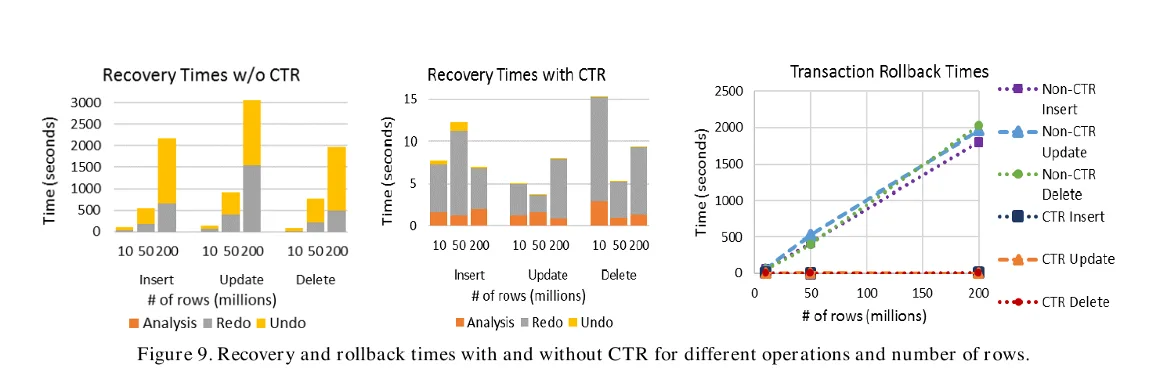
Source: Figure 9 from Constant Time Recovery in Azure SQL Database (VLDB 2019).
There’s a second benefit that surprised me the first time I read it. Because aborted work no longer has to stay in the log for undo purposes, the log can be truncated aggressively even while a huge transaction is running:
| Operation | Traditional log | CTR log |
| 10M inserts | 5,101 MB | 99 MB |
| 50M inserts | 25,873 MB | 185 MB |
| 50M deletes | 38,255 MB | 147 MB |
That 50 million row delete used 38 GB of log before. Now it uses 147 MB. If you’ve ever had a maintenance job fill the transaction log and take an application down, you understand why that row matters. Crazy.
The cost is real but bounded, at least at the time of the paper. On TPC-C, an update-heavy workload, throughput dropped 13.8% with in-row versioning enabled (28% without it). On TPC-E, a more mixed workload, the hit was 2.4%. The team took a single-digit to low-double-digit throughput cost in exchange for removing hour-long outages from the tail.
CTR was enabled worldwide for over three million databases in Azure SQL Database in May 2019.
Where you see this today
CTR ships as Accelerated Database Recovery, always on in Azure SQL Database (you can’t turn it off) and available in SQL Server since 2019.
Practically, it means:
- Rolling back a big transaction is fast, regardless of size. Cancelling a runaway UPDATE no longer means waiting as long as the update ran.
- Recovery after failover is predictable, which is what makes an availability SLA meaningful.
- Long-running data loads don’t blow up your log.
- Optimized locking depends on it. The lock improvements shipping in Azure SQL today build directly on the persistent version store this paper introduced. I’d like to do a blog on this area once I get to that paper as well.
Why this matters if you think relational databases are stuck in the past
The interesting thing about CTR is that it’s a new recovery algorithm, in production, in a system people assume stopped evolving decades ago. ARIES was the textbook answer for 25 years. This work changed the answer, and did it without breaking a single application.
The team also didn’t chase elegance for its own sake. They kept ARIES where ARIES worked, added versioning where it helped, and put the awkward leftovers in a small side channel. That’s engineering under constraints, and it’s why it shipped to millions of databases instead of staying a paper.
What’s changed since the paper
The version store the paper introduced turned out to need its own tuning, and most of the follow-up work went there.
Cleanup got faster. The original design cleaned up old row versions with a single background thread, which could fall behind on busy systems and let the version store grow. SQL Server 2022 made that cleanup multi-threaded, added cleanup for committed transactions rather than only aborted ones, and let user transactions help clean up when the background process is blocked. It also cut the memory used to track versions.
Rollback in tempdb got the same treatment. SQL Server 2025 extends ADR to tempdb, so a large rollback involving temp tables no longer takes as long as the work that created them.
It became a dependency. ADR is always on in Azure SQL Database and is now a prerequisite for optimized locking, which is I will write about eventually in the future. A 2019 recovery paper is the reason a 2024 locking redesign was possible.
If you run SQL Server yourself, ADR is available but off by default, and the version store cleanup improvements are a good reason to be on a recent version before enabling it on a busy database.
Credits
Constant Time Recovery in Azure SQL Database was written by Panagiotis Antonopoulos, Peter Byrne, Wayne Chen, Cristian Diaconu, Raghavendra Thallam Kodandaramaih, Hanuma Kodavalla, Prashanth Purnananda, Adrian-Leonard Radu, Chaitanya Sreenivas Ravella, and Girish Mittur Venkataramanappa (Microsoft).
Next steps
- Read the paper: Constant Time Recovery in Azure SQL Database (VLDB 2019)
- Learn the feature: Accelerated Database Recovery
- Check your own workload: If you’re on SQL Server, enable ADR and compare rollback times on a large transaction
- Next in this series: Always Encrypted, and querying data the database can’t read


0 comments
Be the first to start the discussion.