


When it comes to agents engaging with your production data, Microsoft’s SQL MCP Server is the free, open-source, and secure service for you. It safely exposes CRUD/E (Create, Read, Update, Delete, and Execute) operations that enable agents to act on your behalf. Built on the robust Data API builder engine, SQL MCP Server is a self-hosted container you can run in AKS, ACA, ACI, or any other container service. Developed by the SQL team, SQL MCP Server provides clever guardrails that keep agents predictable and accountable. It’s the heart of any serious Microsoft SQL agentic story.
It’s the little things
SQL MCP Server is well-appointed and nicely documented. But its open-source codebase is also rich with smaller features that complement the engine’s showcase capabilities. Several of these are hidden gems for developers wanting to make the most of the engine and their time.
Remember auto configuration
The 2.0 release in June 2026 introduced an incredible new feature to the engine: auto configuration. Typically, developers configure SQL MCP Server (or Data API builder with the MCP endpoint enabled) using a single JSON file that specifies the database connection and which objects to expose. Auto configuration simplifies this by introducing autoentities, which supports wildcard patterns to automatically include Microsoft SQL tables based on their schema or name. With auto configuration, a single autoentities definition can replace 1, 100, or even 1,000 manually configured entities. But that’s not the hidden feature!

Introducing no-configuration
SQL MCP Server’s container image is hosted in the Microsoft Container Registry. Prior to release 2.0 in June, that image didn’t include a configuration file. Developers had to mount their own configuration file into the container or build a custom image just to use the engine.
Since release 2.0, the base image includes a basic configuration file with a preconfigured autoentities entry that automatically exposes every table in every schema. Of course, this configuration is useless without a connection string. But it opens the door to a fast agentic POC without building your own image or mounting a custom configuration JSON file.
The real gem: DAB_CONNSTRING
Keeping secrets out of configuration
Sensitive values like database connection strings and passwords can be handled without storing them directly in the configuration file. Azure Key Vault is supported for applications in Azure, and container environment variables can be referenced using the native@env() function. Neither approach requires hardcoding secrets in JSON.
SQL MCP Server recognizes one special environment variable: DAB_CONNSTRING. When a developer sets this variable to a database connection string, the engine automatically overrides the connection string property in the primary configuration, regardless of any existing value or function reference.
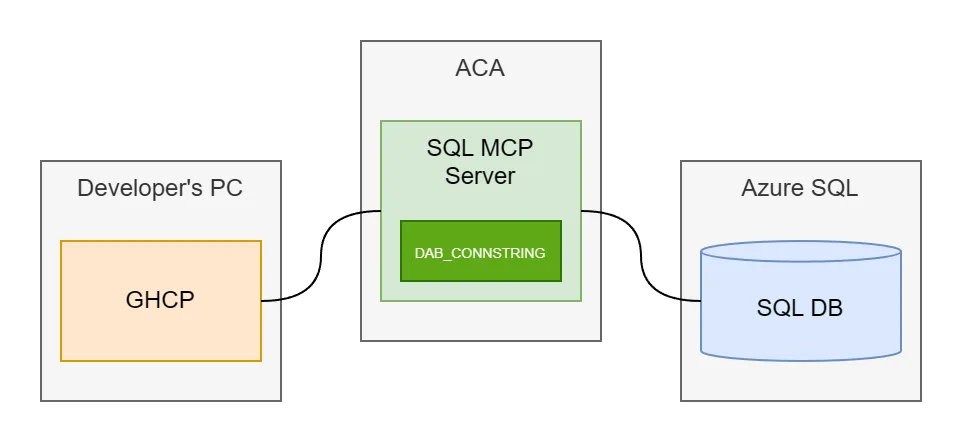
This means a single environment variable can supply the database connection for any configuration, including (and this is the point of this article) the basic configuration bundled in the base Data API builder container image.
A local POC in the blink of an eye
With this one value, developers can get started without building a custom image or mounting a configuration file. If you’re using Docker on your local development machine, you can configure a working MCP endpoint with a command as simple as this:
docker run --name dab -p 5000:5000 \
  -e 'DAB_CONNSTRING=Server=XXX;Database=XXX;User Id=XXX;Password=XXX;TrustServerCertificate=True;' \
  mcr.microsoft.com/azure-databases/data-api-builder:2.0.12
The endpoint is available at http://localhost:5000/mcp, assuming the container starts successfully and can connect to your database.
An Azure POC in the blink of an eye
Since this capability ships as part of the container image, Azure deployments or any other deployments get the same benefit as local development. Here are a few easy options.
Azure Container Apps Express
With Azure Container Apps Express, you can deploy an MCP endpoint using a single command, without building a custom image or mounting a configuration file. Express automatically provisions the Container Apps environment, too.
aca express create `
  --subscription XXXXXXXX-XXXX-XXXX-XXXX-XXXXXXXXXXXX `
  --resource-group XXX
  --name dab `
  --image mcr.microsoft.com/azure-databases/data-api-builder:2.0.12 `
  --ingress external `
  --target-port 5000 `
  --env-vars 'DAB_CONNSTRING=Server=XXX;Database=XXX;User Id=XXX;Password=XXX;TrustServerCertificate=True;'
Azure Container Apps Express is in preview
This assumes your Azure subscription and resource group are already configured. The syntax has been verified against ACA CLI 1.0.0-preview.4.Azure Container Apps
If you don’t want to use ACA Express, you can accomplish a similar deployment with regular Azure Container Apps. Assuming you’ve already created a Container Apps environment, the Azure CLI command is nearly as simple:
az containerapp create `
  --subscription XXXXXXXX-XXXX-XXXX-XXXX-XXXXXXXXXXXX `
  --resource-group XXX
  --name dab `
  --environment XXX `
  --image mcr.microsoft.com/azure-databases/data-api-builder:2.0.12 `
  --ingress external `
  --target-port 5000 `
  --env-vars 'DAB_CONNSTRING=Server=XXX;Database=XXX;User Id=XXX;Password=XXX;TrustServerCertificate=True;'
Azure Container Instances
If you’re not an Azure Container Apps customer and prefer Azure Container Instances (ACI), you can accomplish a similar deployment just as easily:
az container create `
  --subscription XXXXXXXX-XXXX-XXXX-XXXX-XXXXXXXXXXXX `
  --resource-group XXX
  --name dab `
  --image mcr.microsoft.com/azure-databases/data-api-builder:2.0.12 `
  --ports 5000 `
  --ip-address Public `
  --environment-variables 'DAB_CONNSTRING=Server=XXX;Database=XXX;User Id=XXX;Password=XXX;TrustServerCertificate=True;'
Azure Kubernetes Services
Finally, if neither ACA nor ACI is your preferred approach and your enterprise has standardized on Azure Kubernetes Service (AKS), you’re in luck. The same deployment is possible there, too, assuming your Kubernetes context already points to the intended AKS cluster:
kubectl create deployment dab `
  --image=mcr.microsoft.com/azure-databases/data-api-builder:2.0.12

kubectl set env deployment/dab `
  'DAB_CONNSTRING=Server=XXX;Database=XXX;User Id=XXX;Password=XXX;TrustServerCertificate=True;'

kubectl expose deployment dab `
  --type=LoadBalancer `
  --port=5000 `
  --target-port=5000
Is it really that easy?
It is. And you can rest assured that you’re not relying on an undocumented trick intended just for testing. The basic configuration baked into the Data API builder image makes it possible to get an MCP Server running without preparing a configuration file yourself. It’s a fast way to see how effectively agents can operate over your data.
But is this for production?
Not really, at least not without considering the configuration defaults. There’s nothing inherently wrong with a dynamically generated configuration, but the base image configuration was designed for developers. It defaults the hosting environment to development, enabling Swagger and Nitro for endpoint testing and setting Health endpoint access to anonymous. Perhaps most important is that CRUD permissions allow all operations, including mutations, for anonymous users. SQL MCP Server doesn’t, and can’t, bypasses database security, but wide-open access on any endpoint in production is pretty uncommon.
Having said that, now you know. Whether you’re investigating the technology and want the lowest-friction starting point or you are building a proof of concept and want to get up and running fast, SQL MCP Server’s new default configuration in the base image opens up exciting possibilities to get you where you want to go even faster.


0 comments
Be the first to start the discussion.