

Affected locations in British Columbia, Alberta, and Manitoba will not turn their clocks back at 02:00 local time on November 1, 2026. They will remain at UTC−07:00, UTC−06:00, and UTC−05:00, respectively.
Microsoft’s interim guidance for British Columbia, Alberta, and Manitoba describes the new Windows time zones and temporary workarounds.
SQL Server on Windows requires the applicable Windows update—not a separate SQL Server product update. For SQL Server on Linux, Azure SQL Database, and Azure SQL Managed Instance, the following guidance applies when the new regional time zones are not yet available in your deployment.
Known issue with new Canadian time zones
All SQL products are affected by a known .NET TimeZoneInfo issue with the new Canadian Windows time zones for Manitoba, Alberta, and British Columbia. For one hour at the 2026/2027 year boundary, the previous year’s standard UTC offset may be applied, resulting in an incorrect local time or UTC offset. Customers who require time zone conversions during the affected period should use the interim time zone guidance until a SQL fix is available. Customers should apply the SQL update containing the fix when it becomes available. The issue is tracked in dotnet/runtime #136894.
Interim guidance when the new time zone is unavailable
This table adapts the Windows interim guidance for SQL. Use the interim identifiers for explicit SQL conversions, SQL Database or eligible SQL Managed Instance database/session settings, mapped Linux configuration, or new SQL Managed Instances. The instance-level time zone setting cannot be modified for an existing SQL Managed Instance.
| Affected area | Existing SQL time zone | Interim SQL time zone | Required offset from November 1 | Final regional time zone |
| Most of British Columbia | Pacific Standard Time | Yukon Standard Time | UTC−07:00 | British Columbia Standard Time |
| Alberta and locations covered by its guidance* | Mountain Standard Time | Canada Central Standard Time | UTC−06:00 | Alberta Standard Time |
| Manitoba | Central Standard Time | Eastern Standard Time (Mexico) | UTC−05:00 | Manitoba Standard Time |
*The Alberta guidance also covers southeastern BC locations aligning with Alberta and affected Northwest Territories locations, including Yellowknife and Inuvik. Do not apply the first row to all of BC.
For Manitoba, the Windows workaround uses ordinary Eastern Standard Time with automatic DST adjustments disabled. SQL’s AT TIME ZONE does not provide the DST adjustment switch. Instead, Eastern Standard Time (Mexico) supplies UTC−05:00 without seasonal changes under its current rules. Ordinary Eastern Standard Time returns to UTC−04:00 in summer.
Confirm that the selected identifier is available in sys.time_zone_info on the target deployment. These substitutes match the required current and future offsets, not the provinces’ complete historical rules. Do not blanket-replace historical conversions. Move to the regional definition when supported, using the appropriate product-specific method.
Below are the interim time zone values with the name or description property along with the UTC offset. You would typically see this name value in OS time zone selector or Azure Portal UI.
| Interim SQL time zone | Time zone name displayed in the UI |
| Yukon Standard Time | (UTC-07:00) Yukon |
| Canada Central Standard Time | (UTC-06:00) Saskatchewan |
| Eastern Standard Time (Mexico) | (UTC-05:00) Chetumal |
Below are the final time values with the name property along with the UTC offset.
| Interim SQL time zone | Time zone name displayed in the UI |
| British Columbia Standard Time | (UTC-07:00) Pacific Time (British Columbia) |
| Alberta Standard Time | (UTC-06:00) Mountain Time (Alberta) |
| Manitoba Standard Time | (UTC-05:00) Manitoba |
SQL Server on Windows
SQL Server reads installed Windows time zones from the OS registry, as documented for sys.time_zone_info.
Install the applicable Windows update. When the server’s local time must follow the affected region, select the new regional zone under Settings > Time & language > Date & time, following the provincial guidance linked above.
Also update explicit AT TIME ZONE references where appropriate. Installing the update does not rewrite application SQL or make the existing shared US-and-Canada identifier equivalent to the new province-specific definition.
SQL Server on Linux
Follow Configure the time zone for SQL Server on Linux for SQL Server 2022 or later. SQL Server on Linux map the Linux/IANA time zone to a Windows identifier used internally by T-SQL.
The documented mappings for the interim choices are:
| Affected region | Linux/IANA identifier | SQL time zone identifier |
| Most of BC | America/Whitehorse | Yukon Standard Time |
| Alberta and aligned locations | America/Regina | Canada Central Standard Time |
| Manitoba | America/Cancun | Eastern Standard Time (Mexico) |
Configure the matching IANA zone in the SQL Server service or container’s TZ environment, or through the applicable host configuration. Ensure the setting reaches the SQL Server process, not only an interactive shell; restart or redeploy that process as appropriate. TZ takes precedence over /etc/localtime and the other documented configuration sources.
Do not assume that updating Linux tzdata alone updates SQL Server’s Windows-zone definitions or mapping. For older releases, use the corresponding SQL Server 2019 or SQL Server 2017 documentation.
Azure SQL Database
As described in my earlier announcement of local time zone support, the public-preview feature allows configuration at the database or session level.
For example, use the following options for Manitoba:
-- Persistent database default
ALTER DATABASE SCOPED CONFIGURATION
SET TIME_ZONE = 'Eastern Standard Time (Mexico)';

-- Alternatively, override just the current connection
SET TIME ZONE 'Eastern Standard Time (Mexico)';
A session override takes precedence over the database setting. SET TIME ZONE LOCAL removes the session override.
Inside a stored procedure or dynamic SQL batch, the change is scoped to that execution. A normal GO batch separator does not reset a session setting. See the SET TIME ZONE documentation for scope and usage details.
The setting affects current-time functions such as GETDATE(), SYSDATETIME(), and SYSDATETIMEOFFSET(). It does not convert stored values, change explicit AT TIME ZONE expressions, or change UTC timestamps in system views.
Once the regional identifier becomes available, replace the interim setting at the scope your application uses. SET TIME ZONE is not supported on SQL Server.
Azure SQL Managed Instance
The instance time zone can only be selected during creation. To change the instance-level time zone itself, create a replacement instance with the required temporary or final time zone and migrate the workload.
On SQL Managed Instances using the Always-up-to-date update policy where local time zone support is available, use ALTER DATABASE SCOPED CONFIGURATION SET TIME_ZONE or SET TIME ZONE to apply the same interim time zones at database or session scope. These settings change the effective time zone for supported current-time functions without migrating the instance. They do not change the instance-level time zone or SQL Agent schedules; an instance-wide time zone change still requires the migration approach below.
| Migration option | How it works | Trade-off and requirements |
| Failover group | Replicate continuously, then perform a controlled planned failover after synchronization. | More setup; generally lower cutover downtime. Instances must be in different regions and share a DNS zone. |
| Cross-instance point-in-time restore | Restore databases to a replacement instance in the same region, then cut applications over. | Simpler; generally longer downtime. Coordinate source writes and the final restore point to avoid omitting later transactions. Restore-point timestamps are interpreted as UTC. |
Recreate instance-level dependencies, including logins, objects in master, SQL Agent jobs, credentials, linked servers, certificates, SSIS packages and server-level configuration. Validate applications and job schedules before retiring the old instance.
Plan for two migrations when using an interim time zone
If the final regional zone is unavailable, first migrate to an instance configured with the interim zone. After the regional zone becomes available, migrate again to another instance created with that final zone.
For a failover-group approach that returns to the original region:
Original MI — Region 1 → Temporary-zone MI — Region 2 → Final-zone MI — Region 1
The service update does not change the selected time zone of the existing temporary instance. Budget for both migrations and their cutovers.
Normally, failover-group partners should use matching time zones. A deliberate mismatch for this migration requires careful validation; it is not the recommended steady-state high-availability configuration.
If only a query or display requires adjustment, an explicit conversion can avoid changing instance-local time:
SELECT SYSUTCDATETIME() AT TIME ZONE 'UTC'
    AT TIME ZONE 'Eastern Standard Time (Mexico)' AS ManitobaLocalTime;
This changes the query result—not SQL Agent schedules or the instance’s GETDATE() behavior.
Azure SQL Managed Instance guide for impact analysis, discovery and planning
In this section, we will cover steps to help with the impact analysis, discovery of your resources and planning of the migration. This is NOT a prescriptive or complete guidance since the same analysis need to be applied to the OS environments (Windows, Linux), runtime (Python, Java), libraries and other downstream dependencies. Follow the guidance provided by the OS vendor, runtime owner, and library owner on how to obtain the latest time zone updates and update your environment or application.
Step 1: Discover affected Azure SQL Managed Instances
In order to identify the Azure SQL Managed instances in your organization that is configured with one of the affected time zones, you can execute the below PowerShell script from Azure Cloud Shell (PowerShell), or Windows PowerShell 5.1 / 7 with the Azure CLI installed (run az login first). You need Reader access on the subscriptions you want to check.
Inventory SQLMI Instances (Powershell)
The script will provide an output like below with the list of servers, a summary table and potential action(s) to perform.
| Impact | Instance | State | Fix | Policy | TimeZone |
| —— | ——– | —– | — | —— | ——– |
| Yes (Alberta) | sqlmi-finance-prod | Ready | D | AlwaysUpToDate | Mountain |
| Yes (Alberta) | sqlmi-hr-dev | Ready | A+D or R | SQLServer2022 | Mountain |
| Check (Manitoba) | sqlmi-ops-prod | Ready | A+D or R | SQLServer2022 | Central |
| No | sqlmi-sales-prod | Stopped | – | SQLServer2022 | UTC |
| Impact | Instances | Running | Fix D | Fix A+D or R |
| —— | ——— | ——- | —– | ———— |
| Yes (Alberta) | 2 | 2 | 1 | 1 |
| Check (Manitoba) | 1 | 1 | 0 | 1 |
| No | 1 | 0 | 0 | 0 |
The table output can be read as follows:
| Column | Meaning |
| Impact | Yes = Mountain time (Alberta).
Check = Pacific or Central time: impacted only if the workload follows BC or Manitoba time (US Pacific / Central workloads are not affected). No = any other time zone, e.g. Eastern or UTC. |
| State | Ready = running. Stopped instances must be started before applying a fix. |
| Fix | D = set a database-level time zone.
A+D = switch update policy then D R = Recreate the instance. |
| Policy | The instance update policy. The database-level time zone is only available on Always-up-to-date. |
| Summary | Counts per impact level: how many instances, how many running, and how many need each fix. |
NOTE: Even if the instance does not use one of the affected time zones, you need to check for any explicit time zone usage using AT TIME ZONE clause in the SQL code. This can be done by using the SQL script described in the next section. The same checks need to be performed on the downstream dependencies or applications.
Step 2: Discover affected objects in the database
In order to facilitate discovery and analysis of the affected database objects for the SQLMI instances identified in step #1, you can execute the below SQL script in a database to get list of objects that use various date or time functions. The script is meant as an aid to identify the schema objects that are potentially affected and is not intended to be comprehensive. For example, this SQL script will not detect usage of date/time functions in the SQL statements in applications or discover all references.
If you are using Azure SQL Database, Azure SQL Managed Instance (Always-up-to-date & SQL Server 2025 policy), SQL Server 2025 or above, then use below script:
Date time usage discovery script (SQL Server 2025 version)
If you are using Azure SQL Managed Instance (SQL Server 2022 policy), SQL Server 2022 or earlier, then use below script:
Date time usage discovery script (SQL Server 2022 or lower version)
Step 3: Decide on the approach for each affected instance
For each impacted instance, follow the decision tree. For the path with no impact also, access use of AT TIME ZONE clause or other conversions in the SQL code. Use of AT TIME ZONE clause in your SQL objects will be highlighted in by the discovery script in step #2.
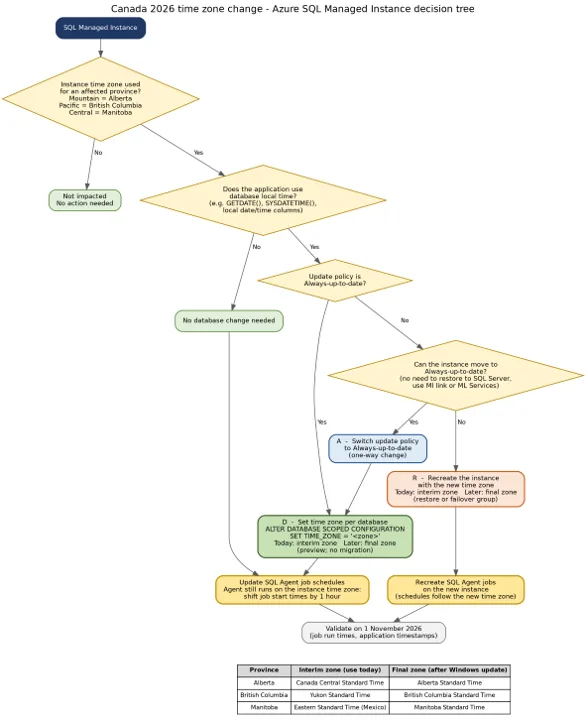
Step 4: Take action
Perform the migration of databases to the SQL Managed instance following your existing deployment methodology. Validate the process in a test environment with all the dependencies before migrating the production environment.
Frequently asked questions
| Question | Answer |
| Can I change the time zone of my existing Azure SQL Managed instance? | No. Use the database-level time zone or recreate the instance. |
| Will the database-level time zone come to Azure SQL Managed instances with the SQL Server 2022/2025 update policy? | No. It is available only with the Always-up-to-date update policy. |
| Does the database-level time zone change in Azure SQL Managed with always-up-to-date policy affect time conversions in SQL Agent, SSIS packages or OS scripts? | No. Agent schedules follow the instance time zone – update them separately. SSIS packages, OS scripts or other external artifacts follow the instance time zone. |
| Do I have to wait for the Windows update? | No. Use the interim zones today and switch to the final time zone later. |
| Should I change historical conversions to the interim zone? | No. Interim time zone match current and future offsets only, not historical rules. |


Will there be a SQL Server for Linux update before November 1st that contains the new Windows time zone definitions and mapping? The latest SQL Server 2022 docker image doesn’t seem to support the new “Alberta Standard Time” timezone for example.
I couldn’t reply to Juke’s comment directly. So, posting the reply separately.
@Jouke – As I replied earlier, we are looking at integrating with IANA tz database and using Unicode ICU library for future release. I actually want to switch T-SQL to use IANA time zones too which is a superset. The Windows time zones itself will not be removed from the product due to backward compatibility.
Now, the actual mechanics of integration is fairly complex since SQL runs on multiple OSes, different platforms, and support policies to satisfy. We hope to have a better solution here.
Yes, we are working on an update for SQL Server on Linux. I don’t have ETA at the moment.
There would be no need for this if SQL Server used (or allowed us to use) IANA timezones, like everything else. Especially on Linux
Thanks for your feedback, Panagiotis. I agree with you to some extent. IANA time zones database itself does not solve the problem. We need a robust API that can be leveraged across platforms. I have been exploring using Unicode CLDR and ICU library for time zones manipulation. But no plans on that yet.
Even if ship IANA time zones database (say with SQL), there is a scale issue when it comes to updating millions of instances in the cloud. Customers will also need to download the latest updates for the desired platform and rollout the changes. This will be in addition...
There would be no need for this if Windows was using IANA time zone database at OS level and provide the API to userland applications.
Same holds for every OS out there which doesn't. If that was the case, all that needed to be done was to download the latest (2026e version) of that DB and all was OK, no system settings change required...
Because Windows has its own TZ DB mechanism/design, this is the consequence being faced on Windows deployments.
(Don't have knowledge/visibility how other OS's are doing this, so cannot comment there).
As of Windows 10 build 1703, Windows...