


Let’s start with an admission: developers all hate BlockOnPossibleDataLoss. It is the bane of a smooth development workflow, as significant schema changes can block deployment because of BlockOnPossibleDataLoss. Having said that, there’s more to life than the developer’s local loop. In fact, it’s arguable that the local loop, while important to you and me, is far less important to the business, perhaps immeasurably so.
What is BlockOnPossibleDataLoss?
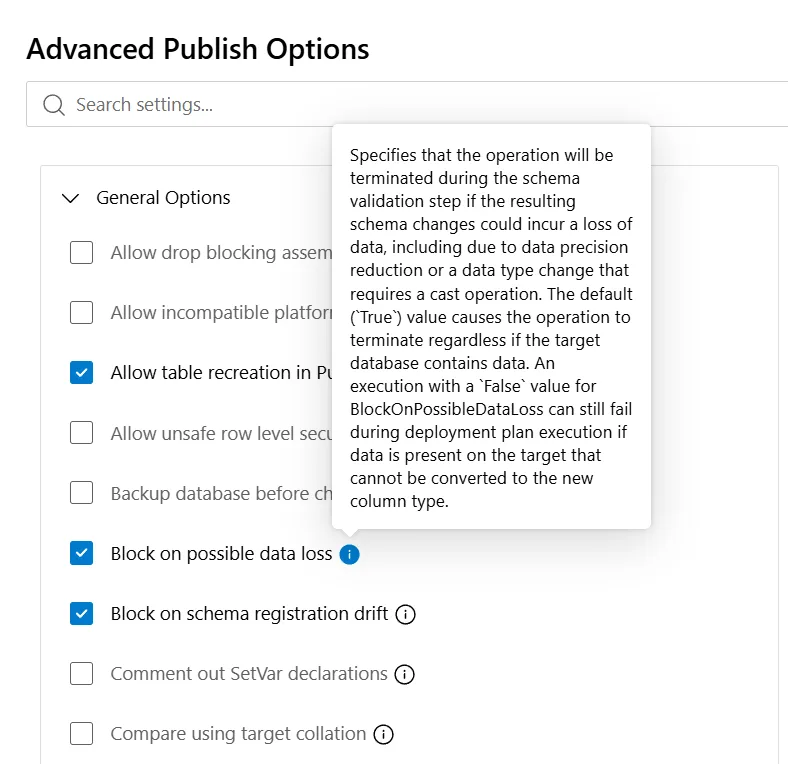
This important feature shows up in a few places. This article discusses its role in Database Projects and in SQL Server Management Studio (SSMS); it defaults to true in both. This simple setting evaluates the delta between your desired schema and your actual schema and calculates if applying your desired schema would result in data loss. If the answer is “yes,” it stops.
An easy example is dropping a table or column. Doing so would clearly lose data. Another, perhaps less obvious, is reducing the range of a column’s data type, like from INT to TINYINT, where any existing value under zero or over 255 could be lost. These evaluations are done by the engine when BlockOnPossibleDataLoss is set to True and, as a result, you can trust that data in your database is not accidentally destroyed by publishing a schema.
SQL Server Management Studio
In Database Projects, the evaluation is between your source DACPAC and the derived metadata from the target database. In SQL Server Management Studio (SSMS), it applies in built-in tooling like Table Designer and Database Diagrams, where similar schema modifications are blocked when you click Save or Ctrl+S, rather than leaving you, in a flicker of a moment, hunting for your most recent SQL backup.The developer loop
When we talk about the developer’s inner loop, we mean localhost. That’s the fast-moving environment where you build and deploy every couple of minutes as you iterate over ideas and approaches to test and validate them. It’s because it is a fast-moving environment that we dislike BlockOnPossibleDataLoss. So what if I drop a table or column? So what if I reduce a data type? That’s the whole point of iteration. And besides, my development database doesn’t hold production data, so all these guardrails are just getting in the way.
The Database Project’s publish profile
Behind the scenes, Database Projects compile SQL files into a DACPAC just like .NET compiles C# files into a DLL. It validates them and packages them in a way raw text files never could. The DACPAC is published to a real database using SqlPackage, a cross-platform command-line tool that does amazing things. In this case, however, it determines possible data loss and enforces the BlockOnPossibleDataLoss setting, or its default when it is not set.
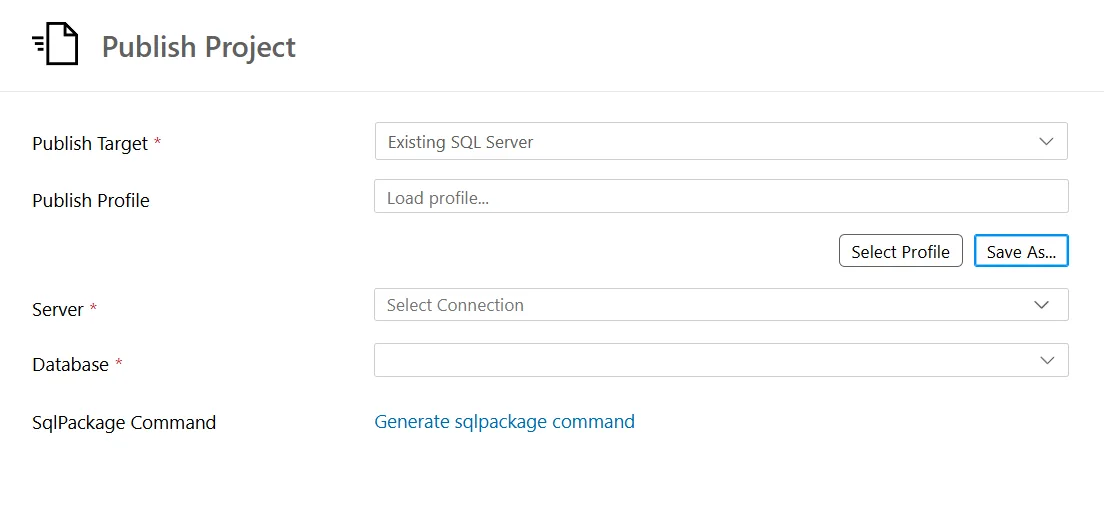
The section most developers forget to engage is Publish Profile, an optional feature of the process that lets you set database and deployment settings, then save them to a reusable profile you can use in subsequent deployments. More importantly, you can create different publish profiles for different environments.
That means you can disable BlockOnPossibleDataLoss in your development publish profile, where iteration and velocity matter most, while enabling BlockOnPossibleDataLoss in your UAT or production publish profiles, where protecting data matters far more. Same Database Project, same DACPAC, different deployment guardrails based on where you’re deploying.
Such a simple solution. You don’t have to choose between developer velocity and protecting production data. You can have both.
SQL Server Management Studio (SSMS) options
I use SSMS 22. It’s faster, prettier, and all-around better than previous versions of the tool. But just like any version of SSMS, BlockOnPossibleDataLoss, referred to here as “Prevent saving changes that require table re-creation,” applies across its tooling and defaults to True. Unlike Database Projects, in SSMS, this designer safeguard is a global option, not something you configure per server, database, or environment.
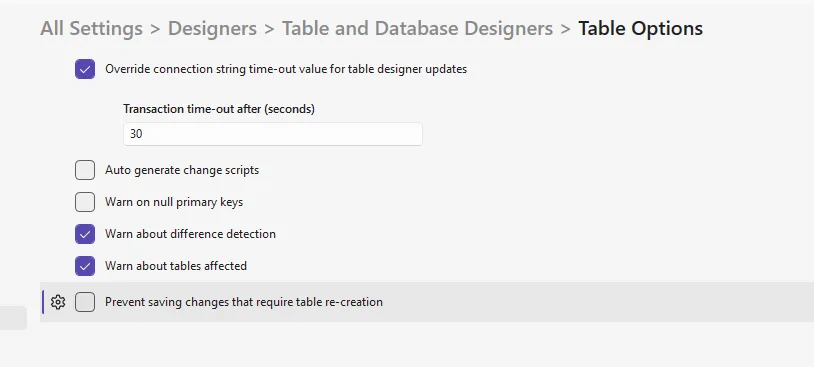
As a result, this requires a little more diligence on your behalf. While unchecking this setting lets you maximize your personal velocity, it introduces a brand-new consideration when you change your connection from a local SQL development instance to your UAT or production environments.
SSMS settings are not scoped
Unlike a Database Project publish profile, this SSMS setting isn’t scoped to a database or environment. It’s an SSMS setting. That means the same guardrail you intentionally remove because it gets in your way locally is still removed when you connect to production.With a flick of the wrist, SSMS allows you to make the changes you need to make, and that’s exactly what you want during development. But that convenience can have dangerous consequences when the database suddenly contains data you care about. The setting didn’t change when you changed environments, but the consequences certainly did.
So, if you disable this protection for your local development loop, remember what you’ve done. You haven’t told SSMS, “I don’t care about my development data.” You’ve told SSMS, “Don’t protect me from possible data loss.” Those are very different things.
Your best friend
The takeaway isn’t that you should always set BlockOnPossibleDataLoss=True. In your local development loop, turning it off can make perfect sense. The takeaway is that the closer you get to production, the more deliberate you should become about how schema changes are deployed.
SSMS is an incredible tool, but direct DDL or schema changes against UAT and production should be the exception, not your deployment strategy, and certainly not your development strategy. Database Projects and SqlPackage give us mechanisms specifically designed for this job: a declarative schema, repeatable deployments, environment-specific publish profiles, and safeguards like BlockOnPossibleDataLoss.
Use them. Move fast locally. Be deliberate in UAT. And be downright suspicious in production. BlockOnPossibleDataLoss=True may not always feel like your best friend, but when the data actually matters, that’s exactly what it is. It’s the best advocate the business has when it comes to database deployments.


0 comments
Be the first to start the discussion.